|

-
Jan 30th, 2012, 06:25 AM
#1
Thread Starter
Junior Member

 Newb Question, Global Variables Newb Question, Global Variables
Okay it's 5:10 AM and I've been up all night trying to figure out this simple problem with Visual Basic in Visual Studio 2010 in a new .ASP website project.
I'm in Visual Basic II class and this has nothing to do with any of my assignments, I'm just messing around trying to understand everything better.
I've read pages and pages of forums and websites regarding this issue, but I either don't understand, or it's a similar issue but doesn't fix my exact problem.
I did however figure out how to declare a global variable, by doing using Public instead of Dim at the very top before any of my sub routines go.
I also figured out that I did it right because I no longer had to declare each thing in a different sub routine, like a button event, or whatever else it may be.
However, here is my situation and problem:
I want to click a button, and have a number randomly generated (figured that part out already). This is a one form personal project of mine and I need other sub modules to use the same variable values. My problem is that all modules can see and use my public declared variable, however what my modules do to that variable isn't public.
So basically my code is like :
Public intRandomNumber As Integer(my global variable)
Protected Sub button1(one button event module)
intRandomNumber = 1 or 2 random formula
end sub
Protected Sub button2 (second button event module)
Do something different if intRandomNumber = 1 or 2.
End Sub
But what happens in button1 sub doesn't carry over the value it ended up with for intRandomNumber so intRandomNumber has no value when I get to button2 module.
How do I make what happens in these different modules to the value of my global variable, stick with my global variable globally??
I hope this all makes sense of some sort... lol.
-
Jan 30th, 2012, 06:37 AM
#2
Re: Newb Question, Global Variables
Why are you using the Subs as PROTECTED?
Such code worlks for me
vb Code:
Public intRandomNumber As Integer
    Public Sub Button1_Click(ByVal sender As Object, ByVal e As System.EventArgs) Handles Button1.Click
        intRandomNumber += 1
    End Sub
    Public Sub Button2_Click(ByVal sender As Object, ByVal e As System.EventArgs) Handles Button2.Click
        Button2.Text = intRandomNumber
    End Sub
You're welcome to rate this post!
If your problem is solved, please use the Mark thread as resolved button
 Wait, I'm too old to hurry!
-
Jan 30th, 2012, 06:54 AM
#3
Thread Starter
Junior Member
Re: Newb Question, Global Variables
it's just what it defaults to, I tried changing it to public it still does nothing. Here is my full actual code, You press Start, and it gives you one of two miss spelled words, then what you type in the text box is correct or not, and it tells the user this by checking pass or fail.
Code:
Partial Class _Default

    Inherits System.Web.UI.Page


    'This is what allows me to create random numbers in a range I designate, in this code I did the designation just below the public function
    'Anytime I use Rand(number, number) it gives me a random number between these set values.
    'Example is the global (Public) variable below, intRandomWordSel
    ' intMyRandomNumber = Rand(1, 1000) this gives me a random number between 1 and 1000
    Public Function Rand(ByVal Low As Long, _
                     ByVal High As Long) As Long
        Rand = Int((High - Low + 1) * Rnd()) + Low


    End Function

    'This creates a global variable
    Public strChall1Answer2 As String = "common"
    Public strChall1Answer1 As String = "starship"
    Public strRandomWord1 As String = " "

    Public intRandomWordSel As Integer


    Protected Sub Page_Load(sender As Object, e As System.EventArgs) Handles Me.Load

    End Sub

    Public Sub btnStart_Click(sender As Object, e As System.EventArgs) Handles btnStart.Click


         intRandomWordSel = Rand(1, 2)


        'This is my random word selection.
        Select Case (intRandomWordSel)

            Case 1
                strRandomWord1 = "mmnco"
                lblRandomWord1.Text = strRandomWord1


            Case 2
                strRandomWord1 = "strahsip"
                lblRandomWord1.Text = strRandomWord1


        End Select

    End Sub


    Public Sub btnSubmitAnswer_Click(sender As Object, e As System.EventArgs) Handles btnSubmitAnswer.Click


        Select Case (intRandomWordSel)

            Case 1
                If txtChallAnswer1.Text = "starship" Then
                    chkPass1.Checked = True
                Else
                    chkFail1.Checked = True


                End If
                chkPass1.Checked = True

            Case 2

                If txtChallAnswer1.Text = "common" Then
                    chkPass1.Checked = True

                Else
                    chkFail1.Checked = True

                End If


        End Select


    End Sub
End Class
Still not working
Last edited by RSims; Jan 30th, 2012 at 07:20 AM.
-
Jan 30th, 2012, 07:00 AM
#4
Re: Newb Question, Global Variables
This is posted in the wrong place... should be in the ASP.NET forum... you'll get a more accurate answer there. I'll ask a mod to move it.
-tg
-
Jan 30th, 2012, 07:03 AM
#5
Thread Starter
Junior Member
Re: Newb Question, Global Variables
Sorry about that, didn't realize it was in the wrong spot.
-
Jan 30th, 2012, 07:18 AM
#6
Thread Starter
Junior Member
Re: Newb Question, Global Variables
I verified my issue is correct by having a label tell me what is in the variable IntRandomWordSel, it does not carry over past my btnStart module.
-
Jan 30th, 2012, 07:45 AM
#7
Re: Newb Question, Global Variables
You might also want to post your ASP.NET code...
-tg
-
Jan 30th, 2012, 09:44 AM
#8
Re: Newb Question, Global Variables
-
Jan 30th, 2012, 01:20 PM
#9
Thread Starter
Junior Member
Re: Newb Question, Global Variables
there is no ASP.net code its all just this simple vb code and my form.
-
Jan 30th, 2012, 01:37 PM
#10
Thread Starter
Junior Member
Re: Newb Question, Global Variables
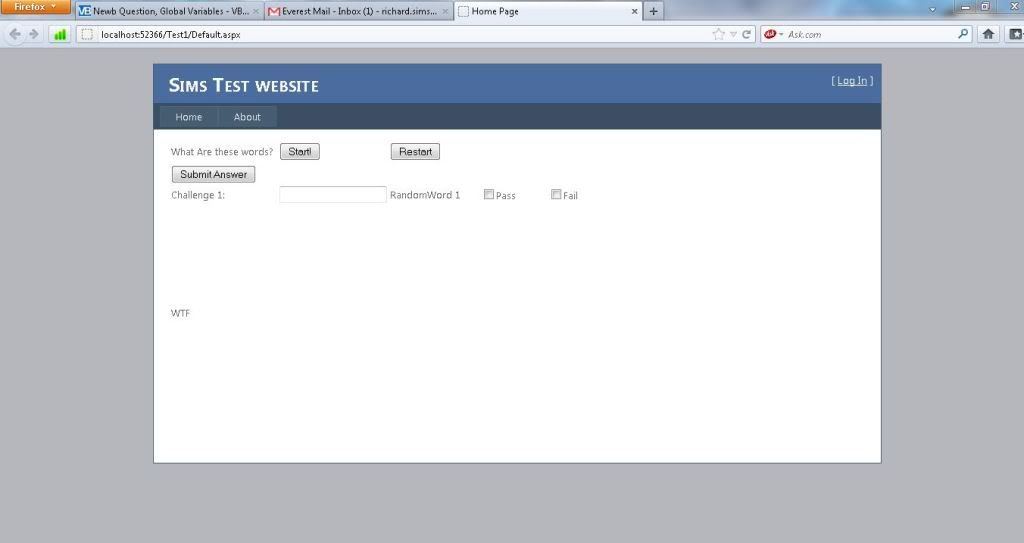
Okay, here is what my default page looks like, everything else is default besides the code for these buttons and labels you see on this page. Where it says RandomWord1 is where it gives you my one of two scrambled words, that works.
It's the pass or fail that is having issues, because intRandomWordSel won't carry over a global value given by the btnStart module so I don't know what word was given to check if they figured it out or not, this part happens after the user enters their answer into the txtbox, and presses Submit Answer.
-
Jan 30th, 2012, 02:08 PM
#11
Thread Starter
Junior Member
Re: Newb Question, Global Variables
Also please ignore my "Restart" button, I have not done any code to it yet since my submit answer button is not working correctly.
-
Jan 30th, 2012, 02:26 PM
#12
Re: Newb Question, Global Variables
There's HAS to be some ASP/HTML code some where... those buttons jsut don't appear out of no where...
Here's where I'm going with this - that "Global" variable is only going to exist for as long as the code is running... which is basically the life of the page... once the code is done running and the page is done rendering, unless you stuff the variable's value somewhere, it's lost. So when you click the submit button, and the form posts, that value doesn't transmit with it... so it gets a new value, which is going to be the same as the time before, and the time before that and so on... it's never changing because it doesn't stick around. It's not the same as a global value in a winforms app... actually it IS exactly like it... a value that only exists for as long as the app is running... unless stored, when I close the app, the value isn't going to be there the next time the app rins.
-tg
-
Jan 30th, 2012, 02:27 PM
#13
Thread Starter
Junior Member
Re: Newb Question, Global Variables
I'm using visual studio 2010, they appear out of the the handy toolbox. lol.
-
Jan 30th, 2012, 02:28 PM
#14
Thread Starter
Junior Member
Re: Newb Question, Global Variables
Are you saying each sub module is like it's own win-form app?
-
Jan 30th, 2012, 02:30 PM
#15
Thread Starter
Junior Member
Re: Newb Question, Global Variables
If so that seems pretty limited =(
-
Jan 30th, 2012, 03:38 PM
#16
Re: Newb Question, Global Variables
no, that's not quite what I said...
but it's because ASP is stateless... as it should be. The server isn't going to maintain state in between calls (with some exceptions).
-tg
-
Jan 30th, 2012, 06:38 PM
#17
Thread Starter
Junior Member
Re: Newb Question, Global Variables
Okay fair enough, however is their a solution to my problem or am I just stuck with this?
-
Jan 30th, 2012, 06:41 PM
#18
Thread Starter
Junior Member
Re: Newb Question, Global Variables
And what are the exceptions? (I appreciate all your input btw being new to VB, ASP and all of this)
-
Jan 30th, 2012, 06:50 PM
#19
Re: Newb Question, Global Variables
You usually pass the variable to session,viewstate or a hidden object.
Please read about this terms so you can benefit more.
ἄνδρα μοι ἔννεπε, μοῦσα, πολύτροπον, ὃς μάλα πολλὰ
πλάγχθη, ἐπεὶ Τροίης ἱερὸν πτολίεθρον ἔπερσεν·
-
Jan 30th, 2012, 10:52 PM
#20
Thread Starter
Junior Member
Re: Newb Question, Global Variables
Suppose if the information was kept on a file of some sort or I had people login and saved it to a database that would work as well. However I'm sure with more research I'll find easier ways to do it. Thanks for the tips guys.
-
Feb 1st, 2012, 03:01 PM
#21
Re: Newb Question, Global Variables
Hello,
There are really 6 "main" places to store information across PostBacks in an ASP.Net application (now that I have said that, someone will no doubt come up with another one  ) )
Session Variable
Client side persistence
View State
Application Variable (however, this should really not be used anymore)
Static/Shared Class - replacement for above
Database persistence
It really depends on how long you want the variable to stick around, and who should have access to it, that will decide which one is right for you.
Off the top of my head, I would suggest that for what you want, a Session variable would work out just fine.
Gary
-
Feb 1st, 2012, 06:56 PM
#22
Thread Starter
Junior Member
Re: Newb Question, Global Variables
Thanks now I know what to look into. 
-
Feb 2nd, 2012, 01:53 AM
#23
Re: Newb Question, Global Variables
 Originally Posted by RSims

Thanks now I know what to look into.
Let me know if you have any other questions, and I will follow up with some examples.
Gary
-
Feb 2nd, 2012, 03:57 AM
#24
Thread Starter
Junior Member
Re: Newb Question, Global Variables
Examples would be great
-
Feb 2nd, 2012, 02:56 PM
#25
Re: Newb Question, Global Variables
Hello,
Which of the above techniques are you wanting to use?
Gary
-
Feb 3rd, 2012, 08:10 AM
#26
Thread Starter
Junior Member
Re: Newb Question, Global Variables
Session Variable sounds like a good option, what would that look like?
-
Feb 3rd, 2012, 04:16 PM
#27
Re: Newb Question, Global Variables
Hello,
As a simple example:
Code:
    Protected Sub Page_Load(ByVal sender As Object, ByVal e As System.EventArgs) Handles Me.Load
        If Not Session("RandomWord") Is Nothing Then
            Me.Label1.Text = Session("RandomWord").ToString()
        End If
    End Sub

    Protected Sub Button1_Click(sender As Object, e As EventArgs) Handles Button1.Click
        Session("RandomWord") = Me.TextBox1.Text
    End Sub
Gary
-
Feb 4th, 2012, 03:11 AM
#28
Thread Starter
Junior Member
Re: Newb Question, Global Variables
I'm sorry, I need more of an explanation. Can you explain session variables and then with my code show me how to implement it so I can understand it better?
-
Feb 4th, 2012, 06:41 AM
#29
Re: Newb Question, Global Variables
-
Feb 5th, 2012, 10:45 AM
#30
Thread Starter
Junior Member
Re: Newb Question, Global Variables
I don't think it would be possible to find me a better video then the one you posted. I want to try this in my code, as soon as I do I'll post my progress. Thank you so much for the help.
-
Feb 7th, 2012, 02:26 AM
#31
Re: Newb Question, Global Variables
Hello,
Not a problem at all.
Give it a try, and let me know if you have any follow up questions.
Gary
 Posting Permissions
- You may not post new threads
- You may not post replies
- You may not post attachments
- You may not edit your posts
-
Forum Rules
|
Click Here to Expand Forum to Full Width
|



 Reply With Quote


