|

-
Jan 6th, 2012, 08:59 AM
#1
Thread Starter
Member

Pasting a word document to an intranet page
Hello everyone, am very new to the forum but my very limited experience here so far has been positive.
I am trying to build a word automation macro.
Background:
In my day job I am responsible for maintaining an intranet site for a large bank. One of the most monotonous and time consuming parts of my job is to take articles from word documents and copy + paste them onto the intranet, so I thought I would try to build a macro that can do this for me.
Aim:
I want a macro that will take an article from Microsoft Word 2003 and turn that article into an article page on SharePoint. If you haven’t used SharePoint before then rest assured its nothing complicated, its just a an Internet Explorer based way of creating and administrating intranet pages, very simple.
Technical details and limitation:
• My workplace runs Microsoft SharePoint 2007, Microsoft Word 2003, Internet Explorer 8 and VBA version 6.5.1053.
• As far as I know, the only program that I could write a macro in is the VBA that comes with Microsoft Office VBA (i.e going into word and bringing up VBA with Alt +F11).
• I cannot install anything on my work computer but I can create a macro as VBA is already a part of Microsoft Office.
• I have extremely limited experience with Macros, I have used Macro’s in the past by recording a macro for some simple tasks and then replaying them, I know how to look at code and step through it but I don’t really know what the code itself means. My lack of knowledge might become a communication barrier so apologise in advance for stupid questions and I greatly appreciate your patience.
What I need the macro to do step by step.
1. It should be possible to launch the macro from any article. For my explanation ill use a mock article about the Smurfs. For the purpose of this projects lets call this Word document ‘SampleArticle’. Once I have opened ‘SampleArticle’ I would like to be able to press Alt+F8 and run the macro.
2. The Macro should open the following page using internet explorer: http://onebank.intranet/news/_layouts/CreatePage.aspx
this is the page used by SharePoint to create article pages. For the purpose of this project lets call this page ‘CreatePage’. In this page the following form appears:
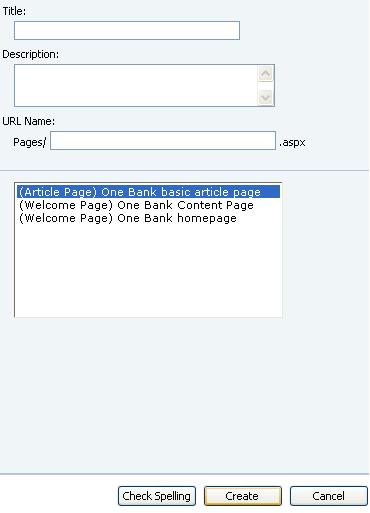
As you can see from the screen shot, ‘CreatePage’ has several text boxes. The important ones are ‘Title’and ‘URL Name’. The cursor starts in the ‘Title’ box.
3. The Macro should take cut the first line (The title) from the ‘SampleArticle’ and paste it into the ‘Title’ box in ‘CreatePage’
4. The Macro should then paste take the same text and paste it into the ‘URL Name’ box but it needs to remove all the non-letter characters and replace all the spaces with hyphens. The end result should look like this:
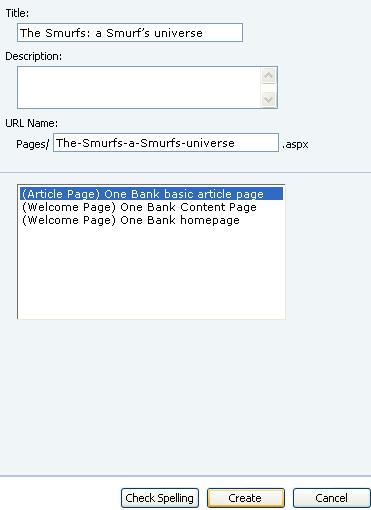
As you can see, the characters “:”and “’” appear in the first box but are removed in the second box, also, any spaces have been replaced with hyphens. Now here is a tricky point. If the title had had a hyphen in it, that hyphen would also need to be deleted and replaced by a hyphen. I know this sounds a bit weird but this creates problems down the line if this is not done.
I was thinking that navigation between the boxes should be done using SendKeys but alas, my skills with VB are not good enough to do this, for some reason it doesn’t work for me. The cursor starts in the ‘Title’ box, it takes two presses of TAB to navigate to ‘URL Name’ box and 3 presses of TAB to get to ‘Create’. Then the Macro should press the ‘Create’ button to create the page. I have been told that SendKeys are sort of the idiots way of doing this and that a macro can actually select boxes directly if you have their element ID, unfortunately I don’t know how to find this out in internet explorer (only in Chrome) so if someone could give me some directions I could always come back with some more info.
Once you click create, SharePoint will create a page with the following URL:
http://onebank.intranet/news/Pages/T...layMode=Design
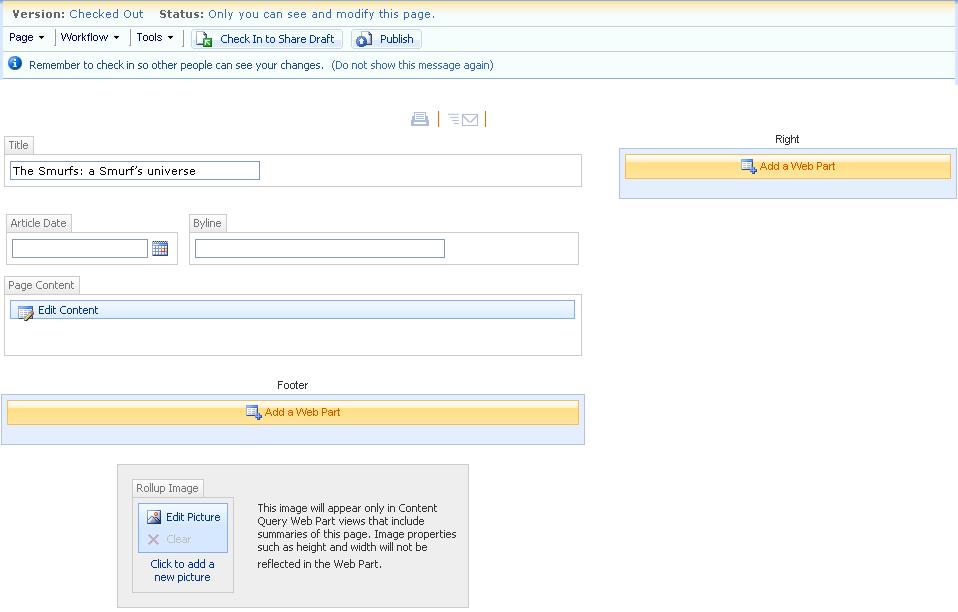
This page will look like this:
Side note: The middle part of the URL titled ‘The-Smurfs-a-Smurfs-universe’ is taken directly out of the ‘URL Name’ box on the previous page. So if you had put something different in that box say ‘Test-one-two-three’, the URL would be:
http://onebank.intranet/news/Pages/T...layMode=Design
Also, as you may notice, the title box is automatically filled out using the text from the previous page.
5. The macro now needs to enter the date. And paste the remainder of the article into the big box ‘Page Content’. Again, the cursor starts in the ‘title’ box. Using SendKeys, six tabs (i.e TAB->TAB-TAB->TAB->TAB->TAB) will navigate from the title box to the ‘Page Content’ box.
Now the macro needs to publish the remainder of the text from ‘SampleArticle’.
Then SendKeys can be used to navigate back to the Datebox and enter the current date. The commands should be: Ctrl +home -> Shift+tab -> Shift+tab -> Shift+tab -> Shift+tab -> Enter -> Enter.
This will fill the current dates into the date box.
The final result will look like this:
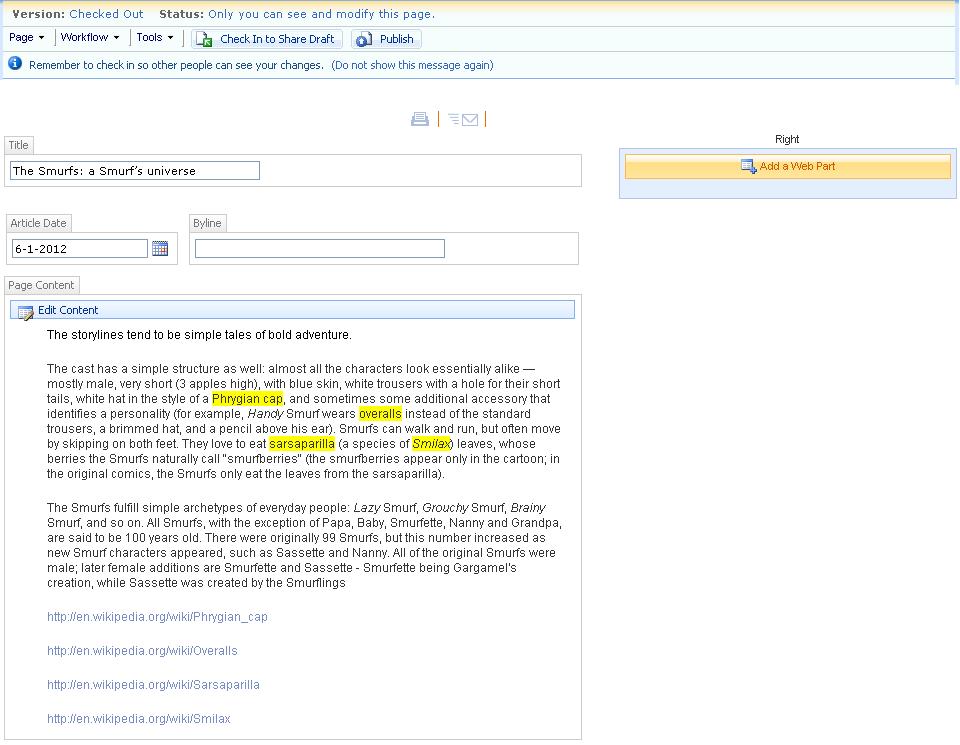
Now the Macro needs to press publish, I am not sure how to do this with SendKeys so will probably need someone to help me out with how this might be done.
These 5 things would already greatly increase the efficiency of my work. I have some other issues with how the text that is pasted needs to be formatted which can also be automated (i.e how to automatically hyperlink the yellow highlighted key words) but ill wait and see if this first part is solvable first.
Looking forward to your advice.
Hugely appreciative.
P.S: the tragedy and irony of this whole thing is that Microsoft has already written some code for this process. As of Word 2007 upwards, users can save a Word page directly onto SharePoint. Unfortunately I have no way of upgrading to Word 2007. Corporate bureaucracy….
P.P.S: I cant seem to insert pictures into my post, I can only attach them at the bottom. The 'Insert Image' icon is not clickable for me (resolved 10.01.13)
Last edited by Mango Eldar; Jan 10th, 2012 at 05:07 AM.
Reason: Updating problems that have been resolved.
-
Jan 7th, 2012, 04:54 AM
#2
Re: Pasting a word document to an intranet page
1. It should be possible to launch the macro from any article.
you could add a custom toolbar button to word
2. you could use a webbrowser control or automate internet explorer, to fill web based forms and submit
3 . text can be parsed before assigning value to web form
this can avoid use of sendkeys and values can be assigned directly to web forms even if not visible, avoids need for copy and paste
note i am assuming (as i have never used sharepoint) the sharepoint page is a webform with a submit button, and as such can be automated
to do so would require study of the page source, to get the names or ids of the form elements that require referencing
there are many examples of submitting web forms in this and the vb6 forum, some of which may be able to help you
if you can post the page source of the web page someon may be able to assist more
i do my best to test code works before i post it, but sometimes am unable to do so for some reason, and usually say so if this is the case.
Note code snippets posted are just that and do not include error handling that is required in real world applications, but avoid On Error Resume Next
dim all variables as required as often i have done so elsewhere in my code but only posted the relevant part
come back and mark your original post as resolved if your problem is fixed 
pete
-
Jan 9th, 2012, 07:14 AM
#3
Thread Starter
Member
Re: Pasting a word document to an intranet page
Thanks for the advice but I am sorry to say that my VB knowledge is not good enough to actually implement most of it. As I mentioned in my post, most of what I have been doing so far is just recording Macros but I am affraid that I dont actually know how to write code myself. I was hoping this would be the place to learn, I am a fast learner though (if someone has the patience to walk me through the basics).
 Originally Posted by westconn1

if you can post the page source of the web page someon may be able to assist more
How do you suggest I do this? If I literally paste the source here it would take up a whole page. I could attach the source code maybe? What is the used format on these forums? My browser lets me save the source as either 'Html source' of 'formatted html view'.
-
Jan 9th, 2012, 07:20 AM
#4
Thread Starter
Member
Re: Pasting a word document to an intranet page
Another small question. I did some cleaning up in my first post to have the pictures in the middle of the text rather than attached all at the end. Is there a way to hide the attachments right at the end so that people dont need to see everything twice?
-
Jan 9th, 2012, 07:40 AM
#5
Frenzied Member
Re: Pasting a word document to an intranet page
for your coding to work you are going to have to look at the pages the web throws up and identify not the surface rendering of the textbox but the back of shop name the box has so that you can fill it in
the same applies to all of the bits you want to interact with
the other option is to directly insert you page in the correct structure
and post it directly, but that may be too much of a tsk for you currenlty
can you identify the html elements on each page?
we of course cannot go to youe onebank... url as the pages are not rendered off site!
here to talk
-
Jan 9th, 2012, 10:04 AM
#6
Thread Starter
Member
Re: Pasting a word document to an intranet page
I can see the source code but I am not sure what I am looking for. How can I find the back shop name of the box?
-
Jan 9th, 2012, 03:47 PM
#7
Re: Pasting a word document to an intranet page
you do not need to post the entire web page
look for the section starting <form ...... ending </form>
the text in between contains all the elements on the form
Code:
<form enctype="multipart/form-data" action="http://www.xxx.com.au/test.php" method="POST">
<input type="hidden" name="MAX_FILE_SIZE" value="1000000" />
Choose a file to upload: <input name="uploadedfile" type="file" /><br />

<input type="submit" value="Upload File" />
</form>

</body>
</html>
this is an example of the simplest form containing a file list input, a hidden input, and a submit button
this is not a good example as a file type input is one that can not be filled by automation, most other input types can be filled by automation
inputs can be filled directly if you know the name or ID specified for them, or indirectly by looping through elements to match some property of the specific element
a basic code to fill and submit the above form would be like
vb Code:
Set wb = CreateObject("internetexplorer.application") wb.navigate2 url Do Until wb.readystate = 4 DoEvents Loop With wb.Document.forms(0) .all("uploadedfile").Value = "xyz" ' this will not work as it is a file type input .submit ' submit form, same as click submit button End With
assumes this is the first or only form on the page
fill text input using the assigned name for the input, inputs do not always have names, if it has ID you can use that instead
vb Code:
.getelementbyid("idvalue").value = "xyz"
it can get more complex if hidden inputs have to have specific values or other scripting (javascript or other) has to run to validate the completed inputs, but the only way to find out is to try it and see
i do my best to test code works before i post it, but sometimes am unable to do so for some reason, and usually say so if this is the case.
Note code snippets posted are just that and do not include error handling that is required in real world applications, but avoid On Error Resume Next
dim all variables as required as often i have done so elsewhere in my code but only posted the relevant part
come back and mark your original post as resolved if your problem is fixed
pete
-
Jan 10th, 2012, 05:05 AM
#8
Thread Starter
Member
Re: Pasting a word document to an intranet page
Ok first question first. How do I paste my code so that it looks all clean and with numbers like the one you pasted? The code I am looking at (which I see through view -> source in internet explorer) is not very clean to begin with, it has all these extra spaces on the left. Might be that I need to clean it up manually? or is there some trick to getting it to look tidy? If someone could let me know that would be great, in the meantime please excuse the messiness.
Also, I am not sure if I should be using PHP to wrap my code, it did some trial and error and PHP came out in colour which I think made things a bit easier to read but this might not have been the best way to post my code. Feel free to correct me.
I tried looking for something which starts with '<form' but the only thing I could find doesn’t look like what you were after. Here it is:
PHP Code:
<form name="aspnetForm" method="post" action="CreatePage.aspx?CancelSource=%2fnews%2fPages%2fdefault.aspx" onsubmit="javascript:return WebForm_OnSubmit();" id="aspnetForm">
I don’t think this is what we are looking for because it is the only part of the code with which begins with '<form' and given there are 3 form boxes on the page I should have been able to find others?
The </form> I found at the very end of the source code, right before </body> and </html>. So maybe the whole page is one giant form?
Since I couldn’t find anything that said </form> in it, I tried to find something that had the titles of the boxes. I did a search for 'title' and 'URL name' and found two pieces of code which were close to each other which might be what we are looking for?
I think this is the code for the 'title' box.
PHP Code:
    <label for="ctl00_PlaceHolderMain_pageTitleSection_ctl00_titleTextBox" id="ctl00_PlaceHolderMain_pageTitleSection_ctl00_LiteralLabelText">Title:</label>

                        </td>

                    </tr>

                    <tr id="ctl00_PlaceHolderMain_pageTitleSection_ctl00_tablerow2">

                        <td><IMG SRC="/_layouts/images/blank.gif" width=1 height=3 alt=""></td>

                    </tr>

                    <!-- End Right_Text -->
I think this is the code for the 'URL name' box
PHP Code:
        <span id="ctl00_PlaceHolderMain_pageTitleSection_ctl02_parentUrlLabel">Pages/</span>

                                        <input name="ctl00$PlaceHolderMain$pageTitleSection$ctl02$urlNameTextBox" type="text" maxlength="123" size="35" id="ctl00_PlaceHolderMain_pageTitleSection_ctl02_urlNameTextBox" class="ms-input" dir="ltr" Title="" excludeFromSpellCheck="true" AlwaysEnableSilent="true" />

                                        <Label>.aspx</Label>

                                    </div>

                                    <div>
The reason I think this is the code for the 'URL name' box is because it has in the code both the labels that appear before and after the 'ULR name'. The label 'Pages/' appears before the box and the label '.aspx' appears after the box. This is exactly what it looks like on the 'CreatePage' page (see pics in first post).
Above both these pieces of code I found the following comment, perhaps this gives some clues?
PHP Code:
        <!-- RCA-only section - offer to update previously converted page -->


            <!-- Location Picker -->


            <!--PageTitleAndDesc-->
Ta.
-
Jan 10th, 2012, 05:18 AM
#9
Thread Starter
Member
Re: Pasting a word document to an intranet page
Also, thanks for your code on how to submit a form but before I can use that I need something more basic.
I need some code for actually taking the text out of the word docuement.
So the first thing the macro needs to do is cut out the first paragraph or the word doc (which is the title) and save this as a variable. Then once I have this I can paste this variable into the 'title' box.
How do I do this?
Btw: can I just say, I am blown away by how helpful people are on the internet. I am a bit new to forum culture. I think its so cool.
-
Jan 10th, 2012, 06:35 AM
#10
Re: Pasting a word document to an intranet page
The </form> I found at the very end of the source code, right before </body> and </html>. So maybe the whole page is one giant form?
seems very likely
your 3rd code box contains a text input with name of "ctl00$PlaceHolderMain$pageTitleSection$ctl02$urlNameTextBox"
note the names and ids may be auto generated, so not usable in code
that is each time the page is loaded they may be different
So the first thing the macro needs to do is cut out the first paragraph or the word doc (which is the title) and save this as a variable. Then once I have this I can paste this variable into the 'title' box.
vb Code:
myvar = documents("somedoc.doc").paragraphs(1)
if the code is in the same document, you can use the thisdocument object
vb Code:
myvar = thisdocument.paragraphs(1)
i do my best to test code works before i post it, but sometimes am unable to do so for some reason, and usually say so if this is the case.
Note code snippets posted are just that and do not include error handling that is required in real world applications, but avoid On Error Resume Next
dim all variables as required as often i have done so elsewhere in my code but only posted the relevant part
come back and mark your original post as resolved if your problem is fixed
pete
-
Jan 10th, 2012, 07:21 AM
#11
Thread Starter
Member
Re: Pasting a word document to an intranet page
A couple of questions. I suspect they are quire basic.
1. Is myvar just the name you gave the variable, can I use any name I want or will it only work with myvar.
2. I want the macro to be executable from any word doc. So I assume using myvar = thisdocument is the way to go?
3. If I use ‘myvar = thisdocument.paragraphs(1)’, will I run into problems later on if for some reason the macro deletes the first paragraph? Suppose I want my macro cuts the first paragraph. This means that what was the second paragraph becomes the first paragraph. Does ‘myvar = thisdocument.paragraphs(1)’ refer to the new first paragraph or the old one? If this is the case how can I get around this? I want the variable to stay the same no matter what happens to the text.
4. How do I set all other paragraphs (everything except for first paragraph) as another variable?
5. If as you say the boxes cannot be selected using code then what do you think about my original proposal of using SendKeys to navigate between boxes and buttons?
6. Suppose I manage to get to the right box (using SendKeys or any other method), how do I paste my variables?
7. How can I get my macro to launch a new page (or tab) of internet explorer with the following URL: http://onebank.intranet/news/_layouts/CreatePage.aspx
-
Jan 11th, 2012, 04:45 AM
#12
Re: Pasting a word document to an intranet page
1. any name you want, except avoid reserved words
2. thisdocument only refers to the document containing the code
3. probably will give a problem, but you can use
txt = thisdocument.paragraphs(1).range.text
the variable will contain unformated text which will remain regardless of what happens to paragraph 1
4. set a range from the start of paragraph 2 to end of document
5. i did not say that
6. sendkeys ctrl v, look up the correct method to send those keystrokes, but i would avoid that method
7. in the previous example in post #7 assign the URL to the variable url
i do my best to test code works before i post it, but sometimes am unable to do so for some reason, and usually say so if this is the case.
Note code snippets posted are just that and do not include error handling that is required in real world applications, but avoid On Error Resume Next
dim all variables as required as often i have done so elsewhere in my code but only posted the relevant part
come back and mark your original post as resolved if your problem is fixed
pete
-
Jan 11th, 2012, 07:13 AM
#13
Thread Starter
Member
Re: Pasting a word document to an intranet page
1. Thanks
2. How do I solve this? I want to write a macro and then give it to other people to use who have never used a macro (at least not knowingly). Can the module in which the macro is written be made to load automatically for all word documents?
3. Perfect!
4. How do I do this? Each document has a different number of paragraphs. Is there a way to select a range from paragraph 2 to the end of the doc? If so what is the code.
5. Sorry maybe I misunderstood. I thought you said the boxes cant be selected because the ID is generated differently each time. If the boxes can be selected using code then how would I do it. If they cannot then what do you suggest?
6. Perhaps you can suggest an alternative? How do I paste a variable without using SendKeys?
7. I tried:
Code:
Set wb = CreateObject("internetexplorer.application")
wb.navigate2 http://onebank.intranet/news/_layouts/CreatePage.aspx
But I get a compile error on the second line. Sorry I am a total novice at this so I am probably doing something very basic wrong.
-
Jan 12th, 2012, 04:26 AM
#14
Re: Pasting a word document to an intranet page
7. as the string is literal (not a variable) it needs to be enclosed in quotes or assign the string to a variable
6. fill the boxes by automation, see line 7 in post #7
5. did you test to see if the boxes did have generated names or if they are the same each time it is loaded?, even if they are auto generated they are still findable, by looping through all the inputs
4. try like
vb Code:
Set r = ThisDocument.Range ' set whole document to range object r.Start = ThisDocument.Paragraphs(2).Range.Start ' move start to paragraph 2 mytxt = r.Text 'assign text value of range to string variable
2. you can put the code into a word template, any documents opened based on that template have the code available, or maybe better use an addin
i do my best to test code works before i post it, but sometimes am unable to do so for some reason, and usually say so if this is the case.
Note code snippets posted are just that and do not include error handling that is required in real world applications, but avoid On Error Resume Next
dim all variables as required as often i have done so elsewhere in my code but only posted the relevant part
come back and mark your original post as resolved if your problem is fixed
pete
Tags for this Thread
 Posting Permissions
- You may not post new threads
- You may not post replies
- You may not post attachments
- You may not edit your posts
-
Forum Rules
|
Click Here to Expand Forum to Full Width
|



 Reply With Quote
