|

-
Sep 21st, 2011, 09:49 AM
#241
Re: [vb6]Alpha Image Control (PNG, AniGIFs, TIFF, & more) [21 Sep 2011]
 Originally Posted by Cube8

After your last update, the TransparencyPct property is not working at all. No matter what I type, it behaves as if it was 100.
Ugh, thanx. Simple fix for me. Unfortunately, that portion of the matrix was moved into a section that is activated only if other parts of the matrix are valid. Bad on me. I'll move it out of that section where it should've been. Will update it today.
Edited: Patch uploaded now
-
Sep 23rd, 2011, 12:54 PM
#242
Re: [vb6]Alpha Image Control (PNG, AniGIFs, TIFF, & more) [23 Sep 2011]
Updated control today. Enhancement-only updates
- New BorderShape property allows borders to have round corners vs. just sharp corners
- Can now drag & paste files from Explorer when zip/compressed files are viewed as "Compressed Folders" (XP and above)
- If dragging multiple files onto control (OLEDropMode=vbOLEDropAutomatic), each file will be processed, as needed, until image successfully loaded. Same logic used if pasting multiple files and loading image via the Clipboard. Previous behavior was to process only the 1st file, do or die
Edited: After playing around with the rounded borders, I can see where non-blended corners may be more desirable than blended corners. The next update will offer a choice between blended & non-blended
As for the size of the rounded corners, I chose to replicate VB's shape control with rounded corners and the results should be nearly identical. If anyone wishes to apply their own border shape, its just a matter of using the Pre-PostPaint events and assigning a clipping region during PrePaint and drawing the custom border in PostPaint. To assist in that regard and to prevent you from having to offset the image and/or adjust dimensions of control to accommodate a 1-pixel border, I'll also include an optional UserDefinedBorder member of the BorderShape property
Another enhancement update coming 1st/2nd of October & will include these options
- BorderShape property: will include rough & blended rounded corner border options. Will also include a UserDefined setting as described above
- Gradient background: For images that use transparency, the control's background can be gradient filled in 8 directions, using 2 colors
: New GradientForeColor will be provided. Gradients start with this color and end with the control's BackColor property
: Horizontally left to right, Vertically top to bottom, Diagonally from top/left to bottom/right, Diagonally from bottom/left to top/right
: To reverse above 4 directions, just swap out GradientForeColor & BackColor properties
Last edited by LaVolpe; Sep 28th, 2011 at 08:29 AM.
-
Sep 30th, 2011, 10:15 AM
#243
Addicted Member


Re: [vb6]Alpha Image Control (PNG, AniGIFs, TIFF, & more) [23 Sep 2011]
Hi, another bug. I noticed as i was using the control that the Mouse Enter event would fire like crazy sometimes. After looking into it I've found that every timer the control's picture is changed (even if the mouse is already over the control) the Mouse Enter event will fire. If I make so that the control's picture changes in the Mouse Move event the Mouse Enter event will fire every time.
-
Sep 30th, 2011, 02:10 PM
#244
Re: [vb6]Alpha Image Control (PNG, AniGIFs, TIFF, & more) [23 Sep 2011]
Originally Posted by cheesebrother
Hi, another bug. I noticed as i was using the control that the Mouse Enter event would fire like crazy sometimes... If I make so that the control's picture changes in the Mouse Move event the Mouse Enter event will fire every time.
Yep, by design. But as I just revisited that routine, I can't tell you for sure why I designed it that way.... Thinking on this and unless I can rediscover why I coded it that way, I'll remove it in next update due this weekend.
If you wish to remove that for right now, rem out the following lines in the Set Picture property
Code:
        If Not m_MouseTracker Is Nothing Then           ' fire mouse leave event if needed
            Call m_MouseTracker.ReleaseMouseCapture(True, ObjPtr(Me))
            Set m_MouseTracker = Nothing
        End If                                          ' assign new image & set render flags
Edited: I may have been thinking in the context of the image vs. the control. Yes, I'm tap dancing a bit. I do agree that the current logic can be counter-productive in this case & will re-work the logic a tad.
Note: That if you set the HitTest property to other than default, you can experience this situation also because the HitTest area can change when the image changes. That is by design also and, in my opinion, is still applicable and sound logic
Last edited by LaVolpe; Sep 30th, 2011 at 04:12 PM.
-
Oct 1st, 2011, 03:26 AM
#245
Addicted Member
Re: [vb6]Alpha Image Control (PNG, AniGIFs, TIFF, & more) [23 Sep 2011]
Originally Posted by LaVolpe
Yep, by design. But as I just revisited that routine, I can't tell you for sure why I designed it that way.... Thinking on this and unless I can rediscover why I coded it that way, I'll remove it in next update due this weekend.
If you wish to remove that for right now, rem out the following lines in the Set Picture property
Code:
        If Not m_MouseTracker Is Nothing Then           ' fire mouse leave event if needed
            Call m_MouseTracker.ReleaseMouseCapture(True, ObjPtr(Me))
            Set m_MouseTracker = Nothing
        End If                                          ' assign new image & set render flags
Edited: I may have been thinking in the context of the image vs. the control. Yes, I'm tap dancing a bit. I do agree that the current logic can be counter-productive in this case & will re-work the logic a tad.
Note: That if you set the HitTest property to other than default, you can experience this situation also because the HitTest area can change when the image changes. That is by design also and, in my opinion, is still applicable and sound logic
Thanks for the fix, in a program that i'm making it will be much appreciated. I also had a suggestion for a possible addition to the control. What if you made it so that a user could crop the picture? It would go something along the lines of this - AlphaImageCtl1.Picture.CropImage(X as integer, Y as integer, Width as integer, Height as integer). It would be a lot like segment image except it would give the user all of the control in the world.
-
Oct 1st, 2011, 11:06 AM
#246
Re: [vb6]Alpha Image Control (PNG, AniGIFs, TIFF, & more) [23 Sep 2011]
Regarding cropping: Well, you can already do that with existing methods:
1. Set AutoSize property so no AutoSizing takes effect & size control to the dimensions of the cropping, i.e., Width, Height
2. May want to set the AlignCenter property to False in this case, so image is drawn at 0,0
3. Set the XOffset & YOffset properties as needed, i.e., (-X, -Y)
The above steps can be placed in a simple user-defined sub within your project. Also by setting these properties during design time, you can see what the cropped image will look like in advance
Edited: A simple user-defined cropping routine
Code:
Option Explicit
' in this example, the control's parent scalemode is pixels

Private Sub AlphaImgCtl1_Click()
    CropImage AlphaImgCtl1, 30, 30, 100, 100
End Sub

Private Sub CropImage(theImage As AlphaImgCtl, X As Long, Y As Long, _
                        Width As Long, Height As Long)

    ' the AlignCenter property should already be set to False for better runtime visual change
    With theImage
        .SetRedraw = False
        .AlignCenter = False
        .AutoSize = lvicNoAutoSize
        ' ensure X, Y are pixel scalemode
        .SetOffsets -X, -Y
        ' ensure X, Y, Width, Height are appropriate container scalemode
        .Move .Left + X, .Top + Y, Width, Height
        .SetRedraw = True
    End With

End Sub
Edited yet again. The above code works extremely well if Aspect is actual size; otherwise, it doesn't because resizing the control changes the dimensions of rendered image which means it isn't really designed to crop while stretched or scaled without a lot of extra calculations from you, including drawing in the PrePaint event (or saving the image to a new GDIpImage object with scaled dimensions ahead of time)
I'm not sure about hardcoding function in the control. In the mean time, this solution should work perfectly, since it doesn't mess with any control settings or rendering options, but does require using the advanced PrePaint & PostPaint events. It also give the coder better control since the cropping area/shape is user-defined and not restricted to rectangular. If one can build a region, one can crop
Code:
Private Declare Function CreateRectRgn Lib "gdi32.dll" (ByVal X1 As Long, ByVal Y1 As Long, ByVal X2 As Long, ByVal Y2 As Long) As Long
Private Declare Function SelectClipRgn Lib "gdi32.dll" (ByVal hDC As Long, ByVal hRgn As Long) As Long
Private Declare Function DeleteObject Lib "gdi32.dll" (ByVal hObject As Long) As Long

Dim bCropping As Boolean

Private Sub AlphaImgCtl1_Click()
    bCropping = Not bCropping
    AlphaImgCtl1.WantPrePostEvents = bCropping
    AlphaImgCtl1.Refresh
End Sub

Private Sub AlphaImgCtl1_PrePaint(hDC As Long, Left As Long, Top As Long, Width As Long, Height As Long, HitTestRgn As Long, Cancel As Boolean)
    ' obviously, one would have a way of caching whether cropping is in effect and what those dimensions were
    ' and also devised simple method to determine if cropping was applicable to this control instance
    If bCropping Then
         Dim hRgn As Long
         hRgn = CreateRectRgn(30, 30, 100, 100) ' relative to the control dimensions (in pixels)
         SelectClipRgn hDC, hRgn
         DeleteObject hRgn
    End If
End Sub

Private Sub AlphaImgCtl1_PostPaint(hDC As Long, Left As Long, Top As Long, Width As Long, Height As Long, HitTestRgn As Long)
    ' same notes from the PrePaint event apply
    SelectClipRgn hDC, 0& ' remove any selected clipping region
End Sub
Last edited by LaVolpe; Oct 1st, 2011 at 12:50 PM.
-
Oct 1st, 2011, 01:37 PM
#247
Addicted Member
Re: [vb6]Alpha Image Control (PNG, AniGIFs, TIFF, & more) [23 Sep 2011]
Originally Posted by LaVolpe
Regarding cropping: Well, you can already do that with existing methods:
1. Set AutoSize property so no AutoSizing takes effect & size control to the dimensions of the cropping, i.e., Width, Height
2. May want to set the AlignCenter property to False in this case, so image is drawn at 0,0
3. Set the XOffset & YOffset properties as needed, i.e., (-X, -Y)
The above steps can be placed in a simple user-defined sub within your project. Also by setting these properties during design time, you can see what the cropped image will look like in advance
Great, I tried the cropping routines and they work quite well. I just had one problem with it. Is it possible to give another alpha image control the cropped picture? I tried doing this, "Set AlphaImgCtl2.Picture = AlphaImgCtl1.SaveImageAsDrawnToGDIpImage" but it gave the whole picture to the receiving control. Thanks.
-
Oct 1st, 2011, 04:14 PM
#248
Re: [vb6]Alpha Image Control (PNG, AniGIFs, TIFF, & more) [23 Sep 2011]
Originally Posted by cheesebrother
...Is it possible to give another alpha image control the cropped picture?
This should work ok. I can think of a couple of other alternatives too, but not without making you declare a bunch of APIs
Code:
        Dim PMS As PICTUREMERGESTRUCT
        With PMS
            .CanvasHeight = 100 ' crop width
            .CanvasWidth = 100 ' crop height
            .Pictures = 1
            ReDim PMS.MIS(0 To .Pictures - 1)
            .MIS(0).Left = -30 ' crop left * -1
            .MIS(0).Top = -30 ' crop top * -1
            Set .MIS(0).Picture = AlphaImgCtl1.SaveImageAsDrawnToGDIpImage()
        End With
        Set AlphaImgCtl2.Picture = MergePictureGDIplus(PMS)
P.S. I'm going to include your suggestion in update this weekend. The function will be called SetClipRect vs. CropImage
By including that new function, users won't have to mess with the Pre/PostPaint events
Last edited by LaVolpe; Oct 1st, 2011 at 04:35 PM.
-
Oct 1st, 2011, 05:08 PM
#249
Re: [vb6]Alpha Image Control (PNG, AniGIFs, TIFF, & more) [1 Oct 2011]
Control updated today for the following reasons
1. Added gradient background option. Gradients start with the GradientForeColor property & end in BackColor property. GradientStyle property has 4 directions. To reverse those directions, simply swap GradientForeColor & BackColor property values and you'll have a total of 8 direction options. In order for gradients to be enabled, the BackStyleOpaque property must also be true
2. The rounded corner border option now allows choice between blended and non-blended corners
3. New SetClipRect function added to the control. This function will clip the rendered output without modifying the image itself or any control properties. Border, if used, is always exempt from clipping
4. The control could fire a MouseExit/MouseEnter event whenever image changes & mouse is over the control. This behavior is not desirable if you are changing images on mouse events. Control no longer fires them in this specific case, unless the HitTest property setting results in a MouseExit event
Gradient examples:

Last edited by LaVolpe; Oct 1st, 2011 at 11:10 PM.
-
Oct 3rd, 2011, 04:35 AM
#250
Addicted Member
Re: [vb6]Alpha Image Control (PNG, AniGIFs, TIFF, & more) [1 Oct 2011]
Thanks, I have everything working and it now does all that I want (at the moment). By the way the new gradient thing for the control is beautiful.
-
Oct 3rd, 2011, 07:47 AM
#251
Re: [vb6]Alpha Image Control (PNG, AniGIFs, TIFF, & more) [1 Oct 2011]
Originally Posted by cheesebrother
By the way the new gradient thing for the control is beautiful.
Thanx, but I already found an anomaly with the GDI API used to create the gradients. It can fail in a specific situation & will replace that routine with one that uses GDI+ instead. Testing same scenarios with GDI+ did not fail where the GDI API did fail.
-
Oct 5th, 2011, 08:54 PM
#252
Re: [vb6]Alpha Image Control (PNG, AniGIFs, TIFF, & more) [5 Oct 2011]
Control updated today to fix a gradient anomaly, a bonehead mistake, and for enhancements...
- Added BkgImage property. BkgImage will paint over solid/gradient background (if applies) and under the control's Picture property
- Added BkgImageStretch property. BkgImage will be clipped in the control or stretched
- Added AsyncDownloadDoneBkgImg event to support async download of BkgImage
- Added SetFixedSizeAspect method to enable aspect of fixed-size during runtime
- Modified main property page to allow insertion of BkgImage
- Rewrote gradient routine to use GDI+ vs. msimg32.dll
- Bonehead mistake: last update somehow broke the PrePaint event (mistakenly deleted a line of code)
Example of layered backgrounds:
The following image has a gradient background and the new BkgImage property (semi-transparent bubble png) drawn over the gradients, then the actual control's Picture (my avatar) drawn over the BkgImage.
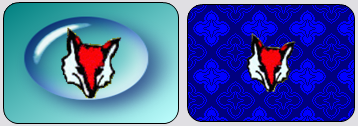
1. The BkgImage property is limited in how it is drawn. It is either drawn clipped by the control (if applicable) or stretched to the control's dimensions. Since the BkgImage property is a GDIpImage class, you have full access to it for other properties, like setting the ImageIndex and/or segmenting it if desired. If you desire a specifically, run-time, drawn image that is rendered with custom attributes/effects, sizes, etc, you'll want to create a new image and assign it to the BkgImage property; i.e., use SavePictureGDIplus, MergePictureGDIplus or maybe TilePictureGDIplus
2. The right-side image above was done using the PrePaint event. The PrePaint & PostPaint events will always give you far more control. Sample code looked like this:
- AlphaImgCtl1 had my avatar in it. WantPrePostEvents property is True
- AlphaImgCtl2 was hidden and had a 48x48 blue tile in it
- PrePaint & PostPaint events are runtime events only, so image not displayed as drawn while in design
Code:
Private Sub AlphaImgCtl1_PrePaint(hDC As Long, Left As Long, Top As Long, Width As Long, Height As Long, HitTestRgn As Long, Cancel As Boolean)
    Dim xOffset As Long
    If AlphaImgCtl1.Border Then xOffset = 1
    TilePictureGDIplus AlphaImgCtl2.Picture, hDC, xOffset, xOffset, _
        AlphaImgCtl1.ScaleWidth, AlphaImgCtl1.ScaleHeight, _
        AlphaImgCtl2.Picture.Width, AlphaImgCtl2.Picture.Height
End Sub
Last edited by LaVolpe; Oct 5th, 2011 at 10:32 PM.
-
Oct 13th, 2011, 08:24 AM
#253
New Member
Re: [vb6]Alpha Image Control (PNG, AniGIFs, TIFF, & more) [5 Oct 2011]
hi lavolpe.
Thanks for creating a great control for vb6.
I want to ask if how can i move the Alpha Image Control to Back of Textboxes?
-
Oct 13th, 2011, 08:44 AM
#254
Re: [vb6]Alpha Image Control (PNG, AniGIFs, TIFF, & more) [5 Oct 2011]
Are you asking how you can draw an image on a textbox? If so, it isn't that easy. Here's an example on vbAccelerator
Otherwise, the control is windowless. Being windowless, it can never be placed above a textbox. It will always be behind a textbox or any other windowed control
-
Oct 13th, 2011, 08:49 AM
#255
New Member
Re: [vb6]Alpha Image Control (PNG, AniGIFs, TIFF, & more) [5 Oct 2011]
thanks about that.
Is there any way i can make it a "windowed" control?
-
Oct 13th, 2011, 09:02 AM
#256
Re: [vb6]Alpha Image Control (PNG, AniGIFs, TIFF, & more) [5 Oct 2011]
Originally Posted by xnipher
Is there any way i can make it a "windowed" control?
Yes, but you'll lose its transparency and/or alphablending ability and then you'll have to draw the control's background manually. If wanting to play with that idea, open the control in design view and find its Windowless property & change it to False. Also change the BackStyle property to Opaque. But you'll have to do the background drawing via the PrePaint event....
Here's how the control accomplishes transparency. It relies on Windowless being true & of course, BackStyle being Transparent. By being windowless, the control borrows its container's device context (DC) to draw on. Since VB knows this, every time whatever is behind the control changes, VB sends the control a snapshot of what is under it. The control then copies that and draws whatever it wants on top of that and then paints it back to the container's DC. Because VB sends the control this information, the control never has to guess or determine when it should be updated, VB informs it. Niffty, easy (more or less) and perfect transparency effects.
Unfortunately, making the control windowed breaks all of this. By being windowed, the control does not use the container's DC. It has its own or is given one on the fly, as needed. The control will never have any knowledge of what is behind it on the container. You will have to basically draw, yourself, whatever is behind it, onto the control. Also, the control will never know that anything behind it was changed and will only rederaw itself when told do via a Refresh command or when it becomes covered/uncovered by other windows.
What you are asking for is basically a transparent picturebox. There is no simple way to create a transparent windowed control. There are methods to fake/simulate transparency and some work well, while others not so much. In either case, those methods rarely update themselves. Rather the owner of the project back-paints onto the control or sends the control some static bitmap to use as a background. Searching for transparent picturebox or transparent textbox may prove useful or fruitless
-
Oct 13th, 2011, 09:10 AM
#257
New Member
Re: [vb6]Alpha Image Control (PNG, AniGIFs, TIFF, & more) [5 Oct 2011]
Originally Posted by LaVolpe
Yes, but you'll lose its transparency and/or alphablending ability and then you'll have to draw the control's background manually. If wanting to play with that idea, open the control in design view and find its Windowless property & change it to False. Also change the BackStyle property to Opaque. But you'll have to do the background drawing via the PrePaint event....
Here's how the control accomplishes transparency. It relies on Windowless being true & of course, BackStyle being Transparent. By being windowless, the control borrows its container's device context (DC) to draw on. Since VB knows this, every time whatever is behind the control changes, VB sends the control a snapshot of what is under it. The control then copies that and draws whatever it wants on top of that and then paints it back to the container's DC. Because VB sends the control this information, the control never has to guess or determine when it should be updated, VB informs it. Niffty, easy (more or less) and perfect transparency effects.
Unfortunately, making the control windowed breaks all of this. By being windowed, the control does not use the container's DC. It has its own or is given one on the fly, as needed. The control will never have any knowledge of what is behind it on the container. You will have to basically draw, yourself, whatever is behind it, onto the control. Also, the control will never know that anything behind it was changed and will only rederaw itself when told do via a Refresh command or when it becomes covered/uncovered by other windows.
What you are asking for is basically a transparent picturebox. There is no simple way to create a transparent windowed control. There are methods to fake/simulate transparency and some work well, while others not so much. In either case, those methods rarely update themselves. Rather the owner of the project back-paints onto the control or sends the control some static bitmap to use as a background. Searching for transparent picturebox or transparent textbox may prove useful or fruitless
It seems that i can't find the Windowless Property of Alpha Image Control.
-
Oct 13th, 2011, 09:24 AM
#258
Re: [vb6]Alpha Image Control (PNG, AniGIFs, TIFF, & more) [5 Oct 2011]
Originally Posted by xnipher
It seems that i can't find the Windowless Property of Alpha Image Control.
1. Open the alpha image control project
2. In the project treeview, double click on AlphaImgCtl (AlphaImgCtl.ctl)
3. You'll now see a gray square. In the property sheet you see its core properties.
-
Oct 17th, 2011, 10:59 AM
#259
Re: [vb6]Alpha Image Control (PNG, AniGIFs, TIFF, & more) [5 Oct 2011]
Just a coding note... Updates expected to be posted around end of October
Now is the time to offer any additional suggestions/ideas
1. Will recognize the PNM family of image formats (pbm, pgm, ppm) for reading and writing
-- will not support rare multiple image formats, though first image will always be processed
2. Planning to include PAM format also, but not having much luck finding a variety of sample images
3. Extracted 32bpp bitmaps from binaries (dll/exe/etc) did not honor alpha channel. Will be fixed
4. Extracted PNGs from binaries (as icon resources) were not being created correctly. Will be fixed
5. Will minimally support AVI (image only) for reading only. I will not include a SaveAs method to AVI
-- these can be added via file name or extracted from dll/exe (i.e., Shell32.dll)
-- I will recommend you do not distribute AVI sources to be used with this control. AVI requires that the destination pc has appropriate video decompressors installed to read your AVI. Uncompressed or RLE AVIs are an exception since any pc should be able to read those
-- I will include a method of converting AVI to animated PNG or animated GIF. This would allow you to distribute AVI frames that can be displayed on your pc to other pc's. However, I'd suspect the GIF/PNG file may be significantly larger than source AVI. And color loss may occur with AVI to GIF, but no color loss with AVI to PNG
-
Oct 21st, 2011, 05:07 PM
#260
Re: [vb6]Alpha Image Control (PNG, AniGIFs, TIFF, & more) [20 Oct 2011]
Updated control today, to address enhancements/issues noted in previous reply.
See post #1, 1st page, for more info
-
Oct 22nd, 2011, 08:29 PM
#261
New Member
Re: [vb6]Alpha Image Control (PNG, AniGIFs, TIFF, & more) [20 Oct 2011]
Hallo Master,
Could you fix the HitTest problem please?
I want to use this control as a custom shape button, but the HitTest is not working correctly.
ps: I've been using your AlphaImageControl.ocx (v1.0) for my projects. THANK YOU! 
-
Oct 22nd, 2011, 08:40 PM
#262
Re: [vb6]Alpha Image Control (PNG, AniGIFs, TIFF, & more) [20 Oct 2011]
You'll have to give me more details, or better yet, whip up a quick sample project & post it so I can test it. Be sure to provide details.
-
Oct 22nd, 2011, 11:45 PM
#263
New Member
Re: [vb6]Alpha Image Control (PNG, AniGIFs, TIFF, & more) [20 Oct 2011]
The problem is even if I set the .HitTest to lvicTrimmedImage, the AlphaImgCtl_MouseEnter() event is still fire even the mouse is in the transparent pixels area.
attached is the sample project, images and AlphaImageControl v1.0 I'm using
(the sample project also need alpha image project v2.1.23 which I don't included)
Sample.rar
-
Oct 23rd, 2011, 01:48 AM
#264
Re: [vb6]Alpha Image Control (PNG, AniGIFs, TIFF, & more) [20 Oct 2011]
I don't use WinRar, zip would be better. Let me explain trimmed image better and it may answer your question.
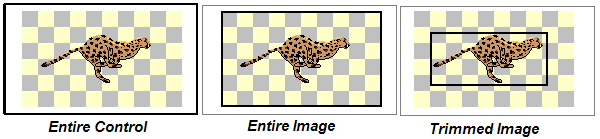
There are 4 hit test settings available
1) lvicPerimeter: The entire control
2) lvicEntirelImage: The image bounds, including any buffered/transparent pixels that may exist
3) lvicTrimmedImage: Any excess buffered/transparent pixels are trimmed off the image by creating a tight rectangle around the image.
4) lvicRunTimeRegion: Passing a valid region handle will result in this setting
In other words, the hit test is always rectangular, except for the 4th option which is user-defined.
Attached image explains the difference between the 1st 3 hit test options. Any mouse actions within the thick rectangle bounds will be registered; whether they are over transparent, partially trannsparent or opaque pixels.
I think what you are looking for is a shaped region that includes only non-transparent areas. That option is not offered with the control. However, nothing saying you can't create your own and pass that.
Last edited by LaVolpe; Oct 23rd, 2011 at 01:52 AM.
-
Oct 23rd, 2011, 10:46 PM
#265
New Member
-
Oct 24th, 2011, 11:26 AM
#266
Re: [vb6]Alpha Image Control (PNG, AniGIFs, TIFF, & more) [20 Oct 2011]
Though I do have the source for my older control, it was based off of my old c32bppDIBsuite project. This version of the control is based nearly 100% off of GDI+. So, you'd need to do a lot of tweaking to get the routines for shaping a region around a GDI+ bitmap.
To make it easy on you & anyone else that wants to do what you are trying to do, I'll simply post what you need here. It could probably be optimized a bit more, but as is, it is super fast.
1. Strongly recommend the AlphaImgCtl's AlignCenter property is FALSE, or if rotating make AutoSize property single angle. Otherwise, you will have to offset the created region so it aligns with a center-drawn image in the control
2. If you are using anything but actual size images, or mirroring/rotating, you'll want to draw the control to a temporary GDIpImage object and process that. Example provided
3. The control does not copy the region you pass as the HitTest property. But it owns it, so you must not delete the region
4. Here are the API declarations you'll need
Code:
Private Declare Function ExtCreateRegion Lib "gdi32" (lpXform As Any, ByVal nCount As Long, lpRgnData As Any) As Long
Private Type RECT
    Left As Long
    Top As Long
    Right As Long
    Bottom As Long
End Type
5. Here is a routine that is designed to be used with my control
Code:
Private Function CreateShapedRegion(imgBytes() As Byte, Width As Long, Height As Long, Optional OpaquenessTolerance As Long = 255) As Long

    ' returns a Windows region handle, or zero if failure
    ' the imgBytes array must be one returned from GDIpImage.AlphaMask function
    ' the OpaquenessTolerance must be a value between 0 and 255
    '   if the pixel opaqueness is < OpaquenessTolerance then that pixel not included in the region

    Dim X As Long, Y As Long, a As Long, lAppendFlag As Long
    Dim r() As RECT, rIndex As Long, rCount As Long

    If UBound(imgBytes) <> Width * Height - 1& Then Exit Function
    ' array returned from GDIpImage.AlphaMask (byte aligned mask), top down format
    rCount = Height                             ' initialize with arbitrary count of RECT structures
    ReDim r(-2 To rCount - 1&)                  ' 1st 2 RECTs are used as the region's 32 byte header
    r(-1).Left = Width                          ' set invalid max value

    For Y = 0& To Height - 1&
        lAppendFlag = 0&                        ' reset for each row
        For X = 0& To Width - 1&
            If imgBytes(a) < OpaquenessTolerance Then ' pixel excluded from region
                If (lAppendFlag And 1&) Then    ' currently appending
                    r(rIndex).Right = X         ' close out the RECT
                    rIndex = rIndex + 1&        ' increment
                    If rIndex = rCount Then     ' redim if needed
                        rCount = rCount + Height
                        ReDim Preserve r(-2 To rCount - 1&)
                    End If
                    lAppendFlag = lAppendFlag Xor 1& ' reset
                End If
            ElseIf (lAppendFlag And 1&) = 0& Then
                r(rIndex).Left = X              ' starting new RECT
                r(rIndex).Top = Y: r(rIndex).Bottom = Y + 1&
                lAppendFlag = 3&                ' appending and a new row will be added to region
            End If
            a = a + 1&                          ' move array pointer along
        Next
        If (lAppendFlag And 1&) Then            ' handle situations where last pixel in row terminates a RECT
            r(rIndex).Right = X                 ' close out the RECT
            rIndex = rIndex + 1&                ' increment index & redim if necessary
            If rIndex = rCount And Y < Height - 1& Then
                rCount = rCount + Height
                ReDim Preserve r(-2 To rCount - 1&)
            End If
        End If
        If (lAppendFlag And 2&) Then            ' row added: update region bounds
            With r(rIndex - 1&)
                If .Right > r(-1).Right Then r(-1).Right = .Right
                If .Left < r(-1).Left Then r(-1).Left = .Left
            End With
        End If
    Next

    If rIndex Then                          ' we have rectangles; therefore, a region to be created
        r(-1).Top = r(0).Top                ' r(-1) is the overall bounds of the region
        r(-1).Bottom = r(rIndex - 1&).Bottom
        With r(-2)
            .Left = 32&                     ' length of region header in bytes
            .Top = 1&                       ' required cannot be anything else
            .Right = rIndex                 ' number of rectangles for the region
            .Bottom = .Right * 16&          ' byte size used by the rectangles
        End With

        ' call function to create region from our byte (RECT) array
        CreateShapedRegion = ExtCreateRegion(ByVal 0&, (rIndex + 2&) * 16&, ByVal VarPtr(r(-2).Left))
    End If

End Function
6. Here are 2 examples of usage
Code:
    ' if needing to render the image (as drawn) before creating a region
        Dim b() As Byte, hRgn As Long
        Dim tImg As GDIpImage
        Set tImg = AlphaImgCtl1.SaveImageAsDrawnToGDIpImage()
        If tImg.AlphaMask(b(), False) Then
            hRgn = CreateShapedRegion(b(), tImg.Width, tImg.Height, 128)
            If hRgn Then AlphaImgCtl1.HitTest = hRgn
        End If

    ' if using actual size image, no rotation nor mirroring
        Dim b() As Byte, hRgn As Long
        If AlphaImgCtl1.Picture.AlphaMask(b(), False) Then
            hRgn = CreateShapedRegion(b(), AlphaImgCtl1.Picture.Width, AlphaImgCtl1.Picture.Height, 128)
            If hRgn Then AlphaImgCtl1.HitTest = hRgn
        End If
Edited: In playing with above code, found a bug that will have to be addressed.
When form is displayed and if control's Visible=False or control is hidden off the viewable form, SaveImageAsDrawnToGDIpImage will fail. This is due to a flag that is only set when the control is first painted & of course, if it isn't visible, it'll never get painted so flag is never set. Same problem will apply to PaintImageAsDrawnToHDC
Last edited by LaVolpe; Oct 24th, 2011 at 06:11 PM.
Reason: optimized CreateShapedRegion a bit
-
Oct 24th, 2011, 05:16 PM
#267
New Member
-
Oct 24th, 2011, 06:52 PM
#268
Re: [vb6]Alpha Image Control (PNG, AniGIFs, TIFF, & more) [20 Oct 2011]
Hope all works well for you. Note that if you set the Border property, or toggle the Border property, you may need to offset your region by 1 pixel both vertically & horizontally. I didn't include that possibility in the routine I provided in post #266. If this is the case, you can always use the OffsetRgn API to adjust for that 1 pixel
My gut reaction was that if you are wanting a shaped region, a border wouldn't be in use anyway
Code:
Private Declare Function OffsetRgn Lib "gdi32.dll" (ByVal hRgn As Long, ByVal X As Long, ByVal Y As Long) As Long
Edited: Since I discovered 2 new bugs (minor), I'll be updating the control. I'll also include the shaped region function in the GDIpImage class. This can reduce your overall code to just the following, after it has been updated:
Code:
    Dim hRgn As Long
    hRgn = AlphaImgCtl1.Picture.RegionFromImage(128)
    If hRgn Then AlphaImgCtl1.HitTest = hRgn
Last edited by LaVolpe; Oct 25th, 2011 at 02:36 PM.
-
Oct 26th, 2011, 07:46 AM
#269
New Member
 Re: [vb6]Alpha Image Control (PNG, AniGIFs, TIFF, & more) [25 Oct 2011] Re: [vb6]Alpha Image Control (PNG, AniGIFs, TIFF, & more) [25 Oct 2011]
Ooo My GOD...
Just when I 'm about to ask for more pointers about shape area HitTest, you already did it. THANK YOU!
I don't know if it's a bug or not,
If I call a MsgBox on Form_Load(), AlphaImgCtl fail to draw properly, even if I call .Refresh method. But it can be fix if I toggle .Visible.
-
Oct 26th, 2011, 08:01 AM
#270
Re: [vb6]Alpha Image Control (PNG, AniGIFs, TIFF, & more) [25 Oct 2011]
Originally Posted by pelermeler
I don't know if it's a bug or not,
If I call a MsgBox on Form_Load(), AlphaImgCtl fail to draw properly, even if I call .Refresh method. But it can be fix if I toggle .Visible.
No, not a bug. It is a known issue that applies only while the control is uncompiled.
Actually any modal windows (MsgBox, CommondDialog, InputBox, etc) displayed while the control is uncompiled has the possibility of events not being sent to the control. These events can effect drawing, async downloads, and your form receiving events from the control. This is all the result of blocking actions IDE creates for uncompiled code
Last edited by LaVolpe; Oct 26th, 2011 at 08:43 AM.
-
Nov 2nd, 2011, 07:56 AM
#271
Fanatic Member
Re: [vb6]Alpha Image Control (PNG, AniGIFs, TIFF, & more) [25 Oct 2011]
Hi LaVolpe. I have a situation where a scanner is outputting tiff images with compressed Jpeg. Have been trying GDI+ but to no avail. Also tried your user control and this too failed.
Then i tried the Freeimage.dll and this appears to work.
I am able to input compressed jpeg tif and load into a dib , then put this dib into a picture box.
Is it possible that something can be done with GDI+ or will this not be possible.
Many thanks
-
Nov 2nd, 2011, 08:03 AM
#272
Re: [vb6]Alpha Image Control (PNG, AniGIFs, TIFF, & more) [25 Oct 2011]
Originally Posted by k_zeon
I have a situation where a scanner is outputting tiff images with compressed Jpeg. Have been trying GDI+ but to no avail.
Can you upload a sample tiff? I'll have to do a bit of playing and maybe some research too
Edited: Forget about the sample image. It's not gonna happen. The TIFF compression options that GDI+ supports are noted below. I suspect that if a different compression other than that listed, GDI+ isn't supporting it. A manual parsing/uncompression method would need to be employed or use of 3rd party tools.
- CCITT3
- CCITT4
- LZW
- RLE
- None
Edited yet again. Further reading on the net hints that lossy compressed tiffs may be supported in Win7 and Vista if current service packs are up to date -- don't know for sure.
And a quote from another forum (not verified as accurate)
... By the way GDI+ reads some of tiffs compressed by JPEG, i suppose it depends on color depth or something else.
It does seem that the newer version of jpeg compression could be easily parsed out. But to get an idea at how messed up jpeg compression within tiff is/was, here is an interesting link
Last edited by LaVolpe; Nov 2nd, 2011 at 12:37 PM.
-
Nov 2nd, 2011, 11:12 AM
#273
New Member
Re: [vb6]Alpha Image Control (PNG, AniGIFs, TIFF, & more) [25 Oct 2011]
Hello,
this image control is realy amazing, very powerful.
Now i want to do some tests.
I want to use a picture from a standard vb6 PictureBox control, like:
Set AlphaImgCtl1.Picture = PictureBox1.Picture
but i am not successful.
Can you help?
Many thanks.
-
Nov 2nd, 2011, 11:57 AM
#274
Re: [vb6]Alpha Image Control (PNG, AniGIFs, TIFF, & more) [25 Oct 2011]
Originally Posted by cromit
I want to use a picture from a standard vb6 PictureBox control, like:
Set AlphaImgCtl1.Picture = PictureBox1.Picture
but i am not successful.
Can you help?
Many thanks.
Take a few moments and read over the 2 RTF files that were included in the zip file you downloaded
Code:
Set AlphaImgCtl1.Picture = LoadPictureGDIplus(PictureBox1.Picture)
-
Nov 3rd, 2011, 05:26 PM
#275
Re: [vb6]Alpha Image Control (PNG, AniGIFs, TIFF, & more) [3 Nov 2011]
Control updated today - enhancements only. The following have been added.
1. WMA music files can be selected as source for images. These files, much like MP3 files, can contain embedded images that may be extracted.
Edited: Will wait for a bit before updating again. Found a WMA where Windows Media Player placed a WM/Picture tag in a block I wasn't parsing. I've modified my version to ensure all images were parsed & when updated, the control will include this new tweak
2. Control is now databound-capable. This means you can tie the control to a field within a database, assuming that field contains image data. The control can be bound during design-time with a configured Adodc (ADO data control). During run-time, it can be bound by an Adodc or ADO recordset. This control is not compatible with VB's DAO Data control. The LoadPictureGDIp.rtf file contains information on how to set the databound control's DataSource property during design-time and run-time; not as straightforward as one would think.
See post#1 for more
Last edited by LaVolpe; Nov 4th, 2011 at 12:04 PM.
-
Nov 6th, 2011, 12:47 PM
#276
Re: [vb6]Alpha Image Control (PNG, AniGIFs, TIFF, & more) [6 Nov 2011]
Control patched today. A logic bug in the mp3 tag parser could occur for tags less than 30 bytes. You should immediately download the updated/patched control if you were already using v2.1.25 posted on 3 Nov.
-
Nov 6th, 2011, 10:41 PM
#277
Addicted Member
Re: [vb6]Alpha Image Control (PNG, AniGIFs, TIFF, & more) [6 Nov 2011]
Hi Lavolpe,
thanks for all recent update. I found what seem to be a bug with the alpha transparency of PNG file.
If you get a 1x1 pixel png of color RED and you STRETCH it to 200x1 pixel, you'll get a line of 200x1 pixel of RED... wich is normal.
now, I take a 1x6 pixel RED with the following alpha transparency:
1x1: 15%
1x2: 30%
1x3: 45%
1x4: 60%
1x5: 75%
1x6: 90%
(in other word I got a 1x6 red line going to the White)
and I stretch it to 200x6 pixel and it give a reversed pattern from Y1 to Y6 starting red at X1 and ending transparent at X200
in other word the pattern is reversed from top to bottom from x1 to x200 instead of staying the same pattern (but stretched)
what do you think ?
-
Nov 6th, 2011, 11:20 PM
#278
Re: [vb6]Alpha Image Control (PNG, AniGIFs, TIFF, & more) [6 Nov 2011]
Originally Posted by VbNetMatrix
...
what do you think ?
My brain hurts.
Maybe a picture is worth a 1000 words, along with the source image uploaded too 
Edited:
Here's what I did and I get what I expected: a 6-pixel high line stretched to 200x wide. When zoomed in using PaintBrush or other app, one can clearly see the 6 bands; nothing unexpected. Maybe, however you created the line, you were thinking transparency, but the method you used was thinking opacity? Or when you loaded/saved the PNG, it was done upside down?
Code:
    Me.ScaleMode = vbPixels
    Dim ss As SAVESTRUCT, tImg As New GDIpImage
    ss.Width = 1: ss.Height = 6 ' create 1x6 blank image
    ss.ColorDepth = lvicConvert_TrueColor32bpp_ARGB
    SavePictureGDIplus Nothing, tImg, , ss
    SetPixelGDIplus tImg, 0, 0, vbRed, 255 * 0.85  ' set colors from 15% transparency
    SetPixelGDIplus tImg, 0, 1, vbRed, 255 * 0.7   ' to 90% transparency
    SetPixelGDIplus tImg, 0, 2, vbRed, 255 * 0.55  ' note this function uses opacity
    SetPixelGDIplus tImg, 0, 3, vbRed, 255 * 0.4   ' vs transparency; therefore
    SetPixelGDIplus tImg, 0, 4, vbRed, 255 * 0.25  ' 15% transparent = 85% opaque
    SetPixelGDIplus tImg, 0, 5, vbRed, 255 * 0.1
    SavePictureGDIplus tImg, tImg, lvicSaveAsPNG    ' convert to PNG
    aicLine.Picture = tImg                          ' apply image over white bkg
    aicLine.BackColor = vbWhite: aicLine.BackStyleOpaque = True
    aicLine.Interpolation = lvicNearestNeighbor     ' shows bands better (no blending)
    aicLine.Aspect = lvicStretch                    ' stretch image now
    aicLine.Move aicLine.Left, aicLine.Top, 200, 6

Last edited by LaVolpe; Nov 7th, 2011 at 03:19 PM.
-
Nov 7th, 2011, 11:03 PM
#279
Addicted Member
Re: [vb6]Alpha Image Control (PNG, AniGIFs, TIFF, & more) [7 Nov 2011]
'm very sorry, I should have compiled the latest version before posting that bug that annoyed me for month...
you already fixed it. (I still got the old version though if you need it to see my problem)
however your answer raised another one in my head. You're talking like if opacity and transparency is not the same ?
Maybe I don't use the proper term. The zoomed picture you provided is a good exemple.
it's a red pixel wich you applyed a transparency layer, therefore changing the opacity of the red pixel from top to bottom. am I not correct ?
-
Nov 7th, 2011, 11:15 PM
#280
Re: [vb6]Alpha Image Control (PNG, AniGIFs, TIFF, & more) [7 Nov 2011]
Originally Posted by VbNetMatrix
however your answer raised another one in my head. You're talking like if opacity and transparency is not the same ?
Opacity = the degree to which light is not allowed to travel through a material
Transparency = the physical property of allowing light to travel through a material
Definitions provided from wikipedia, but almost any source will give similar definitions
They are opposites. 100% opacity is 0% transparency & 100% transparency is 0% opacity.
One could argue that they are the same when opacity or transparency is 50%, same as gray is both black & white
P.S. If you find a bug, especially one that annoys you, don't wait a month. I'm very receptive to bug reports 
Last edited by LaVolpe; Nov 8th, 2011 at 12:28 AM.
Tags for this Thread
 Posting Permissions
- You may not post new threads
- You may not post replies
- You may not post attachments
- You may not edit your posts
-
Forum Rules
|
Click Here to Expand Forum to Full Width
|



 Reply With Quote
 (mind-blowing)
