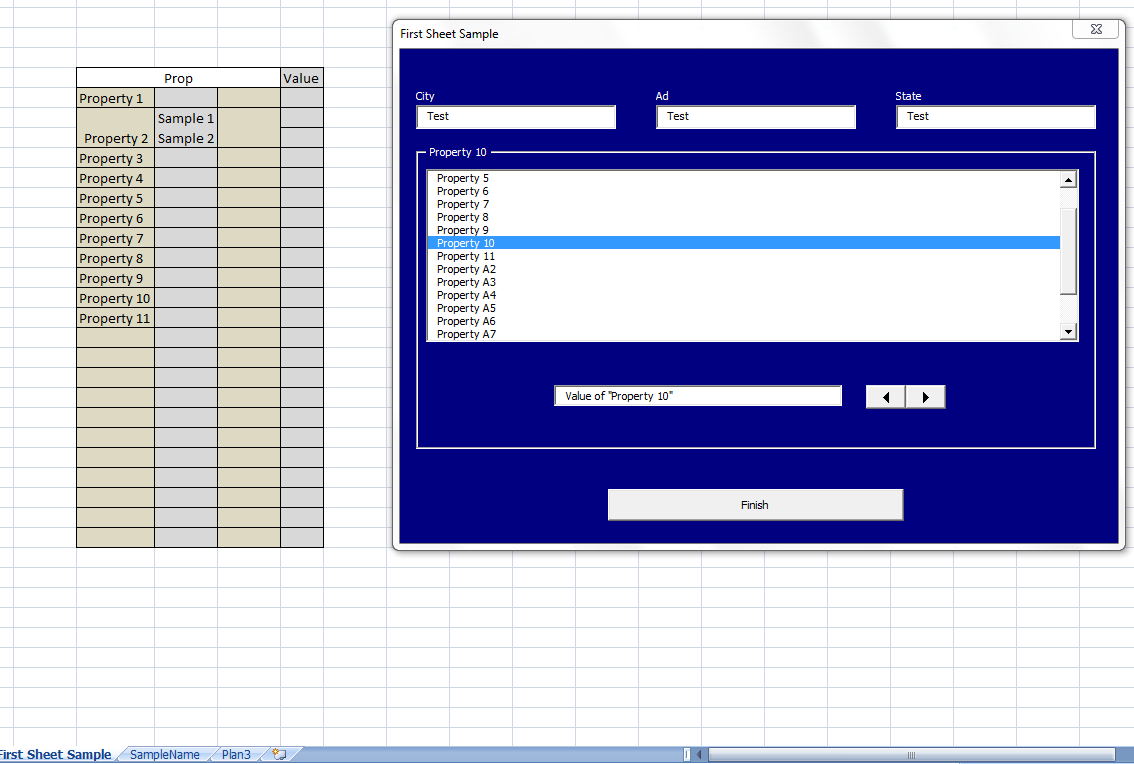
In a form, I have a listbox, a textbox, a spinbutton and a button "finish". I created the spinbutton to goes through the listbox and I use the textbox to save values to each property on listbox usin a array MyMtx().
It's almost working:
Code:
Private Sub SpinButton1_Change()

    If SpinButton1.Value > ListBox1.ListCount Then
        SpinButton1.Value = ListBox1.ListCount
    End If

    If ListBox1.ListCount > SpinButton1.Value And SpinButton1.Value >= 0 And SpinButton1.Value <= ListBox1.ListCount Then
        ListBox1.ListIndex = SpinButton1.Value
    End If
    TextBox1.SetFocus

End Sub
and
Code:
Private Sub ListBox1_Change()
    SpinButton1.Value = ListBox1.ListIndex
    TextBox1.Text = MyMtx(ListBox1.ListIndex, 2)
    TextBox1.SetFocus
End Sub
Code:
Private Sub TextBox1_Change()
On Error Resume Next
    MyMtx(ListBox1.ListIndex, 2) = TextBox1.Text
End Sub
The spinbutton is working, it can run through the listbox Up and Down, perfect. But, TextBox1.SetFocus is not working. I don't know why, it works just each two times I click on spinbutton, not every time I click.
Last edited by marlonsaveri; Jul 19th, 2011 at 03:25 PM.
Reason: To put [Code] on 3rd code.
i do my best to test code works before i post it, but sometimes am unable to do so for some reason, and usually say so if this is the case. Note code snippets posted are just that and do not include error handling that is required in real world applications, but avoid On Error Resume Next
dim all variables as required as often i have done so elsewhere in my code but only posted the relevant part
come back and mark your original post as resolved if your problem is fixed
pete
Dim MyMtx() As String

Private Sub SpinButton1_Change()
 On Error GoTo trataerro1
    If SpinButton1.Value > ListBox1.ListCount Then
        SpinButton1.Value = ListBox1.ListCount
    End If

    If ListBox1.ListCount > SpinButton1.Value And SpinButton1.Value >= 0 And SpinButton1.Value <= ListBox1.ListCount Then
        ListBox1.ListIndex = SpinButton1.Value
        DoEvents
    End If
    TextBox1.SetFocus
    DoEvents
trataerro1:
End Sub

Private Sub UserForm_Initialize()
On Error GoTo trataerro2

    Dim j As Integer
    Dim i As Integer


'   Title of the form
    Me.Caption = ActiveSheet.Name

'   Listbox
    final = Sheets("SampleName").Range("E" & Rows.Count).End(xlUp).Row + Sheets("SampleName").Range("N" & Rows.Count).End(xlUp).Row - 2
    ReDim MyMtx(final, 2) As String

    For i = 0 To Sheets("SampleName").Range("E" & Rows.Count).End(xlUp).Row - 2
        MyMtx(i, 1) = Sheets("SampleName").Range("E2").Offset(i, 0)
    Next i

    j = 0
    For i = Sheets("SampleName").Range("E" & Rows.Count).End(xlUp).Row - 1 To final - 1
        MyMtx(i, 1) = Sheets("SampleName").Range("N2").Offset(j, 0)
        j = j + 1
    Next i

    For i = 0 To final - 1
        ListBox1.AddItem MyMtx(i, 1)
    Next i
        ListBox1.Selected(0) = True

trataerro2:
End Sub

Private Sub CommandButton1_Click()
    On Error GoTo trataerro3

    Dim valor As String
    Dim busca As Range
    Dim SearchedWord As String
    Dim planilha As Worksheet


    'Save values on the sheet
    Set planilha = ActiveWorkbook.ActiveSheet
    planilha.Range("A1").FormulaR1C1 = BoxCity.Text
    'etc

    For i = 0 To ListBox1.ListCount     'for each prop...

        SearchedWord = MyMtx(i, 1)  'Find the prop on the sheet
        Set busca = ActiveWorkbook.ActiveSheet.Cells.Find(what:=SearchedWord, after:=Range("A1"), LookIn:=xlFormulas, _
            LookAt:=xlPart, SearchOrder:=xlByRows, SearchDirection:=xlNext, _
            MatchCase:=False, SearchFormat:=False)

        If Not busca Is Nothing Then        'If something is found...

                valor = Replace(MyMtx(i, 2), ".", ",") 'We correct commas and dots...


            If Not valor = "" Then 'and paste on the sheet.
                Cells(busca.Row, busca.Column + 3).FormulaR1C1 = valor
            End If

        End If
    Next i
    Unload AddProp
trataerro3:
End Sub

Private Sub ListBox1_Change()
On Error GoTo trataerro4
    'Change the frame
    Frame1.Caption = ListBox1.Text
    'Correct spinbutton (it happens when we click on the listbox)
        SpinButton1.Value = ListBox1.ListIndex
    'Save the value on the array...
    TextBox1.Text = MyMtx(ListBox1.ListIndex, 2)
    'Get focus
    TextBox1.SetFocus
    DoEvents
trataerro4:
End Sub

Private Sub TextBox1_Change()
On Error Resume Next
    MyMtx(ListBox1.ListIndex, 2) = TextBox1.Text
End Sub
post the workbook if you want, as i only use excel 200, i can only open .xls files
i do my best to test code works before i post it, but sometimes am unable to do so for some reason, and usually say so if this is the case. Note code snippets posted are just that and do not include error handling that is required in real world applications, but avoid On Error Resume Next
dim all variables as required as often i have done so elsewhere in my code but only posted the relevant part
come back and mark your original post as resolved if your problem is fixed
pete
Private Sub CommandButton2_Click() '<
With ListBox1
    If .ListIndex > 0 Then
        .ListIndex = .ListIndex - 1
    End If
End With
TextBox1.SetFocus
End Sub

Private Sub CommandButton3_Click() '>
With ListBox1
    If .ListIndex < .ListCount - 1 Then
        .ListIndex = .ListIndex + 1
    End If
End With
TextBox1.SetFocus
End Sub
Also, I've never had any luck using the "Spin" button. Always seemed a bit buggy to me. You could easily make your own using two command buttons and a text box. The SpinButton control may be causing you the greif.
i tested your form, with the same results you are getting, every 2nd or 3rd click the focus goes to the frame instead of the textbox, it seems to do this regardless of whether you have textbox1.setfocus
note that each time the spin button is clicked the listbox change event is fired and probably the textbox change event would also be fired
i was unable to determine any immediate solution
i do my best to test code works before i post it, but sometimes am unable to do so for some reason, and usually say so if this is the case. Note code snippets posted are just that and do not include error handling that is required in real world applications, but avoid On Error Resume Next
dim all variables as required as often i have done so elsewhere in my code but only posted the relevant part
come back and mark your original post as resolved if your problem is fixed
pete



 Why .setfocus is not running every time?

 Reply With Quote

 Re: Why .setfocus is not running every time?