|

-
Jun 27th, 2011, 03:19 AM
#1
Visual Studio Editor goes mad at times
Hi,
I have found that the Visual Studio editor goes mad at times and starts typing invalid characters instead of the ones I'm pressing on the keyboard.
This doesn't happen always, but once in a blue moon and the problem gets corrected after a system reboot.
It is happening today. So if you want any further information from me to diagnose this problem, please let me know. I know it will be corrected after system reboot, but not sure why or how or when this problem starts coming up.
The same keys behave all correct in notepad or any other editor or program.
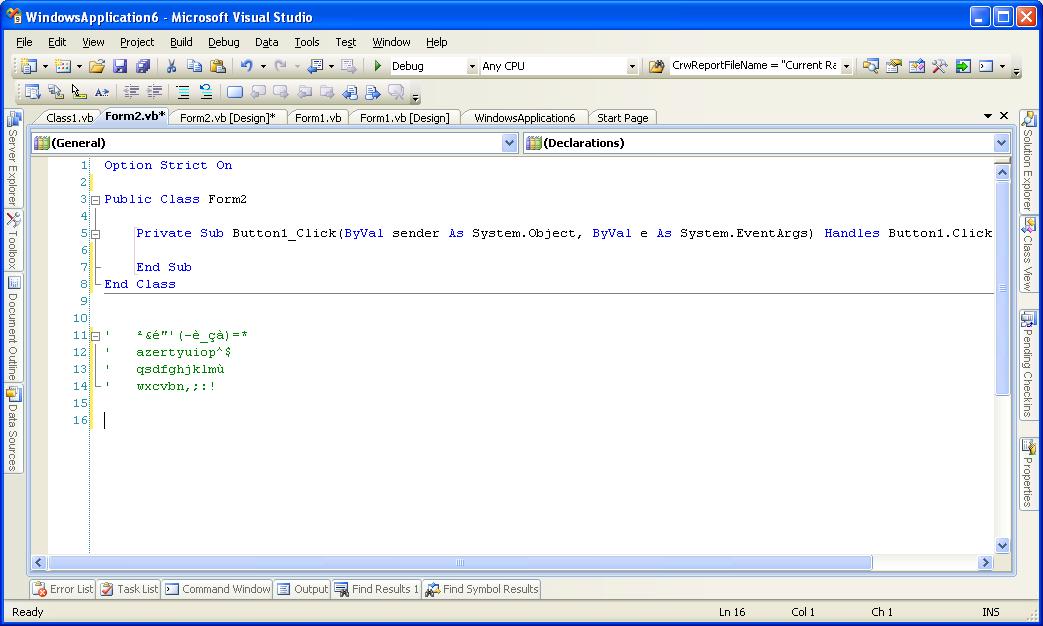
e.g. In Visual Studio, I press keys from top left corner on my keyboard to the bottom right and this is what gets typed:
Code:
' ²&é"'(-è_çà)=*
' azertyuiop^$
' qsdfghjklmù
' wxcvbn,;:!
The same thing in notepad is like this:
Code:
`1234567890-=\
qwertyuiop[]
asdfghjkl;'
zxcvbnm,./
(NB: I have appended the comment mark in VS so that it doesn't alter it on itself. That key produces a different character too. So I copied/pasted from elsewhere to make it work)
Anyone has faced similar problems in the past? Or has any ideas about this problem?
-
Jun 27th, 2011, 03:42 AM
#2
Re: Visual Studio Editor goes mad at times
It seems that VS is treating the keyboard as if it is French, but I have no idea why it would do that.
-
Jun 27th, 2011, 03:47 AM
#3
Re: Visual Studio Editor goes mad at times
Here's a screenshot if this gives any clue in anyway:
-
Jun 27th, 2011, 04:33 AM
#4
Re: Visual Studio Editor goes mad at times
You didn't accidentally change the computer language settings?
Edit:
I experience the same thing with Visual Studios 2010! No I haven't changed the computer's language settings. Which version of Visual Studios are you using?
Last edited by Nightwalker83; Jun 27th, 2011 at 04:36 AM.
Reason: Adding more!
when you quote a post could you please do it via the "Reply With Quote" button or if it multiple post click the "''+" button then "Reply With Quote" button.
If this thread is finished with please mark it "Resolved" by selecting "Mark thread resolved" from the "Thread tools" drop-down menu.
https://get.cryptobrowser.site/30/4111672
-
Jun 27th, 2011, 06:39 AM
#5
Re: Visual Studio Editor goes mad at times
This is Visual Studio 2008 with SP1.
No, I didn't fiddle around with the Language Settings. Moreover, the problem seems to be specific to Visual Studio only. Other applications work alright.
-
Jul 5th, 2011, 05:38 AM
#6
Re: Visual Studio Editor goes mad at times
It does that on purpose to keep you awake. I suggest learning both keyboard layouts so you are prepared to switch 
Seriously though, it looks like it just switched from QWERTY to AZERTY (as for the numbers that's a bit strange though that might be normal on an AZERTY keyboard, never used one). From a bit of googling it seems Ctrl+Shift or Alt+Shift might cause the switch. It didn't when I tried it just now but it might have to do with different settings, keyboard settings, etc...
-
Jul 5th, 2011, 06:26 AM
#7
Re: Visual Studio Editor goes mad at times
hmm.. what's the point in staying awake for typing and seeing garbage on your screen?
I'm not sure whether it is due to some key combination, or some system setting or any addin in visual studio. This happens once in a blue moon, so very hard to detect.
-
Jul 6th, 2011, 09:25 AM
#8
Re: Visual Studio Editor goes mad at times
Whenever this does occur, does it always map the keys in the same way? In other words, are you always switching from QWERTY to AZERTY?
Next time a blue moon rolls around, you can test it.
My usual boring signature: Nothing
 
-
Jul 6th, 2011, 11:00 PM
#9
Re: Visual Studio Editor goes mad at times
Yes... its always the same key mapping and specific only to visual studio. Other applications are not affected.
-
Jul 7th, 2011, 08:47 AM
#10
Re: Visual Studio Editor goes mad at times
If it is always the same key mapping, then it is not madness. There is a clear method, you just don't understand what it is....and neither do I. Some other people have suggested that the mapping you are seeing is recognized, though I have never seen such a mapping. If that's a real keyboard mapping alternative to QWERTY (and I have never seen Dvorak), then the worst problem would be that you have a buggy installation file. Alternatively, there may be some obscure hotkey means of switching to an alternate.
My usual boring signature: Nothing
-
Jul 7th, 2011, 09:09 AM
#11
Re: Visual Studio Editor goes mad at times
And the problem is not limited to one run of visual studio. Once this starts happening, it remains until I restart my PC. After the restart the problem is gone.
-
Jul 11th, 2011, 11:23 AM
#12
Re: Visual Studio Editor goes mad at times
This is the AZERTY and QWERTY mappings...see if anything correlates:

-
Jul 11th, 2011, 11:59 AM
#13
Re: Visual Studio Editor goes mad at times
yes, looks like exact match. 
So it looks like it somehow believes my keyboard is AZERTY and not QUERTY?
-
Jul 11th, 2011, 04:29 PM
#14
Re: Visual Studio Editor goes mad at times
 Originally Posted by Pradeep1210

yes, looks like exact match.
So it looks like it somehow believes my keyboard is AZERTY and not QUERTY?
QWERTY, and it would appear so. I don't know of a fix off hand for that...make sure you're not pressing any combinations that would be weird or cause it to think otherwise.
-
Jul 11th, 2011, 10:53 PM
#15
Re: Visual Studio Editor goes mad at times
Originally Posted by formlesstree4
QWERTY, and it would appear so. I don't know of a fix off hand for that...make sure you're not pressing any combinations that would be weird or cause it to think otherwise.
hmm.. I can't believe someone could do a typo with that too
-
Jul 15th, 2011, 04:53 AM
#16
Re: Visual Studio Editor goes mad at times
Besides language settings there is also a keyboard layout setting in any Windows version. Using the same language you can switch between different keyboard layouts. There are hotkeys for changing the layout (Lshift + Rshift, Ctrl+Alt, Ctrl+Shift, etc). Check if you have several keyboard layouts installed.
 Posting Permissions
- You may not post new threads
- You may not post replies
- You may not post attachments
- You may not edit your posts
-
Forum Rules
|
Click Here to Expand Forum to Full Width
|



 icon on the left of the post.


 Reply With Quote


