|

-
Jun 25th, 2011, 06:55 AM
#1
Thread Starter
PowerPoster


 [RESOLVED] [VB6] - test if alt acelerator key was activated [RESOLVED] [VB6] - test if alt acelerator key was activated
i know owner draw menus, but how can i test if the alt key acelarator was activated?(i try the getkeystate(), but don't works, in these)
-
Jun 25th, 2011, 03:26 PM
#2
Re: [VB6] - test if alt acelerator key was activated
Maybe one of these
1. Use a mouse hook (SetWindowsHookEx API). That allows you to preview all keyboard events before VB gets them.
2. In a subclass procedure for main-level window if wanting to trap Alt+Space, you can look for the WM_SYSCOMMAND & WM_COMMAND messages with wParam being SC_KEYMENU
-
Jun 25th, 2011, 04:49 PM
#3
Thread Starter
PowerPoster
Re: [VB6] - test if alt acelerator key was activated
 Originally Posted by LaVolpe

Maybe one of these
1. Use a mouse hook (SetWindowsHookEx API). That allows you to preview all keyboard events before VB gets them.
2. In a subclass procedure for main-level window if wanting to trap Alt+Space, you can look for the WM_SYSCOMMAND & WM_COMMAND messages with wParam being SC_KEYMENU
Code:
If wParam = SC_KEYMENU Then
        s = "&New"
    Else
        s = "New"
    End If
sorry but i don't understand correctly
-
Jun 25th, 2011, 05:00 PM
#4
Re: [VB6] - test if alt acelerator key was activated
Maybe you should tell us what you want to do when the ALT key is pressed? The ALT key is used for accelerator keys in both menus and on controls.
-
Jun 25th, 2011, 05:02 PM
#5
Thread Starter
PowerPoster
Re: [VB6] - test if alt acelerator key was activated
Originally Posted by LaVolpe
Maybe you should tell us what you want to do when the ALT key is pressed? The ALT key is used for accelerator keys in both menus and on controls.
is for normal work of menus (when you click on it, the "&" is activated)(speaking only in caption items)
-
Jun 25th, 2011, 05:13 PM
#6
Re: [VB6] - test if alt acelerator key was activated
Originally Posted by joaquim
is for normal work of menus (when you click on it, the "&" is activated)(speaking only in caption items)
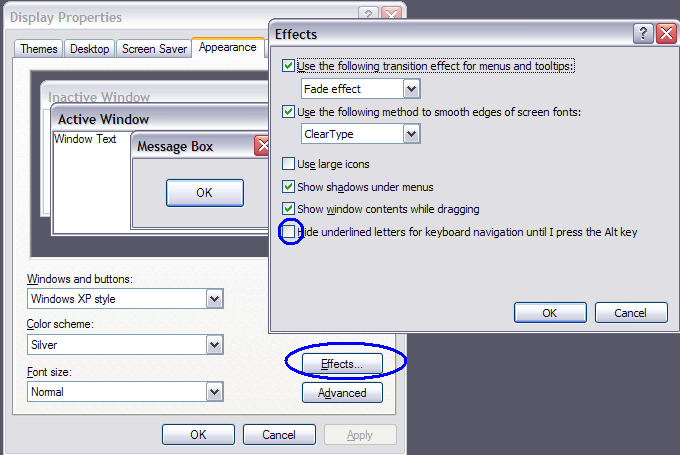
Oh, that system setting. See SystemParametersInfo API
If you want to underline the characters based on that setting, this is my recommendation.
1. Set a mouse hook to look for the ALT key being pressed if that setting is on; else always underline
2. When ALT is pressed, without another key, set a flag in your program
3. When you are drawing your menus and the flag is set, include the & symbol else do not
4. When the menus close, reset that flag
The above is just an idea; not the complete logic. For other ideas, may want to search for the following both here & google: SPI_SETKEYBOARDCUES
Last edited by LaVolpe; Jun 25th, 2011 at 05:18 PM.
-
Jun 25th, 2011, 05:15 PM
#7
Thread Starter
PowerPoster
Re: [VB6] - test if alt acelerator key was activated
Originally Posted by LaVolpe
Oh, that system setting. See SystemParametersInfo API
If you want to underline the characters based on that setting, this is my recommendation.
1. Set a mouse hook to look for the ALT key being pressed if that setting is on; else always underline
2. When ALT is pressed, without another key, set a flag in your program
3. When you are drawing your menus and the flag is set, include the & symbol else do not
4. When the menus close, reset that flag
The above is just an idea; not the complete logic. For other ideas, may want to search for the following both here & google: SPI_SETKEYBOARDCUES
i use the drawtext() api function, but i don't know nothing about that flag
-
Jun 25th, 2011, 05:18 PM
#8
Re: [VB6] - test if alt acelerator key was activated
Ugh, ignore above.
If you want to draw underlined characters based on the system setting. It's easier than that:
The DRAWITEMSTRUCTURE you used for custom drawing menus tells you.
Code:
Dim DIS As DRAWITEMSTRUCTURE
Const ODS_NOACCEL As Long = &H100
...
  If (DIS.ItemState And ODS_NOACCEL) = 0 Then
      ' do draw with &
  Else
      ' don't draw with &
  End If
...
-
Jun 25th, 2011, 05:30 PM
#9
Thread Starter
PowerPoster
Re: [VB6] - test if alt acelerator key was activated
Originally Posted by LaVolpe
Ugh, ignore above.
If you want to draw underlined characters based on the system setting. It's easier than that:
The DRAWITEMSTRUCTURE you used for custom drawing menus tells you.
Code:
Dim DIS As DRAWITEMSTRUCTURE
Const ODS_NOACCEL As Long = &H100
...
  If (DIS.ItemState And ODS_NOACCEL) = 0 Then
      ' do draw with &
  Else
      ' don't draw with &
  End If
...
i'm trying use it... but don't works
-
Jun 25th, 2011, 10:28 PM
#10
Re: [VB6] - test if alt acelerator key was activated
Originally Posted by joaquim
i'm trying use it... but don't works
If your system isn't set up for it, that ItemState flag will not be set.
-
Jun 26th, 2011, 04:34 AM
#11
Thread Starter
PowerPoster
Re: [VB6] - test if alt acelerator key was activated
Originally Posted by LaVolpe
If your system isn't set up for it, that ItemState flag will not be set.
i had that option activated.
(by testting these my system is crazy: mozilla and VB6, by defaul, have the alt key activated)
-
Jun 26th, 2011, 12:05 PM
#12
Re: [VB6] - test if alt acelerator key was activated
Regarding other apps they do not hide the accelerator key. That option first came in Win2K.
If the menus are owner drawn, the code for owner-drawing must handle the ODS_NOACCEL flag (post #8). If not, they will most likely draw the accelerator all the time. If the menus are true menus and not owner drawn, then they should behave as expected.
Now, I downloaded the menu sample project you are using from your other thread. It works fine.
Code:
...
   CopyMemory DIS, ByVal lParam, Len(DIS)

  If (DIS.itemState And ODS_NOACCEL) = 0 Then
    Debug.Print "use accelerator keys "; DIS.itemState
  Else
    Debug.Print "do not use accelerator keys "; DIS.itemState
  End If
...
1. Ensure you have the option activated to hide accelerator menu keys unless ALT pressed
2. Click on a subclassed menu that has at least one accelerator key
-- this should print: do not use accelerator keys
3. Now hit the ESC key a couple times to ensure your menu does not have focus
4. Press the ALT key and click on the same menu item
-- this should print: use accelerator keys
The above only applies to subclassed menu items. Unsubclassed menu items should behave correctly
-
Jun 26th, 2011, 12:10 PM
#13
Thread Starter
PowerPoster
Re: [VB6] - test if alt acelerator key was activated
Originally Posted by LaVolpe
Regarding other apps they do not hide the accelerator key. That option first came in Win2K.
If the menus are owner drawn, the code for owner-drawing must handle the ODS_NOACCEL flag (post #8). If not, they will most likely draw the accelerator all the time. If the menus are true menus and not owner drawn, then they should behave as expected.
Now, I downloaded the menu sample project you are using from your other thread. It works fine.
Code:
...
   CopyMemory DIS, ByVal lParam, Len(DIS)

  If (DIS.itemState And ODS_NOACCEL) = 0 Then
    Debug.Print "use accelerator keys "; DIS.itemState
  Else
    Debug.Print "do not use accelerator keys "; DIS.itemState
  End If
...
1. Ensure you have the option activated to hide accelerator menu keys unless ALT pressed
2. Click on a subclassed menu that has at least one accelerator key
-- this should print: do not use accelerator keys
3. Now hit the ESC key a couple times to ensure your menu does not have focus
4. Press the ALT key and click on the same menu item
-- this should print: use accelerator keys
The above only applies to subclassed menu items. Unsubclassed menu items should behave correctly
well i did anotherthing and works: i put use 1 boolean variable in form key up event and with keycode i can change the boolean variable. but my vb6 stills and mozilla fox crazy with underline, always, showed
-
Jun 26th, 2011, 12:28 PM
#14
Re: [VB6] - test if alt acelerator key was activated
Originally Posted by joaquim
well i did anotherthing and works: i put use 1 boolean variable in form key up event and with keycode i can change the boolean variable. but my vb6 stills and mozilla fox crazy with underline, always, showed
Use Spy++ on those applications
Mozilla: Their "menus" are not true menus. They are drawn as part of the window, just like you'd draw on a picturebox
VB IDE: Menu bar is not a true menu; it is a toolbar. The dropdown menus from that bar are ownerdrawn I believe. They are always showing the accelerator key simply because VB probably hasn't updated the IDE since Win2K to handle the new ownerdrawn flags.
Some notes
1) If true menus are not owner drawn, they should behave correctly
2) Trapping the ALT key is not the correct way to do it in my opinion, if you want to replicate how Windows draws menus. Up to you of course.
3) Subclassed popup menus probably should be drawn with the accelerator key all the time unless they are specifically processed in the subclass procedure by handling the WM_CONTEXTMENU message. Pressing Shift+F10 is similar to mousing a Right Click with ALT key toggled on.
To see what I mean, do this
a: Ensure hiding accelerator keys option is selected
b. Add a textbox to your form
c. Set focus to it. Right click on it. You will not see accelerator keys
d. Hit ESC and now press Shift+F10. You will see accelerator keys
Edited: The entire idea, in my opinion, regarding hiding the accelerator keys was just stupid. Basically, when Windows uses that option, it is saying: "hey if I'm using my mouse to navigate menus, hide the keys. But if I'm using my keyboard then show the keys". So with those keys hidden by default, if there was an accelerator key for a menu item, you'd never know it unless you took the time to find them, using the keyboard to start the menus off. But then again, people over the past decade have been more mouse-users than keyboard-users. And the ratio of mouse to keyboard users will probably increase exponentially over time
Last edited by LaVolpe; Jun 26th, 2011 at 01:14 PM.
-
Jun 26th, 2011, 04:46 PM
#15
Thread Starter
PowerPoster
Re: [VB6] - test if alt acelerator key was activated
sorry LaVolpe but i'm seen your code:
Code:
 If (DIS.ItemState And ODS_NOACCEL) = 0 Then
      ' do draw with &
  Else
      ' don't draw with &
  End If
and something isn't right. the dis.itemstate=false(i understand) but ODS_NOACCEL=0 i don't understand
because it's a const.
anotherthing: finally a put to work.. thanks
-
Jun 26th, 2011, 04:49 PM
#16
Re: [VB6] - test if alt acelerator key was activated
The const value was given in previous post: ODS_NOACCEL = &H100
When using AND, we are testing to see if the .ItemState contains the flag ODS_NOACCEL.
If the result is zero, then the flag is not included and means 1 of 3 things
1) The operating system is older than Win2K
2) The user does not have the option set to hide the accelerator keys
3) The user has the option set, and the keyboard initiated the menus not the mouse
When the flag is not set, it simply means to draw the menu with the accelerator key
Last edited by LaVolpe; Jun 26th, 2011 at 04:53 PM.
-
Jun 26th, 2011, 04:53 PM
#17
Thread Starter
PowerPoster
Re: [VB6] - test if alt acelerator key was activated
Originally Posted by LaVolpe
The const value was given in previous post: ODS_NOACCEL = &H100
When using AND, we are testing to see if the .ItemState contains the flag ODS_NOACCEL.
If the result is zero, then the flag is not included and means 1 of 3 things
1) The operating system is older than Win2K
2) The user does not have the option set to hide the accelerator keys
3) The user has the option set, but the mouse initiated the menus not the keyboard
ok.. thanks for the information
give me a tip\sugestion: for show the shortcut keys i use the drawtext() api function but in right align. it's the right way, right?
-
Jun 26th, 2011, 05:03 PM
#18
Re: [VB6] - test if alt acelerator key was activated
I'd say it depends on you.
VB IDE uses right aligned short cut keys.
Windows Explorer (look at View | Go To menu) uses a tabular alignment
Mozilla (look at its Bookmarks menu) uses a tabular alignment.
Tabular alignment can be calculated as so
1. Determine the maximum width needed to display all menu captions, not including the shortcut keys, on that menu panel only.
2. Add a buffer to that max width, say 10 pixels as you determine looks good. Your menu panel size will include the max size needed to display the caption + shortcut key + buffer, for all menu items
3. Draw the menu caption without the shortcut keys
4. Now draw the shortcut keys offset at the max width + that buffer
The captions will be aligned left. The shortcut keys will be left aligned but appear like they are in another column within the menu panel, understand?
-
Jun 26th, 2011, 05:09 PM
#19
Thread Starter
PowerPoster
Re: [VB6] - test if alt acelerator key was activated
 Posting Permissions
- You may not post new threads
- You may not post replies
- You may not post attachments
- You may not edit your posts
-
Forum Rules
|
Click Here to Expand Forum to Full Width
|



 Reply With Quote
