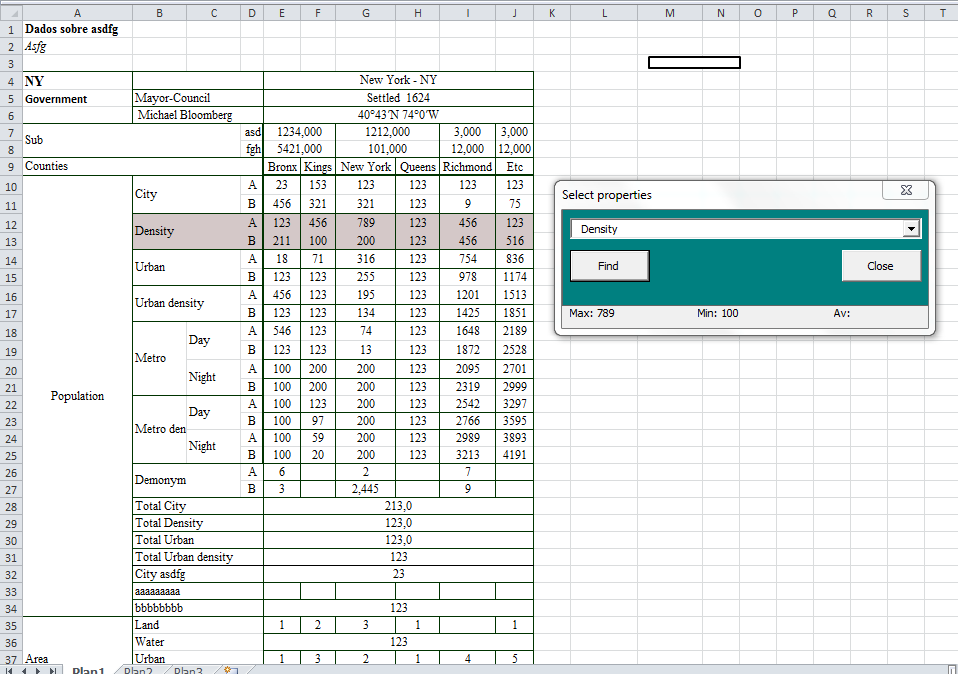
I have a form here that, when it's opened, we selected a property in a combobox and we click "search. "
When such property is found, it is highlighted in another color in spreadsheet and the form shows the maximum, minimum and average.
However...
1. I can't add items to combobox (there are some blanks).
2. Moreover, in the original workbook, it can not understand that
Code:
"numcol = Cells (myfinded.Row, Columns.count). End (xlToLeft). Column"
is used to take the last column of the table, though, I don't have idea why, it's ok on the sample file I did to this forum.
3. Is not calculating the maximum, minimum and average interval correctly, although the function is apparently right.
Can, please, somebody teach me how to fix these things?
Moreover, in the original workbook, it can not understand that
my guess would be myfinded is nothing
i do my best to test code works before i post it, but sometimes am unable to do so for some reason, and usually say so if this is the case. Note code snippets posted are just that and do not include error handling that is required in real world applications, but avoid On Error Resume Next
dim all variables as required as often i have done so elsewhere in my code but only posted the relevant part
come back and mark your original post as resolved if your problem is fixed
pete
as i can not open your workbook, i could only take a guess, sorry it is wrong
what do you get with msgbox numcol?
what type is numcol defined as?
what error do you get?
Last edited by westconn1; Mar 28th, 2011 at 02:52 AM.
i do my best to test code works before i post it, but sometimes am unable to do so for some reason, and usually say so if this is the case. Note code snippets posted are just that and do not include error handling that is required in real world applications, but avoid On Error Resume Next
dim all variables as required as often i have done so elsewhere in my code but only posted the relevant part
come back and mark your original post as resolved if your problem is fixed
pete
Each time is a error, for example, 1004, that couldn't find "average" in worksheetfunction class.
Msgbox numcol returns 10, ok in this sample, but not in all sheets.
numcol is long.
That's the code:
HTML Code:
    Option Explicit
    Dim numlin As Long
    Dim numcol As Long


Private Sub CommandButton1_Click() 'close button
    prop_especific.Hide
'   No colors
    With Cells.Interior
        .Pattern = xlNone
        .TintAndShade = 0
        .PatternTintAndShade = 0
    End With
End Sub

Private Sub CommandButton2_Click()

    On Error GoTo StudyError

'   declare
    Dim myfinded As Range
    Dim col As Integer
    Dim lin As Integer
    Dim MySearchedWord As String
    Dim myrange As Range

'   No colors
    With Cells.Interior
        .Pattern = xlNone
        .TintAndShade = 0
        .PatternTintAndShade = 0
    End With

'   Hide labels
    LabelMax.Caption = ""
    LabelMin.Caption = ""
    LabelMed.Caption = ""
    LabelMax.Visible = False
    LabelMin.Visible = False
    LabelMed.Visible = False

'   Find combobox value
    MySearchedWord = ComboBox1.Value
    Set myfinded = Cells.Find(what:=MySearchedWord, After:=Range("B3"), LookIn:=xlFormulas, _
        LookAt:=xlPart, SearchOrder:=xlByRows, SearchDirection:=xlNext, _
        MatchCase:=False, SearchFormat:=False)

'   Paint cells
    Range(myfinded.Address).Interior.Color = RGB(212, 200, 200)
    For lin = myfinded.Row To myfinded.MergeArea(myfinded.MergeArea.count).Row  'for first to last merged cell
       For col = 3 To numcol 'for 3td to last col
         Cells(lin, col).Interior.Color = RGB(212, 200, 200)
         Next
    Next


'   Get max, min and average of myrange
    For lin = myfinded.Row To myfinded.MergeArea(myfinded.MergeArea.count).Row
        For col = 4 To numcol
            If Not myrange Is Nothing Then
                Set myrange = Union(myrange, Cells(lin, col))
             Else
                Set myrange = Cells(lin, col)
            End If
        Next col
    Next lin

    LabelMax.Visible = True
    LabelMin.Visible = True
    LabelMed.Visible = True

    LabelMax.Caption = "Max: " & WorksheetFunction.max(myrange)
    LabelMin.Caption = "Min: " & WorksheetFunction.min(myrange)
    LabelMed.Caption = "Av: " & WorksheetFunction.Average(myrange)
    Exit Sub

StudyError:

End Sub


Private Sub UserForm_Initialize()

    On Error GoTo StudyError

    Dim maxlin As Integer 'keep property numb
    Dim maxcol As Integer 'get number of data about each property
    Dim counties As String 'guarda a counties
    Dim i As Integer

'   Discover how many rows and col there's in the table
    Dim myfinded As Range
    Dim MySearchedWord As String

    'rows:
    numlin = Range("A" & Rows.count).End(xlUp).Row
    numlin = Range("A" & numlin).MergeArea.count + numlin

    'find word "counties", go to the end of the table to know the number of col
    MySearchedWord = "counties"
    Set myfinded = Cells.Find(what:=MySearchedWord, After:=Range("A1"), LookIn:=xlFormulas, _
        LookAt:=xlPart, SearchOrder:=xlByRows, SearchDirection:=xlNext, _
        MatchCase:=False, SearchFormat:=False)
    If Not myfinded Is Nothing Then
        numcol = Cells(myfinded.Row, Columns.count).End(xlToLeft).Column
    End If
MsgBox numcol

'   Put things in combobox
    For i = 10 To numlin 'we don't count titles rows
            ComboBox1.AddItem Cells(i, 2).FormulaR1C1
    Next

'   Remove empty items
    For i = 1 To ComboBox1.ListCount - 1
        If Len(ComboBox1.List(i)) = 0 Then
           ComboBox1.RemoveItem i
        End If
    Next

    Exit Sub

StudyError:

End Sub
For i = 1 To ComboBox1.ListCount - 1
If Len(ComboBox1.List(i)) = 0 Then
ComboBox1.RemoveItem i
End If
Next
you should work from the bottom up when removing items, each time an item is removed it changes the indexes of items below and causes the next item to be missed
this probably has nothing to do with your current problem, but something you need to be aware of
on doing some testing using parts of your code, if found that i was actually returning range objects on a different worksheet to what i was expecting, this gave me 1004 errors on average function and returned 0 for max and min, on fully qualifying ranges when setting range objects gave me correct results
you can test this with
msgbox myrange.parent.name
, the result surprised me as i was sure i was working with sheet1, but ..............
i do my best to test code works before i post it, but sometimes am unable to do so for some reason, and usually say so if this is the case. Note code snippets posted are just that and do not include error handling that is required in real world applications, but avoid On Error Resume Next
dim all variables as required as often i have done so elsewhere in my code but only posted the relevant part
come back and mark your original post as resolved if your problem is fixed
pete
this is getting weirder and weirder.
The first time I run the form, using "for" as you said, it works. To be sure, I've put a "msgbox" in this part:
Code:
    If Not myfinded Is Nothing Then
        numcol = Cells(myfinded.Row, Columns.count).End(xlToLeft).Column
    End If

'   Put things in combobox
    For i = 10 To numlin 'we don't count titles rows
            ComboBox1.AddItem Cells(i, 2).FormulaR1C1
    Next

    MsgBox ComboBox1.ListCount & ". numcol = " & numcol

'   Remove empty items
    For i = ComboBox1.ListCount - 1 To 1
        If Len(ComboBox1.List(i)) = 0 Then
           ComboBox1.RemoveItem i
        End If
    Next
However, when I try to open the form a second time, it just opens, without showing the msgbox and numcol is not respected
Private Sub UserForm_Initialize()
        MsgBox "why????"
the "msgbox" doesn't appear
About
Code:
msgbox myrange.parent.name
I use a portuguese version of Excel. So, it doesn't show: "sheet1", but "plan1"
==============
The number of items remains the same:
Code:
    lastcount = ComboBox1.ListCount - 1
'   Remove empty items
    For i = lastcount To 1
        If Len(ComboBox1.List(i)) < 1 Then
           ComboBox1.RemoveItem i
        End If
    Next
    MsgBox ComboBox1.ListCount 'there are no difference between combobox1.listcount and lastcount yet
Last edited by marlonsaveri; Apr 3rd, 2011 at 09:25 AM.
Private Sub UserForm_Initialize()
        MsgBox "why????"
it does show when i test
The first time I run the form, using "for" as you said, it works. To be sure, I've put a "msgbox" in this part:
i do not know when it is supposed to run or why it only runs once, maybe post a sample workbook the demonstrates the problem
i do my best to test code works before i post it, but sometimes am unable to do so for some reason, and usually say so if this is the case. Note code snippets posted are just that and do not include error handling that is required in real world applications, but avoid On Error Resume Next
dim all variables as required as often i have done so elsewhere in my code but only posted the relevant part
come back and mark your original post as resolved if your problem is fixed
pete
Private Sub UserForm_Initialize()
MsgBox "why????"
the "msgbox" doesn't appear
I have had problems in excel with the Initialize events, sometimes its like the object has not completely loaded before it trys to run the code.
What I ended up doing, with Pete's help, was putting the code I wanted in the Initialize event in another sub, then in the initialization event, use the application.ontime to to run the sub, with the code, after a 1 second delay.



 What's wrong with it?

 Reply With Quote

 Originally Posted by marlonsaveri


