|

-
Mar 26th, 2011, 07:37 AM
#1
Thread Starter
New Member

Making a top down shooter? Need help please.
Okay, I got most of my game threshed out, and I got all my programming together, Im just missing TWO main points of code for it.
The first main point of code is this; the game is an "over the top view" shooter, so your character is in the center of the screen while you move, and the map scrolls up and down when you use WASD. I know how to make my character move, the problem is the plotting; I dont know how to make the map scroll everytime you move. Also, i cant just cycle images through animations as if I do it that way, when I add a multiplayer server, it simply wont work.
The second part of the code is this; where your character looks is controlled by the mouse. So if your mouse is to the left of your character, your character is looking left, and so on. The thing is, I have NO idea how to make your character look at the cursor, also, I dont know how to make him shoot when you click, and to have the rounds go where your mouse is pointed (where he is looking).
I am also missing one "animation" bit. Basicly, when you shoot, your bullet is in the form of a fast-moving tracer. I already have a .BMP of the tracer, the problem is, I KNOW how to make the tracer move at x speed, the problem is, if my character shoots down, the tracer is going to travel down the screen, except the tracer will be horizontal,becuase thats how it was drawn. Is it possible to change the angle of the .BMP so that it fits to the angle of firing?
Big thanks!
-
Mar 28th, 2011, 08:11 AM
#2
Re: Making a top down shooter? Need help please.
What are you programming this in? What game engines/platforms are you using?
So, you're making a shooter where your character is always in the center of the screen and the map scrolls under them? Kinda like Time Pilot or a similar style game?
-
Mar 28th, 2011, 06:08 PM
#3
Thread Starter
New Member
Re: Making a top down shooter? Need help please.
Oh thanks for replying.
And now that you mention it, yes, like Time Pilot; except I think the game Alien Swarm might be a little bit of a better representation since your guys' direction of vision is where your cursor is moved to.
And Im just coding in Visual Basic 2008. No game engines. I want this to be very compatible with many computers, and I also want this to be a learning experience for me (without game engines, its a little bit more challenging)
Thank you!
-
Mar 29th, 2011, 04:37 PM
#4
Re: Making a top down shooter? Need help please.
Without a gaming framework like XNA or game engine, it's going to be extremely difficult, if not downright impossible. One of most basic things a game framework does for you is sets up your DirectX environment and allow you to load in graphics as sprites. Sprites can be easily moved and more importantly, rotated at will. It's something you just can't do with GDI+ and PictureBoxes. Don't think of game related libraries as a crutch; they're a tool to be used, and happen to be the right tool for the job.
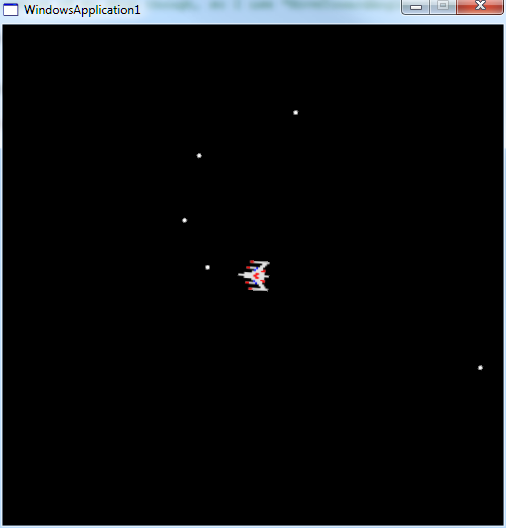
Below is a simple example using VB2008, Microsoft's XNA Framework and FlatRedBall (a game engine library). All of these are just added to your project as references and when you create a setup project or publish your project via ClickOnce, their runtime packages are automatically included. The example depicts a Galaga ship sitting center-screen Time-Pilot style. Moving the mouse rotates the ship to face the cursor and clicking the left mouse button "fires" a shot. It's something that took me about 20 minutes to cobble together.
Code:
Imports Microsoft.Xna.Framework
Imports Microsoft.Xna.Framework.Input

Imports System.Math

Imports FlatRedBall
Imports FlatRedBall.Math
Imports FlatRedBall.Math.Geometry
Imports FlatRedBall.Graphics
Imports FlatRedBall.Graphics.Particle
Imports FlatRedBall.Input

Public Class Game1
    Inherits Game

    Private graphics As GraphicsDeviceManager
    Private sprShip As Sprite
    Private sprBullets As New SpriteList

    Public Sub New()
        graphics = New GraphicsDeviceManager(Me)
    End Sub

    Protected Overrides Sub Initialize()
        'Set up my graphics
        Dim grOp As New GraphicsOptions
        grOp.SuspendDeviceReset()
        grOp.SetResolution(500, 500)
        grOp.ResumeDeviceReset()
        FlatRedBallServices.InitializeFlatRedBall(Me, Me.graphics, grOp)

        'Set up the camera
        SpriteManager.Camera.Orthogonal = True
        SpriteManager.Camera.OrthogonalWidth = FlatRedBallServices.ClientWidth
        SpriteManager.Camera.OrthogonalHeight = FlatRedBallServices.ClientHeight
        SpriteManager.Camera.UsePixelCoordinates(True)

        'Make the ship
        sprShip = SpriteManager.AddSprite("Galaga.png")
        sprShip.ScaleX = sprShip.Texture.Width / 4.0F
        sprShip.ScaleY = sprShip.Texture.Height / 4.0F
        sprShip.X = FlatRedBallServices.ClientWidth / 2.0F
        sprShip.Y = FlatRedBallServices.ClientHeight / 2.0F
    End Sub

    Protected Overrides Sub Update(ByVal gameTime As Microsoft.Xna.Framework.GameTime)
        FlatRedBallServices.Update(gameTime)

        'Rotate ship to face mouse
        Dim mouseVector As New Vector2(Convert.ToSingle(InputManager.Mouse.X - (FlatRedBallServices.ClientWidth / 2)), Convert.ToSingle(InputManager.Mouse.Y - (FlatRedBallServices.ClientHeight / 2)))
        Dim r As Single = Convert.ToSingle(Atan(mouseVector.X / mouseVector.Y))
        If InputManager.Mouse.Y > (FlatRedBallServices.ClientHeight / 2) Then r += MathHelper.Pi
        'r is my absolute position to my mouse cursor.  I want to limit the turning radius of my ship though, so I use "MoveTowardAngle()" below.

        sprShip.RotationZ = MathFunctions.MoveTowardAngle(sprShip.RotationZ, r, 0.06)

        'Check if the trigger is being pressed
        If InputManager.Mouse.ButtonPushed(FlatRedBall.Input.Mouse.MouseButtons.LeftButton) Then
            'Make a bullet
            Dim sprBullet As Sprite = FlatRedBall.SpriteManager.AddSprite("bullet.png")
            sprBullet.ScaleX = sprBullet.Texture.Width / 2.0F
            sprBullet.ScaleY = sprBullet.Texture.Height / 2.0F
            Dim circle As New Circle With {.Radius = 1}
            sprBullet.SetCollision(circle)
            'Bullet starts at ship
            sprBullet.X = sprShip.X
            sprBullet.Y = sprShip.Y
            sprBullet.RotationZ = sprShip.RotationZ

            'Bullets shoot away from ship's current position
            sprBullet.YVelocity = Convert.ToSingle(100 * Cos(sprShip.RotationZ))
            sprBullet.XVelocity = Convert.ToSingle(-100 * Sin(sprShip.RotationZ))
            sprBullets.Add(sprBullet)
        End If

        'Check if any bullets are moved off the screen
        Dim sprTemp As New SpriteList
        For Each sprBullet As Sprite In sprBullets
            If sprBullet.Y > FlatRedBallServices.ClientHeight OrElse sprBullet.Y < 0 OrElse _
                sprBullet.X > FlatRedBallServices.ClientWidth OrElse sprBullet.X < 0 Then

                sprTemp.Add(sprBullet)
            End If

        Next
        SpriteManager.RemoveSpriteList(sprTemp)

        MyBase.Update(gameTime)
    End Sub

    Protected Overrides Sub Draw(ByVal gameTime As Microsoft.Xna.Framework.GameTime)
        FlatRedBallServices.Draw()
        MyBase.Draw(gameTime)
    End Sub
End Class
Bonus 1: I also added a function that limits the speed the ship rotates so it has to "spin" to face the cursor and thus moves more naturally.
Bonus 2: The bullets have collision zones defined, so it's easy to detect when they hit enemy targets later.
Bonus 3: It's DirectX, which means it's fast, smooth, and flicker-free.
 Posting Permissions
- You may not post new threads
- You may not post replies
- You may not post attachments
- You may not edit your posts
-
Forum Rules
|
Click Here to Expand Forum to Full Width
|



 Reply With Quote

 the people who helped you and mark your forum RESOLVED when you're done!