|

-
Mar 14th, 2011, 09:18 AM
#1
Thread Starter
Frenzied Member


Can't connect to Internet (driver problems)
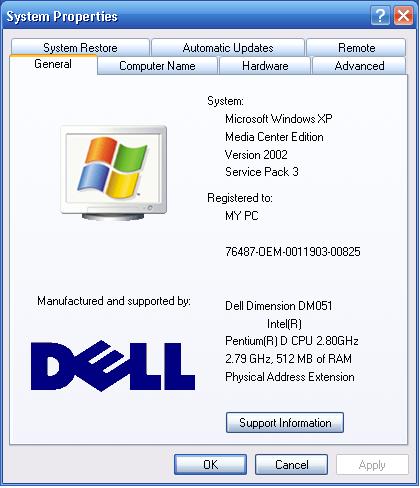
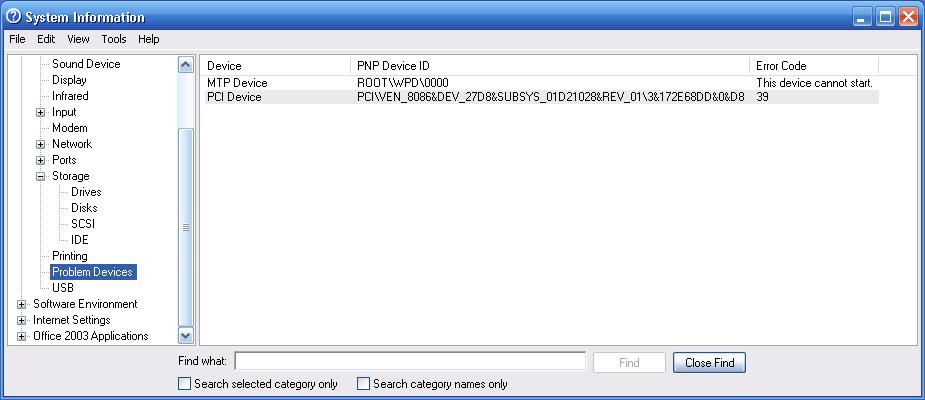
We were given a dell compter by my wifes mother, she says she was connecting to the internet right up until she unplugged it to bring it here. I went through and cleaned out all the junk (mostly on-line gambling apps) I could find. When I try to connect to our router (Verizon, Westell 7500) it makes the connection buts says it isn't working. I can go to our Verizon account online and see that the computer is being recognized by the router. When I checked the Hardware in the device manager it has a ! next to MPT Device under Portable Devices and a ! next to PCI Device under System Devices. I looked all over the web to see if I can get drivers for these devices, (New Found Hardware Manager does open when booting up) but only for the PCI device. Thought I could download the drivers on my laptop then move them over to the desktop. Any suggestions on what I can do nex?
Computer Information:
System Information: Problem Devices:
-
Mar 14th, 2011, 09:44 AM
#2
Hyperactive Member
Re: Can't connect to Internet (driver problems)
If it's a Verizon card, try getting in touch with Verizon, or the actual manufacture. Usually the manufacture will have a support section on their website where you can download the Drivers for their devices.
At first I thought you were talking about a Cell Modem. If it's a standard ethernet router, you really shouldn't need drivers for the router, you just need your networking card working.
If you need drivers for the network card you need to find out what kind of card it is first, you can get a new one for like $20, so it may not even be worth the hassle.
Anyways here's Westell's site:
http://www.westell.com/technical-sup...l-support.html
Last edited by nO_OnE; Mar 14th, 2011 at 09:52 AM.
Reason: Update
-
Mar 14th, 2011, 10:14 AM
#3
Thread Starter
Frenzied Member
Re: Can't connect to Internet (driver problems)
I kow it isn't the router, and am assumong it is the network card. But what about the PCI and MTP issues?
-
Mar 14th, 2011, 02:41 PM
#4
Hyperactive Member
Re: Can't connect to Internet (driver problems)
I don't know, I am not use to looking at the sytem info, generally I just look at the device manager for problems.
It is probably not an issue with the PCI itself, just referring to a device plugged into a PCI slot...
Check in the device manager
-
Mar 15th, 2011, 09:00 AM
#5
Fanatic Member

Re: Can't connect to Internet (driver problems)
Maybe the problem is the software you using. The software can't read the PCI because not compatible maybe. Try to find a software that will compatible to your hardware.
___________________

Give some REP. if my POST is helpful 
-
Mar 15th, 2011, 01:12 PM
#6
Thread Starter
Frenzied Member
Re: Can't connect to Internet (driver problems)
all I am trying to do is plug in a cat 5 to connect to our router. same cat 5 I use to connect with my laptop. Shouldn't be any conflicts at all.
-
Mar 15th, 2011, 01:44 PM
#7
Fanatic Member
Re: Can't connect to Internet (driver problems)
Nothing will be conflict on that. If your using cat 5 to the router and your using cat 6 to your laptop maybe there would be. But if that is the scenario that is only software problem.
___________________
Give some REP. if my POST is helpful
-
Mar 15th, 2011, 05:39 PM
#8
Re: Can't connect to Internet (driver problems)
Am I right in assuming that the device which is not working is the network card? If it is, then find the make and model of the device by opening the box and looking at the network card. If it is build into the motherboard you will need to look at the make and model of that instead. You should then be able to get your hands on the appropriate drivers from the manufacturers website.
If the network card is shown as recognised and you have a corresponding "Local Area Connection" in your network connections list then you will need to check your IPv4 settings are set to automatically obtain IP and DNS information from the DHCP server. You can reach this by right clicking on the connection and selecting "Properties" then double click on the IP / TCP Settings.
-
Mar 15th, 2011, 08:36 PM
#9
Thread Starter
Frenzied Member
-
Mar 15th, 2011, 11:55 PM
#10
Thread Starter
Frenzied Member
Re: Can't connect to Internet (driver problems)
I have been trying to find somewhere to download drivers from. All I have found is software to scan my computer then get me to buy something. I think I am looking for an updated driver for Intel(R) Pro/100 ve adapter ndis 5.1. driver. I know I have downloaded drivers before but have been having no luck with this.
-
Mar 16th, 2011, 01:42 AM
#11
Hyperactive Member
Re: Can't connect to Internet (driver problems)
Is it a pre-configured computer that came with the network card already in it? Such as an Asus, HP, Compaq, etc...
If so just goto their website, find the support site, find your computer model number (There should be a sticker somewhere on the computer with the model number) and find your drivers.
If the network card was an addition, and you don't have the model number, you may have better luck than me, but like I recommended before, its only $20 for a new one...
-
Mar 16th, 2011, 04:14 AM
#12
Re: Can't connect to Internet (driver problems)
From your screen shot I can see your Wireless and Wired network cards are installed properly - your wireless card is actually connected to a network. Your device listing shows a PCI device is not working properly, this is not necessarily the network card though. You should have a separate section for these.
Is it the wireless or wired Ethernet that is giving you problems? When you connect, does it show in the notification area that a connection has been made? Does it actually pick up a valid email address which is not in the 169.254.x.x range?
-
Mar 16th, 2011, 04:17 AM
#13
Re: Can't connect to Internet (driver problems)
You can download the latest drivers from the Intel website:
http://downloadcenter.intel.com/Sear...esktop+Adapter
-
Mar 16th, 2011, 04:46 AM
#14
Thread Starter
Frenzied Member
Re: Can't connect to Internet (driver problems)
it is the wired connection, picked up the wireless yesterday and it installed and works just fine. We switched over to verizon and are using their router, when I try to connect with the wired connection, if I go online on our other comuter the router recognizes the connection is trying to be made, but gets no info about the computer.
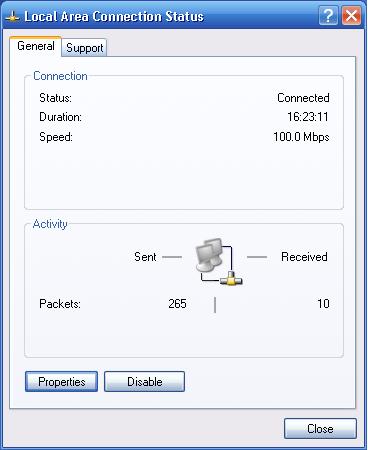
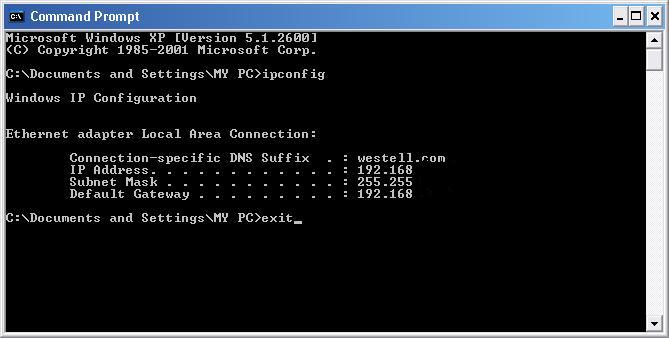
When I tried to install the drivers, it told me I would have to remove Intel ProSet Wired as it wasn't updatable. Ran test through Proset and now the connection is working, but a web oage won't open. It doesn't time out, just remains blank. Here is the connection properties and the IP address from cmd.
And yes I removed the wireless adapter to get these readings.
Last edited by CoachBarker; Mar 16th, 2011 at 05:38 AM.
Reason: additional information
-
Mar 16th, 2011, 07:27 AM
#15
Re: Can't connect to Internet (driver problems)
It is beginning to look more like an issue with the switch / router you are connecting to. The default gateway should be the address of router which is connected to the Internet (check this is right).
In addition to this, try pinging a website (Google for example) from the command line. If you are getting replies rather than timeouts then you can connect to the outside world and resolve domain names. This means the problem is probably originating from the browser software / firewall software on the machine (i.e. some firewalls break when they see a different network).
On the router side, check that you don't have MAc address filtering enabled or any other security features that may block new client.
-
Mar 16th, 2011, 11:51 AM
#16
Thread Starter
Frenzied Member
Re: Can't connect to Internet (driver problems)
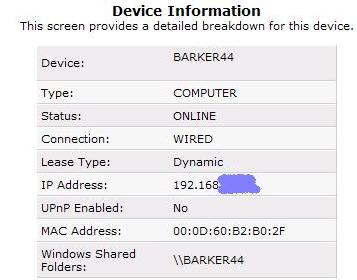
OK, checked on my laptop which is wired in and the ip address of the router is correct. Pinged google and timed out. After we got Verizon and the new router, we hooked my daughters computer through the router(wired) and my laptop(wired and wireless) and had no issues. so the problem must be in this computer.
Again when I am wired into the router and check with Verizon it recognizes the computer and when I checked the device information this is what I get.
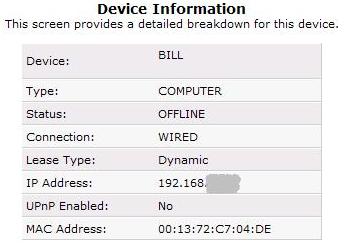
Details for my laptop in comparison
-
Mar 16th, 2011, 02:06 PM
#17
Re: Can't connect to Internet (driver problems)
Check whether a proxy is configured.
Try pinging 63.236.73.220 (vbforums.com) and if you wish, post the result of ipconfig /all to get a little more detail on DNS settings.
By the way, it is safe to post the full IP-addresses from your computer. They're all internal.
Delete it. They just clutter threads anyway.
-
Mar 16th, 2011, 04:22 PM
#18
Thread Starter
Frenzied Member
Re: Can't connect to Internet (driver problems)
ping when connected by wireless:

ping when wire connected:

-
Mar 16th, 2011, 06:18 PM
#19
Re: Can't connect to Internet (driver problems)
It does appear that there is communication. So it looks like a DNS issue. Before connecting to the wired connection, run ipconfig /flushdns to clear the dns cache. Then attempt to ping google.com again. If it fails to resolve the domain name to an IP address then this might be your problem.
You can also test by running nslookup and typing domain names. This should result in a reply with an IP address when working correctly.
Can you do a ipconfig /all for your connection too?
-
Mar 16th, 2011, 07:46 PM
#20
Thread Starter
Frenzied Member
Re: Can't connect to Internet (driver problems)

got nothing when pinging google this time
-
Mar 16th, 2011, 08:20 PM
#21
Re: Can't connect to Internet (driver problems)
The connection shown there is the wireless connection rather than the wired connection. When you attempt to ping Google does it fail to resolve the name to an IP address? If you ping using just the IP address, does that work.
If the above is true check the following: the DNS server in ipconfig /all is the same as that assigned to the wireless. Temporarily disable any firewalls you have installed / the Windows firewall and see if this makes a difference (don't forget to turn it back on after).
-
Mar 17th, 2011, 01:20 AM
#22
Thread Starter
Frenzied Member
Re: Can't connect to Internet (driver problems)
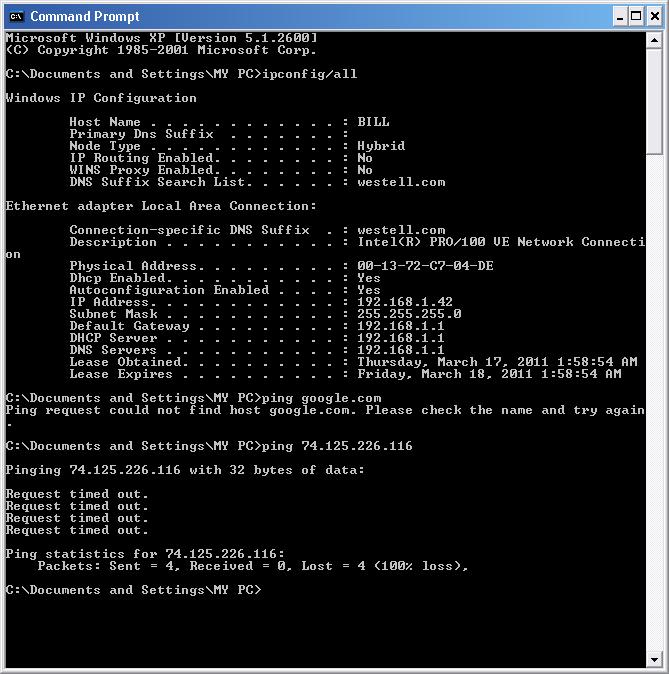
the DNS server in ipconfig /all is the same as that assigned to the wireless. No change with the fire wall off.
-
Mar 17th, 2011, 03:36 AM
#23
Re: Can't connect to Internet (driver problems)
Package drops at that rate is unlikely to be a software problem..
Judging by previous posts, the cable doesn't seem to be the problem.
And neither the modem/router.
I think the card is just fried.
The last thing I'm suggesting is changing the MAC-address.
http://www.mydigitallife.info/2008/0...nix-and-linux/
Change it to something completely random.
I've seen some modems/routers respond totally weird to certain MAC-addresses, so that is always on my checklist when problemsolving.
Delete it. They just clutter threads anyway.
-
Mar 17th, 2011, 03:53 AM
#24
Re: Can't connect to Internet (driver problems)
Restarting the the router is something else you can try. As well as a spare network card. I once had a machine with buggy integrated NIC and it would periodically cause the entire network to go dead until it was unplugged and the machine restarted (I have no idea why).
I assume you managed to re-install the drivers in the end.
-
Mar 17th, 2011, 04:48 AM
#25
Thread Starter
Frenzied Member
Re: Can't connect to Internet (driver problems)
TheBigB; guess I cn try changing the AC address, can't hurt.
visualAd; in order to install the drivers I ned to delete PROSet Wired. Is it alright to delete this program to install the drivers?
-
Mar 17th, 2011, 05:41 AM
#26
Re: Can't connect to Internet (driver problems)
Set a restore point first and you should be fine. I cannot make any guarantees though  just be prepared to reinstall the original software if it doesn't work. just be prepared to reinstall the original software if it doesn't work.
-
Mar 20th, 2011, 04:50 AM
#27
Thread Starter
Frenzied Member
Re: Can't connect to Internet (driver problems)
well haven't solved the issue yet but would like to thank you both for your time and effort to try and help solve this. Supposed to get the discs for this computer today so maybe there is a restore disc in the pile. Reps to both.
 Posting Permissions
- You may not post new threads
- You may not post replies
- You may not post attachments
- You may not edit your posts
-
Forum Rules
|
Click Here to Expand Forum to Full Width
|



 Reply With Quote

