|

-
Mar 2nd, 2011, 05:18 PM
#1
 [RESOLVED] Impossible Question [RESOLVED] Impossible Question
This question totally sucks, and is pretty much hopeless to ask, but maybe somebody has a suggestion as to what else to look at. The code is spread through multiple dlls and is utterly massive, so I'm not about to post the whole amount, and I'm not sure what subset of it would be useful.
The situation is that I am drawing images on pictureboxes. All the pictureboxes are rectangles where the long axis is twice as long as the short axis. The pictureboxes are oriented either North, South, East, or West (some in each direction). Of course, North and South would look the same, as would East and West, except that the image drawn onto the picturebox is such that you can tell North from South and East from West.
A bitmap is used as the image. It is scaled to the size of the picturebox, then some other graphics are drawn onto the bitmap. This drawing is done as a series of steps. Initially, all bitmaps are oriented N-S, such that they are longer than they are wide. A border is drawn onto the picturebox, then a different segment is added at the bottom (which is how you can tell a N from an S). As a last step, the image is rotated so that it matches the orientation of the picturebox. These steps result in an image in the picturebox, with a border, and a segment drawn at the bottom, such that you can see which images are oriented N, S, E, or W. All of this is working fine.
The next step is to draw lines across the pictureboxes at certain points. It is pretty complicated as to where the lines are drawn, but you can picture it as being one line drawn across the short axis of the picturebox. Through drag and drop, these lines can be moved anywhere on the picturebox I want. This, too, is working. I can drag the lines anywhere I want along the picturebox, and I can see that the actions are occuring correctly.
The problem is that, for the E and W raceways, the lines are visible only if they are in the left side of the picturebox. If I drag them to the right side of the picturebox, they are no longer visible. On the N-S pictureboxes, the lines are visible no matter where I put them. Furthermore, I can step through the code and see that the lines are being drawn. They are actually drawn as rectangles, using the FillRectangle method of the graphics object. I can confirm that all of the parameters used by the FillRectangle method are correct, regardless of where I put the lines. The problem is that they only show up if they are drawn on the left half of the image.
That's the whole description, and I would agree that it is pretty much hopeless. I have spent a few hours confirming everything that I could confirm. There are few reasons why graphics might not show up, and I have ruled out most of them. Nothing is being drawn over the graphic, the borders show that the rotation is working correctly, and the lines are being drawn in the right place and at the right size.
The two alternatives appear to be either that the graphics object is not drawing the line, or that the line is being drawn in the wrong place. Neither one makes sense. How could the logic work for the N-S but not the E-W? It's the same logic other than the parameters passed to the FillRectangle, and I can confirm that those parameters are correct in all cases. Furthermore, how could it draw correctly in the left half of the picturebox but not in the right, regardless of whether it is E or W? If it was drawing wrong, it would draw wrong for both. How would it even know which half it was drawing in? Why would it care?
So, I suppose what I am looking for is whether or not there is something odd about the way graphics work that could cause strange behavior in half of an image?
My usual boring signature: Nothing
 
-
Mar 2nd, 2011, 05:26 PM
#2
Re: Impossible Question
It sounds to me as if you have somehow managed to keep the drawing area (the graphics object?) at the original N-S dimensions, perhaps by not altering it during the rotation phase.
That would cause the items in the right hand side to not be drawn for the sake of efficiency, because as far as it is concerned they will never be displayed.
-
Mar 2nd, 2011, 05:31 PM
#3
Re: Impossible Question
Are there any visuals that we could look at?
-
Mar 2nd, 2011, 05:44 PM
#4
Re: Impossible Question
My initial thought was that maybe it's being covered by another graphic object or something.
-tg
-
Mar 2nd, 2011, 05:47 PM
#5
Re: Impossible Question
If you can get design-time support and events with your drawings like other .net objects, would that help?
You can download and install the Visual Basic PowerPacks and see if it is any useful to you:
http://msdn.microsoft.com/en-us/vbasic/bb735936
It has shapes to help you at design time and can be coded like other .net objects with events, properties and methods.
-
Mar 2nd, 2011, 06:26 PM
#6
Re: Impossible Question
Have you tried Graphics.SmoothingMode = HighQuality? If your filled rectangles are 1 pixel wide or less, you could run into rounding errors otherwise. BB
-
Mar 2nd, 2011, 07:09 PM
#7
Re: Impossible Question
Ask an impossible question and get a bunch of answers.
@BB: The size of the lines varies depending on the size of the image, but even the 1 pixel lines show up on the left side. The four pixel wide lines have the same problem.
@TG: That was one of my thoughts, as well, though by now I can't say that it was my initial thought. Therefore, I commented out everything after drawing those lines. The code I commented out would draw other things in some situations, but in this case, they would draw nothing, and commenting them out had no impact. No drawing takes place after drawing those lines, and all the drawing other than the lines works correctly.
@Pradeep: That might be of some use, but is kind of a last resort.
@FA: That is also a last resort. The images are pretty dynamic. In fact, the drawing routine draws a series of images that make up an animation sequence. All of the images that go into the animation sequence are identical except for the background image, and the animation is working perfectly, which shows the sequence of background images correctly. The lines are drawn on each frame of the animation (or not drawn, if they are on the right side of those E-W pictureboxes). Furthermore, an animation sequence is drawn for each of four different zoom levels such that, as the user zooms in or out, the proper animation set is displayed. That too, is working perfectly. So the graphics are very animated.
@Si: That's what I was looking for. Frankly, it is the only thing that seems to make sense. I was thinking that there could be such an issue, so after rotating the initial image, I disposed the graphics object created for drawing the borders and such on that image, and got a new graphics object based on the image. I was thinking that doing so would take care of your suggestion, but perhaps not. I'll try testing that.
My usual boring signature: Nothing
-
Mar 2nd, 2011, 07:21 PM
#8
Re: [RESOLVED] Impossible Question
Si had it right. I thought that after the rotation I could dispose of the graphics object and do this:
grph = Drawing.Graphics.FromImage(dSurface)
where dSurface was the rotated image to get a new graphics object that had the rotated image. That was not the case. Instead, I took the image, created a new bitmap from the rotated image with the proper size for the rotated image, and got a new graphics object from that. It worked. Seems overly complicated, though, so if there is a better way to update the graphics image, I'd like to hear about it. Of course, this solution required just two lines. The one listed above, and one other that created a new bitmap for the E-W oriented PB. Small in code, but probably not so small in resources.
Interestingly, I had looked at the clipping region of the old graphics object, and it looked right. It wasn't, though. All of the numbers were correct, what I missed was that the height and width were backwards. The clipping region was still the clipping region of the old orientation of the image.
Looked right at it....didn't see it.
My usual boring signature: Nothing
-
Mar 2nd, 2011, 07:58 PM
#9
Re: [RESOLVED] Impossible Question
Strike that. I looked right at it and DID see it. After studying this issue further, the VisibleClipBounds of the graphics object is correct. When I rotate the image and get a new graphics object, the VisibleClipBounds change to reflect the new orientation of the image. However, unless I create a new bitmap and get the graphics object from that new bitmap, the clipping is wrong. I note that the Clip property of the graphics object is certainly different for the two different bitmaps, but it is a value that is pretty much meaningless to me (it changes from 800,000 or so to a million or so). Setting a clip region for the graphics object causes the VisibleClipRegion to become the intersection of that region and the bitmap. However, even if I set the clip region such that it would be clipping to the right size and shape, it still doesn't work. The actual region that is being clipped is NOT the visible clipping region, in this case. The graphics object appears to be retaining some invisible setting from the original bitmap, and the VisibleClippingRegion is not the actual clipping region that is being used, nor is the Clip property the ONLY clipping region being used (though if you set the Clip property, the region you set will ALSO be used).
I'd be interested in any thoughts on that subject, as well.
My solution, as it stands, is to create a new bitmap from the rotated bitmap, then get a new graphics object from that new bitmap. This works. I also tried getting a new graphics image from the rotated bitmap, which did not work. I then tried setting the clipping region of the graphics object explicitly, which also did not work. Lastly, I tried getting a new graphics object from the rotated bitmap and setting the clipping region to the proper size, and that, too, failed.
My usual boring signature: Nothing
-
Mar 3rd, 2011, 07:14 AM
#10
Re: [RESOLVED] Impossible Question
That is rather odd... I would look at the rotation process, as there may be something in it that isn't quite right.
However, your investigations make it sound as if there is some kind of inherent issue outside of your code, which presumably can't be fixed in a better way than you are doing already.
-
Mar 3rd, 2011, 09:07 AM
#11
Re: [RESOLVED] Impossible Question
It sounds like it ought to be something trivial, but it's hard to be sure without seeing some code. You shouldn't need to worry about clip regions unless you are using them for some specific purpose. (The VisibleClipBounds of a control's graphics object is equal to the client area of the control, or the area invalidated if smaller.) Maybe you are invalidating the rectangles before rotating them instead of afterwards. If so, invalidate the picture boxes instead. BB
-
Mar 3rd, 2011, 10:13 AM
#12
Re: [RESOLVED] Impossible Question
I'm not dealing with the pictureboxes. The images are drawn to the size of the pictureboxes, but since I am drawing all of the animation sequences for all of the zoom levels at the same time, the current size of the picturebox is utterly irrelevant. Here's the code that does the rotation in the working format:
Code:
                grph.Dispose()
                'Now rotate the image prior to adding fish and RWPB.
                If mDirection = HISInCommon.Direction.East Then
                    dSurface.RotateFlip(RotateFlipType.Rotate270FlipNone)
                    dSurface = New Bitmap(dSurface, lng, shrt)
                ElseIf mDirection = HISInCommon.Direction.West Then
                    dSurface.RotateFlip(RotateFlipType.Rotate90FlipNone)
                    dSurface = New Bitmap(dSurface, lng, shrt)
                ElseIf mDirection = HISInCommon.Direction.North Then
                    dSurface.RotateFlip(RotateFlipType.Rotate180FlipX)
                End If

                grph = Drawing.Graphics.FromImage(dSurface)
Note that I create new bitmaps only for the East and West. If I comment out the lines that create the new bitmap from the current one, the VisibleClippingRegion will show correctly, but the image will have the problems described.
I noted in the documentation that the VisibleClippingRegion is the intersection of the control clipping region with and other clip region set in the graphics object. Apparently, there is more to it than that, as the VisibleClippingRegion is correct, yet the actual display is being clipped to something else. The clip property takes on certain values depending on whether I create a new bitmap or not, as noted in the earlier post, but setting my own clip region has no impact on the result.
My usual boring signature: Nothing
-
Mar 3rd, 2011, 02:49 PM
#13
Re: [RESOLVED] Impossible Question
The only thing I can think of is that the right edge of the image/drawing area is actually 1 pixel less than your area you are drawing in.
For example, with a drawing area 10 pixels by 10 pixels, if you DRAW a rectangle that is 10 pixels by 10 pixels, the right and bottom of that rectangle will be outside your drawing bounds. if you FILL a rectangle then it will fill the 10x10 area.
Code:
	Protected Overrides Sub OnPaint(ByVal e As System.Windows.Forms.PaintEventArgs)
		e.Graphics.Clear(Color.White)
		Dim r As New Rectangle(100, 100, 10, 10)
		e.Graphics.DrawRectangle(Pens.Red, r)
		Dim br As New SolidBrush(Color.FromArgb(128, 0, 0, 255))
		e.Graphics.FillRectangle(br, r)
	End Sub
If you zoom in, you'll see the painted area is actually 11x11 pixels (not 10x10 as one might expect).
Now, i don't know if this is relevant to your issue, but it's a possibility. In addition, do you have a border on the picture boxes? I'm not sure if that can cause problems. I know that drawing to the full form canvas would probably highlight your issue, since the picturebox will restrict your drawing area to something you may not be expecting (I've always found drawing to pictureboxes ultimately a futile affair and draw to a full blown canvas or buffer for a user control or form).
Last edited by SJWhiteley; Mar 3rd, 2011 at 02:53 PM.
"Ok, my response to that is pending a Google search" - Bucky Katt.
"There are two types of people in the world: Those who can extrapolate from incomplete data sets." - Unk.
"Before you can 'think outside the box' you need to understand where the box is."
-
Mar 3rd, 2011, 03:10 PM
#14
Re: [RESOLVED] Impossible Question
I'm not actually drawing to the picturebox, but creating a sequence of bitmap images that are later applied to the picturebox. There is a border being drawn on that image, but I don't believe the issue you bring up (which I have run into before) is relevant in this case, because half of the image was being clipped, so it was considerably more than a border area.
My usual boring signature: Nothing
-
Mar 3rd, 2011, 03:57 PM
#15
Re: [RESOLVED] Impossible Question
The fact that "half the image" was being clipped, taken together with the image width is twice the height suggests to me that you are making a mistake about the orientation somewhere; in other words, I agree(k) with Si. It's not obvious where that is happening from the code you have posted, though.
Would it help you think about what is happening if you use an immutable SourceBitmap, plus a DestinationBitmap which is always a new object and which you can orient and draw on? I mean something like this:
Code:
DestBitmap = New Bitmap(SourceBitmap) 'for all directions
Select Case mDirection
   Case Direction.North 'no change
   Case Direction.East : DestBitmap.RotateFlip(RotateFlipType.Rotate90FlipNone)
   Case Direction.South: DestBitmap.RotateFlip(RotateFlipType.Rotate180FlipNone)
   Case Direction.West : DestBitmap.RotateFlip(RotateFlipType.Rotate270FlipNone)
End Select
Using grph As Graphic = Graphics.FromImage(DestBitmap)
   'draw Fish
   'draw RWPB (whatever that is)
End Using
Then you can display DestBitmap centred on the appropriate drawing surface (PictureBox or whatever) without worrying about the orientation.
-
Mar 3rd, 2011, 04:03 PM
#16
Re: [RESOLVED] Impossible Question
 Originally Posted by Shaggy Hiker

I'm not actually drawing to the picturebox, but creating a sequence of bitmap images that are later applied to the picturebox. There is a border being drawn on that image, but I don't believe the issue you bring up (which I have run into before) is relevant in this case, because half of the image was being clipped, so it was considerably more than a border area.
Ye, i just re-read your post. I was taking 'left side' and 'right side' as the very left and very right, and not as a split down the middle.
And as it seems to be a 'split' down the middle, coupled with the description of the size, then I'd follow up with what Si and Boop Boops mentions.
"Ok, my response to that is pending a Google search" - Bucky Katt.
"There are two types of people in the world: Those who can extrapolate from incomplete data sets." - Unk.
"Before you can 'think outside the box' you need to understand where the box is."
-
Mar 3rd, 2011, 06:57 PM
#17
Re: [RESOLVED] Impossible Question
Originally Posted by boops boops
The fact that "half the image" was being clipped, taken together with the image width is twice the height suggests to me that you are making a mistake about the orientation somewhere; in other words, I agree(k) with Si. It's not obvious where that is happening from the code you have posted, though.
Would it help you think about what is happening if you use an immutable SourceBitmap, plus a DestinationBitmap which is always a new object and which you can orient and draw on? I mean something like this:
Code:
DestBitmap = New Bitmap(SourceBitmap) 'for all directions
Select Case mDirection
   Case Direction.North 'no change
   Case Direction.East : DestBitmap.RotateFlip(RotateFlipType.Rotate90FlipNone)
   Case Direction.South: DestBitmap.RotateFlip(RotateFlipType.Rotate180FlipNone)
   Case Direction.West : DestBitmap.RotateFlip(RotateFlipType.Rotate270FlipNone)
End Select
Using grph As Graphic = Graphics.FromImage(DestBitmap)
   'draw Fish
   'draw RWPB (whatever that is)
End Using
Then you can display DestBitmap centred on the appropriate drawing surface (PictureBox or whatever) without worrying about the orientation.
That actually won't work, and the puzzle is why not. After all, the code you have posted is almost exactly the same as the code I posted. You add the line that creates the bitmap initially, which I left out, but the line is there in my code, too (it is just there four different times, because I am creating an animation sequence, so there are four different background images that get drawn on, but that is early in a loop. For any one iteration, the code you have shown is what I had when I started this thread.). You also used a select statement rather than an If tree, but that's trivial. Therefore, the difference between your code and mine is that I create a new bitmap AFTER the rotation if the rotation is East or West. For that reason, I can state with considerable confidence that your code won't work, because I tried it several times. I just couldn't believe that it wouldn't work and assumed that I had left out some trivial step, so I would keep re-writing it with minor variations (such as disposing the graphics object I had been using before doing the rotation rather than right before getting the new graphics object, though, as you would expect, that had no impact). The ONLY way to get it to work was to create a new bitmap after the rotation.
After rotation, the graphics object created from the DestBitmap (in your code) is STILL clipping to the unrotated image, though there is no evidence that it should do so based on any of the graphics properties. The only solution that worked was to create a new bitmap based on the after rotation image.
My usual boring signature: Nothing
-
Mar 3rd, 2011, 07:40 PM
#18
Re: [RESOLVED] Impossible Question
There is a difference. Your present code uses the same label for the bitmap before and after rotation:
Code:
dSurface = New Bitmap(dSurface, w, h)
So when you come into that snippet you can't be sure what orientation dSurface has - it may have already been rotated. (Of course, you may be resetting it somewhere but you didn't say.) In my version -- and your original version -- that problem doesn't exist because the destination bitmap is cloned from the immutable source bitmap.
There is also a point to Using ... End Using. Whatever you do to the rotated Destination bitmap -- drawing the fish, drawing the line or anything else -- happens in that block. So that is where you need to look for whatever is going wrong.
By the way, Shaggy, do you use an image debugger visualizer (for VS2005+ including Express)? It helps in this kind of thing. BB
-
Mar 4th, 2011, 11:45 AM
#19
Re: [RESOLVED] Impossible Question
No, I hadn't heard of that. Should be useful.
As for the difference, I don't see it. The code that I posted is the code that is working. To get to the code that was not working, it should look like this:
Code:
grph.Dispose()
                'Now rotate the image prior to adding fish and RWPB.
                If mDirection = HISInCommon.Direction.East Then
                    dSurface.RotateFlip(RotateFlipType.Rotate270FlipNone)
                ElseIf mDirection = HISInCommon.Direction.West Then
                    dSurface.RotateFlip(RotateFlipType.Rotate90FlipNone)
                ElseIf mDirection = HISInCommon.Direction.North Then
                    dSurface.RotateFlip(RotateFlipType.Rotate180FlipX)
                End If

                grph = Drawing.Graphics.FromImage(dSurface)
What I left out from that would be this line:
Code:
dSurface = New Bitmap(HISInCommon.RUShape.shWater1, shrt, lng)
which came (roughly) right before the previous snippet (though this is actually in a loop, so the images are shWater1, shWater2, shWater3, and so forth. Therefore, when you combine the two, I am creating dSurface from a source bitmap, just as you are, then rotating dSurface, just as you are, then getting a graphics object from the rotated dSurface, just as you are. It is this that design that fails.
Adding in the lines that create a new bitmap from the rotated version of dSurface is the solution that makes the design work.
However, after thinking about it a bit more, let me ask this: If you have a clipping region on a graphics object, and you add a new clipping region, does the new one replace the old one, or are the two intersected? If the answer is that the two are intersected, then that would explain what is happening....sort of. At the very least, I could fix the code without creating new bitmaps if I could reset the clipping region of the graphics object.
My usual boring signature: Nothing
-
Mar 4th, 2011, 05:18 PM
#20
Re: [RESOLVED] Impossible Question
Originally Posted by Shaggy Hiker
However, after thinking about it a bit more, let me ask this: If you have a clipping region on a graphics object, and you add a new clipping region, does the new one replace the old one, or are the two intersected? If the answer is that the two are intersected, then that would explain what is happening....sort of. At the very least, I could fix the code without creating new bitmaps if I could reset the clipping region of the graphics object.
When you define a Graphics object from a memory Bitmap, the clip bounds are the bounds of the bitmap. If you then set the Clip property of the Graphics object, the new clip replaces the existing clip region. The same is true if you use the Grapics.SetClip method, except then you have an optional CombineMode argument which allows you to specify Union, Intersect, XOR and so on. You can reset the Clip to the bitmap bounds with Graphics.ResetClip. You haven't said if you are defining a specific clip region as a means of preventing drawing on some part of the bitmap. If you aren't, there is no point in thinking about clipping: just use the bitmap bounds.
Without seeing more of your code, it's impossible to guess what part cloning the bitmap after rotating its source plays in solving your problem. It does sound like the kind of thing you want to get clear about, since who knows what new problems may lurk.
I'm still puzzled why you dispose the graphics object at the start of that block of code instead of at the end (or even better with Using/End Using). The only point of existence of grph is to draw stuff on your target bitmap dSurface. If you let your graphics object get out there to party with whatever code it likes, no wonder it comes back with a somewhat soiled bitmap. I recommend the debugger visualizer and a large can of disinfectant . .
BB
Edit: More specifically, it sounds like you are creating a new bitmap called dSurface on each pass of your loop. If you address grph outside the loop, how can you tell which instance of dSurface it is going to draw on?
Last edited by boops boops; Mar 4th, 2011 at 05:32 PM.
-
Mar 4th, 2011, 05:57 PM
#21
Re: [RESOLVED] Impossible Question
I want to avoid larding up the post with reams of unnecessary code. Naturally, the situation is a bit complicated. The reason for disposing of the graphics object is because I have to, since I will be getting a new one a bit later. Here's all the code that relates:
Code:
For i As Integer = 0 To 3
                Select Case i
                    Case 0
                        dSurface = New Bitmap(HISInCommon.RUShape.shWater1, shrt, lng)
                        spillImage = Spill1
                    Case 1
                        dSurface = New Bitmap(HISInCommon.RUShape.shWater2, shrt, lng)
                        spillImage = Spill2
                    Case 2
                        dSurface = New Bitmap(HISInCommon.RUShape.shWater3, shrt, lng)
                        spillImage = Spill3
                    Case Else
                        dSurface = New Bitmap(HISInCommon.RUShape.shWater4, shrt, lng)
                        spillImage = spill4
                End Select

                Dim grph As Drawing.Graphics = Drawing.Graphics.FromImage(dSurface)

                'Draw the border.
                grph.FillRectangle(mFillBrush, 0, 0, bWidth, lng)
                grph.FillRectangle(mFillBrush, 0, 0, shrt, bWidth)
                grph.FillRectangle(mFillBrush, shrt - bWidth, 0, bWidth, lng)
                grph.FillRectangle(mFillBrush, 0, lng - bWidth, shrt, bWidth)


                'Then draw in the depthables, but only for sizes greater than 0.
                If level > 0 Then
                    For Each dpth In mDepthable
                        Dim lRect As Rectangle
                        'This has to be drawn before the flip to get the images working right.
                        If dpth.Distance = 0 Then
                            lRect = New Rectangle(bWidth, lng - (2 * sWidth), shrt - (2 * bWidth), 2 * sWidth)
                        Else
                            lRect = New Rectangle(bWidth, CInt((dpth.Distance * (lng / 100))) - sWidth, shrt - (2 * bWidth), 2 * sWidth)
                        End If
                        grph.DrawImage(spillImage, lRect, 0, 0, lRect.Width, lRect.Height, GraphicsUnit.Pixel, imageAttrs)
                    Next
                End If

                grph.Dispose()
                'Now rotate the image prior to adding fish and RWPB.
                If mDirection = HISInCommon.Direction.East Then
                    dSurface.RotateFlip(RotateFlipType.Rotate270FlipNone)
                    dSurface = New Bitmap(dSurface, lng, shrt)
                ElseIf mDirection = HISInCommon.Direction.West Then
                    dSurface.RotateFlip(RotateFlipType.Rotate90FlipNone)
                    dSurface = New Bitmap(dSurface, lng, shrt)
                ElseIf mDirection = HISInCommon.Direction.North Then
                    dSurface.RotateFlip(RotateFlipType.Rotate180FlipX)
                End If

                grph = Drawing.Graphics.FromImage(dSurface)
You see the code I posted earlier is the end of that section. There is further drawing that takes place after the posted code, but it appears to be irrelevant (it is just the loop that draws the lines).
The code begins with a loop that uses a different starting image as the background for each iteration (and a different starting image for the spill, but that's different). It then draws the border. Next it draws in a rectangular shaped image. Finally it does the rotation. Remove the two lines that create the new bitmap from the post-rotated image, and anything subsequently drawn to the image is clipped to the bounds of the pre-rotated image, thereby removing anything from the right half of the rectangle.
The reason I was doing anything with clip regions was that it was clear that the graphics object was clipping to the old image bounds. Therefore, I thought that if I set a new clip region such that it clipped to the new image dimensions, then the new clip region would replace the old and all would be well. That was not the case. Setting a clip region intersected the old with the new rather than replacing the old with the new.
You should be able to recreate the exact same thing using the code that you posted. Take an image that is twice as tall as it is wide, then follow the steps you showed, then use the graphics image to draw to the right hand side of the image, and show it in a picturebox. If lines drawn on the right, post rotation, show up, that would be very interesting, as they are not for me.
My usual boring signature: Nothing
-
Mar 5th, 2011, 09:39 AM
#22
Re: [RESOLVED] Impossible Question
Hi Shaggy, I can't say I've solved the issue but I've narrowed it down. Suppose you display an oblong image like this:
vb Code:
Dim bmp = New Bitmap("d:\picture\boops2.png") PictureBox1.Image = bmp
Here's how it looks (picturebox SizeMode is CentreImage):

Now I insert these lines after line 1 above to flip the bitmap 90 degrees and clear it to red:
vb Code:
bmp.RotateFlip(RotateFlipType.Rotate90FlipNone) Using g As Graphics = Graphics.FromImage(bmp) g.Clear(Color.Red) End Using
The result is as expected:
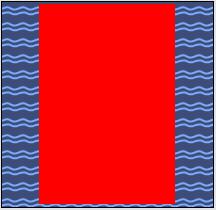
Now suppose I replace Dim bmp = New Bitmap("d:\picture\boops2.png") by this:
vb Code:
Dim src = New Bitmap("D:\pictures\boops2.png") Dim bmp = New Bitmap(src)
You'd think it wouldn't make the least difference, but it does:
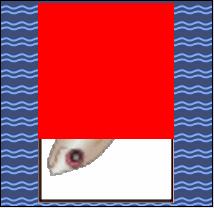
I think this reproduces your initial problem. bmp is correctly rotated, and VisibleClipBounds.ToString correctly returns its bounds. But the Graphics object remains clipped to the initial orientation, that of src. It appears that this "undocumented feature" depends only on whether you instantiate the bitmap from a file or from another bitmap, and it seems to be unrelated to the Clip property of the Graphics.
BB
Last edited by boops boops; Mar 5th, 2011 at 09:42 AM.
-
Mar 5th, 2011, 10:21 AM
#23
Re: [RESOLVED] Impossible Question
I agree. And keep in mind that I do have a working solution, so further solving this is not in any way critical, but my solution seems awkward. Clearing out that clipping would be really nice if it was efficient...though, frankly, it no longer even has to be efficient, since I have reworked the code so that the slow parts are all out of the way during startup.
My usual boring signature: Nothing
 Posting Permissions
- You may not post new threads
- You may not post replies
- You may not post attachments
- You may not edit your posts
-
Forum Rules
|
Click Here to Expand Forum to Full Width
|



 Reply With Quote


 icon on the left of the post.


