|

-
Feb 28th, 2011, 02:08 AM
#1
Thread Starter
New Member

 NEO MP3 Player : Fully Developed IN VB 6.0 NEO MP3 Player : Fully Developed IN VB 6.0
I am sharing my mp3Player Project with all u great developers. I am working on
it since last 3-4 years(as my hobby).
The main reason of submission to this site is the presence of 'LaVolpe -my ideal one' as active member, who has always inspired me a lot especially the way he shares his knowledge and helps others.
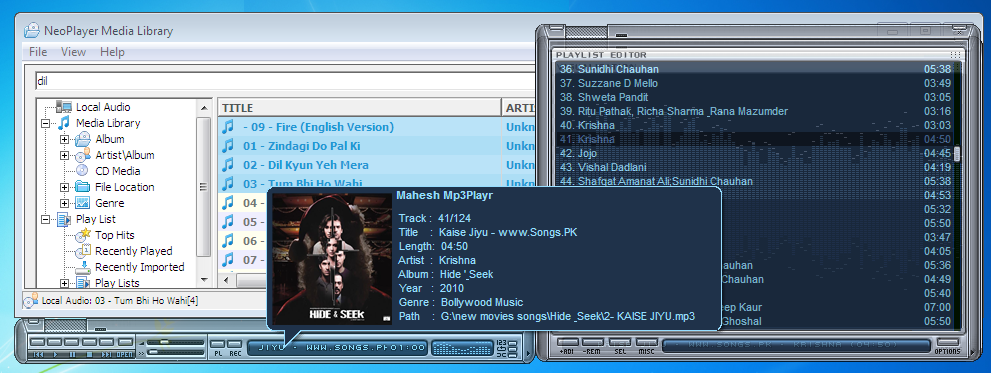
Project: Neo MP3 player v2.1
Platform: VB6.0
Authors: Mahesh Kurmi
Raúl Martínez (actually he was first who started it)
many others active members on PSC and other sites who supported
me directly or indirectly.
Features: It is very much similar to winamp in usage and features, for more
visithttp://neoaudioplayer.blogspot.com/2...v20-setup.html
Info: It is not completed yet, I know it has still lot of bugs,because I haven't tested it thoroughly. All the suggestions and Bugs found are welcome, I will try my best to append project accordingly.
More to implement:
1. internet Radio/ shout-casting
2. Recording
3. 3D sound ...many more
Note: If u find error "unable to set corporate level with hardware" then run the exe as administrator to get working.
Alternate Links
Use the link below to download fully working project with all compatibility files available
Source code: [URL="http://www.mediafire.com/?8tx8bixgg6pw6y6"]
-
Feb 28th, 2011, 09:46 AM
#2
Re: NEO MP3 Player : Fully Developed IN VB 6.0
Well the download link takes you to a page which allows you to
download a RAR file which contains an exe file and a text file.
I rarely run an unknown exe. Also, unless I am mistaken, this site is
about VB6 SOURCE code to help developers.
-
Mar 1st, 2011, 02:14 AM
#3
Thread Starter
New Member
Re: NEO MP3 Player : Fully Developed IN VB 6.0
Pls visithttp://www.mediafire.com/?8tx8bixgg6pw6y6
as mentioned in post, for source code, and pls give me feedback accordingly.
-
Mar 1st, 2011, 02:17 AM
#4
Thread Starter
New Member
Re: NEO MP3 Player : Fully Developed IN VB 6.0
Alternate Links
Use the link below to download fully working project with all compatibility files available
Source code: [url="http://www.mediafire.com/?8tx8bixgg6pw6y6"]
-
Mar 1st, 2011, 01:27 PM
#5
Re: NEO MP3 Player : Fully Developed IN VB 6.0
Your code needs some indenting work. I use & recommend an addin
which is invaluable (http://www.oaltd.co.uk/indenter/default.htm)
Some of your forms have multiple timers. It is fairly easy to make
one timer do the work of several.
Some controls have the default name and some menu items names are
not intuitive as to their meaning, e. g. 'aaa'
Got an error 2nd time I ran the program trying to load your binaries.
In Sub Main, I added 'ChDir App.Path' which fixed it.
Several of your forms are confusing, i. e. have a Minimize looking
button to close the form.
Doesn't appear that the equalizer settings are saved. Have to turn it
back on & set the presets.
The Preferences form has a close (X) button that does nothing. Also the
green checkbox captions are hard to read.
Your app has many unused variables & procedures. If you don't have
MZ Tools, it is another addin I highly recommend. One of its tools is
Review Source Code, which will find all those things & allow you to
trim the fat. (http://www.mztools.com/index.aspx)
I see you use FMOD for your music machine. Curious if you seen or
tried BASS (http://www.un4seen.com/)
My comments are meant to be constructive. It is obvious you have
spent a huge amount of time on this app and it is very impressive.
I especially like the visualizations.
-
Mar 1st, 2011, 11:19 PM
#6
Thread Starter
New Member
Re: NEO MP3 Player : Fully Developed IN VB 6.0
Thanks a lot dear.
your knowledge in Vb seems to be impressive.
First I would like to let u know that i do not have any programming background, I am a civil Engineer and currently running an institute for a very reputed engineering exam in INDIA (IITJEE) so i am never in touch with software industry. what I have implemented is just the application of logic and mathematics without bothering about its professional touch.
But now I believe being in contact with person like u will help me a lot.
@addins
Also i am listening these tools for the first time i soon will try to learn these and i may need your help in
this.
@ buttons' locations or color
Please use 'DEFAULT' theme with player which is mostly completed.
@BASS
I tried BASS but I personally felt FMOD better and easier to use.
@Unused variables
I will soon remove all of them
@Comments
really your comments are very -very useful and I am very thankful to u for that, Pls keep helping others
-
Mar 3rd, 2011, 02:13 AM
#7
Frenzied Member
Re: NEO MP3 Player : Fully Developed IN VB 6.0
In Non-English VB6 IDE, VB6 can't show proper weird characters like "Á", "À",etc.
Code:
Private Function IndexWord(sWord As String) As Integer
Dim iWord As Integer
Select Case sWord
Case "A", "Á", "À": iWord = 0
Case "B": iWord = 1
Case "C": iWord = 2
Case "D": iWord = 3
Case "E", "É": iWord = 4"
Case "F": iWord = 5
Case "G": iWord = 6
Case "H": iWord = 7
Case "I", "Í", "Ì": iWord = 8
Case "J": iWord = 9
Case "K": iWord = 10
Case "L": iWord = 11
Case "M": iWord = 12
Case "N", "Ñ": iWord = 13"
Case "O", "Ó", "Ò": iWord = 14
Case "P": iWord = 15
Case "Q": iWord = 16
Case "R": iWord = 17
Case "S": iWord = 18
Case "T": iWord = 19
Case "U", "Ú", "Ù", "Ü", "Û": iWord = 20
Case "V": iWord = 21
Case "W": iWord = 22
Case "X": iWord = 23
Case "Y": iWord = 24
Case "Z": iWord = 25
Case """": iWord = 26
Case "@", "®": iWord = 27"
Case " ": iWord = 29
Case " ": iWord = 29
Case " ": iWord = 29
Case "0": iWord = 31
Case "1": iWord = 32
Case "2": iWord = 33
Case "3": iWord = 34
Case "4": iWord = 35
Case "5": iWord = 36
Case "6": iWord = 37
Case "7": iWord = 38
Case "8": iWord = 39
Case "9": iWord = 40
Case "_": iWord = 41
Case ".": iWord = 42
Case ":", ";": iWord = 43
Case "(", "<": iWord = 44
Case ")", ">": iWord = 45
Case "-", "~", "°": iWord = 46"
Case "'", "`", "´": iWord = 47"
Case "!", "¡": iWord = 48"
Case "_": iWord = 49
Case "+": iWord = 50
Case "\", "|": iWord = 51
Case "/": iWord = 52
Case "[", "{": iWord = 53
Case "]", "}": iWord = 54
Case "^": iWord = 55
Case "&": iWord = 56
Case "%": iWord = 57
Case ",": iWord = 58
Case "=": iWord = 59
Case "$": iWord = 60
Case "#": iWord = 61
Case "Ã": iWord = 62"
Case "ö", "õ", "ô": iWord = 63
Case "Ä": iWord = 64"
Case "?", "¿": iWord = 65"
Case "*": iWord = 66
Case Else
iWord = 29
End Select
IndexWord = iWord
End Function
-
Aug 13th, 2011, 09:40 PM
#8
New Member
Re: NEO MP3 Player : Fully Developed IN VB 6.0
Code:
Private Declare Function GetDC Lib "user32.dll" (ByVal hwnd As Long) As Long
Private Declare Function ReleaseDC Lib "user32.dll" (ByVal hwnd As Long, ByVal hdc As Long) As Long
Private Declare Function OleTranslateColor Lib "oleaut32.dll" (ByVal lOleColor As Long, ByVal lHPalette As Long, lColorRef As Long) As Long
Private Declare Function CreatePen Lib "gdi32.dll" (ByVal nPenStyle As Long, ByVal nWidth As Long, ByVal crColor As Long) As Long
Private Declare Function MoveToEx Lib "gdi32" (ByVal hdc As Long, ByVal X As Long, ByVal Y As Long, ByVal lpPoint As Long) As Long
Private Declare Function DeleteObject Lib "gdi32.dll" (ByVal hObject As Long) As Long
Private Declare Function SelectObject Lib "gdi32.dll" (ByVal hdc As Long, ByVal hObject As Long) As Long
Private Declare Function LineTo Lib "gdi32.dll" (ByVal hdc As Long, ByVal X As Long, ByVal Y As Long) As Long
Private Declare Function Polygon Lib "gdi32" (ByVal hdc As Long, lpPoint As Any, ByVal nCount As Long) As Long
Private Declare Function CreateSolidBrush Lib "gdi32.dll" (ByVal crColor As Long) As Long
Private Declare Function InvalidateRect Lib "user32.dll" (ByVal hwnd As Long, ByRef lpRect As Any, ByVal bErase As Long) As Long
Private Declare Function LoadCursor Lib "user32" Alias "LoadCursorA" (ByVal hInstance As Long, ByVal lpCursorName As Long) As Long
Private Declare Function DestroyCursor Lib "user32" (ByVal hCursor As Long) As Long
Private Declare Function SetCursor Lib "user32" (ByVal hCursor As Long) As Long

Private Function RenderGradient(ByVal hdc As Long, _
                                ByVal X As Long, _
                                ByVal Y As Long, _
                                ByVal Width As Long, _
                                ByVal Height As Long)
    Dim a      As Long
    Dim Perc   As Single
    Dim vRed   As Long
    Dim vGreen As Long
    Dim vBlue  As Long

    For a = 0 To Height
        Perc = 1 - (a / Height)

        vRed = (61 * Perc) + (37 * (1 - Perc))
        vGreen = (132 * Perc) + (80 * (1 - Perc))
        vBlue = (246 * Perc) + (148 * (1 - Perc))

        DrawLine hdc, X, Y + a, Width, Y + a, RGB(vRed, vGreen, vBlue)
    Next
End Function
Public Sub DrawLine(ByVal hdc As Long, _
                    ByVal X1 As Long, _
                    ByVal Y1 As Long, _
                    ByVal X2 As Long, _
                    ByVal Y2 As Long, _
                    Optional ByVal Color As Long = -1, _
                    Optional ByVal BorderWidth As Long = 1)

    Dim hPen       As Long
    Dim hBrush     As Long
    Dim TransColor As Long
    Dim OldPen     As Long
    Dim OldBrush   As Long
    Dim pt(2)      As POINTAPI

    If Color <> -1 Then
        Call OleTranslateColor(Color, 0&, TransColor)
        hPen = CreatePen(0, BorderWidth, TransColor)
        OldPen = SelectObject(hdc, hPen)
        hBrush = CreateSolidBrush(Color)
        OldBrush = SelectObject(hdc, hBrush)
    End If

    If X1 >= 0 Then MoveToEx hdc, X1, Y1, 0

    LineTo hdc, X2, Y2

    If Color <> -1 Then
        DeleteObject SelectObject(hdc, OldPen)
        DeleteObject SelectObject(hdc, OldBrush)
    End If
End Sub
picList_MouseMove Add code
Code:
        '---------------------------------------------------------------------------------------------------------------------------
        '---------------------------------------------------------------------------------------------------------------------------
        Dim hdc   As Long
        Dim lItem As Long
        Dim lTop  As Long

        InvalidateRect picList.hwnd, ByVal 0&, False

        lItem = HitTestPlst(X, Y)

        If Y > ((lItem - Scrollbar.Value) * LstTextHeight + 20) Then
            lTop = (lItem - Scrollbar.Value) * LstTextHeight + 30
        ElseIf Y > ((lItem - Scrollbar.Value) * LstTextHeight) Then
            lTop = (lItem - Scrollbar.Value) * LstTextHeight
        End If

        DoEvents

        hdc = GetDC(picList.hwnd)

        RenderGradient hdc, 1, lTop, picList.ScaleWidth - 10, 1

        ReleaseDC 0&, hdc
        '---------------------------------------------------------------------------------------------------------------------------
        '---------------------------------------------------------------------------------------------------------------------------
 Posting Permissions
- You may not post new threads
- You may not post replies
- You may not post attachments
- You may not edit your posts
-
Forum Rules
|
Click Here to Expand Forum to Full Width
|



 Reply With Quote