|

-
Feb 16th, 2011, 04:51 AM
#1
Thread Starter
Frenzied Member


Why counting checked CheckBoxes fails
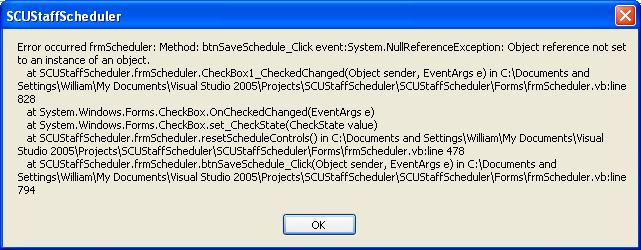
in my app I have to count the number of checkboxes have been checked to validate how many days were selected. 28 checkboxes in 2 groups of 14 to represent 2 pay periods. I tried counting the days by handling the CheckStateChanged or the CheckedChanged events of 14 checkboxes for each pay period, then if checked add 1 to payPeriod1 or 2. Either one of these works and counts the checked boes but when I try to reset my controls I get;
Code:
Private Sub CheckBox1_CheckedChanged(ByVal sender As System.Object, ByVal e As System.EventArgs) Handles CheckBox9.CheckedChanged, CheckBox8.CheckedChanged, CheckBox7.CheckedChanged, CheckBox6.CheckedChanged, CheckBox5.CheckedChanged, CheckBox4.CheckedChanged, CheckBox3.CheckedChanged, CheckBox2.CheckedChanged, CheckBox14.CheckedChanged, CheckBox13.CheckedChanged, CheckBox12.CheckedChanged, CheckBox11.CheckedChanged, CheckBox10.CheckedChanged, CheckBox1.CheckedChanged
        Dim chbx As CheckBox = TryCast(Me.ActiveControl, CheckBox)
        If chbx.Checked = True Then
            payPeriod1 += 1
        End If
    End Sub

    Private Sub CheckBox15_CheckedChanged(ByVal sender As System.Object, ByVal e As System.EventArgs) Handles CheckBox28.CheckedChanged, CheckBox27.CheckedChanged, CheckBox26.CheckedChanged, CheckBox25.CheckedChanged, CheckBox24.CheckedChanged, CheckBox23.CheckedChanged, CheckBox22.CheckedChanged, CheckBox21.CheckedChanged, CheckBox20.CheckedChanged, CheckBox19.CheckedChanged, CheckBox18.CheckedChanged, CheckBox17.CheckedChanged, CheckBox16.CheckedChanged, CheckBox15.CheckedChanged
        Dim chbx As CheckBox = TryCast(Me.ActiveControl, CheckBox)
        If chbx.Checked = True Then
            payPeriod2 += 1
        End If
    End Sub

    Private Sub CheckBox1_CheckStateChanged(ByVal sender As System.Object, ByVal e As System.EventArgs) Handles CheckBox9.CheckStateChanged, CheckBox8.CheckStateChanged, CheckBox7.CheckStateChanged, CheckBox6.CheckStateChanged, CheckBox5.CheckStateChanged, CheckBox4.CheckStateChanged, CheckBox3.CheckStateChanged, CheckBox2.CheckStateChanged, CheckBox14.CheckStateChanged, CheckBox13.CheckStateChanged, CheckBox12.CheckStateChanged, CheckBox11.CheckStateChanged, CheckBox10.CheckStateChanged, CheckBox1.CheckStateChanged
        Dim chbx As CheckBox = TryCast(Me.ActiveControl, CheckBox)
        If chbx.CheckState = CheckState.Checked Then
            payPeriod1 += 1
        End If
    End Sub

    Private Sub CheckBox15_CheckStateChanged(ByVal sender As System.Object, ByVal e As System.EventArgs) Handles CheckBox28.CheckStateChanged, CheckBox27.CheckStateChanged, CheckBox26.CheckStateChanged, CheckBox25.CheckStateChanged, CheckBox24.CheckStateChanged, CheckBox23.CheckStateChanged, CheckBox22.CheckStateChanged, CheckBox21.CheckStateChanged, CheckBox20.CheckStateChanged, CheckBox19.CheckStateChanged, CheckBox18.CheckStateChanged, CheckBox17.CheckStateChanged, CheckBox16.CheckStateChanged, CheckBox15.CheckStateChanged
        Dim chbx As CheckBox = TryCast(Me.ActiveControl, CheckBox)
        If chbx.CheckState = CheckState.Checked Then
            payPeriod2 += 1
        End If
    End Sub
Reset controls after saving record using JMCs method of accessing buried controls:
Code:
Public Sub resetScheduleControls()
        Dim ctl As Control = Me.GetNextControl(Me, True)
        'Get the first control in the tab order.
        Do Until ctl Is Nothing
            Dim cbx As CheckBox = TryCast(ctl, CheckBox)
            If cbx IsNot Nothing Then
                cbx.CheckState = CheckState.Unchecked
            End If
            ctl = Me.GetNextControl(ctl, True)
            'Get the next control in the tab order.
        Loop

        Me.MonthCalendar1.Enabled = True
        Me.cboSelectStaffSchedule.Items.Remove(Me.cboSelectStaffSchedule.SelectedItem)
        Me.cboSelectStaffSchedule.Text = "Staff Member"
        If Me.cboWhatShift.Text = "Shift" And Me.cboPosition.Text = "Position" Then
            Me.btnPreviewSchedule.Enabled = False
        Else
            Me.btnPreviewSchedule.Enabled = True
        End If
    End Sub
What am doing wrong or what am I misunderstanding 
-
Feb 16th, 2011, 07:19 AM
#2
Re: Why counting checked CheckBoxes fails
Why are you using TryCast and then assuming that the reference returned has a value? The whole point of TryCast is to return a reference of the specified type if the specified object is that type and to return a null reference, i.e. Nothing, otherwise. If you're using TryCast then you must be expecting that a null reference could be returned, so why aren't you testing for a null reference? If you don't, you get exactly what you're seeing now: a NullReferenceException.
That said, I don't see why you're using TryCast and ActiveControl at all. The error message tells you that the issue originated in the Click event handler of a Button. If you clicked a Button then that Button is presumably the active control. That's why TryCast is returning a null reference. You should be using DirectCast rather than TryCast and 'sender' rather than Me.ActiveControl. That will always give you the CheckBox that raised the CheckedChanged event.
Also, when resetting the CheckBoxes, you should be setting the Checked property, not the CheckState. CheckState is only relevant for three-state CheckBoxes. Your CheckBoxes are presumably either checked or not checked, so the CheckState property is irrelevant.
-
Feb 16th, 2011, 07:45 AM
#3
Thread Starter
Frenzied Member
Re: Why counting checked CheckBoxes fails
 Posting Permissions
- You may not post new threads
- You may not post replies
- You may not post attachments
- You may not edit your posts
-
Forum Rules
|
Click Here to Expand Forum to Full Width
|



 Reply With Quote
