|

-
Feb 7th, 2011, 11:50 AM
#1
Thread Starter
Fanatic Member

Need your insights for "Hex/data/file reader GUI"
Hello everyone.
Working on a simple program (plug-in) written in .NET for private usage. basically, it has a lot of small programs combined, and will run on start-up.
It can already take screen shots (with regions) and has global input event handlers, window class with windows API's to manipulate other windows (close, copy, minimize, maximize, hide, show etc.). Now working on the "Data Reader".
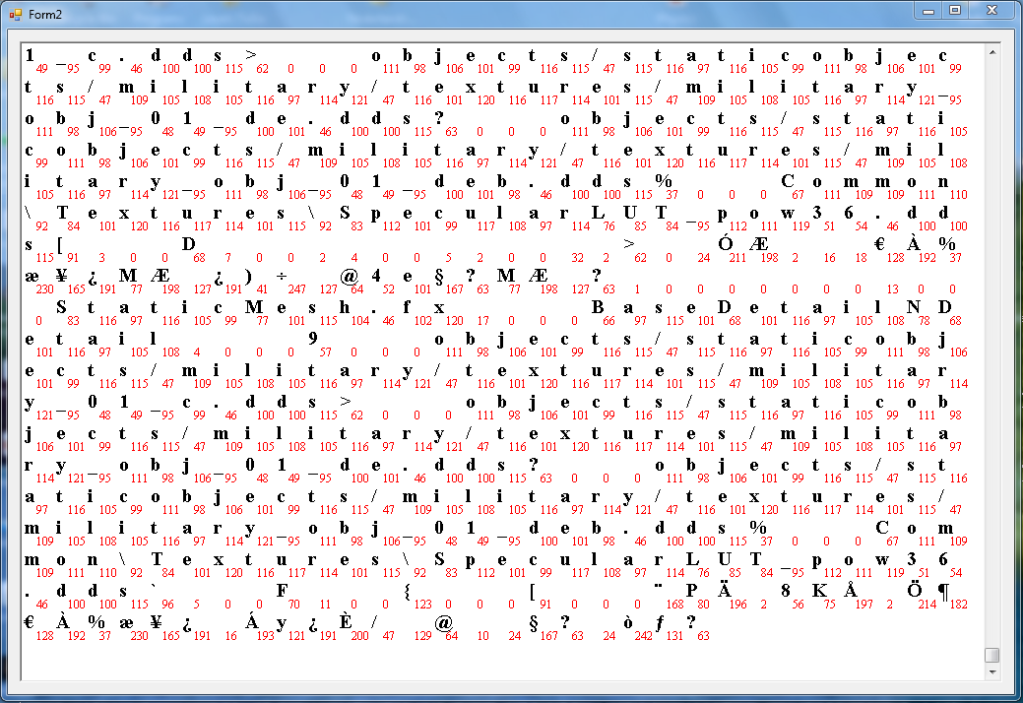
I had already finished the coding structure behind it, but I am not pleased with the gui...it doesn't display enough of the file at once. Here a screenshot:

It can highlight parts of the file and display the corresponding string, int16, int32, int64, single, double and Unicode character. Problem is, for the GUI I can only think of two versions:
- horizontal version: nicely aligned like my above screenshot but does not display enough.
- vertically aligned with a fixed character width. Displays enough, but lacks readability due to the multiple lines, and makes it hard to display byte values.
What would you do in my case? Stick with horizontal as it is now, change to vertical line view or maybe something completely different?
-
Feb 7th, 2011, 02:27 PM
#2
Re: Need your insights for "Hex/data/file reader GUI"
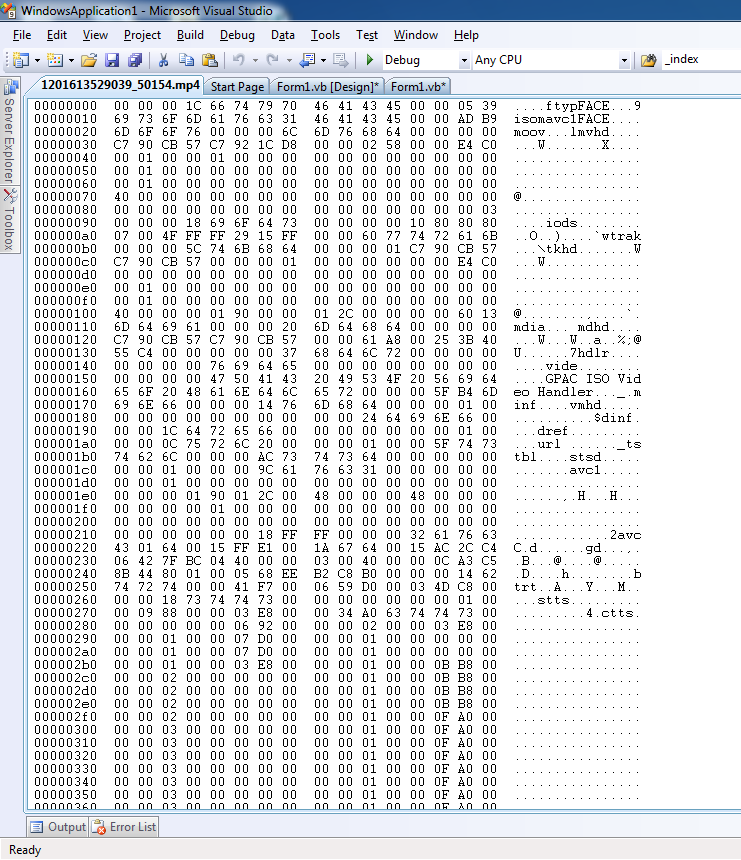
How about making it like how other standard editors do it?
-
Feb 8th, 2011, 09:08 AM
#3
Thread Starter
Fanatic Member
Re: Need your insights for "Hex/data/file reader GUI"
Yep that's the vertical one, I have a problem with the "read-ability". Sure, it displays a lot, but it is hard to display byte/hex values in such a way you know to what character it belongs. Also, no proper highlighting, although I guess that could be added easily.
I do like how the field looks like, but it simply lacks the ability to quickly find/read/highlight a given byte.
Any way to display both the character and the byte value in one "box" without ruining the readability?
EDIT
For example, this lay-out:

It looks good, but the char-byte-char-byte structure vertically is a bit annoying. Maybe something like a toggle between character and byte view?
Last edited by bergerkiller; Feb 8th, 2011 at 09:42 AM.
-
Feb 9th, 2011, 03:28 AM
#4
Re: Need your insights for "Hex/data/file reader GUI"
If you remove the spacing between char and its corresponding byte value, I think you could get a better (more readable) view. Optionally you can add options to turn off either of them or show both.
Also play around with font size of both of them. That might get you a better way. (numbers in small fonts, chars in slightly bigger)
Last edited by Pradeep1210; Feb 9th, 2011 at 03:37 AM.
-
Feb 10th, 2011, 10:23 AM
#5
Thread Starter
Fanatic Member
Re: Need your insights for "Hex/data/file reader GUI"
Hey that's not even such a bad idea, large/small fonts, like this:
A56
or:
56A
Might even use subscripts/superscripts.
Thanks Pradeep1210, really a thing I overlooked. 
-
Feb 10th, 2011, 10:37 AM
#6
Re: Need your insights for "Hex/data/file reader GUI"
I've always wished we had some good choices for fonts that use two small hex digits run together for bytes with no standard "printable" glyph (characters outside the ASCII 32 to 126 range).
Most of the ones I've found look terrible though, except for those that cost money.
-
Feb 10th, 2011, 11:36 AM
#7
Thread Starter
Fanatic Member
Re: Need your insights for "Hex/data/file reader GUI"
Well it's a bit buggy at this point, but I managed to quickly script this:

Large char text, small red byte value bottom right corner. Draw code:
Code:
        Public Sub Draw(ByRef g As Graphics, ByVal loc As Point)
            g.DrawString(_c, New Font("Times New Roman", 20, FontStyle.Bold, GraphicsUnit.Pixel), Brushes.Black, loc.X, loc.Y)
            g.DrawString(_b, New Font("Times New Roman", 12, FontStyle.Regular, GraphicsUnit.Pixel), Brushes.Red, loc.X + 13, loc.Y + 18)
            g.DrawRectangle(Pens.Black, New Rectangle(loc.X, loc.Y, 32, 32))
        End Sub
Only needs some tweaking in the itemcountX/Y value so it nicely fits over the entire screen, plus some centering of the byte value. Overall, I am pleased.
EDIT
Yes, this seems to be the best solution. Reminds me of the elements table of chemistry. 

Thanks everyone for sharing your idea's around this. :P
Last edited by bergerkiller; Feb 10th, 2011 at 02:01 PM.
-
Feb 10th, 2011, 02:00 PM
#8
Re: Need your insights for "Hex/data/file reader GUI"
I think if you remove the gridlines it would look better 
-
Feb 10th, 2011, 03:08 PM
#9
Thread Starter
Fanatic Member
 Posting Permissions
- You may not post new threads
- You may not post replies
- You may not post attachments
- You may not edit your posts
-
Forum Rules
|
Click Here to Expand Forum to Full Width
|



 Reply With Quote

 icon on the left of the post.