|

-
Feb 7th, 2011, 01:00 PM
#1
Thread Starter
Hyperactive Member

Running Excel from scheduled task
Have a problem that I hope I can get some help with. I've scheduled a task to run on a terminal server during the night when no one is logged on. The task starts Excel and directs it to open a workbook. The workbook has a Workbook_Open event that launches a macro. The macro won't start and I believe it is because macros are not enabled within the Excel instance that is started. Excel opens and just hangs.
How can I get macros to start automatically in this environment? Thanks.
-
Feb 7th, 2011, 02:37 PM
#2
Re: Running Excel from scheduled task
You can either lower the macro security level, or use digital signatures to sign the macro so that it is trusted.
-
Feb 7th, 2011, 02:52 PM
#3
Re: Running Excel from scheduled task
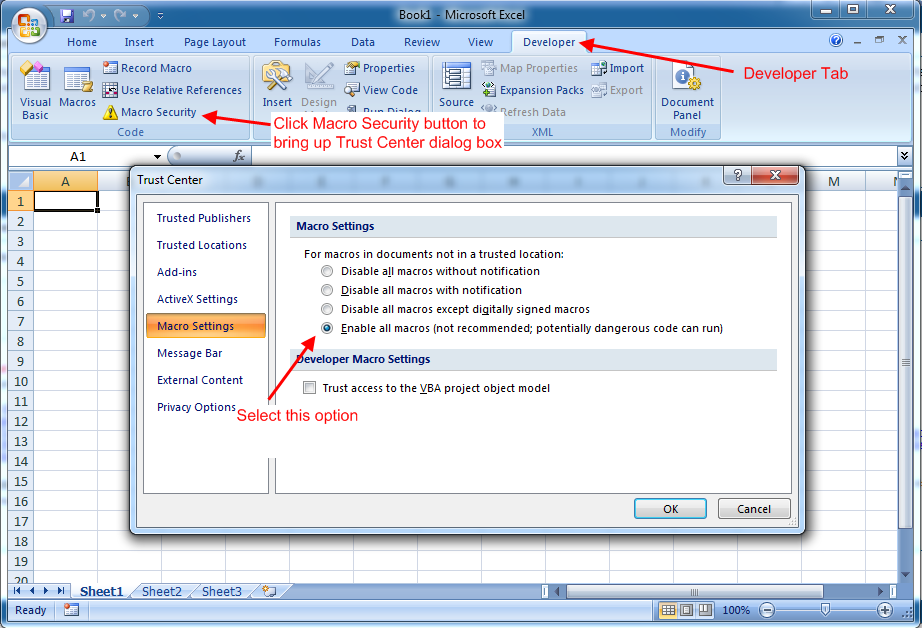
Here is a screenshot depecting how to do it in Excel 2007.
For earlier versions, the option is available in Tools menu.
-
Feb 7th, 2011, 03:48 PM
#4
Thread Starter
Hyperactive Member
Re: Running Excel from scheduled task
Thanks. I know how to set macro levels for a user. But this is Excel that is invoked by a task running on the server; i.e., no user is logged on. The administrator created the scheduled task. Digital signatures sounds like it might work. How do you do that with a macro?
-
Feb 7th, 2011, 04:11 PM
#5
Re: Running Excel from scheduled task
-
Feb 7th, 2011, 06:47 PM
#6
Thread Starter
Hyperactive Member
Re: Running Excel from scheduled task
Thanks. That helped a lot. Next question is: how do I set the macro security level to 'Disable all macros except digitally signed macros' on a Windows Server?
-
Feb 8th, 2011, 01:41 AM
#7
Re: Running Excel from scheduled task
See the same screenshot in post #3. It is the 3rd option from top (or 2nd from bottom) 
-
Feb 8th, 2011, 04:14 AM
#8
Hyperactive Member
Re: Running Excel from scheduled task
So is it giving you an error saying that the content is not enabled?? If it is, another way around it is to setup a trusted location on the computer/server that you are tring to run this on. If in 2007, open up your trust center (On that computer) and goto trusted locations and add the location where you have the file.
If it is not giving you that errror, then you may need to set up a delay in your macro. I have had this problem numerous times using the workbook_open event. It appears in some cases it trys to run the macro before the workbook is fully open. If this is the case you can create a module, copy your code into the module and give it a function name. Then in the workbook_open event you can use application ontime to give it a 1 second delay then run the function.
-
Feb 8th, 2011, 06:31 AM
#9
Thread Starter
Hyperactive Member
Re: Running Excel from scheduled task
It is not giving any error that I can see. The job opens as scheduled on the server at 7:00 AM. I can see the job process (cmd.exe) and the Excel process in the process list (not my own user process list but everything that is running on the server via tasklist.exe). Excel is not doing anything but will not exit. As a test, I changed the Workbook-Open macro to simply store a value in the workbook that is opened and then jump to the macro exit label where it does a workbook save and Application.Quit. The workbook never gets updated and Excel never quits. So I suspect the Workbook_Open macro never runs. The Excel instance that gets started by the scheduled task, I suspect, has its macro security level set to high. This is not the same Excel instance that opens when I start Excel as a user because no one is logged on when the scheduled task starts.
-
Feb 8th, 2011, 06:36 AM
#10
Thread Starter
Hyperactive Member
Re: Running Excel from scheduled task
More info. One thing that I don't understand is that if it's true that Excel won't let the Workbook_Open macro to run, why doesn't Excel open the workbook and keep it assigned to itself; i.e., while Excel is in its open-do-nothing state, I can open the workbook in my user session and update it without getting a 'workbook is currently opened by another user' warning.
 Posting Permissions
- You may not post new threads
- You may not post replies
- You may not post attachments
- You may not edit your posts
-
Forum Rules
|
Click Here to Expand Forum to Full Width
|



 Reply With Quote

 icon on the left of the post.
