|

-
Nov 29th, 2010, 03:21 AM
#1
Thread Starter
Fanatic Member

error publishing aspx
hi im having runtime error response after publishing aspx to production server running win2003 -IIS6. i have enable .net2 web service. the virtual directory authentication methods uses, enable anonymous access and integrated windows authentication is also enabled under authentication access.
Code:
<!-- Web.Config Configuration File -->

<configuration>
    <system.web>
        <customErrors mode="Off"/>
    </system.web>
</configuration>


Notes: The current error page you are seeing can be replaced by a custom error page by modifying the "defaultRedirect" attribute of the application's <customErrors> configuration tag to point to a custom error page URL.


<!-- Web.Config Configuration File -->

<configuration>
    <system.web>
        <customErrors mode="RemoteOnly" defaultRedirect="mycustompage.htm"/>
    </system.web>
</configuration>
Learn something new every .001 second. 
-
Nov 29th, 2010, 04:00 AM
#2
Re: error publishing aspx
Hey,
Are you deploying to a server that is under your control, or to a shared host?
Have you configured IIS correctly? Do you have any logging enabled on your site? i.e. can you see at what point the application is failing?
The above error message is basically a generic one, that can have a number of causes, so we are going to need more information from you before being able to make any more suggestions.
Gary
-
Nov 29th, 2010, 07:41 AM
#3
Thread Starter
Fanatic Member
Re: error publishing aspx
hi gary, yes im deploying it to a server under our control.
Have you configured IIS correctly? Yes, the test hello aspx page run properly. but when i hit the default page of production site, immediately it send me the error. is there anything i need to check in IIS settings?
error
Code:
<add assembly="System.Web.Extensions, Version=3.5.0.0, Culture=neutral, PublicKeyToken=31BF3856AD364E35"/>
web.config
Code:
<configuration>
	<connectionStrings>
		<add name="direct_deliveryConnectionString" connectionString="Data Source=.\sqlexpress;Initial Catalog=08novcs;User ID=inventoryuser;Password=7151epeN" providerName="System.Data.SqlClient"/>
	</connectionStrings>
	<system.web>
		<!--
            Set compilation debug="true" to insert debugging
            symbols into the compiled page. Because this
            affects performance, set this value to true only
            during development.

            Visual Basic options:
            Set strict="true" to disallow all data type conversions
            where data loss can occur.
            Set explicit="true" to force declaration of all variables.
        -->
		<compilation debug="true" strict="false" explicit="true">
			<assemblies>
				<add assembly="System.Design, Version=2.0.0.0, Culture=neutral, PublicKeyToken=B03F5F7F11D50A3A"/>
				<add assembly="System.Windows.Forms, Version=2.0.0.0, Culture=neutral, PublicKeyToken=B77A5C561934E089"/>
				<add assembly="System.Web.Extensions, Version=3.5.0.0, Culture=neutral, PublicKeyToken=31BF3856AD364E35"/>
				<add assembly="System.Web.Abstractions, Version=3.5.0.0, Culture=neutral, PublicKeyToken=31BF3856AD364E35"/>
				<add assembly="System.Core, Version=3.5.0.0, Culture=neutral, PublicKeyToken=B77A5C561934E089"/>
				<add assembly="System.Data.Linq, Version=3.5.0.0, Culture=neutral, PublicKeyToken=B77A5C561934E089"/>
				<add assembly="System.Data.Services.Client, Version=3.5.0.0, Culture=neutral, PublicKeyToken=B77A5C561934E089"/>
				<add assembly="System.Data.Services.Design, Version=3.5.0.0, Culture=neutral, PublicKeyToken=B77A5C561934E089"/>
				<add assembly="System.Data.Entity, Version=3.5.0.0, Culture=neutral, PublicKeyToken=B77A5C561934E089"/>
      </assemblies>
    </compilation>

		<pages>
			<namespaces>
				<clear/>
				<add namespace="System"/>
				<add namespace="System.Collections"/>
				<add namespace="System.Collections.Specialized"/>
				<add namespace="System.Configuration"/>
				<add namespace="System.Text"/>
				<add namespace="System.Text.RegularExpressions"/>
				<add namespace="System.Web"/>
				<add namespace="System.Web.Caching"/>
				<add namespace="System.Web.SessionState"/>
				<add namespace="System.Web.Security"/>
				<add namespace="System.Web.Profile"/>
				<add namespace="System.Web.UI"/>
				<add namespace="System.Web.UI.WebControls"/>
				<add namespace="System.Web.UI.WebControls.WebParts"/>
				<add namespace="System.Web.UI.HtmlControls"/>
			</namespaces>
		</pages>
		<!--
            The <authentication> section enables configuration
            of the security authentication mode used by
            ASP.NET to identify an incoming user.
        -->
		<authentication mode="Windows"/>
		<!--
            The <customErrors> section enables configuration
            of what to do if/when an unhandled error occurs
            during the execution of a request. Specifically,
            it enables developers to configure html error pages
            to be displayed in place of a error stack trace.

        <customErrors mode="RemoteOnly" defaultRedirect="GenericErrorPage.htm">
            <error statusCode="403" redirect="NoAccess.htm" />
            <error statusCode="404" redirect="FileNotFound.htm" />
        </customErrors>
        -->

  </system.web>
</configuration>
Last edited by jlbantang; Nov 29th, 2010 at 08:00 AM.
Learn something new every .001 second.
-
Nov 29th, 2010, 02:47 PM
#4
Re: error publishing aspx
Hey,
The obvious things to check would be that the correct .Net Version has been selected for the application/virtual directory that is running your application.
Is it possible you can take a screen shot of the error that you are seeing?
Gary
-
Nov 30th, 2010, 03:48 AM
#5
Thread Starter
Fanatic Member
Re: error publishing aspx
hi gary, i start removing the assemblies showing in the error and it turns out the error cause. anyway, how does the application/virtual directory relate to the error?
Learn something new every .001 second.
-
Nov 30th, 2010, 07:43 AM
#6
Re: error publishing aspx
Exactly which assemblies did you remove?
Did you happen to upgrade this project between .Net 2.0 and .Net 3.5? It could be that the old references to the .Net 2.0 assemblies was what the problem was.
Gary
-
Nov 30th, 2010, 07:54 AM
#7
Thread Starter
Fanatic Member
Re: error publishing aspx
It is purely .Net 2.0 version and I do not remember adding third party controls in the project.
Code:
<add assembly="System.Web.Extensions, Version=3.5.0.0, Culture=neutral, PublicKeyToken=31BF3856AD364E35"/>
<add assembly="System.Web.Abstractions, Version=3.5.0.0, Culture=neutral, PublicKeyToken=31BF3856AD364E35"/>
<add assembly="System.Core, Version=3.5.0.0, Culture=neutral, PublicKeyToken=B77A5C561934E089"/>
<add assembly="System.Data.Linq, Version=3.5.0.0, Culture=neutral, PublicKeyToken=B77A5C561934E089"/>
<add assembly="System.Data.Services.Client, Version=3.5.0.0, Culture=neutral, PublicKeyToken=B77A5C561934E089"/>
<add assembly="System.Data.Services.Design, Version=3.5.0.0, Culture=neutral, PublicKeyToken=B77A5C561934E089"/>
<add assembly="System.Data.Entity, Version=3.5.0.0, Culture=neutral, PublicKeyToken=B77A5C561934E089"/>
hey can you visit the test site I would really appreciate your feedback. Just hit login button to continue.
Learn something new every .001 second.
-
Nov 30th, 2010, 08:00 AM
#8
Re: error publishing aspx
Hey,
If this is solely a .Net 2.0 application, why do you have references to .Net 3.5 assemblies?
Gary
-
Nov 30th, 2010, 08:06 AM
#9
Thread Starter
Fanatic Member
Re: error publishing aspx
It was really surprising why 3.5 assemblies hop-in to config file and i dont have .net 3.5 installed in development pc.
Learn something new every .001 second.
-
Nov 30th, 2010, 10:40 AM
#10
Re: error publishing aspx
Hey,
Are you sure? Which version of Visual Studio are you using?
Gary
-
Dec 1st, 2010, 09:39 AM
#11
Thread Starter
Fanatic Member
Re: error publishing aspx
hi gary, im using vs 2005. today i found out where the assembly coming from, and it is added in config file when i use updatepanel. and i need to run the page with assemblies required by the controls.
Learn something new every .001 second.
-
Dec 1st, 2010, 10:10 AM
#12
Re: error publishing aspx
Set the CustomError=Off and see what the exact error message
Please mark you thread resolved using the Thread Tools as shown
-
Dec 1st, 2010, 10:34 AM
#13
Re: error publishing aspx
Hey,
Ah, ok, so it sounds to me like you are running a Visual Studio 2005 application, targetting .Net Framework 2.0, are you are trying to make that site AJAX enabled?
Is that correct?
Gary
-
Dec 1st, 2010, 10:40 AM
#14
Re: error publishing aspx
Did you check the Correct version its pointing to ?
See the attached image ,Check the Asp.net Version
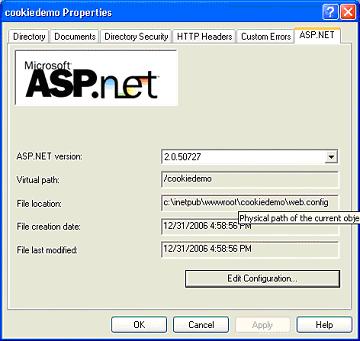
Please mark you thread resolved using the Thread Tools as shown
-
Dec 1st, 2010, 10:41 AM
#15
Re: error publishing aspx
Dana, this is what I asked in post #4 
-
Dec 1st, 2010, 11:07 AM
#16
Re: error publishing aspx
Please mark you thread resolved using the Thread Tools as shown
 Posting Permissions
- You may not post new threads
- You may not post replies
- You may not post attachments
- You may not edit your posts
-
Forum Rules
|
Click Here to Expand Forum to Full Width
|



 Reply With Quote


 Originally Posted by gep13

