|

-
Nov 24th, 2010, 06:29 AM
#1
Thread Starter
New Member

Making ActiveX control for Excel 2003
Hello,
I am making ActiveX control project in VB6. It creates .ocx file I can add this control in other projects but while adding it to excel 2003 as a activex control, it's content doesn't show. It's only appearing by borders. However many other activex control in my computer can be added to excel. Can't VB6 's activex controls be added to excel?
thanks
-
Nov 24th, 2010, 09:35 AM
#2
Re: Making ActiveX control for Excel 2003
Welcome to the forums.
I am willing to bet that it something within your usercontrol that is the problem. We'd have no way of knowing without more detailed info.
1. Suggest looking at code that may be using the Ambient.UserMode to turn on/off functions. Note that not all ocx containers will eport Ambient.UserMode the same way, if at all.
2. Suggest looking at code where you may be using On Error Resume Next which may be hiding an error you should be aware of.
-
Nov 24th, 2010, 09:56 AM
#3
Thread Starter
New Member
Re: Making ActiveX control for Excel 2003
thanks for the answer LaVolpe...
I created a ActiveX Control project.
I have added just a button on the usercontrol...there is no code.
I am making it .ocx from the file menu.
Should I add a code in it?
If there is a sample project that would be very useful...
thank you very much...
-
Nov 24th, 2010, 11:03 AM
#4
Re: Making ActiveX control for Excel 2003
So, your ocx is just a container for the VB button? And when you add to your Excel app, the button is not visible? You have no other code that is toggling the button's visibility? Maybe a small screenshot of what the button looks like when run in a VB project and what it looks like run in your Excel.
One more question. Is this happening on the same pc that the ocx was created/compiled on?
-
Nov 25th, 2010, 05:39 AM
#5
Thread Starter
New Member
-
Nov 29th, 2010, 05:02 AM
#6
Thread Starter
New Member
Solved by Interop-Forms-Toolkit
-
Jan 15th, 2011, 10:39 AM
#7
Thread Starter
New Member
Re: Making ActiveX control for Excel 2003
 Originally Posted by mech3

Compiling activex control project. It has a button which shows a messagebox:

In another exe project I am adding that ocx as a component:

Works fine:
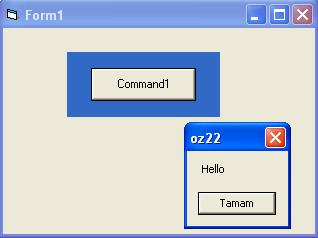
However When I add in to excel as a ActiveX Control:

It looks like this:

and all of these on same computer...
I still need an help about the making excel control in VB6.
thanks...
-
Jan 17th, 2011, 07:17 AM
#8
Thread Starter
New Member
Re: Making ActiveX control for Excel 2003
it is solved when I switch off the design mode in Excel...
 Posting Permissions
- You may not post new threads
- You may not post replies
- You may not post attachments
- You may not edit your posts
-
Forum Rules
|
Click Here to Expand Forum to Full Width
|



 Reply With Quote
