|

-
Nov 8th, 2010, 07:01 AM
#1
Deriving from a UserControl
Hi,
I made a UserControl called SliderUserControl which contains two labels and a WebSlider (third party slider control) in a table. The labels left and right of the slider should give the value of the slider and (Maximum - value) of the slider respectively. So if the slider goes from 0-100 and is at 30 now, then the control looks like this:
Code:
30 ----|---------- 70
I accomplished this with some simple javascript, and it's all working just fine:
asp Code:
<%@ Control Language="vb" AutoEventWireup="false" CodeBehind="SliderUserControl.ascx.vb" Inherits="F1TimeTrials.Controls.SliderUserControl" %>
<%@ Register assembly="Infragistics35.Web.v10.2, Version=10.2.20102.1011, Culture=neutral, PublicKeyToken=7dd5c3163f2cd0cb" namespace="Infragistics.Web.UI.EditorControls" tagprefix="ig" %>
 <script type="text/javascript" id="igClientScript">
<!--
     function sliderControl_ValueChanged(sender, eventArgs) {
        var leftLabel = document.getElementById('<%= Me.lblLeftValue.ClientID %>');
        var rightLabel = document.getElementById('<%= Me.lblRightValue.ClientID %>');
         var maxValue = sender.get_maxValueAsDouble();
        var value = eventArgs.get_newValue();
        leftLabel.innerHTML = value;
        rightLabel.innerHTML = maxValue - value;
    }// -->
</script>
 <asp:Table ID="table" runat="server">
    <asp:TableRow runat="server">

        <asp:TableCell runat="server">
            <asp:Label runat="server" ID="lblLeftValue" Text="0" />
        </asp:TableCell>
         <asp:TableCell runat="server">
            <ig:WebSlider ID="sliderControl" runat="server">
                <ClientEvents ValueChanged="sliderControl_ValueChanged" />
            </ig:WebSlider>
        </asp:TableCell>
         <asp:TableCell runat="server">
            <asp:Label runat="server" ID="lblRightValue" Text="100"/>
        </asp:TableCell>
     </asp:TableRow>
</asp:Table>
In order to interact with the WebSlider third party control directly I made some 'pass-through' properties such as MaxValue, MinValue, etc:
vb.net Code:
Imports Infragistics.Web.UI.EditorControls
 Namespace Controls
     Public Class SliderUserControl
        Inherits System.Web.UI.UserControl
         Public ReadOnly Property Slider As WebSlider
            Get
                Return Me.sliderControl
            End Get
        End Property
         Public Property Value As Object
            Get
                Return Me.Slider.Value
            End Get
            Set(ByVal value As Object)
                Me.Slider.Value = value
            End Set
        End Property
         Public Property MinValue As Object
            Get
                Return Me.Slider.MinValue
            End Get
            Set(ByVal value As Object)
                Me.Slider.MinValue = value
            End Set
        End Property
         Public Property MaxValue As Object
            Get
                Return Me.Slider.MaxValue
            End Get
            Set(ByVal value As Object)
                Me.Slider.MaxValue = value
            End Set
        End Property
    End Class
End Namespace
Anyway, as I said, this works fine. If I use a Register directive that points to the SliderUserControl.ascx source then I can use it on my page and it works.
However, I actually need three different kind of sliders, each slightly different from this 'base' slider. For example, one will work with integers, another will work with float point values, etc. So what I want to do is create three classes that inherit SliderUserControl, and customize it from there.
So, for example, a slider that goes from 1 to 11 with only one label (without the extra second label on the right) could look like this:
vb.net Code:
Imports Infragistics.Web.UI.EditorControls
 Namespace Controls
     Public Class NormalSlider
        Inherits SliderUserControl
         Private Sub Page_Load(ByVal sender As Object, ByVal e As System.EventArgs) Handles Me.Load
            If Not Me.IsPostBack Then
                Me.Slider.ValueType = SliderValueType.Int
                Me.Slider.MinValue = 1
                Me.Slider.MaxValue = 11
                Me.Slider.Value = 6
                Me.Slider.SmallChange = 1
                Me.Slider.LargeChange = 3
                Me.Slider.Tickmarks.NumberOfMajorTickmarks = 3
                Me.Slider.Tickmarks.NumberOfMinorTickmarks = 11
                 Me.lblLeftValue.Text = "6"
                Me.lblRightValue.Visible = False
            End If
        End Sub
     End Class
End Namespace
And now I'm a little stuck... I can build this project, but the NormalSlider control does not show up in the toolbox as I'm used to from windows forms projects.
I thought well, that's probably different for ASP.NET, but then I remembered that it DOES work for a different control. I have a class Grid that inherits a third party UltraWebGrid control:
vb.net Code:
Imports Infragistics.WebUI.UltraWebGrid
 Namespace Controls
    Public Class Grid
        Inherits Infragistics.WebUI.UltraWebGrid.UltraWebGrid

        '...
    End Class
End Namespace
When I build the project now, the Grid control does show up in the toolbox! So that's a bit strange...
However, I googled the problem of course and I figured out how to get a custom control (class inheriting a control) onto a page, and apparently I can use another Register directive where I need to specify the Assembly and the Namespace. As far as I know, the Assembly is just the current project (the control is not in a separate project) called F1TimeTrials, and the Namespace is either Controls or F1TimeTrials.Controls.
So I tried both of those, for example:
asp Code:
<%@ Register TagPrefix="uc" Assembly="F1TimeTrials" Namespace="F1TimeTrials.Controls" %>
Now, I can type "<uc:" and Intellisense shows me the NormalSlider control. Great! However, when I place it on the page, it does not show up during design-time. There's just nothing there.
asp Code:
<%@ Page Title="" Language="vb" AutoEventWireup="false" MasterPageFile="~/Site.Master" CodeBehind="SliderTest.aspx.vb" Inherits="F1TimeTrials.SliderTest" %>
 <%@ Register TagPrefix="uc" Assembly="F1TimeTrials" Namespace="F1TimeTrials.Controls" %>
   <asp:Content ID="Content1" ContentPlaceHolderID="HeadContent" runat="server">
</asp:Content>
<asp:Content ID="Content2" ContentPlaceHolderID="MainContent" runat="server">
     <!-- ScriptManager required for the WebSlider third party control -->
    <asp:ScriptManager runat="server">
    </asp:ScriptManager>
     <!-- Slider: -->
    <uc:NormalSlider runat="server" ID="slider1" />
 </asp:Content>
There are no warnings or errors or anything, but the control isn't there.
When I run the project, it throws a null-reference exception in the Page_Load event of the NormalSlider class. Apparently, Slider (= the WebSlider third party control on the base class) is Nothing.
I don't get it... How can it be Nothing in the Page_Load event? Should I call some method that creates the control in the base-class first? Or ..?!
Does anyone see what I'm doing wrong?
-
Nov 8th, 2010, 07:18 AM
#2
Re: Deriving from a UserControl
Did you drag and drag the user control and see the code definition ?
Please mark you thread resolved using the Thread Tools as shown
-
Nov 8th, 2010, 07:26 AM
#3
Re: Deriving from a UserControl
 Originally Posted by danasegarane

Did you drag and drag the user control and see the code definition ?
I've no idea what you mean. Drag what, and drag it where?
I did just notice that in the properties window, when I select the NormalSlider tag in the aspx code, the Slider property says "(none)" (and therefore the MaxValue, MinValue, and Value properties give a null-reference exception). It seems that the WebSlider in the base control (SliderUserControl) is simply not created when I derive from it...?
Last edited by NickThissen; Nov 8th, 2010 at 07:30 AM.
-
Nov 8th, 2010, 07:34 AM
#4
Re: Deriving from a UserControl
In the Properties windows, you can see the Assemblyname and Rootname space. Are they same as this one
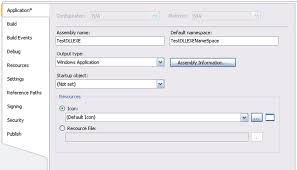
<%@ Register TagPrefix="uc" Assembly="F1TimeTrials" Namespace="F1TimeTrials.Controls" %>
Please mark you thread resolved using the Thread Tools as shown
-
Nov 8th, 2010, 07:56 AM
#5
Re: Deriving from a UserControl
Both are F1TimeTrials. The NormalSlider class is, as you can see from the code, in the Controls namespace, which would be F1TimeTrials.Controls in full. The SliderUserControl base class is also in the Controls namespace.
I cannot change the Register directive. If I change the Namespace to just Controls it says "cannot resolve name Controls". If I change the Assembly to "F1TimeTrials.Controls" instead, it says "Element 'NormalSlider' is not a known element." and when I try to run it I get a parser error: "Could not load file or assembly 'F1TimeTrials.Controls' or one of its dependencies. The system cannot find the file specified.".
Last edited by NickThissen; Nov 8th, 2010 at 08:00 AM.
-
Nov 8th, 2010, 08:09 AM
#6
Re: Deriving from a UserControl
Is it a Web Application or Website project ?
Please mark you thread resolved using the Thread Tools as shown
-
Nov 8th, 2010, 08:18 AM
#7
Re: Deriving from a UserControl
I think I selected ASP.NET Web Application when creating it. I can't even find anything about a Website project.
EDIT
It does say 'Convert to Web Application' when I rightclick the project node...? :S
-
Nov 8th, 2010, 08:28 AM
#8
Re: Deriving from a UserControl
I converted it to a Web Application (I don't see any difference though, it says it's added code-behind files, but I already had those on all pages), but no change.
-
Nov 8th, 2010, 08:34 AM
#9
Re: Deriving from a UserControl
Originally Posted by NickThissen
I think I selected ASP.NET Web Application when creating it. I can't even find anything about a Website project.
EDIT
It does say 'Convert to Web Application' when I rightclick the project node...? :S
If you right click on the Properties and if you are able to change the Assembly name then its a web application project.See the image in Previous Post.
Please mark you thread resolved using the Thread Tools as shown
-
Nov 8th, 2010, 09:21 AM
#10
Re: Deriving from a UserControl
Yes I can change the Assembly name in the project properties.
-
Nov 8th, 2010, 09:28 AM
#11
Re: Deriving from a UserControl
I guess my problem is that the controls in the base class are never created. In windows forms, you get an InitializeComponent method (in the designer code) where the controls are created and added to the form, and if you don't call that you get this problem. I guess I need some kind of equivalent for InitializeComponents, but I cannot find it...
-
Nov 8th, 2010, 10:11 AM
#12
Re: Deriving from a UserControl
I just did few work around.
Create one web application with two classes.
Code:
Public Class MyDropDownList
    Inherits DropDownList
    Private _myvalue As String
    Public Property Myvalue() As String
        Get
            Return "From Base Class"
        End Get
        Set(ByVal value As String)
            _myvalue = value
        End Set
    End Property
End Class
Code:
Public Class InheritedDropDownList
    Inherits MyDropDownList


    Private Sub InheritedDropDownList_Load(ByVal sender As Object, ByVal e As System.EventArgs) Handles Me.Load
        Me.Items.Add(MyBase.Myvalue)
    End Sub
End Class
This created toolbox entry.I just drag and drop in the Form
Code:
<%@ Page Language="vb" AutoEventWireup="false" CodeBehind="Default.aspx.vb" Inherits="WebApplication1._Default" %>

<%@ Register Assembly="WebApplication1" Namespace="WebApplication1" TagPrefix="cc1" %>


<!DOCTYPE html PUBLIC "-//W3C//DTD XHTML 1.0 Transitional//EN" "http://www.w3.org/TR/xhtml1/DTD/xhtml1-transitional.dtd">

<html xmlns="http://www.w3.org/1999/xhtml" >
<head runat="server">
    <title></title>
</head>
<body>
    <form id="form1" runat="server">
    <div>
        <cc1:InheritedDropDownList ID="InheritedDropDownList1" runat="server">
        </cc1:InheritedDropDownList>
    </div>
    </form>
</body>
</html>
I noticed this points. The assemblyname and assembly were the same
<%@ Register Assembly="WebApplication1" Namespace="WebApplication1" TagPrefix="cc1" %>
Please mark you thread resolved using the Thread Tools as shown
-
Nov 8th, 2010, 10:15 AM
#13
Re: Deriving from a UserControl
I just noticed the two init event fired for both the controls
Code:
Private Sub MyDropDownList_Init(ByVal sender As Object, ByVal e As System.EventArgs) Handles Me.Init

    End Sub

 Private Sub InheritedDropDownList_Init(ByVal sender As Object, ByVal e As System.EventArgs) Handles Me.Init

    End Sub
Please mark you thread resolved using the Thread Tools as shown
-
Nov 8th, 2010, 10:37 AM
#14
Re: Deriving from a UserControl
I think the difference is that you are inheriting from a custom control while I inherit a UserControl. Your 'MyDropdownList' is a custom control because it inherits DropdownList, and not UserControl. The problem with me is that the controls in the UserControl (it is a kind of control container after all, while your dropdownlist is not) are not created in the derived types.
-
Nov 8th, 2010, 10:50 AM
#15
Re: Deriving from a UserControl
Are you getting error on this line ?
Code:
Me.Slider.ValueType = SliderValueType.Int
In the Page_LoadEvent Add the usercontrol to the page using the Page.LoadControl Method
And this will load the control in page avoids the null reference exception
Please mark you thread resolved using the Thread Tools as shown
-
Nov 8th, 2010, 11:02 AM
#16
Re: Deriving from a UserControl
Again I have no idea what you mean... The Page_Load event of what? The UserControl? That makes no sense: I am adding the UserControl to the UserControl??
The load event of the Page that I'm using it on? That makes no sense either, why can't I do it during design-time as usual?
-
Nov 9th, 2010, 12:39 AM
#17
Re: Deriving from a UserControl
Please mark you thread resolved using the Thread Tools as shown
-
Nov 9th, 2010, 02:52 AM
#18
Re: Deriving from a UserControl
Hello Nick,
I have been following this thread on and off, as I don't have a direct answer to your question, but one thing that you should bear in mind is that the ASP.Net Designer, although good, can't do everything. Unless you are creating design time support for your User Controls, is there any real "need" to see them in the designer? Typically, when using a UserControl, I add it dynamically to the page, when required, i.e. using LoadControl. Once that is done, I set the required properties of the control.
Gary
-
Nov 9th, 2010, 04:06 AM
#19
Re: Deriving from a UserControl
No I don't need to see it in the designer, and that's not the main issue even. The issue is that the WebSlider control, which is in the SliderUserControl usercontrol, is not created. That's also the reason it's not showing in the designer because it's simply that control + two labels, which show the value of the control. In the properties window I can see the Slider property (which returns the WebSlider control) and it is (none) or Nothing, so as soon as I run the page I get a null-reference exception on using the Slider property. I don't get it, as the Slider property just returns the WebSlider control on the UserControl, how can it be Nothing?
 Posting Permissions
- You may not post new threads
- You may not post replies
- You may not post attachments
- You may not edit your posts
-
Forum Rules
|
Click Here to Expand Forum to Full Width
|



 Reply With Quote

