|

-
Oct 1st, 2010, 06:02 AM
#1
Thread Starter
Frenzied Member


Scheduling Tables and Relationships question
I am in the process of creating a scheduling application in vb.net, I am using MS Access as the backend.
Simple scenario:
- the boss puts a blank schedule on the desk
- staff select the days they want to work
- she then uses my app to assign staff to the days
- previews and verifies schedule
- prints out in an excel format
Application layout: a Month Calendar is used to select the start date of a 28 date range. Saves the Start Date and the End Date to textboxes. The 28 day date range (just the day, Oct 1, 2010), 1 is saved as the text property of a checkbox control. She then selects the checkboxes of the days the staff wants to work.
Data that needs to be saved:
- Start Date
- End Date
- Date Range
- Employee ID
- Days Selected
Current Tables and Relationships
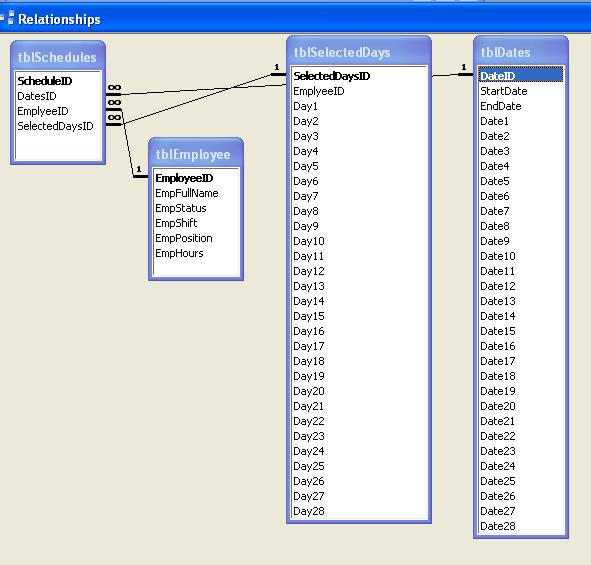
Am I going about this the right way or does this need to be changed?
-
Oct 1st, 2010, 07:44 AM
#2
Re: Scheduling Tables and Relationships question
Instead of storing all the Days in a single row I would store one per row; DayNumber (1-28). Omitting the row if the employee is not scheduled. If more than one employee is scheduled, then there will be that many rows. I don't know what tblDates is for. You can always calculate the date on the fly.
VB6 Library
If I helped you then please help me and rate my post!
If you solved your problem, then please mark the post resolved
-
Oct 1st, 2010, 08:29 AM
#3
Re: Scheduling Tables and Relationships question
I'd have an employee table... and a selecteddates table.... the employee table is self-evident, so I'll skip it, but the selecteddates table would have the emplID (int, FK to employee table) and a selectedDate (datetime) .... and that's pretty much it.
-tg
-
Oct 2nd, 2010, 04:10 AM
#4
Thread Starter
Frenzied Member
Re: Scheduling Tables and Relationships question
MarMan : tblDates is for the range betewwn Start and End tblDays is the days the employee selected.
TechGnome: guess KISS works here huh, will give it a try.
-
Oct 2nd, 2010, 05:40 AM
#5
Thread Starter
Frenzied Member
Re: Scheduling Tables and Relationships question
OK if I do it as techgnome suggested, I would have a selectedDate table;
tblSelectedDates
SelectedDateID
StaffID
StartDate
EndDate
then I can loop through the range of dates to set controls, and to populate a DGV to preview the schedules I only have to worry about filling the DGV by either StartDate to view all staff scheduled for that period or StaffID to see all schedules for that employee, right.
 Posting Permissions
- You may not post new threads
- You may not post replies
- You may not post attachments
- You may not edit your posts
-
Forum Rules
|
Click Here to Expand Forum to Full Width
|



 Reply With Quote
