|

-
Oct 1st, 2010, 05:10 AM
#1
Thread Starter
Frenzied Member


Textbox autocomplete
Next problem. 
I have a textbox that autocompletes from a dynamic custom autocompletesource.
It works, but only if the entered text is at the beginning of a autocomplete item.
So I enter "abc".
The autocompletelist contains "abcd", "defabc".
What it does now is only show the first item.
What I want it to do is to also show the second item.
What would also work is it to show the complete custom autocompletelist, because I already filtered it myself.
I've searched around the net, and it seems there is no 'good' way to do it.
Most suggestions go for making a custom control, which I might, but would wouldn't prefer.
Does anyone here by any chance know a fancy hack to fix this?
Thanks
Delete it. They just clutter threads anyway.
-
Oct 1st, 2010, 05:45 AM
#2
Re: Textbox autocomplete
Set the TextBox.AutoCompleteMode to Suggest
From MSDN
Displays the auxiliary drop-down list associated with the edit control. This drop-down is populated with one or more suggested completion strings.
Please mark you thread resolved using the Thread Tools as shown
-
Oct 1st, 2010, 06:08 AM
#3
Thread Starter
Frenzied Member
Re: Textbox autocomplete
Yes I had that working.
Example:
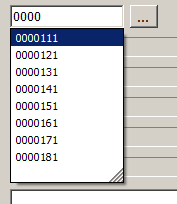
This works.
If I'd change the autocomplete list to something like:
Description 1 - 0000111
Description 2 - 0000121
Description 3 - 0000131
etc.
And enter 0000, I would like it to show the list, but it doesn't as none of the list items start with 0000.
I know it's not designed to function that way, but is there any override for it to work like that?
Delete it. They just clutter threads anyway.
 Posting Permissions
- You may not post new threads
- You may not post replies
- You may not post attachments
- You may not edit your posts
-
Forum Rules
|
Click Here to Expand Forum to Full Width
|



 Reply With Quote
