|

-
Sep 21st, 2010, 02:11 PM
#1
Thread Starter
New Member

Controls cannot be sized on a form.
This just happened in the last few days. Our site administrators push updates to WIN XP SP3 frequently and I'm assuming that one of these has done something... Controls can be added to a form in VB6, but sizing does not work after the control has been placed on the form. Everything else works. Any ideas?
-
Sep 21st, 2010, 02:44 PM
#2
Re: Controls cannot be sized on a form.
Welcome to VBForums 
Right-click on the form, and make sure that "Lock controls" does not have a tick next to it.
-
Sep 21st, 2010, 06:54 PM
#3
Re: Controls cannot be sized on a form.
 Originally Posted by si_the_geek

Welcome to VBForums
Right-click on the form, and make sure that "Lock controls" does not have a tick next to it.
Good catch, Si. He may have right clicked on the form and somehow pressed the L key. I have done this a few times but not often. 
I have to question why this "feature" even existed. 
-
Sep 22nd, 2010, 05:04 AM
#4
Re: Controls cannot be sized on a form.
I have found it useful at times, such as when I have carefully placed various items and just want to select one of them to alter properties, but not risk accidentally moving them (which can take a while to fix).
-
Sep 22nd, 2010, 08:01 AM
#5
Thread Starter
New Member
Re: Controls cannot be sized on a form.
Lock Controls is not highlighted. Controls on the form can be added, moved, and deleted, but not sized. Strange. I've been using VB6 since it came out and I've never seen this. Just started a few days ago.
-
Sep 22nd, 2010, 09:02 AM
#6
Re: Controls cannot be sized on a form.
1. Does this happen with brand new projects too?
2. Do you get the grab handles when you select a control?
3. If you try resizing using the mouse, does the control just snap back? If so check your grid size & snap-to-grid settings in the Options menu
4. Can you resize a control by changing its Width/Height property directly in the property sheet?
5. Oh, is this for all controls or just some? If some, which ones?
Last edited by LaVolpe; Sep 22nd, 2010 at 09:06 AM.
-
Sep 22nd, 2010, 09:22 AM
#7
Thread Starter
New Member
Re: Controls cannot be sized on a form.
1. Does this happen with brand new projects too?
Yes.
2. Do you get the grab handles when you select a control? Yes, but as soon as I click on the grab handle, focus goes from the control to the form.
3. If you try resizing using the mouse, does the control just snap back? If so check your grid size & snap-to-grid settings in the Options menu.
See #2. I changed the grid size from 120x120 to 60x60 and 240x240 with no change. Don't know where the snap-to-grid settings are?
4. Can you resize a control by changing its Width/Height property directly in the property sheet?
Yes.
5. Oh, is this for all controls or just some? If some, which ones? All that I've tried.
-
Sep 22nd, 2010, 09:47 AM
#8
Re: Controls cannot be sized on a form.
Interesting. This is a legit copy of VB6 correct? If no one else has any suggestions, you may want to try to reinstall VB & latest service pack.
-
Sep 22nd, 2010, 09:55 AM
#9
Thread Starter
New Member
Re: Controls cannot be sized on a form.
Yes. I've reinstalled VS 6 with SP5 and the problem remains. My guess is that one of the MS updates has done something.
-
Sep 22nd, 2010, 06:36 PM
#10
Re: Controls cannot be sized on a form.
Originally Posted by parkerstnc
Yes. I've reinstalled VS 6 with SP5 and the problem remains. My guess is that one of the MS updates has done something.
Open a new form. Right click on the form and post a captured image of the window that pops up. It should look like this:
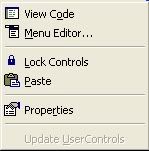
Does it? If not, what actually does appear?
-
Sep 23rd, 2010, 07:25 AM
#11
Thread Starter
New Member
Re: Controls cannot be sized on a form.
Yes it looks identical except that paste is grayed out because I have nothing to paste.
-
Sep 23rd, 2010, 07:33 AM
#12
New Member
Re: Controls cannot be sized on a form.
i work @ the same plant with parkerstnc, different building, but same IT downloads. i've been having the same issue for the last month with vb6. doesn't happen with studio 2005 or any other app.
-
Sep 23rd, 2010, 10:05 AM
#13
Fanatic Member

Re: Controls cannot be sized on a form.
I can't see Code Doc's image, so a quick question: when you click on a control, are the grab-handles blue or white?
-
Sep 23rd, 2010, 10:28 AM
#14
New Member
Re: Controls cannot be sized on a form.
they are blue and appear as usual when i left clik. when i hover the mouse over one, the correct resize arrows appear (horizontal, vertical or diagonal). as soon as i left clik and hold to drag, the object lose focus and the form is now selected, which of course causes the subsequent drag to simply create the dotted line selection box on the form.
it doesn't happen on vb6 c, visual studio 2005, or any other app i've tried.. plus it's happened on 3 different pcs (2 of them dell desktops and mine is a dell notebook) for 3 different users who have 3 different licensed copies. parker has tried a reload of vb which didn't fix it. the only common seems to be that we all get updates/downloads from our corporate IT (they would happen at different times based on when we have the pc online, the way IT sequences downloads based on user/equipment id's, etc).
until i found out the other 2 guys have the problem and that the other apps are ok., i figured it was some weird mouse-hardware related problem
-
Sep 24th, 2010, 02:31 AM
#15
Re: Controls cannot be sized on a form.
I think I'd ask if the Site Administrators have made any changes in the last month or so which could have affected VB6. (Most likely, IMHO, changed some Policy settings which have had an unintentional knock-on effect)
Is everyone with VB6 installed affected ?
Does your configuration allow unrestricted access to the C drive or are all your working files held on a Server ? Perhaps the permissions have changed.
Have you tried running VB6 using "Run as Administrator" to see if that makes any difference? (right click on VB6 and chose "Run as Administrator" from the resulting Drop-down menu.)
Also, if you're running Vista or W7 try switching UAC off (if you are allowed to)
You could also try installing SP6
Last edited by Doogle; Sep 24th, 2010 at 02:46 AM.
-
Sep 25th, 2010, 02:13 AM
#16
Re: Controls cannot be sized on a form.
Originally Posted by ne23843
until i found out the other 2 guys have the problem and that the other apps are ok., i figured it was some weird mouse-hardware related problem
You could try sizing and moving via the Keyboard to eliminate any 'mouse funnies'
Select the control, then:
Shift and left arrow will decrease the width
Shift and right arrow will increase the width
Shift and up arrow will decrease height
Shift and down arrow will increase the height
Ctrl and left arrow moves it to the left
Ctrl and right arrow moves it to the right
Ctrl and up arrow moves it up
Ctrl and down arrow moves it down
Last edited by Doogle; Sep 25th, 2010 at 02:36 AM.
-
Sep 28th, 2010, 02:31 AM
#17
Re: Controls cannot be sized on a form.
Did you Guys ever get this sorted ? I'd be very interested to know the cause / resolution
-
Sep 28th, 2010, 01:34 PM
#18
Thread Starter
New Member
Re: Controls cannot be sized on a form.
Tried SP6. No solution yet... Using the shift + arrow method. Thanks.
-
Jan 23rd, 2011, 09:43 AM
#19
Addicted Member

Re: Controls cannot be sized on a form.
Has anyone tried to contact Microsoft directly about this problem ?
-
Jan 23rd, 2011, 08:32 PM
#20
Re: Controls cannot be sized on a form.
Originally Posted by tcurrier
Has anyone tried to contact Microsoft directly about this problem?
That will die without an audience. Microsoft provides practically no support at all for VB6 except for what is already shown on the support site jungle. 
 Posting Permissions
- You may not post new threads
- You may not post replies
- You may not post attachments
- You may not edit your posts
-
Forum Rules
|
Click Here to Expand Forum to Full Width
|



 Reply With Quote


