|

-
Sep 21st, 2010, 06:31 AM
#1
 [RESOLVED] Can we simplify inserting local images? [RESOLVED] Can we simplify inserting local images?
There's a nice yellow button for inserting images up there above the message editing window. It could be very useful when you want images interspersed with the message text e.g. for a tutorial. The dialogue is designed to accept a URL but it doesn't provide a way to insert a file name. I've spent over an hour trying to figure out how to do it and came up with this roundabout procedure:
1. Click Manage Attachments
2. browse for the image and upload it
3. right click on the uploaded file name
4a. in FireFox, select Copy Link Location.
4b. in IE, select Properties and Ctrl-C the URL.
5. remove the attachment
6. click the Insert Image button
7. paste in the URL.
In some future update of the forum code, I wonder if it would be possible to modify the Insert Image dialog to accept a file name? Maybe even offer a Browse button?
BB
-
Sep 21st, 2010, 06:40 AM
#2
Re: Can we simplify inserting local images?
An easier way is to attach your image(s) and then use the [attach]00000[/attach] tag where you want the image to appear. (The 00000 is the attachment number)
-
Sep 21st, 2010, 06:50 AM
#3
Re: Can we simplify inserting local images?
Having just done this in a thread, I thought I would clarify what marty has suggested (I use it all the time). Hopefully, this inline image, will explain it:
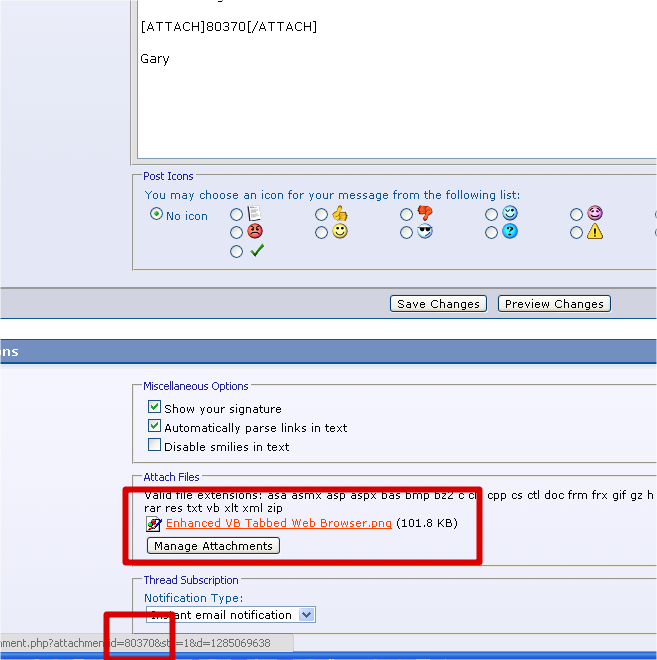
Once uploaded, hover over the image hyperlink in the Attach Files section, get the id from the url string, and place it between the attach tags.
Gary
Last edited by gep13; Sep 21st, 2010 at 07:44 AM.
-
Sep 21st, 2010, 06:52 AM
#4
Re: Can we simplify inserting local images?
Hmm, do attached images worked differently in the forum feedback forum?
The above is not what I would have expected? I have done the exact same in this thread:
http://www.vbforums.com/showthread.p...67#post3885767
And it works by putting the image inline with the rest of the text, but not in the above post.
Gary
-
Sep 21st, 2010, 06:57 AM
#5
Re: Can we simplify inserting local images?
Thanks for the bit about hovering. I never noticed that you could do that and I always did a two step process of attaching and then clicking on the attachment and getting the number from the url.
-
Sep 21st, 2010, 07:00 AM
#6
Re: Can we simplify inserting local images?
 Originally Posted by MartinLiss

An easier way is to attach your image(s) and then use the [attach]00000[/attach] tag where you want the image to appear. (The 00000 is the attachment number)
Thanks Martin, let's try it. First of all, attachment 1:
Attachment 1
Now for another one:
Attachment 2
It's useful but unfortunately it's not quite what I want. I want to intersperse the images in the text like this , not have them down at the bottom. Anyway, my suggestion of improving the Insert Image dialog still stands. , not have them down at the bottom. Anyway, my suggestion of improving the Insert Image dialog still stands.
BB
Edit: wow, three messages while I was replying. Are you guys quick or am I slow?
Last edited by boops boops; Sep 21st, 2010 at 07:06 AM.
-
Sep 21st, 2010, 07:03 AM
#7
Re: Can we simplify inserting local images?
As I said, for some reason, it doesn't seem to happen correctly within this particular forum, but if you try it in one of the other, it will work.
There must be a setting in this forum that is preventing it from displaying the way it should.
Gary
-
Sep 21st, 2010, 07:07 AM
#8
Re: Can we simplify inserting local images?
That request really should be made to vBulletin since it's their software.
-
Sep 21st, 2010, 07:10 AM
#9
Re: Can we simplify inserting local images?
You used 1 and 2 rather than the attachment id.
-
Sep 21st, 2010, 07:40 AM
#10
Re: Can we simplify inserting local images?
Originally Posted by MartinLiss
You used 1 and 2 rather than the attachment id.
OK, let's try it:  . Yes this clearly works in preview. It took me some moment to figure out that you have to get the Attachment ID, not the 10 digit number at the end of the URL. I see the Attachment ID provides a way to reuse an already uploaded image. That's another need that isn't well catered for in the controls/dialogs. . Yes this clearly works in preview. It took me some moment to figure out that you have to get the Attachment ID, not the 10 digit number at the end of the URL. I see the Attachment ID provides a way to reuse an already uploaded image. That's another need that isn't well catered for in the controls/dialogs.
Originally Posted by JPync
That request really should be made to vBulletin since it's their software.
Yes but who is supposed to make the request? It seems to me that the forum Administrators could (and maybe should) filter suggestions from individual users and pass them on if they deem them appropriate.
Thanks to all, BB
-
Sep 21st, 2010, 07:46 AM
#11
Re: Can we simplify inserting local images?
Originally Posted by gep13
Hmm, do attached images worked differently in the forum feedback forum?
The above is not what I would have expected? I have done the exact same in this thread:
http://www.vbforums.com/showthread.p...67#post3885767
And it works by putting the image inline with the rest of the text, but not in the above post.
Gary
Originally Posted by gep13
As I said, for some reason, it doesn't seem to happen correctly within this particular forum, but if you try it in one of the other, it will work.
There must be a setting in this forum that is preventing it from displaying the way it should.
Gary
Ignore me!!
Looks like I got the attachment ID wrong in my earlier post (must have been a blonde moment). I have edited my above post with the correct attachment ID, and it now works.
Gary
-
Sep 21st, 2010, 07:54 AM
#12
Re: Can we simplify inserting local images?
Originally Posted by boops boops
OK, let's try it: . Yes this clearly works in preview. It took me some moment to figure out that you have to get the Attachment ID, not the 10 digit number at the end of the URL. I see the Attachment ID provides a way to reuse an already uploaded image. That's another need that isn't well catered for in the controls/dialogs.
Yes but who is supposed to make the request? It seems to me that the forum Administrators could (and maybe should) filter suggestions from individual users and pass them on if they deem them appropriate.
Thanks to all, BB
We don't carry any more weight with them than anybody else. They have millions upon millions of users. They won't give us any special credence. If they think an idea makes sense, or they get enough requests for it, they'll consider it.
-
Sep 21st, 2010, 08:28 AM
#13
Re: Can we simplify inserting local images?
Originally Posted by JPnyc
We don't carry any more weight with them than anybody else. They have millions upon millions of users. They won't give us any special credence. If they think an idea makes sense, or they get enough requests for it, they'll consider it.
Fair enough. But it sounds like writing to them would be a waste of time. So lets consider this thread  . .
BB
-
Sep 21st, 2010, 10:26 AM
#14
Re: [RESOLVED] Can we simplify inserting local images?
In all probability, you're right. I Post images with text comments all the time, I don't see the difficulty. It's likely they will view it the same way.
-
Sep 22nd, 2010, 09:35 AM
#15
Re: [RESOLVED] Can we simplify inserting local images?
Originally Posted by boops boops
There's a nice yellow button for inserting images up there above the message editing window. It could be very useful when you want images interspersed with the message text e.g. for a tutorial. The dialogue is designed to accept a URL but it doesn't provide a way to insert a file name. I've spent over an hour trying to figure out how to do it and came up with this roundabout procedure:
1. Click Manage Attachments
2. browse for the image and upload it
3. right click on the uploaded file name
4a. in FireFox, select Copy Link Location.
4b. in IE, select Properties and Ctrl-C the URL.
5. remove the attachment
6. click the Insert Image button
7. paste in the URL.
In some future update of the forum code, I wonder if it would be possible to modify the Insert Image dialog to accept a file name? Maybe even offer a Browse button?
BB
If you create a post in the advanced editor (not the inline or quick one at the bottom) one of the buttons in the top row has a paperclip with a down arrow. If you've already attached images to the post using the manage attachments thing then clicking the paperclip shows a dropdown menu with the images (things like zip files don't show) and when you click the image name you want, it inserts the [attach]xxxxxx[/attach] with the x's filled in for the attachment. If you haven't attached any images to the post and you click the paperclip then it opens the manage attachments window and you can upload them, then click the paperclip again and select each image as you create & edit your post.
This has been built in for a very long time.
-
Sep 22nd, 2010, 09:40 AM
#16
Re: [RESOLVED] Can we simplify inserting local images?
Originally Posted by JuggaloBrotha
If you create a post in the advanced editor (not the inline or quick one at the bottom) one of the buttons in the top row has a paperclip with a down arrow. If you've already attached images to the post using the manage attachments thing then clicking the paperclip shows a dropdown menu with the images (things like zip files don't show) and when you click the image name you want, it inserts the [attach]xxxxxx[/attach] with the x's filled in for the attachment. If you haven't attached any images to the post and you click the paperclip then it opens the manage attachments window and you can upload them, then click the paperclip again and select each image as you create & edit your post.
This has been built in for a very long time.
Noice tip!!
I did not know this.
Thanks
Gary
-
Sep 22nd, 2010, 10:23 AM
#17
Re: [RESOLVED] Can we simplify inserting local images?
Originally Posted by JuggaloBrotha
If you create a post in the advanced editor (not the inline or quick one at the bottom) one of the buttons in the top row has a paperclip with a down arrow. If you've already attached images to the post using the manage attachments thing then clicking the paperclip shows a dropdown menu with the images (things like zip files don't show) and when you click the image name you want, it inserts the [attach]xxxxxx[/attach] with the x's filled in for the attachment. If you haven't attached any images to the post and you click the paperclip then it opens the manage attachments window and you can upload them, then click the paperclip again and select each image as you create & edit your post.
This has been built in for a very long time.
Wow, I've been around here forever and I never noticed the paperclip. Nice tip! I wonder what else I've missed? 
Last edited by MartinLiss; Sep 22nd, 2010 at 10:30 AM.
-
Sep 22nd, 2010, 10:31 AM
#18
Re: [RESOLVED] Can we simplify inserting local images?
Originally Posted by gep13
Noice tip!!
I did not know this.
Thanks
Gary
Originally Posted by MartinLiss
Wow, I've been around here forever and I never noticed the paperclip. Nice tip! I wonder what else I've missed?
jmcilhinney told me about it over a year ago on another forum (www.*************s.com), been thankful for it ever since
edit:
The filter fail is still failing btw, would be nice to not have that false positive happening
-
Sep 22nd, 2010, 10:34 AM
#19
Re: [RESOLVED] Can we simplify inserting local images?
Originally Posted by JuggaloBrotha
...The filter fail is still failing btw, would be nice to not have that false positive happening
What do you mean?
-
Sep 22nd, 2010, 10:36 AM
#20
Re: [RESOLVED] Can we simplify inserting local images?
I think he is referring to the linked url being ***'ed out.
Gary
-
Sep 22nd, 2010, 10:42 AM
#21
Re: [RESOLVED] Can we simplify inserting local images?
Originally Posted by MartinLiss
What do you mean?
There's two vb-dot-netforum.com's out there, the one the filter is blocking because of spam is the one without the "s" at the end so a legitimate forum which is www.vbd-dot-netforums.com gets blocked because it stars out everything but the last s which means the filter's actually blocking 2 sites, one that got blocked because of spam (because I asked why in a previous feedback thread that can't link to because you guys delete the feedback threads every so often for whatever stupid reason) and one legit site because it has a similar url.
My guess is that when vb-dot-netforum.com got added to the filter the person who added it didn't include the ".com" which is why false positives are happening.
Edit: I should clarify about the deleting of the feedback threads, I can see why they'd be deleted because then they can't be posted in anymore, but they could be closed just as easily instead of flat out removed so in the event of above situation I could link to it instead of explaining the whole thing out again.
Last edited by JuggaloBrotha; Sep 22nd, 2010 at 10:46 AM.
-
Sep 22nd, 2010, 10:48 AM
#22
Re: [RESOLVED] Can we simplify inserting local images?
We don't delete threads unless they are rule violations etc.
Here is the thread:
http://www.vbforums.com/showthread.php?t=616658
-
Sep 22nd, 2010, 10:57 AM
#23
Re: [RESOLVED] Can we simplify inserting local images?
Originally Posted by si_the_geek
Got it, thanks. I wasn't seeing those threads because of the subforum's default cut off age of 10 days, I was able to find it in my profile so I see much older threads.
-
Sep 22nd, 2010, 10:59 AM
#24
Re: [RESOLVED] Can we simplify inserting local images?
Originally Posted by JuggaloBrotha
Got it, thanks. I wasn't seeing those threads because of the subforum's default cut off age of 10 days, I was able to find it in my profile so I see much older threads.
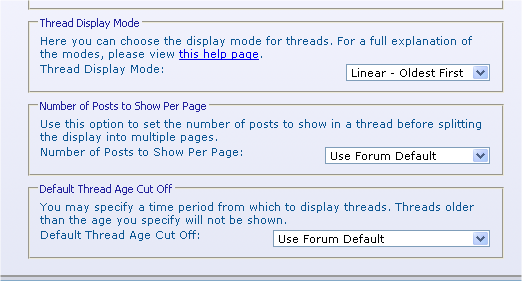
That's not a default. It's set in your UserCP.
-
Sep 22nd, 2010, 11:01 AM
#25
Re: [RESOLVED] Can we simplify inserting local images?
Check your settings in User CP:
Gary
-
Sep 22nd, 2010, 12:07 PM
#26
Re: [RESOLVED] Can we simplify inserting local images?
Originally Posted by MartinLiss
That's not a default. It's set in your UserCP.
Originally Posted by gep13
Check your settings in User CP:
Gary
Right, that's what I said, I did find it in the settings:
Originally Posted by JuggaloBrotha
I was able to find it in my profile so I see much older threads.
-
Sep 22nd, 2010, 02:45 PM
#27
Re: [RESOLVED] Can we simplify inserting local images?
Originally Posted by si_the_geek
Or they make fun of me
-
Sep 22nd, 2010, 03:01 PM
#28
Re: [RESOLVED] Can we simplify inserting local images?
Originally Posted by JPnyc
Or they make fun of me
Ha ha!!  The power... The power...
 Posting Permissions
- You may not post new threads
- You may not post replies
- You may not post attachments
- You may not edit your posts
-
Forum Rules
|
Click Here to Expand Forum to Full Width
|



 Reply With Quote
 2009 - 2016


