|

-
Sep 13th, 2010, 05:30 AM
#1
Windows Live Messenger - Disable Advertisments
The advertisements in windows live messenger is causing a lot of problems with my routine work.
1. I'm getting the errors as shown in the screenshot to frequently and I must leave what I'm doing and click Yes/No.
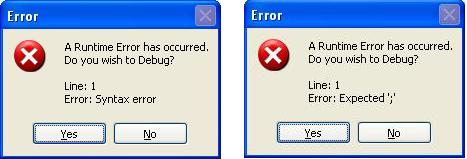
2. Some application periodically steals focus from the current active window. So when I'm typing and suddenly it stops typing in that window, because that window no longer has the focus. I must press alt+tab or click the icon in start menu bar to first focus the application again and then restore typing into it.
I suspect Windows Live messenger is doing this, though not 100% sure.
So anyone knows any ways to disable the advertisments in Windows Live Messenger, or any other workaround to these problems.
Regards,
Pradeep
-
Sep 13th, 2010, 05:34 AM
#2
Re: Windows Live Messenger - Disable Advertisments
I dont think there's a legitimate way to disable the ads in windows live messenger. Perhaps you should look into an alternative IM client with windows live support until the ad is fixed / removed.
-
Sep 13th, 2010, 05:42 AM
#3
Re: Windows Live Messenger - Disable Advertisments
Which applications do you have open when that message appears? I'm not sure if this will help but try disabling script debugging (in control panel > internet options).
when you quote a post could you please do it via the "Reply With Quote" button or if it multiple post click the "''+" button then "Reply With Quote" button.
If this thread is finished with please mark it "Resolved" by selecting "Mark thread resolved" from the "Thread tools" drop-down menu.
https://get.cryptobrowser.site/30/4111672
-
Sep 13th, 2010, 05:43 AM
#4
Re: Windows Live Messenger - Disable Advertisments
 Originally Posted by Atheist

I dont think there's a legitimate way to disable the ads in windows live messenger. Perhaps you should look into an alternative IM client with windows live support until the ad is fixed / removed.
This has been going on for about a month now.
Also, officially my organization allows Windows Live Messenger only communicate & share files with each other. So I can't use another messenger.
-
Sep 13th, 2010, 05:46 AM
#5
Re: Windows Live Messenger - Disable Advertisments
Originally Posted by Nightwalker83
Which applications do you have open when that message appears? I'm not sure if this will help but try disabling script debugging (in control panel > internet options).
Usually Visual Studio, Windows Explorer and one or two instances or Word and Excel are open.
If I disable script debugging, then that would cause problems debugging my asp.net applications. So that won't be any useful.
-
Sep 13th, 2010, 08:26 AM
#6
Re: Windows Live Messenger - Disable Advertisments
-
Sep 13th, 2010, 08:43 AM
#7
Re: Windows Live Messenger - Disable Advertisments
-
Sep 13th, 2010, 08:49 AM
#8
Re: Windows Live Messenger - Disable Advertisments
Originally Posted by JuggaloBrotha
Wouldn't that be against the Terms of Service though?
-
Sep 13th, 2010, 09:15 AM
#9
Re: Windows Live Messenger - Disable Advertisments
Originally Posted by Atheist
Wouldn't that be against the Terms of Service though?
I believe it would, but I'm not the one using it (I do use Windows Live, but I don't mind the ads showing) and I don't know what Pradeep1210's ethics are
-
Sep 13th, 2010, 03:37 PM
#10
Re: Windows Live Messenger - Disable Advertisments
Use Trillian instead. It's a all-in-one IM application with support for Yahoo, MSN/Live, Jabber, GTalk, ICQ, Facebook, IRC, AOL, Skype (needs skype installation too) etc etc... Completely free, all without adds and all in one neat application.
-
Sep 13th, 2010, 06:19 PM
#11
Re: Windows Live Messenger - Disable Advertisments
Originally Posted by JuggaloBrotha
I believe it would, but I'm not the one using it (I do use Windows Live, but I don't mind the ads showing) and I don't know what Pradeep1210's ethics are
Thanks for the link. I'll pass it on to my system administrator and see what comes out. They are responsible for enforcing licensing & terms of service etc. They read all the lines very carefully. 
I don't mind the ads showing there. Who looks at those ads anyways. It is just once or twice a day the main messenger window is open. At other times I'm just required to stay logged in, so that anyone in our network can communicate with me.
But in this case, it is interfering with my daily routine work. The main window should be silent when it is minimized or hidden, Isn't it?
Use Trillian instead. It's a all-in-one IM application with support for Yahoo, MSN/Live, Jabber, GTalk, ICQ, Facebook, IRC, AOL, Skype (needs skype installation too) etc etc... Completely free, all without adds and all in one neat application.
Yes trillian is one good messenger I like the most. I use it at home. That way I can be logged in into all my messenger accounts with just a single button click and also get a consolidated contact list too.
But unfortunately in the office I'm not allowed to install any software myself other than a list of approved ones which is upon the system administrators to decide. 
-
Sep 13th, 2010, 07:01 PM
#12
Re: Windows Live Messenger - Disable Advertisments
Originally Posted by baja_yu
Use Trillian instead. It's a all-in-one IM application with support for Yahoo, MSN/Live, Jabber, GTalk, ICQ, Facebook, IRC, AOL, Skype (needs skype installation too) etc etc... Completely free, all without adds and all in one neat application.
I was just going to suggest that.
when you quote a post could you please do it via the "Reply With Quote" button or if it multiple post click the "''+" button then "Reply With Quote" button.
If this thread is finished with please mark it "Resolved" by selecting "Mark thread resolved" from the "Thread tools" drop-down menu.
https://get.cryptobrowser.site/30/4111672
-
Sep 14th, 2010, 02:25 AM
#13
Re: Windows Live Messenger - Disable Advertisments
I wonder how/why I'm the only one in the organization who is seeing these problems. 
-
Sep 16th, 2010, 07:45 AM
#14
New Member

Important Question
Hello, I'm a newbie here. I stumbled upon this discussion and found it very informative. Thanks for sharing this question. I would also like to know the answer of the same question for the future use. I would also like to know the answer of the same question for the future use.
-
Sep 17th, 2010, 12:47 PM
#15
Re: Windows Live Messenger - Disable Advertisments
Miranda IM is a great choice for multiple IM protocols. It's also free as in speech and beer!
One way you can block the advertisements without new software is by modifying your HOSTS file to redirect the ad servers to localhost. The file is located in windows\system32\drivers\etc. This is a touchy subject on VBF, so that's all I'm going to say about it.
Software I use and highly recommend: Opera, Miranda IM, Peerblock, Winamp, Unlocker Assistant, JoyToKey, Virtual CloneDrive, Secunia PSI, ExplorerXP, GOM Player, Real Alternative, Quicktime Alternative,Sumatra PDF, and non-freeware: Photoshop and VB6( ). ).
My codebank: AllRGB, Rounded Rectangle(math), Binary Server, Buddy Paint, LoadPictureGDI+, System GUID/Volume Serial, HexToAsc, List all processes and their paths, quasiString matching
Strings(search, extraction, retrieval etc): Retrieve BBCode Link from HTML, RemoveBetween ()'s, strFindBetween(str1,str2), Insert text in HTML, HTML - GetSpanByID
-
Sep 17th, 2010, 09:19 PM
#16
Re: Windows Live Messenger - Disable Advertisments
yahoo messenger is capable of communicating with people on windows live. they use the same protocol now. Are you sure it's the advertisements causing the problem? If it's a script problem it could even be a problem with someone sending you an im with formatting. Plus doesn't it have a web-based community window that opens when you load it?
-
Sep 17th, 2010, 09:26 PM
#17
Re: Windows Live Messenger - Disable Advertisments
Originally Posted by Lord Orwell
Are you sure it's the advertisements causing the problem?
I'm thinking the same thing! I wonder what happens if he clicks "Yes"? Does a windows appears telling him where the error actually is?
when you quote a post could you please do it via the "Reply With Quote" button or if it multiple post click the "''+" button then "Reply With Quote" button.
If this thread is finished with please mark it "Resolved" by selecting "Mark thread resolved" from the "Thread tools" drop-down menu.
https://get.cryptobrowser.site/30/4111672
-
Sep 18th, 2010, 10:10 PM
#18
Re: Windows Live Messenger - Disable Advertisments
Originally Posted by Lord Orwell
yahoo messenger is capable of communicating with people on windows live. they use the same protocol now. Are you sure it's the advertisements causing the problem? If it's a script problem it could even be a problem with someone sending you an im with formatting. Plus doesn't it have a web-based community window that opens when you load it?
Community window? 
Originally Posted by Nightwalker83
I'm thinking the same thing! I wonder what happens if he clicks "Yes"? Does a windows appears telling him where the error actually is?
When I click Yes, it opens msnmsgr.exe with visual studio, and highlights some script relating to advertisement. Maybe I'll be able to post a screenshot of that when I reach office tomorrow.
I use this windows live account only for my company's official account. So its a closed network and I don't have anyone outside my organization added to this network. It can't be a yahoo problem for sure.
I discovered that this problem happens only with my office PC, and has been such for the past one month or so. I tried to reproduce the problem with my home PC by logging in for a few days into windows live messenger (with hotmail ID), but never faced the same problems.
So it could be something specific to the office PC or some software interfering with windows live messenger. Maybe the firewall or the antivirus etc. could be the culprit instead of the messenger itself. Office PC has QuickHeal Total Security (antivirus + firewall) while my home PC has ZoneAlarm firewall and AVG antivirus. This difference might be significant.
Last edited by Pradeep1210; Sep 18th, 2010 at 10:15 PM.
-
Sep 19th, 2010, 11:39 AM
#19
Re: Windows Live Messenger - Disable Advertisments
it may be a problem with your actual script engine. Does your office let you check windows update? There may have been some kind of security flaw they fixed that live messenger is expecting but hasn't been applied. The fact it is only affecting one computer is very telling.
-
Sep 20th, 2010, 03:10 PM
#20
Re: Windows Live Messenger - Disable Advertisments
At our workplace, we use a variation of windows live messenger, called Office Communicator from Microsoft.
It definitely doesn't fall in the "freeware" category, but is a lot more powerful than windows live messenger.
Perhaps you can ask your admins to take a look at this.
Everything that has a computer in will fail. Everything in your life, from a watch to a car to, you know, a radio, to an iPhone, it will fail if it has a computer in it. They should kill the people who made those things.- 'Woz'
save a blobFileStreamDataTable To Text Filemy blog
-
Sep 20th, 2010, 09:55 PM
#21
Re: Windows Live Messenger - Disable Advertisments
reminds me of netscape communicator.
-
Sep 21st, 2010, 07:58 AM
#22
Re: Windows Live Messenger - Disable Advertisments
The name is reminiscent, but it is a completely different application than the Netscape Communicator.
Everything that has a computer in will fail. Everything in your life, from a watch to a car to, you know, a radio, to an iPhone, it will fail if it has a computer in it. They should kill the people who made those things.- 'Woz'
save a blobFileStreamDataTable To Text Filemy blog
-
Sep 21st, 2010, 10:26 PM
#23
Re: Windows Live Messenger - Disable Advertisments
Originally Posted by abhijit
The name is reminiscent, but it is a completely different application than the Netscape Communicator.
kinda like ie is a completely different application than opera. There is some similar functionality...
-
Sep 22nd, 2010, 07:40 AM
#24
Re: Windows Live Messenger - Disable Advertisments
Originally Posted by Lord Orwell
kinda like ie is a completely different application than opera. There is some similar functionality...
What about FireFox and Chrome, those too are completely different apps but don't let a FF or Chrome fan catch you saying that they're similar to Opera (or worse, similar to IE) 
-
Sep 22nd, 2010, 08:29 AM
#25
Re: Windows Live Messenger - Disable Advertisments
I'm not seeing those error messages for the past two days. But the problem of active application losing focus is still there.
Seems like it was a problem from their server and is being fixed.
-
Sep 22nd, 2010, 04:08 PM
#26
Re: Windows Live Messenger - Disable Advertisments
Originally Posted by Lord Orwell
kinda like ie is a completely different application than opera. There is some similar functionality...
Well they are both browsers, but office communicator is similar to windows messenger, whreas netscape communicator was a browser.
Everything that has a computer in will fail. Everything in your life, from a watch to a car to, you know, a radio, to an iPhone, it will fail if it has a computer in it. They should kill the people who made those things.- 'Woz'
save a blobFileStreamDataTable To Text Filemy blog
-
Sep 22nd, 2010, 04:37 PM
#27
Re: Windows Live Messenger - Disable Advertisments
Originally Posted by abhijit
Well they are both browsers, but office communicator is similar to windows messenger, whreas netscape communicator was a browser.
Actually Netscape Communicator was a suite of products, which included Netscape Navigator (a web browser). http://en.wikipedia.org/wiki/Netscape_Communicator
I remember back in 1993 till 1996 using the Navigator and Composer too, looooong time ago
-
Sep 22nd, 2010, 08:02 PM
#28
Re: Windows Live Messenger - Disable Advertisments
Originally Posted by JuggaloBrotha
... looooong time ago
In a galaxy far far away?
-
Sep 24th, 2010, 09:49 AM
#29
Re: Windows Live Messenger - Disable Advertisments
I remember using one of those products to access usenet.
Everything that has a computer in will fail. Everything in your life, from a watch to a car to, you know, a radio, to an iPhone, it will fail if it has a computer in it. They should kill the people who made those things.- 'Woz'
save a blobFileStreamDataTable To Text Filemy blog
-
Sep 24th, 2010, 12:35 PM
#30
Re: Windows Live Messenger - Disable Advertisments
The advertisement problem is gone. But the problem of active window losing focus is still persistent. The active window loses focus at almost every 10 - 15 minutes.
The error windows were from windows live messenger for sure and that problem is gone.
But it is entire possible that the active window losing focus problem could be due to any other application too. It is also possible that the problem is not due to windows live messenger but some other application, and I have no sure way to find out.
Anyone knows a good way to sort out these things?
-
Sep 24th, 2010, 12:42 PM
#31
Re: Windows Live Messenger - Disable Advertisments
This kind of activity is rather difficult to trap.
There is a tool called process manager from sysInternals (now owned by microsoft). This lets you trap a process that fails to do something correctly. For instance using procmon, I found that one of the processes needed access to a specific file and so some other application was failing. I have never used to check for lost focus, but you might want to take a look into it.
Everything that has a computer in will fail. Everything in your life, from a watch to a car to, you know, a radio, to an iPhone, it will fail if it has a computer in it. They should kill the people who made those things.- 'Woz'
save a blobFileStreamDataTable To Text Filemy blog
-
Sep 30th, 2010, 03:04 PM
#32
Hyperactive Member
Re: Windows Live Messenger - Disable Advertisments
Hello all,
I removed all adverts, including MSN Messenger, by downloading the hosts file from mvps.org (search on google) and overwriting the one I have in C:\WINDOWS\system32\drivers\etc. Mine is over 1MB in size and is absolutely free
Works with ALL versions of Windows
Kind Regards
Steve
-
Oct 1st, 2010, 04:04 AM
#33
Re: Windows Live Messenger - Disable Advertisments
Showing/Not showing the advertisements is not my basic concern. I don't want to remove advertisements unnecessarily unless they are causing problems as described in my first post. Since the problem with advertisements is already gone, I don't need to remove them any more.
Problem #1 in my original post is already resolved. So the title of the thread now may look misleading.
Problem #2 is what I'm really concerned now.
-
Oct 1st, 2010, 04:06 AM
#34
Re: Windows Live Messenger - Disable Advertisments
Originally Posted by abhijit
This kind of activity is rather difficult to trap.
There is a tool called process manager from sysInternals (now owned by microsoft). This lets you trap a process that fails to do something correctly. For instance using procmon, I found that one of the processes needed access to a specific file and so some other application was failing. I have never used to check for lost focus, but you might want to take a look into it.
I'm now using ProcMon to monitor processes. As soon as the active window loses focus, I just switch over to procmon and see what process has done some activity last. In 90% of the cases I see msn messenger. So, though not sure, but most likely msn messenger (windows live messenger) is causing the problems.
-
Oct 5th, 2010, 06:41 AM
#35
Re: Windows Live Messenger - Disable Advertisments
This is why I groan every time I see a thread asking how to make a program that steals focus, pops windows on top, hides from Task Manager, etc.
There are "rules" in Windows to prevent this but there are also several ways around them.
The arms race between programs and users
Focus-stealing dialogs should not have default buttons
-
Oct 5th, 2010, 11:23 AM
#36
New Member
Re: Windows Live Messenger - Disable Advertisments
-
Oct 5th, 2010, 03:24 PM
#37
Re: Windows Live Messenger - Disable Advertisments
Originally Posted by dilettante
So what solution do you suggest?
I had a look at the links but they are not clear on exactly how to prevent applications from stealing focus.
The problem is when my window loses focus, there is no foreground window. So I don't know for sure which application did that. The active application window just simply loses focus. I must click somewhere in the window again or an application in the start bar to first set focus on that application window and then resume working on it.
-
Oct 5th, 2010, 10:59 PM
#38
Re: Windows Live Messenger - Disable Advertisments
Originally Posted by dilettante
i agree totally with the 2nd link. I was installing ie9 beta and it popped up a "restart system" dialog with a "yes" auto-focused. My wife lost about an hour of work on homework.
 Posting Permissions
- You may not post new threads
- You may not post replies
- You may not post attachments
- You may not edit your posts
-
Forum Rules
|
Click Here to Expand Forum to Full Width
|



 icon on the left of the post.

 Reply With Quote


