|

-
Aug 31st, 2010, 08:11 AM
#1
Thread Starter
Junior Member

 Collecting all AD groups a user is member of, including nested ones Collecting all AD groups a user is member of, including nested ones
Dear all,
I've created a function that works very well, but it's limited to AD groups direct membership. I would like to display all AD groups a user belongs to, included the nested one.
Here is my code:
vb Code:
Sub CollectGroupMemberShip() 'Reset the form to default values ResetToDefault() Dim strGroupList = Nothing 'Variable that will be used to cancel the rest of the process in case wrong username UserNotFound = 0 'Various Dim to connect to AD using wished domain and user account Dim rootDSE As New DirectoryEntry("LDAP://MyDomain/RootDSE") Dim filterString As String = "(&(objectClass=user)(objectCategory=person)(sAMAccountName=" & UserLoginID_TextBox.Text & "))" Dim domainRoot As New DirectoryEntry("LDAP://MyDomain/" & rootDSE.Properties("defaultNamingContext")(0).ToString()) Dim domainSearch As New DirectorySearcher(domainRoot, filterString) 'Property to search for domainSearch.PropertiesToLoad.Add("memberOf") Dim domainSearchResult As SearchResult = domainSearch.FindOne() 'In case the username is not found, raise an error and quit If domainSearchResult Is Nothing Then MsgBox("User not found. Please check the spelling!", MsgBoxStyle.Critical, "User not found...") UserNotFound = 1 Exit Sub End If 'For each group the user is member of, I isolate the name of the group and I add it into a list For Each domainGroup In domainSearchResult.Properties("memberof") 'Split the full path using 'comma' Dim Split1 = Split(domainGroup, ",") 'Split the first occurance using 'equal' to get rid of 'CN=' Dim Split2 = Split(Split1(0), "=") 'Dim the group name (OK not really necessary, but nicer for using it afterwards) Dim GroupName = Split2(1) 'Now time to use the group list If strGroupList = "" Then strGroupList = GroupName Else strGroupList = strGroupList & "," & GroupName End If Next 'Split the group list using 'comma' Dim arrGroupList = Split(strGroupList, ",") 'Using 'QuickSort' function to sort the list by alphabetical order Quicksort(arrGroupList, LBound(arrGroupList), UBound(arrGroupList)) 'Re-arrange the list to have one group per line Dim strSortedGroups = Join(arrGroupList, vbCrLf) 'Display the result in the textbox on the form UserGroups_TextBox.Text = strSortedGroups 'Just display on the form the number of groups the user is member of Groups_GroupBox.Text = Groups_GroupBox.Text & " (" & arrGroupList.Length & ")" End Sub
Is there any ways to achieve that?
Many thanks in advance for your answer(s)
Mezzomix23
Last edited by mezzomix23; Sep 1st, 2010 at 10:39 AM.
-
Aug 31st, 2010, 09:49 AM
#2
Re: Collecting all AD groups a user is member of, including nested ones
Take a look at chris128's code bank submission.
-
Aug 31st, 2010, 02:16 PM
#3
Thread Starter
Junior Member
Re: Collecting all AD groups a user is member of, including nested ones
 Originally Posted by ForumAccount

Hi ForumAccount,
Thank you for the link, Unfortunately, it didn't answer my question.
In addition to that, here is a quote from the author:
Originally Posted by chris128
Also, this is a codebank thread and as such it is not really for asking questions so if you do still have more questions that are not strictly related to this ADTreeView control (finding out which users are in a group is not really related) then please post them in the VB.NET part of the forum and if necessary then just put a link to this thread in there so that people know what you are working with 
I'll wait (and continue to search on my side as well) for an answer on this topic
Mezzomix23
-
Sep 1st, 2010, 09:32 AM
#4
Re: Collecting all AD groups a user is member of, including nested ones
The problem with doing this, and the reason why my treeview does not get nested group members, is because you can easily end up in an endless loop.
Lets say you have a group (lets call it Group_A) and another group called (lets call this one Group_B) - Group_A could be a member of Group_B but then Group_B can also be a member of Group_A. So if I was trying to get all groups that a user was a member of then I would loop through the memberOf attribute of the user, then recursively loop through the memberOf attribute for every group that the user was a member of. When I hit Group_A though I will find Group_B in the memberOf attribute, so then I query that and find Group_A in the memberOf attribute so I query that and this just goes round and round infinitely. You might be able to get round this by building a list of all groups you have queried so far and then before you query each group you would check to make sure they are not already in the list... not sure how well this would work but its an idea.
Anyway, if you are 100% sure you don't have any groups that contain other groups which might then you could do it quite easily - I'll put together an example and post it in a few minutes but in the mean time here's a few other suggestions based on the code you posted:
1. Dispose of your DirectoryEntry and DirectorySearcher objects - otherwise you will end up with memory leaks. Easiest way to deal with this is just to use the Using statement when you declare them, like so:
vb Code:
Using domainSearch As New DirectorySearcher
  'Do stuff here that uses this DirectorySearcher instance
End Using
2. A more efficient LDAP filter than the one you are currently using to find users would be this:
vb Code:
Dim filterString As String = "(&(sAMAccountType=805306368)(sAMAccountName=" & UserLoginID_TextBox.Text & "))"
3. If you are wanting to search the domain that your user and computer accounts are members of, then rather than doing all this:
vb Code:
Dim rootDSE As New DirectoryEntry("LDAP://MyDomain/RootDSE")
        Dim filterString As String = "(&(objectClass=user)(objectCategory=person)(sAMAccountName=" & UserLoginID_TextBox.Text & "))"
        Dim domainRoot As New DirectoryEntry("LDAP://MyDomain/" & rootDSE.Properties("defaultNamingContext")(0).ToString())
        Dim domainSearch As New DirectorySearcher(domainRoot, filterString)
you can just do this:
vb Code:
Dim filterString As String = "(&(objectClass=user)(objectCategory=person)(sAMAccountName=" & UserLoginID_TextBox.Text & "))"
Dim domainSearch As New DirectorySearcher(New DirectoryEntry, filterString)
(but obviously that is not taking into account the previous points about the filter and the Using statement)
Hope that helps
Last edited by chris128; Sep 1st, 2010 at 10:44 AM.
-
Sep 1st, 2010, 10:41 AM
#5
Re: Collecting all AD groups a user is member of, including nested ones
OK here's an example of how you could do it, but bear in mind that this does not include primary groups. I'll explain after this code...
vb Code:
Private Function GetUserGroups(ByVal sAMAccountName As String) As List(Of String)
        Using RootDE As New DirectoryEntry
            Using Searcher As New DirectorySearcher(RootDE)
                Searcher.Filter = "(&(sAMAccountType=805306368)(sAMAccountName=" & sAMAccountName & "))"
                Searcher.PropertiesToLoad.Add("memberOf")
                Dim UserSearchResult As SearchResult = Searcher.FindOne
                If UserSearchResult Is Nothing Then
                    Throw New ApplicationException("No user with username " & sAMAccountName & " could be found in the domain")
                Else
                    Dim GroupList As New List(Of String)
                    For Each Group In UserSearchResult.Properties("memberOf")
                        Dim GroupName As String = CStr(Group).Remove(0, 3)
                        GroupName = GroupName.Remove(GroupName.IndexOf(","))
                        RecursiveGetGroups(Searcher, GroupList, GroupName)
                    Next
                    Return GroupList
                End If
            End Using
        End Using
End Function
 Private Sub RecursiveGetGroups(ByVal SearcherObject As DirectorySearcher, ByVal CurrentList As List(Of String), ByVal GroupName As String)
        If Not CurrentList.Contains(GroupName) Then
            CurrentList.Add(GroupName)
            SearcherObject.Filter = "(&(objectClass=Group)(CN=" & GroupName & "))"
            Dim GroupSearchResult As SearchResult = SearcherObject.FindOne
            If Not GroupSearchResult Is Nothing Then
                For Each Group In GroupSearchResult.Properties("memberOf")
                    Dim ParentGroupName As String = CStr(Group).Remove(0, 3)
                    ParentGroupName = ParentGroupName.Remove(ParentGroupName.IndexOf(","))
                    RecursiveGetGroups(SearcherObject, CurrentList, ParentGroupName)
                Next
            End If
        End If
End Sub
So to use it to get all groups for a user with the username "JoeBloggs" you would just do this:
vb Code:
For Each group As String In GetUserGroups("JoeBloggs")
       MessageBox.Show(group)
Next
As mentioned above, primary groups are a bit of a pain because when a user is a member of a group and you set it as their primary group (or if they already have a Primary Group defined by default, like when the Domain Users group is the Primary Group for newly created users) then this group will not actually be held in the user's MemberOf attribute. Instead, the user's PrimaryGroupID attribute gets set to the SID of the group... which makes it a bit of a pain for us when we are trying to work with a user's group membership from code.
I wrote the function below to use in some code that removed users from groups, because I needed to check to see if the group they were being removed from was the user's primary group and warn the user if it was (because you can't remove a user from their primary group). Whilst you cant use this directly to get the name of the primary group, hopefully it gives you something to at least get started with:
vb Code:
Public Shared Function IsPrimaryGroup(ByVal GroupDE As DirectoryEntry, ByVal AccountPrimaryGroupID As Integer) As Boolean
        Try
            Dim GroupIDBytes() As Byte = DirectCast(GroupDE.Properties("objectSid").Value, Byte())
            Dim GroupSID As New Security.Principal.SecurityIdentifier(GroupIDBytes, 0)
            Dim SplitSID() As String = GroupSID.Value.Split("-"c)
            Return AccountPrimaryGroupID = CInt(SplitSID(SplitSID.Length - 1))
        Catch ex As Exception
            Throw New ApplicationException("Error comparing SID of group to account primary group ID: " & ex.Message)
        End Try
End Function
-
Sep 1st, 2010, 01:33 PM
#6
Thread Starter
Junior Member
Re: Collecting all AD groups a user is member of, including nested ones
Hi Chris,
Thank you very much for your help.
I've tested your code and it seems to work quite good. But (yes, there is a "but"  ), for my own user account, and the code returns 159 groups. When I try "whoami /groups" from a command line on Vista, I have 177 groups. ), for my own user account, and the code returns 159 groups. When I try "whoami /groups" from a command line on Vista, I have 177 groups.
Would you have an idea why?
For reference, I've taken your code as is, except for the display and the error message in case user is not found (I've added the "QuickSort" function, if the difference comes from there), which gives:
vb Code:
Private Function GetUserGroups(ByVal sAMAccountName As String) As List(Of String)
        Using RootDE As New DirectoryEntry
            Using Searcher As New DirectorySearcher(RootDE)
                Searcher.Filter = "(&(sAMAccountType=805306368)(sAMAccountName=" & sAMAccountName & "))"
                Searcher.PropertiesToLoad.Add("memberOf")
                Dim UserSearchResult As SearchResult = Searcher.FindOne
                If UserSearchResult Is Nothing Then
                    MsgBox("User not found. Please check the spelling!", MsgBoxStyle.Critical, "User not found...")
                    UserNotFound = 1
                    Return Nothing
                    Exit Function
                Else
                    Dim GroupList As New List(Of String)
                    For Each Group In UserSearchResult.Properties("memberOf")
                        Dim GroupName As String = CStr(Group).Remove(0, 3)
                        GroupName = GroupName.Remove(GroupName.IndexOf(","))
                        RecursiveGetGroups(Searcher, GroupList, GroupName)
                    Next
                    Return GroupList
                End If
            End Using
        End Using
    End Function
     Private Sub RecursiveGetGroups(ByVal SearcherObject As DirectorySearcher, ByVal CurrentList As List(Of String), ByVal GroupName As String)
        If Not CurrentList.Contains(GroupName) Then
            CurrentList.Add(GroupName)
            SearcherObject.Filter = "(&(objectClass=Group)(CN=" & GroupName & "))"
            Dim GroupSearchResult As SearchResult = SearcherObject.FindOne
            If Not GroupSearchResult Is Nothing Then
                For Each Group In GroupSearchResult.Properties("memberOf")
                    Dim ParentGroupName As String = CStr(Group).Remove(0, 3)
                    ParentGroupName = ParentGroupName.Remove(ParentGroupName.IndexOf(","))
                    RecursiveGetGroups(SearcherObject, CurrentList, ParentGroupName)
                Next
            End If
        End If
    End Sub
      Sub CollectGroupMemberShip()
        Dim strGroupList = Nothing
        UserNotFound = 0
         GetUserGroups(UserLoginID_TextBox.Text)
         If UserNotFound = 1 Then
            Exit Sub
        End If
         For Each group As String In GetUserGroups(UserLoginID_TextBox.Text)
            If strGroupList = "" Then
                strGroupList = group
            Else
                strGroupList = strGroupList & "," & group
            End If
        Next
         Dim arrGroupList = Split(strGroupList, ",")
        Quicksort(arrGroupList, LBound(arrGroupList), UBound(arrGroupList))
        Dim strSortedGroups = Join(arrGroupList, vbCrLf)
        UserGroups_TextBox.Text = strSortedGroups
         Groups_GroupBox.Text = Groups_GroupBox.Text & " (" & arrGroupList.Length & ")"
     End Sub
     Sub Quicksort(ByVal strValues(), ByVal min, ByVal max)
         Dim strMediumValue, high, low, i
         'If the list has only 1 item, it's sorted.
        If min >= max Then Exit Sub
         ' Pick a dividing item randomly.
        i = min + Int(Rnd(max - min + 1))
        strMediumValue = strValues(i)
         ' Swap the dividing item to the front of the list.
        strValues(i) = strValues(min)
         ' Separate the list into sublists.
        low = min
        high = max
        Do
            ' Look down from high for a value < strMediumValue.
            Do While strValues(high) >= strMediumValue
                high = high - 1
                If high <= low Then Exit Do
            Loop
             If high <= low Then
                'The list is separated.
                strValues(low) = strMediumValue
                Exit Do
            End If
             'Swap the low and high strValues.
            strValues(low) = strValues(high)
             'Look up from low for a value >= strMediumValue.
            low = low + 1
            Do While strValues(low) < strMediumValue
                low = low + 1
                If low >= high Then Exit Do
            Loop
             If low >= high Then
                'The list is separated.
                low = high
                strValues(high) = strMediumValue
                Exit Do
            End If
             'Swap the low and high strValues.
            strValues(high) = strValues(low)
        Loop 'Loop until the list is separated.
         'Recursively sort the sublists.
        Quicksort(strValues, min, low - 1)
        Quicksort(strValues, low + 1, max)
     End Sub
Thank you
Mezzomix23
-
Sep 1st, 2010, 01:47 PM
#7
Re: Collecting all AD groups a user is member of, including nested ones
The reason you get extra groups from tools like WHOAMI or GPRESULT is because they include local groups (groups on the computer you are using, such as the Users group) and computed groups (like the Everyone group). If you only ever wanted to identify the groups that the currently logged on user was a member of then you would be able to get those same groups somehow but as I believe you want to be able to identify the group membership of any user then the best you can do is find out which Active Directory groups they are in.
Oh and you dont need your own QuickSort method just to alphabetically sort a list of strings you can just use the built-in Sort method of the List(Of String) class. For example:
vb.net Code:
'Create a list and add stuff to it in an unsorted order
        Dim Groups As New List(Of String)
        Groups.Add("Something")
        Groups.Add("zSomething")
        Groups.Add("aSomething")
         'Use the built in Sort method
        Groups.Sort()
         'Now if we loop through from start to finish they are in
        'alphabetical order
        For i As Integer = 0 To Groups.Count - 1
            MessageBox.Show(Groups(i))
        Next
Last edited by chris128; Sep 1st, 2010 at 01:52 PM.
-
Sep 1st, 2010, 03:15 PM
#8
Thread Starter
Junior Member
Re: Collecting all AD groups a user is member of, including nested ones
Hi Chris,
Thank you for your answer.
I will test your sort method tomorrow at work. Is this code correct or is it to complicated (once again)? I'm using a textbox to display all groups, one group per line
vb Code:
Dim Groups As New List(Of String)
 For Each group As String In GetUserGroups(UserLoginID_TextBox.Text)
    Groups.Add(group)
Next
 'Use the built in Sort method
Groups.Sort()
 For i As Integer = 0 To Groups.Count - 1
    If strGroupList = "" Then
        strGroupList = Groups(i)
    Else
        strGroupList = strGroupList & vbCrLf & Groups(i)
    End If
Next
 UserGroups_TextBox.Text = strGroupList
Groups_GroupBox.Text = Groups_GroupBox.Text & "(" & strGroupList.Length & ")"
Regarding the groups, while using WHOAMI, I've removed the local groups before the count. All groups that remained are like:
DOMAIN\Name of the group
I will check the groups' difference to say if I can identify them and understand why I have not the same count 
Thank you
Mezzomix23
-
Sep 1st, 2010, 03:42 PM
#9
Re: Collecting all AD groups a user is member of, including nested ones
There is no need to use that loop at the start of your code because all you are doing is looping through a List(Of String) and adding each item in it to a new List(Of String)... you may as well just keep the original list
Here is how I would do it (haven't tested this code but it should work) :
vb Code:
Dim Groups As List(Of String)
Groups = GetUserGroups(UserLoginID_TextBox.Text)
Groups.Sort()
 Dim GroupsStringBuilder As New System.Text.StringBuilder
 For i As Integer = 0 To Groups.Count - 1
     GroupsStringBuilder.AppendLine(Groups(i))
Next
 UserGroups_TextBox.Text = GroupsStringBuilder.ToString
Groups_GroupBox.Text &= "(" & Groups.Count & ")"
Regarding the groups, while using WHOAMI, I've removed the local groups before the count. All groups that remained are like:
DOMAIN\Name of the group
I will check the groups' difference to say if I can identify them and understand why I have not the same count
There will be at least one domain group that is not in the list my code produces - the user's primary group. I explained why in one of my previous posts in this thread. As a result of that, any groups that the user's primary group is a member of also wont be in there. If I get chance tomorrow I might try and write a function that gets the user's primary group name as well but I think I've given you plenty to be getting on with and you can hopefully work out how to do that on your own
-
Sep 2nd, 2010, 01:46 AM
#10
Thread Starter
Junior Member
Re: Collecting all AD groups a user is member of, including nested ones
Hi Chris,
Your code works perfectly
I've compared the 2 lists and you are right, all missing groups are from "DOMAIN\Domain Users".
I've been able to see that some I'm member of groups I should really not be part of, due to the fact Domain Users have been added as member :s but this is another story.
Despite your explanation are clear, I'm still not fully understanding why it's hard to get users' primary group, therefore little bit hard for me to write the code  If you could help me again? If you could help me again?
Another question: Do you think it could be possible to have a display like that:
GroupName1
GroupName2
GroupName3 (Member of GroupName4)
or
GroupName1
GroupName2
GroupName3 (Hosts GroupName4)
Thank you in advance
Mezzomix23
-
Sep 2nd, 2010, 03:51 AM
#11
Re: Collecting all AD groups a user is member of, including nested ones
Despite your explanation are clear, I'm still not fully understanding why it's hard to get users' primary group, therefore little bit hard for me to write the code If you could help me again?
OK I'll try and explain it again but I think I'm going to end up just saying pretty much what I have already said
To determine a user's group membership, in my code and in the code that you were using before, we look at the user's MemberOf attribute? The MemberOf attribute of each user holds a list of references to every group that the user is a member of (in their domain anyway, it doesn't hold references to groups in trusted domains). However, as groups have (or used to have) a relatively low limit to how many members they can have, Microsoft needed to find another way of adding any number of users to the Domain Users group. So because the group could not hold a reference to all of the thousands of users that a company might have, they made it so that each user object had an attribute that could hold the ID of a single group and this would count as that user being a member of that group.
So in every user's PrimaryGroupID attribute, you will find the ID (which is the last section of the group's SID, also known as the RID) of the group that is that user's primary group. Now because the user is 'joined' to the group just by having the group's RID in the PrimaryGroupID attribute then there is no reference to the primary group in the user's MemberOf attribute, which is why it makes it difficult for us.
What we have to do is look at the user's PrimaryGroupID attribute to get the group's RID, then convert this RID to a full SID (which we do by just adding the RID to end of the SID of the domain), then find the group with that SID and get it's name.
I'm actually going to be writing a little tool today or tomorrow that will get a full list of the groups a user is a member of, so I will have to figure this primary group issue out. So I'll post the code here if I get it all working
-
Sep 2nd, 2010, 06:22 AM
#12
Re: Collecting all AD groups a user is member of, including nested ones
Well I've made my application that lists all group membership, so here's the function I came up with for getting the name of the primary group from the ID held in the PrimaryGroupID attribute of the user:
vb Code:
Private Function GetPrimaryGroupName(ByVal SearcherObject As DirectorySearcher, ByVal User As SearchResult) As String
        Try
            Dim UserSID As New Security.Principal.SecurityIdentifier(DirectCast(User.Properties("objectSid")(0), Byte()), 0)
            Dim GroupSID As New Security.Principal.SecurityIdentifier(UserSID.AccountDomainSid.ToString & "-" & CStr(User.Properties("primaryGroupID")(0)))
            Dim GroupSIDString As New System.Text.StringBuilder
            Dim GroupSIDBytes(GroupSID.BinaryLength - 1) As Byte
            GroupSID.GetBinaryForm(GroupSIDBytes, 0)
             For i As Integer = 0 To GroupSIDBytes.Length - 1
                GroupSIDString.Append("\" & Hex(GroupSIDBytes(i)).PadLeft(2, "0"c))
            Next
             SearcherObject.Filter = "(objectSid=" & GroupSIDString.ToString & ")"
            Dim GroupSearchResult As SearchResult = SearcherObject.FindOne
            If Not GroupSearchResult Is Nothing Then
                Dim GroupName As String = GroupSearchResult.Path.Replace("LDAP://", String.Empty).Remove(0, 3)
                Return GroupName.Remove(GroupName.IndexOf(","))
            Else
                Throw New ApplicationException("Failed to locate primary group - no results returned for the LDAP query " & SearcherObject.Filter)
            End If
        Catch ex As Exception
            Throw New ApplicationException("Error getting primary group: " & ex.Message.Trim)
        End Try
End Function
So to use this from the previous code example, we just need to modify it to look like this:
vb Code:
Private Function GetUserGroups(ByVal sAMAccountName As String) As List(Of String)
        Using RootDE As New DirectoryEntry
            Using Searcher As New DirectorySearcher(RootDE)
                Searcher.Filter = "(&(sAMAccountType=805306368)(sAMAccountName=" & sAMAccountName & "))"
                Searcher.PropertiesToLoad.Add("memberOf")
                Searcher.PropertiesToLoad.Add("primaryGroupID")
                Searcher.PropertiesToLoad.Add("objectSid")
                Dim UserSearchResult As SearchResult = Searcher.FindOne
                If UserSearchResult Is Nothing Then
                    Throw New ApplicationException("No user with username " & sAMAccountName & " could be found in the domain")
                Else
                    Dim GroupList As New List(Of String)
                    For Each Group In UserSearchResult.Properties("memberOf")
                        Dim GroupName As String = CStr(Group).Remove(0, 3)
                        GroupName = GroupName.Remove(GroupName.IndexOf(","))
                        RecursiveGetGroups(Searcher, GroupList, GroupName)
                    Next
                    RecursiveGetGroups(Searcher, GroupList, GetPrimaryGroupName(Searcher, UserSearchResult)) '<-- this is where we call our new function
                    Return GroupList
                End If
            End Using
        End Using
End Function
So that should now get ALL domain groups that a user is a member of
I'm going to tidy the code up a bit and then post it on my blog or in the codebank on this forum, and the tool that uses these methods to show you a list of all groups will be available on my website by tomorrow (for free of course)
-
Sep 2nd, 2010, 06:41 AM
#13
Thread Starter
Junior Member
Re: Collecting all AD groups a user is member of, including nested ones
Hi Chris,
Thank you very very much. It works perfectly and your second try for explanation clarified the situation.
What about?
Another question: Do you think it could be possible to have a display like that:
GroupName1
GroupName2
GroupName3 (Member of GroupName4)
or
GroupName1
GroupName2
GroupName3 (Hosts GroupName4)
Do you think this is something possible?
Thank you
Mezzomix23
-
Sep 2nd, 2010, 07:52 AM
#14
Re: Collecting all AD groups a user is member of, including nested ones
It is definitely possible... but I think you might end up with a very long list that will not be very easy to read and understand, unless of course you don't have many groups that are members of other groups.
I haven't got time at the moment to show you exactly how to do it but it shouldn't be that hard to modify my example above to do that.
-
Sep 3rd, 2010, 03:04 AM
#15
Re: Collecting all AD groups a user is member of, including nested ones
OK I've posted a post on my blog with a slightly improved version of that GetPrimaryGroupName function and an explanation of how it works. However, one thing to point out is that there is a bug in the code posted on my blog that means if a group has a comma in the name then you will not get the full group name returned. I have fixed this in the code I'm using in my program so I'll post the fixed code later today. Anyway here's the blog post: http://cjwdev.wordpress.com/2010/09/...ive-directory/
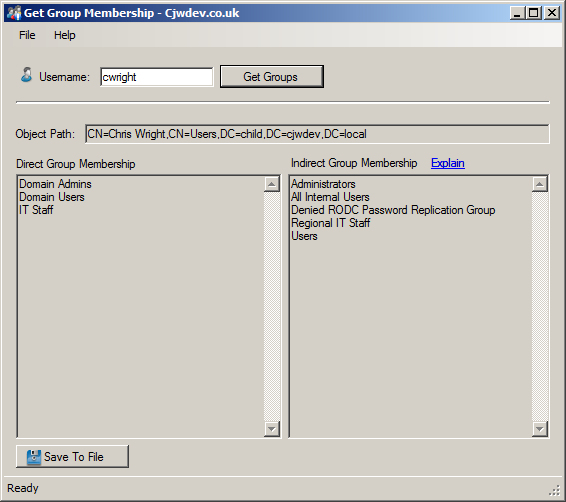
Also the program I wrote that uses this function along with the other functions I posted in this thread to show you the user's group membership can be downloaded here if anyone is interested: http://www.cjwdev.co.uk/Software/Get...ship/Info.html
Here's a screenshot:
-
Sep 3rd, 2010, 04:03 AM
#16
Thread Starter
Junior Member
Re: Collecting all AD groups a user is member of, including nested ones
Hi Chris,
Thank you for your time helping me.
I've downloaded the application, but it's only an exe file. I'm more interested into the code behind, to separate direct from indirect membership, as well as your function to save the result to a file (I've tried several ways, but there was always something that didn't work, so I've given up for the moment).
Is it possible to have the code of the application?
Thank you
Mezzomix23
-
Sep 3rd, 2010, 05:19 AM
#17
Re: Collecting all AD groups a user is member of, including nested ones
Yeah I know, I didn't write the application for you, I wrote it just as a tool for other people to use
Have you actually tried to do it yourself? I've done an awful lot of the work for you so far, and identifying which groups the user is directly a member of and which they are indirectly a member of is fairly simple when you already have the code I've posted.
As for saving the list of groups to a text file, if you have already got all of your groups in a textbox on separate lines then it is as simple as:
vb Code:
IO.File.WriteAllLines("C:\ExampleFile.txt", GroupTextBox.Lines)
-
Sep 3rd, 2010, 07:25 AM
#18
Re: Collecting all AD groups a user is member of, including nested ones
In response to the PM you just sent me asking about how to prompt the user for a file location - you can use the SaveFileDialog class like so:
vb Code:
Dim SFD As New SaveFileDialog
If SFD.ShowDialog = Windows.Forms.DialogResult.OK Then
      IO.File.WriteAllLines(SFD.FileName, SomeTextBox.Lines)
End If
SFD.Dispose()
So as you can see, we use the SaveFileDialog's FileName property to get the path to the file that the user selected and pass that in to the WriteAllLines method so that it writes to that location.
-
Sep 3rd, 2010, 09:08 AM
#19
Thread Starter
Junior Member
Re: Collecting all AD groups a user is member of, including nested ones
Hi Chris,
This helped me a lot, thank you.
Regarding the direct group membership vs indirect group membership, as I said, I've not understood all the piece of code you have used so far, so I've not been able to find out how to generate 2 lists... I will keep on trying and let you know if I managed to or not.
Thank you
Mezzomix23
-
Sep 3rd, 2010, 09:27 AM
#20
Re: Collecting all AD groups a user is member of, including nested ones
Which bits in particular do you not understand? I'm not going to explain basic .NET programming concepts because there are loads of resources on the internet that already explain that - however, if you don't understand something specific in my code then I'll gladly try to explain.
Also, I often used to find the easiest way to understand some code that someone else had given me was to run the code and step through it in the debugger. You can do this by placing a breakpoint on a line at the start of the code that you want to step through and then when you run the program you will find that when the code hits that line the program will freeze and you will be taken back to the source code view and you can use the F8 key to execute the code line by line. So this lets you follow the flow of the code and see what it is actually doing - also whilst in this debugging mode you can hover the mouse over any variables to see their current values.
-
Sep 3rd, 2010, 09:45 AM
#21
Thread Starter
Junior Member
Re: Collecting all AD groups a user is member of, including nested ones
Hi Chris,
I already use the debugger when something gets wrong and try to understand why ;-)
For the piece of code, this one for example:
vb Code:
Dim GroupList As New List(Of String)
For Each Group In UserSearchResult.Properties("memberOf")
                        Dim GroupName As String = CStr(Group).Remove(0, 3)
                        GroupName = GroupName.Remove(GroupName.IndexOf(","))
                        RecursiveGetGroups(Searcher, GroupList, GroupName)
                    Next
                    RecursiveGetGroups(Searcher, GroupList, GetPrimaryGroupName(Searcher, UserSearchResult))
GroupList: I do not understand how the GroupName is added into the GroupList, as the GroupList is only used when you call the RecursiveGetGroups function.
From that point, I've not find a way to create a list with only Direct MemberShip as the list is mixed up staight forward with Indirect and therefore how to give this information at the end of the function.
After that, you reuse RecursiveGetGroups with more options including Primary group and there I'm completely lost.
Sorry for my poor knowledge... as I said, I learn a lot from existing piece of code (when I understand them) but it's hard for my to manipulate them to display what I want when something is not clear.
Thank you
Mezzomix23
-
Sep 3rd, 2010, 04:13 PM
#22
Re: Collecting all AD groups a user is member of, including nested ones
Originally Posted by mezzomix23
Hi Chris,
GroupList: I do not understand how the GroupName is added into the GroupList, as the GroupList is only used when you call the RecursiveGetGroups function.
From that point, I've not find a way to create a list with only Direct MemberShip as the list is mixed up staight forward with Indirect and therefore how to give this information at the end of the function.
Well what you need to understand is that when a variable holds an instance of a class (like our GroupList variable does, because List(Of String) is a class) then it actually just holds a pointer to that object, not the object itself. So basically we have a List(Of String) stored at some random point in memory and the GroupList variable just holds a reference to where exactly that List(Of String) actually is in memory, so we can access the List(Of String) by using this GroupList variable. What this means is that we can pass our GroupList variable around between functions and all we are actually passing is the pointer to the List(Of String), not the List(Of String) itself.
So now that you know this, you can see that when we pass the GroupList variable in to the RecursiveGetGroups function we are just passing the reference to that same List(Of String). Therefore, the CurrentList variable in the RecursiveGetGroups function (which is the argument where the list gets passed in) is referring to the exact same List(Of String) that the GroupList variable is referring to. So anything that we do to the CurrentList variable also affects the GroupList variable as well - because they both actually refer to the same object.
Just remember that this concept only works for variables that hold an instance of a class - it does not work for variables that hold a structure or for primitive types (such as Integer, Date, Boolean etc). If we were to do the same thing with an argument that was of type Boolean then the original variable would not be changed when we changed the variable within another function where we had passed it in as an argument.
Hope that makes sense and helps clear things up a little.
-
Sep 4th, 2010, 11:44 AM
#23
Re: Collecting all AD groups a user is member of, including nested ones
Oh and I've updated the code in this blog post about getting the primary group name as the old code had a couple of bugs in: http://cjwdev.wordpress.com/2010/09/...ive-directory/
-
Sep 4th, 2010, 03:38 PM
#24
Thread Starter
Junior Member
Re: Collecting all AD groups a user is member of, including nested ones
Hi Chris,
Do I have to use the new code posted on your blog about primary groups in my own code?
If I start in that direction, am I on the right track?
vb Code:
Private Function GetUserGroups(ByVal sAMAccountName As String) As List(Of String)
        Using RootDE As New DirectoryEntry
            Using Searcher As New DirectorySearcher(RootDE)
                Searcher.Filter = "(&(sAMAccountType=805306368)(sAMAccountName=" & sAMAccountName & "))"
                Searcher.PropertiesToLoad.Add("memberOf")
                Searcher.PropertiesToLoad.Add("primaryGroupID")
                Searcher.PropertiesToLoad.Add("objectSid")
                Dim UserSearchResult As SearchResult = Searcher.FindOne
                If UserSearchResult Is Nothing Then
                    Throw New ApplicationException("No user with username " & sAMAccountName & " could be found in the domain")
                Else
                    Dim GroupList As New List(Of String)
                    Dim DirectGroupList as New List(Of String)
                    For Each Group In UserSearchResult.Properties("memberOf")
                        Dim GroupName As String = CStr(Group).Remove(0, 3)
                        GroupName = GroupName.Remove(GroupName.IndexOf(","))
                        DirectGroupList.Add(GroupName)
                        RecursiveGetGroups(Searcher, GroupList, GroupName)
                    Next
                    RecursiveGetGroups(Searcher, GroupList, GetPrimaryGroupName(Searcher, UserSearchResult)) '<-- this is where we call our new function
                    Return GroupList
                    Return DirectGroupList
                End If
            End Using
        End Using
End Function
-
Sep 4th, 2010, 04:16 PM
#25
Re: Collecting all AD groups a user is member of, including nested ones
Yeah you are definitely on the right track there and yeah it would be a good idea to use the updated code on my blog to get the primary group name because if you use the old code then you will have problems if the group name has a comma in it.
So you've figure out how to get the direct groups into their own list, but the problem you have now is that you can't return both lists from the function (a function can only return one object) and also you will find that your indirect group list includes all of the direct groups as well.
Lets look at that second problem first, the direct groups being added to both lists. All you need to do is tell the RecursiveGetGroups function not to add the group to the list but only when we call it from the loop in the GetUserGroups function (otherwise it just wouldn't add any groups at all to the list). One way to do this is to simply add another argument to the RecurisveGetGroups function that specifies whether we we want to add the group to the list or if we just want it to get the groups that this group is a member of and add those to the list.
So for example the signature could look like this:
vb Code:
Private Sub RecursiveGetGroups(ByVal SearcherObject As DirectorySearcher, ByVal CurrentList As List(Of String), ByVal GroupName As String, ByVal AddToList As Boolean)
Notice the extra Boolean argument.
Then the actual definition of the method could look like this:
vb Code:
If Not CurrentList.Contains(GroupName) Then
            If AddToList Then '<-- Check the new argument and only add the group if it is set to True
                 CurrentList.Add(GroupName)
            End If
            SearcherObject.Filter = "(&(objectClass=Group)(CN=" & GroupName & "))"
            Dim GroupSearchResult As SearchResult = SearcherObject.FindOne
            If Not GroupSearchResult Is Nothing Then
                For Each Group In GroupSearchResult.Properties("memberOf")
                    Dim ParentGroupName As String = CStr(Group).Remove(0, 3)
                    ParentGroupName = ParentGroupName.Remove(ParentGroupName.IndexOf(","))
                    RecursiveGetGroups(SearcherObject, CurrentList, ParentGroupName, True) '<-- Call this same function, with the AddToList argument set to True
                Next
            End If
End If
So as you can see, when the RecursiveGetGroups function calls itself, it specifies the AddToList argument as True, but when we call it from our GetUserGroups function we want to set that argument to False - because we have already added those groups to our DirectGroups list.
E.g
vb Code:
Dim GroupList As New List(Of String)
Dim DirectGroupList as New List(Of String)
For Each Group In UserSearchResult.Properties("memberOf")
          Dim GroupName As String = CStr(Group).Remove(0, 3)
          GroupName = GroupName.Remove(GroupName.IndexOf(","))
          DirectGroupList.Add(GroupName)
          RecursiveGetGroups(Searcher, GroupList, GroupName, False) '<-- AddToList argument is False
Next
and that's all there is to it
Now for the other issue - returning both of these lists from the GetUserGroups function. There are a few options here, but the most straight forward and easy to understand is probably to just create your own Class that has two properties, one for each list, and have the function return an instance of this class containing the two separate lists. Have a go at doing that yourself but if you get really stuck then I'll give you an example of what I mean.
-
Sep 5th, 2010, 10:11 AM
#26
Thread Starter
Junior Member
Re: Collecting all AD groups a user is member of, including nested ones
I'm pretty sure that it's not the best way to achieve it, but if I do something like:
vb Code:
Public DirectGroupList as New List(Of String) = Nothing
Then:
vb Code:
Dim IndirectGroupList As New List(Of String) For Each Group In UserSearchResult.Properties("memberOf") Dim GroupName As String = CStr(Group).Remove(0, 3) GroupName = GroupName.Remove(GroupName.IndexOf(",")) DirectGroupList.Add(GroupName) RecursiveGetGroups(Searcher, IndirectGroupList, GroupName, False) '<-- AddToList argument is False Next RecursiveGetGroups(Searcher, IndirectGroupList, GetPrimaryGroupName(Searcher, UserSearchResult)) '<-- this is where we call our new function Return IndirectGroupList
Of course I will use the updated function "RecursiveGetGroups" and the rest of the updated function "GetUserGroups".
I can only test tomorrow as I do not have AD at home
-
Sep 6th, 2010, 02:49 AM
#27
Thread Starter
Junior Member
Re: Collecting all AD groups a user is member of, including nested ones
Hi Chris,
Thanks to you, I made it
I've compared the result of my code to the result of your code and I have the same information in both sides
I'm still pretty sure that I'm not doing it the best way, but at least it works. If you would like to review it
Here is the code:
vb Code:
Public Class UserInfo
...
...
...
Public DirectGroupList As New List(Of String)
...
...
...
End Class
Then Function GetUserGroups
vb Code:
Private Function GetUserGroups(ByVal sAMAccountName As String) As List(Of String)
        ToolStripStatusLabel.Text = "Querying Active Directory..." '<- Here
        Using RootDE As New DirectoryEntry
            Using Searcher As New DirectorySearcher(RootDE)
                Searcher.Filter = "(&(sAMAccountType=805306368)(sAMAccountName=" & sAMAccountName & "))"
                Searcher.PropertiesToLoad.Add("memberOf")
                Searcher.PropertiesToLoad.Add("primaryGroupID")
                Searcher.PropertiesToLoad.Add("objectSid")
                Dim UserSearchResult As SearchResult = Searcher.FindOne
                If UserSearchResult Is Nothing Then
                    MsgBox("User not found. Please check the spelling!", MsgBoxStyle.Critical, "User not found...")
                    UserNotFound = 1
                    Return Nothing
                    Exit Function
                Else
                    ToolStripStatusLabel.Text = "Getting list of groups..." '<- Here
                    Dim IndirectGroupList As New List(Of String)
                    For Each Group In UserSearchResult.Properties("memberOf")
                        ToolStripStatusLabel.Text = Nothing
                        Dim GroupName As String = CStr(Group).Remove(0, 3)
                        GroupName = GroupName.Remove(GroupName.IndexOf(","))
                        ToolStripStatusLabel.Text = "Found " & GroupName '<- Here
                        StatusStrip1.Refresh() '<- Here
                        DirectGroupList.Add(GroupName)
                        RecursiveGetGroups(Searcher, IndirectGroupList, GroupName, False)
                    Next
                    DirectGroupList.Add(GetPrimaryGroupName(Searcher, UserSearchResult))
                    RecursiveGetGroups(Searcher, IndirectGroupList, GetPrimaryGroupName(Searcher, UserSearchResult), False)
                    Return IndirectGroupList
                End If
            End Using
        End Using
    End Function
Then Sub CollectGroupMemberShip (it's this one that is called by the Search button in my tool)
vb Code:
Sub CollectGroupMemberShip()
        UserNotFound = 0
        DirectGroupList.Clear()
         Dim IndirectGroups As List(Of String)
        IndirectGroups = GetUserGroups(UserLoginID_TextBox.Text)
        If UserNotFound = 1 Then
            Exit Sub
        End If
        IndirectGroups.Sort()
        DirectGroupList.Sort()
         Dim DirectGroupsStringBuilder As New System.Text.StringBuilder
         For i As Integer = 0 To DirectGroupList.Count - 1
            DirectGroupsStringBuilder.AppendLine(DirectGroupList(i))
        Next
         Dim IndirectGroupsStringBuilder As New System.Text.StringBuilder
         For i As Integer = 0 To IndirectGroups.Count - 1
            IndirectGroupsStringBuilder.AppendLine(IndirectGroups(i))
        Next
         DirectUserGroups_TextBox.Text = DirectGroupsStringBuilder.ToString
        DirectGroups_GroupBox.Text &= " (" & DirectGroupList.Count & ")"
         IndirectUserGroups_TextBox.Text = IndirectGroupsStringBuilder.ToString
        IndirectGroups_GroupBox.Text &= " (" & IndirectGroups.Count & ")"
     End Sub
Another thing I've been able to do is like on your tool: having displayed the groups that are found in real time (but I've not added the progressbar as I've not been able to display it correctly, as you did ). I've seen that during the search, you are able to move the tool, but for me, it's not really the case... the tool freezes during the search... any idea to what I can look for?
I've updated RecursiveGetGroups like that (as well as GetUserGroups, see code below):
vb Code:
For Each Group In GroupSearchResult.Properties("memberOf")
                    Dim ParentGroupName As String = CStr(Group).Remove(0, 3)
                    ParentGroupName = ParentGroupName.Remove(ParentGroupName.IndexOf(","))
                    ToolStripStatusLabel.Text = "Found " & ParentGroupName '<- Here
                    StatusStrip1.Refresh() '<- Here
                    RecursiveGetGroups(SearcherObject, CurrentList, ParentGroupName, True)
                Next
By the way, do you know how to translate "pwdLastSet" from "Larege Integer/Interval" to a date?
For my own account, the value is "129271917041974556" which is somehow 12 days ago.
The same for "lockoutTime" but to convert it to minutes... to know how many time the account will remain locked
Thank you in advance
Mezzomix23
P.S.: In your code here:
http://cjwdev.wordpress.com/2010/09/...ive-directory/
All the "-" (minus) signs are not recognized in Visual Basic Express 2008... I had to retype them and they are accepted. Maybe you used some kind of smart dash instead of minus sign, I do not know, but try to update the code on your page and I will retry to let you know if it still do the same.
Last edited by mezzomix23; Sep 6th, 2010 at 07:04 AM.
-
Sep 7th, 2010, 08:15 AM
#28
Thread Starter
Junior Member
Re: Collecting all AD groups a user is member of, including nested ones
Hi Chris,
I've been able to find out how to deal with "pwdLastSet" and "lockoutTime"
Here is the code to display the human readable date from the value set in user's AD attribute:
VB Code:
domainSearch.PropertiesToLoad.Add("pwdLastSet")
For Each pwdLastSet In domainSearchResult.Properties("pwdLastSet")
        MsgBox(DateTime.FromFileTime(Convert.ToInt64(pwdLastSet)))
Next
 domainSearch.PropertiesToLoad.Add("lockoutTime")
For Each lockoutTime In domainSearchResult.Properties("lockoutTime")
        MsgBox(DateTime.FromFileTime(Convert.ToInt64(lockoutTime)))
Next
The last remaining thing is to find out why my application is "locked" (meaning I can not move the window or close it) while the search is in progress.
Thank you
Mezzomix23
-
Sep 7th, 2010, 09:33 AM
#29
Re: Collecting all AD groups a user is member of, including nested ones
Yeah I wrote this post about getting the LastLogon attribute, which does the same thing: http://www.vbforums.com/showthread.php?p=3854050
As for why your application freezes, that is because you are doing all of this work (which takes a while) on the UI thread, which is the thread that is responsible for repainting your window and for processing user input. What you need to do to stop this is to perform the work on another thread. There are plenty of guides and topics on this forum and other websites about multithreading and how to get around the most common problem that people have with multithreading - interacting with controls on the UI thread from the another thread. See this post for a guide on how to use the BackgroundWorker component, which is a class that basically wraps up the functionality of a single thread so that it is easy to use and manage: http://www.vbforums.com/showthread.php?t=471889
and this for information on how to access controls on your form (which are on the UI thread) from another thread: http://www.vbforums.com/showthread.php?t=498387
-
Sep 7th, 2010, 09:42 AM
#30
Thread Starter
Junior Member
Re: Collecting all AD groups a user is member of, including nested ones
Hi Chris,
I will read that. It's not critical to have the window "free" during the search, but would like to understand this better
About my code to return Direct and Indirect lists, despite it's working fine, do you see any potential issue keeping it like that?
Thank you
Mezzomix23
-
Sep 7th, 2010, 12:15 PM
#31
Re: Collecting all AD groups a user is member of, including nested ones
Well yeah its not ideal the way you are doing it now, though it probably wont cause you any real problems in this application if it is a fairly simple app.
Consider if you had several functions and a few of them needed to return more than just 2 objects - would you just declare loads of Public variables at the form class level (ie outside of a Sub/Function) for each one? It would get very messy and it also means that you have then got those objects sat in memory for the entire lifetime of your form. The way I would recommend doing it is to declare a Class or Structure that will be used to hold these objects and return that from your function. Here's a simple example:
vb Code:
'This is our class that will be populated and returned by the function
Public Class MyFunctionResult

    'These should really be Properties rather than just public fields but its just an example
    Public ObjectOne As String
    Public ObjectTwo As List(Of String)
    Public ObjectThree As Integer
 End Class
  'In our Form
Public Class Form1
     Private Function SomeFunction As MyFunctionResult '<-- The function returns an instance of our class that we defined above
        Dim ReturnObject As New MyFunctionResult
        Dim SomeList As New List(Of String)
        SomeList.Add("example list item")
        ReturnObject.ObjectOne = "Example string"
        ReturnObject.ObjectTwo = SomeList
        ReturnObject.ObjectThree = 25
        Return ReturnObject
    End Function
     'Now we can call the function from wherever we want and get the results from each of the fields in our MyFunctionResult class:
   Private Sub Button1_Click(ByVal 'etc etc)
        Dim Result As MyFunctionResult = SomeFunction
        MessageBox.Show("Object One returned from function = " & Result.ObjectOne & vbNewLine & _
                            "Object Two returned from function has " & Result.ObjectTwo.Count & " items" & vbNewLine & _
                           "Object Three returned from function = " & CStr(Result.ObjectThree))
   End Sub
 End Class
Hopefully that demonstrates what I mean and sorry if it doesn't compile as I just typed it from memory (shouldnt need much work to fix it if anything doesn't work straight away)
-
Sep 8th, 2010, 02:53 AM
#32
Thread Starter
Junior Member
Re: Collecting all AD groups a user is member of, including nested ones
Hi Chris,
Thank you for your valuable info
I have one stupid question: by any chance, in the code of your own GetGroupMembership application, did you do something in case one of the group the user is directly member of (not indirect nor primary group) has a comma inside?
When I run your tool, it works correctly and when I run mine, I have an error. The comma is replaced by a back-slash and therefore the function cannot get the groups this group is member of
Thank you
-
Sep 8th, 2010, 03:20 AM
#33
Re: Collecting all AD groups a user is member of, including nested ones
Yes, I used the function that I used in my Primary Group function which you can see in the blog post I linked to in a previous post. Here is the code (which is on the blog post) and the explanation (which is also on the blog post) :
vb Code:
Private Function GetGroupNameFromPath(ByVal Path As String) As String
    Dim GroupName As String = Path.Replace("LDAP://", String.Empty).Remove(0, 3)
    Dim SeparatorIndex As Integer = 0
    For i As Integer = 0 To GroupName.Length – 1
        If GroupName(i) = ","c AndAlso Not GroupName(i – 1) = "\"c Then
            SeparatorIndex = i
            Exit For
        End If
    Next
    GroupName = GroupName.Remove(SeparatorIndex)
    Return GroupName.Replace("\,", ",").Replace("\\", "\").Replace("\+", "+").Replace("\""", """").Replace("\<", "<").Replace("\>", ">").Replace("\;", ";")
End Function
This function takes the full group path (e.g LDAP://CN=GroupA,OU=Groups,DC=MyDomain,DC=local) and does the following:
1. Removes the LDAP:// from the start of the string and then removes the first 3 characters from the resulting string (which will be “CN=”)
2. Loops through the string from start to end and looks for a comma that is not preceded by a \ character. This is because we want to remove everything after the comma that will be at the end of the group name but if the group name contains a comma then we would end up removing any part of the group name that comes after that comma. If a group name has a comma (or any other special character) in it then it will actually be stored in AD with a \ before it. So that is the reason for making sure there isnt a \ before the comma that we find.
3. Now that we have the location of the first comma that is not actually part of the group name, we remove everything after that comma so that we are left with just the group name
4. We return the string and use several calls to Replace to get rid of the \ character that will precede any special characters
-
Sep 8th, 2010, 04:32 AM
#34
Thread Starter
Junior Member
Re: Collecting all AD groups a user is member of, including nested ones
Hi Chris,
Is it correct if I update the code from:
vb Code:
For Each Group In UserSearchResult.Properties("memberOf")
                        Dim GroupName As String = CStr(Group).Remove(0, 3)
                        GroupName = GroupName.Remove(GroupName.IndexOf(","))
                        DirectGroupList.Add(GroupName)
                        RecursiveGetGroups(Searcher, IndirectGroupList, GroupName, False)
                    Next
To:
vb Code:
For Each Group In UserSearchResult.Properties("memberOf")
                        Dim GroupName As String = GetGroupNameFromPath(Group)
                        ToolStripStatusLabel.Text = "Found " & GroupName
                        RecursiveGetGroups(Searcher, IndirectGroupList, GroupName, False)
                    Next
I've compared the results from my new code to your application and seems to be the same
Thank you
-
Sep 8th, 2010, 05:15 AM
#35
Re: Collecting all AD groups a user is member of, including nested ones
Yep - thats it
-
Sep 8th, 2010, 02:19 PM
#36
Thread Starter
Junior Member
Re: Collecting all AD groups a user is member of, including nested ones
Hi Chris,
It seems that in your tool, your forgot to use the "GetGroupNameFromPath" function in "RecursiveGetGroups" function.
I've found a user that is member of a group that is member of a group that has a comma inside. I've tested your tool as well as throw an error as well.
This is for your information
-
Sep 8th, 2010, 04:22 PM
#37
Re: Collecting all AD groups a user is member of, including nested ones
Ah I think I might have corrected that already - which version have you got? I realised shortly after I made it and uploaded a new version (version 1.1) which should sort that out.
EDIT: Oh no actually you are right when I corrected that bug before I only corrected it for the direct group membership. Thanks for pointing it out, cant believe I missed it! I've corrected it now and just about to upload the new version - cheers.
Last edited by chris128; Sep 8th, 2010 at 04:35 PM.
-
Sep 16th, 2010, 02:53 AM
#38
Thread Starter
Junior Member
Re: Collecting all AD groups a user is member of, including nested ones
I've tried to understand the backgroundworker, but for the moment it's still "obscur" I'm not ready to have it work in my application. Anyhow, I won't give up
Another question: Do you know if it's possible to specific a DC to connect to to perform the search? We are in a worldwide organization and replication can take time, so contacting the DC the user is "attached" to at the moment we perform the query might return most accurate result.
Thank you
Mezzomix23
-
Sep 16th, 2010, 03:39 AM
#39
Re: Collecting all AD groups a user is member of, including nested ones
Yeah just put the DC name in front of the LDAP path that you are using for the root of your search. e.g
Code:
LDAP://MyDCName:389/OU=blah,DC=mydomain,DC=local
However, in the code we have been working with above we have not actually being specifying an LDAP path so you might wonder where you need to put this (if we dont specify an LDAP path then it just binds to the root of the domain). Basically where you have this line:
vb Code:
Using RootDE As New DirectoryEntry
you can replace it with this:
vb Code:
Using RootDE As New DirectoryEntry("LDAP://MyDCName:389/DC=Mydomain,DC=local")
So if you wanted to use a DC called DC1 and your domain was called microsoft.local then you would use:
"LDAP://DC1:389/DC=microsoft,DC=local"
-
Sep 16th, 2010, 08:39 AM
#40
Thread Starter
Junior Member
Re: Collecting all AD groups a user is member of, including nested ones
Hu Chris,
Thank you, it was exactly what I was looking for
 Posting Permissions
- You may not post new threads
- You may not post replies
- You may not post attachments
- You may not edit your posts
-
Forum Rules
|
Click Here to Expand Forum to Full Width
|



 Reply With Quote


