
Results 1 to 3 of 3

Thread: [RESOLVED] DataGridView - setting the colour of a row?

  1. #1

    Thread Starter
    Addicted Member tgf-47's Avatar
    Join Date
    Feb 2010
    Location
    CapeTown, South Africa -34.01244,18.337415
    Posts
    209

    Resolved [RESOLVED] DataGridView - setting the colour of a row?

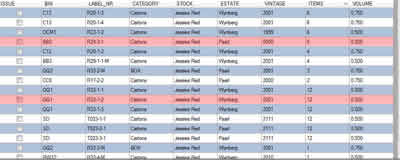
    I have a dgv where every alternating row is a different colour to make it more readable, as you can see in my attachment.

    I now want to recolour certain rows to another colour. Lets for example say all rows where column(7).value < 5 should be red or whatever.

    I coloured 2 rows in the example to show you what i want.

    Is this possible?
    if yes, how?
    Name:  dgv.jpg
Views: 1354
Size:  7.9 KB
    Last edited by tgf-47; Jun 30th, 2010 at 09:49 AM.

  2. #2
    Frenzied Member
    Join Date
    Jun 2007
    Location
    India
    Posts
    1,158

    Re: DataGridView - setting the colour of a row?

    vb Code:
    1. Me.DataGridView1.Rows(2).DefaultCellStyle.BackColor = Color.Red

  3. #3

    Thread Starter
    Addicted Member tgf-47's Avatar
    Join Date
    Feb 2010
    Location
    CapeTown, South Africa -34.01244,18.337415
    Posts
    209

    Re: [RESOLVED] DataGridView - setting the colour of a row?

    For future reference, this is the code i use in my DGV

    vb Code:
    1. Private Sub ColourMixedItems()
    2.         Dim tmp As String
    3.         Dim i As Integer = 0
    4.         Dim counter As Integer = DGVReceipt.Rows.Count
    5.  
    6.         Do Until i = counter
    7.             tmp = DGVReceipt(2, i).Value
    8.             If tmp <> Nothing Then
    9.                 If tmp.EndsWith("M") Then
    10.                     DGVReceipt.Rows(i).DefaultCellStyle.BackColor = Color.LemonChiffon
    11.                 End If
    12.             End If
    13.             i += 1
    14.         Loop
    15.     End Sub

Tags for this Thread

Posting Permissions

  • You may not post new threads
  • You may not post replies
  • You may not post attachments
  • You may not edit your posts
  •  


Click Here to Expand Forum to Full Width