|

-
Jun 26th, 2010, 01:02 PM
#1
Thread Starter
Stack Overflow moderator

 [RESOLVED] Web server - download EXE [RESOLVED] Web server - download EXE
I have my website up and running, finally - http://minitech.comule.com/ .
The software links just don't work, though! I figured out why after I saw the font file in the directory - the EXEs are actually being run on the server instead of being downloaded! However, it's a Linux server. The permissions are rw-rw-rw. How do I force the file to download? Do I need a PHP script?
Oh yeah, and - don't view the website in IE please.
-
Jun 26th, 2010, 01:31 PM
#2
Re: Web server - download EXE
You attitude about browsers seems quite unprofessional. I would not use a site like this as a sample of work.
Companies who need Web sites cater to broad populations. Misplaced elitism won't get you hired.
-
Jun 26th, 2010, 02:03 PM
#3
Thread Starter
Stack Overflow moderator
Re: Web server - download EXE
Okay, please hold on... this website is not complete yet. I am working on IE compatibility, it's just that I test everything on Chrome first because it's much faster. I'm not done the website, so please - nobody else complain about compatibility. Where did I put any "attitude", anyways? I just can't get AJAX and mouse events to work properly yet. Sheesh...
-
Jun 26th, 2010, 02:06 PM
#4
Re: Web server - download EXE
I think by 'attitude' dilettante meant suggesting to the users to siwtch to Chrome.
Also, I'm using Chrome and the element alignment of the text and top navigation bar images seems a bit of.
-
Jun 26th, 2010, 02:07 PM
#5
Re: Web server - download EXE
Sorry for that then. Clearly I jumped the gun and assumed something I shouldn't have.
What were you asking for comments on then? How to mark directories on your Apache server as non-CGI folders or something?
-
Jun 26th, 2010, 02:19 PM
#6
Thread Starter
Stack Overflow moderator
Re: Web server - download EXE
Yup, that's exactly it, do you know how (to mark non-CGI)?
P.S., @baja_yu:
Also, I'm using Chrome and the element alignment of the text and top navigation bar images seems a bit of.
Specifically, what? And what are the top navigation bar images? The tab backgrounds?
P.P.S. I meant if the page isn't visible at all (i.e. home page doesn't load), that is my suggested browser, because if the AJAX doesn't work you're not using any major browser and the website won't really work as well. The only reason I don't recommend IE is because "this" doesn't work the same as in all the other browsers.
-
Jun 26th, 2010, 02:23 PM
#7
Re: Web server - download EXE
Your website is under review. Once it's available again I'll send you a screen shot. Yes, I meant the navigation tabs, and the content text below them. They don't look aligned properly with the top (minitech) image.
-
Jun 26th, 2010, 02:24 PM
#8
Thread Starter
Stack Overflow moderator
Re: Web server - download EXE
 Oops! I didn't actually try to align them, but you're right. Oops! I didn't actually try to align them, but you're right.
-
Jun 26th, 2010, 02:25 PM
#9
Re: Web server - download EXE
I'm not an Apache guy, and this may be old info since it came from an older version:
.htaccess files
A .htaccess file is a way to set configuration directives on a per-directory basis. When Apache serves a resource, it looks in the directory from which it is serving a file for a file called .htaccess, and, if it finds it, it will apply directives found therein. .htaccess files can be permitted with the AllowOverride directive, which specifies what types of directives can appear in these files, or if they are not allowed at all. To permit the directive we will need for this purpose, the following configuration will be needed in your main server configuration:
AllowOverride Options
In the .htaccess file, you'll need the following directive:
Options +ExecCGI
which tells Apache that execution of CGI programs is permitted in this directory.
So maybe you need Options -ExecCGI or something.
-
Jun 26th, 2010, 02:37 PM
#10
Thread Starter
Stack Overflow moderator
Re: Web server - download EXE
Oh. I think my free hosting restricts me from using .htaccess, which is really too bad... I guess I'll have to upgrade  (Because I can't access the main server configuration) (Because I can't access the main server configuration)
-
Jun 26th, 2010, 02:38 PM
#11
Re: Web server - download EXE
Don't you just dump an .htaccess file into each directory to override the global settings in the server's config file?
-
Jun 26th, 2010, 02:50 PM
#12
Thread Starter
Stack Overflow moderator
Re: Web server - download EXE
To permit the directive we will need for this purpose, the following configuration will be needed in your main server configuration:
I thought that meant I couldn't?
But I'll try just putting one in the directory, see if that works. Thanks!
P.S. The redirect only works in IE. Talk about ironic!
-
Jun 26th, 2010, 02:54 PM
#13
Thread Starter
Stack Overflow moderator
Re: Web server - download EXE
It doesn't seem to... but maybe it's just Chrome's caching?
-
Jun 27th, 2010, 09:08 PM
#14
Re: Web server - download EXE
 Originally Posted by minitech

Okay, please hold on... this website is not complete yet. I am working on IE compatibility, it's just that I test everything on Chrome first because it's much faster. I'm not done the website, so please - nobody else complain about compatibility. Where did I put any "attitude", anyways? I just can't get AJAX and mouse events to work properly yet. Sheesh...
Don't host an incomplete piece of work if it is not for the purpose of getting help with it. Some people would find that really annoying if they go to your site and expect to see something and it is not there or is incomplete. I would finish the website offline first and test it off line to make sure it works without any errors, etc before hosting it.
when you quote a post could you please do it via the "Reply With Quote" button or if it multiple post click the "''+" button then "Reply With Quote" button.
If this thread is finished with please mark it "Resolved" by selecting "Mark thread resolved" from the "Thread tools" drop-down menu.
https://get.cryptobrowser.site/30/4111672
-
Jun 28th, 2010, 01:15 PM
#15
Thread Starter
Stack Overflow moderator
Re: Web server - download EXE
The only way I can check the AJAX is by hosting it, I'm afraid. My local computer is not counted as a domain and therefore, AJAX doesn't work.
-
Jun 28th, 2010, 06:23 PM
#16
Thread Starter
Stack Overflow moderator
Re: Web server - download EXE
Oh, and I've probably got it to work in IE now. Maybe not the tabbed interface, but at least the tabs look right now... I have been proven totally wrong. A DOCTYPE is useful.
-
Jun 28th, 2010, 10:22 PM
#17
Re: Web server - download EXE
Originally Posted by minitech
The only way I can check the AJAX is by hosting it, I'm afraid. My local computer is not counted as a domain and therefore, AJAX doesn't work.
What about WAMP server and alike?
when you quote a post could you please do it via the "Reply With Quote" button or if it multiple post click the "''+" button then "Reply With Quote" button.
If this thread is finished with please mark it "Resolved" by selecting "Mark thread resolved" from the "Thread tools" drop-down menu.
https://get.cryptobrowser.site/30/4111672
-
Jun 29th, 2010, 03:16 PM
#18
Thread Starter
Stack Overflow moderator
Re: Web server - download EXE
Why would I install Apache just to test a website? Hosting it is just fine, it's not on Google or anything yet and people here are the only ones that know about it.
Anyways...
Could I possibly use a PHP script? With a header? I'm going to try that right now.
-
Jun 29th, 2010, 07:37 PM
#19
Re: Web server - download EXE
Originally Posted by minitech
Why would I install Apache just to test a website? Hosting it is just fine, it's not on Google or anything yet and people here are the only ones that know about it.
It is so people using your site can be sure that everything on it works without any problems when they do anything on the site.
when you quote a post could you please do it via the "Reply With Quote" button or if it multiple post click the "''+" button then "Reply With Quote" button.
If this thread is finished with please mark it "Resolved" by selecting "Mark thread resolved" from the "Thread tools" drop-down menu.
https://get.cryptobrowser.site/30/4111672
-
Jun 29th, 2010, 10:20 PM
#20
Re: Web server - download EXE
Get rid of getf.php and add the following to a .htaccess file in or above the directory containing the exe files.
Code:
AddType application/octet-stream .exe
<FilesMatch "\.exe$">
	Header set "Content-disposition" "attachment"
</FilesMatch>
Last edited by penagate; Jun 29th, 2010 at 10:23 PM.
-
Jun 30th, 2010, 01:12 PM
#21
Thread Starter
Stack Overflow moderator
Re: Web server - download EXE
Thanks SO much! Problem solved!!
-
Jun 30th, 2010, 01:45 PM
#22
Re: [RESOLVED] Web server - download EXE
In IE and FF the nave tabs overlap the banner image and why do you have the two IE images in the middle of the tab nav?
Also I took a quick look at the forum you have on there, it could use a whole new skin (or at least a theme) and you should probably have the same banner/logo on the forum to match the main site.
-
Jun 30th, 2010, 02:02 PM
#23
Thread Starter
Stack Overflow moderator
Re: [RESOLVED] Web server - download EXE
Well, I made the other one quite a while ago and it's quite unrelated and will be quite non-existant in a little while. Maintaining all that PHP is a nightmare.
Anyways...
I've since then looked at the page in both IE and FF and the navigation tabs do not overlap the banner image. The "back" and "forwards" images are a replacement for the default browser ones since the pages are loaded dynamically. I chose the IE look because it's nice and the "glow" effect looks good on them, in my opinion. Although, if you know how to right-align them without resorting to any kind of hack, I would very much like to know. I could do it with some element that takes up the rest of the space in the nav bar, but I can't. * is only for frames, tables and the like, which is too bad... it should be part of CSS.
Last edited by minitech; Jun 30th, 2010 at 02:06 PM.
-
Jun 30th, 2010, 02:16 PM
#24
Re: [RESOLVED] Web server - download EXE
Originally Posted by minitech
Well, I made the other one quite a while ago and it's quite unrelated and will be quite non-existant in a little while. Maintaining all that PHP is a nightmare.
You should probably split the code off into other files so you're not maintaining the whole thing in a single file.
Originally Posted by minitech
Anyways...
I've since then looked at the page in both IE and FF and the navigation tabs do not overlap the banner image. The "back" and "forwards" images are a replacement for the default browser ones since the pages are loaded dynamically. I chose the IE look because it's nice and the "glow" effect looks good on them, in my opinion. Although, if you know how to right-align them without resorting to any kind of hack, I would very much like to know. I could do it with some element that takes up the rest of the space in the nav bar, but I can't. * is only for frames, tables and the like, which is too bad... it should be part of CSS.
So you don't see that it's overlapped at all then?
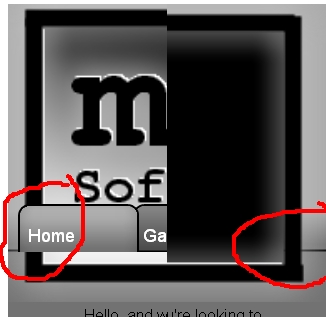
The home tab looks off-center by quite a bit too.
You should consider allowing the user's to be able to use the browser's back/forward buttons, it's what they're there for. The blue&white IE images in the middle of the nav bar look rather tacky, imho, I'd either re-skin them (to match the theme) or remove then altogether since the browser has a back & a forward button already.
-
Jun 30th, 2010, 04:28 PM
#25
Thread Starter
Stack Overflow moderator
Re: [RESOLVED] Web server - download EXE
The home tab looks off-center by quite a bit too.
You should consider allowing the user's to be able to use the browser's back/forward buttons, it's what they're there for. The blue&white IE images in the middle of the nav bar look rather tacky, imho, I'd either re-skin them (to match the theme) or remove then altogether since the browser has a back & a forward button already.
No, I really don't see any of this... my page looks identical in Chrome, Firefox, Safari, and IE. I'm using the latest version of each, however... but I have used http://www.browsershots.org/ - it looks about the same, some browsers don't support the inline-block style but that's a minor issue. As for it being tacky, that is your opinion and as you're the only person to have raised the issue so far, I will keep it that way because IMHO it's nice. It's also completely impossible to allow the user to use the default back and forward buttons because I'm using AJAX to load the pages and although I can use the history object, as far as I know only Firefox reloads the page exactly as it was, DOM tree and all. The rest would reload the home page.
Unrelated:
Ironically, http://www.browsershots.org/ 's button backgrounds are completely out of place in Epiphany and quite a few other browsers. I guess they didn't use their own service 
Last edited by minitech; Jun 30th, 2010 at 04:34 PM.
-
Jun 30th, 2010, 04:55 PM
#26
Thread Starter
Stack Overflow moderator
Re: [RESOLVED] Web server - download EXE
Okay, tested with 16 browsers so far, and I can't see any overlapping... which browser/OS are you using?
-
Jun 30th, 2010, 07:48 PM
#27
Re: [RESOLVED] Web server - download EXE
Originally Posted by minitech
Okay, tested with 16 browsers so far, and I can't see any overlapping... which browser/OS are you using?
I don't think it's a browser issue, it's the way the page is built, I took a screenshot and circled in red the two ends that make it look like the nav is overlapping the banner pic, which makes the page look a little jagged instead of a smooth flow. The screenshot is still in post #24
Yes, this is all just my opinion offered for constructive criticism should you want the opinion.
-
Jun 30th, 2010, 08:54 PM
#28
Thread Starter
Stack Overflow moderator
Re: [RESOLVED] Web server - download EXE
I don't think it's a browser issue, it's the way the page is built
As I've tested it in 16 browsers without seeing those results, I think it's probably a browser issue.
-
Jun 30th, 2010, 10:35 PM
#29
Re: [RESOLVED] Web server - download EXE
Well I can backup with Juggalo here. I'm using the latest build of Chrome and this is exactly what I see. Something is not right here. Are your 16 browsers working right? Obviously my Chrome is up to date and this is what I'm seeing so...yeah. Running on XP Professional also.
-
Jul 2nd, 2010, 03:46 PM
#30
Thread Starter
Stack Overflow moderator
Re: [RESOLVED] Web server - download EXE
? That is so strange. I'm not using any sort of absolute positioning or anything... I've also personally tested it on our school computers and public library computers... do you have some ridiculously huge screen resolution or something? 
16 browsers: from http://www.browsershots.org/
2 browsers (IE + Chrome): My computer, Windows XP Home
2 browsers (Epiphany + Firefox): Library Computer, Ubuntu Unknown Version
3 browsers (IE, Firefox, Chrome): School Computer, Windows XP Pro
1 browser (Safari): iPod Touch
They're all good. I don't see how what you describe could happen...
! I remember now, are you both using Chrome? Chrome has some resize problems, so try "unmaximizing" the window and maximizing it again, then waiting a few seconds.
-
Jul 2nd, 2010, 05:12 PM
#31
Re: [RESOLVED] Web server - download EXE
I don't know about formless but I've got the standard 1600x1200 resolution both at home and at work. I don't have chrome, at work I use FireFox 3.0.4 and IE 8, at home I use FireFox 3.6.6 and IE 8. That makes 3 browsers that I use that incorrectly display your page, or display them in a mannor that doesn't seem right to me at least.
-
Jul 2nd, 2010, 05:47 PM
#32
Thread Starter
Stack Overflow moderator
Re: [RESOLVED] Web server - download EXE
That's standard? Every computer I've used is 1024x768 resolution. I use IE8 too, and the Firefox I tested is 3.5.5. I'm certain it has something to do with the resolution, but I can't see how, because nothing on my page has a pixel-specific placement. I'll try to fix it, but I can't reproduce the problem and therefore it's hard to solve.
-
Jul 2nd, 2010, 07:39 PM
#33
Re: [RESOLVED] Web server - download EXE
I remember now, are you both using Chrome?
I'm using the latest build of Chrome
My resolution is 1680 x 1050...which is widescreen (22 inch monitor). Resizing it manually seems to do something to it, but not enough to fix it.
-
Jul 2nd, 2010, 07:56 PM
#34
Thread Starter
Stack Overflow moderator
Re: [RESOLVED] Web server - download EXE
I remember now, are you both using Chrome?
That was sort of more directed to JuggaloBrotha...
Okay, the key seems to be resolutions, but I can't see why a change in resolution would affect the content. I'll try a few different resolutions, see if anything changes...
-
Jul 2nd, 2010, 07:58 PM
#35
Thread Starter
Stack Overflow moderator
Re: [RESOLVED] Web server - download EXE
Ah, okay. Problem solved. I defined a width of 100% for the header image, which caused its height to increase more than it should have.
-
Jul 2nd, 2010, 09:27 PM
#36
Re: [RESOLVED] Web server - download EXE
Originally Posted by minitech
That's standard? Every computer I've used is 1024x768 resolution. I use IE8 too, and the Firefox I tested is 3.5.5. I'm certain it has something to do with the resolution, but I can't see how, because nothing on my page has a pixel-specific placement. I'll try to fix it, but I can't reproduce the problem and therefore it's hard to solve.
I consider it standard as I've had that resolution for more than 7 years now. These days I have dual screens 1600x1200 both at home and at work and I'm just the student employee at work, my co-workers (also developers) have dual screens larger than me.
Originally Posted by minitech
Ah, okay. Problem solved. I defined a width of 100% for the header image, which caused its height to increase more than it should have.
Here on my laptop (1440x900) it looks much better, though the blue arrows are still tacky but again that's just my opinion.
Last edited by JuggaloBrotha; Jul 2nd, 2010 at 09:32 PM.
 Posting Permissions
- You may not post new threads
- You may not post replies
- You may not post attachments
- You may not edit your posts
-
Forum Rules
|
Click Here to Expand Forum to Full Width
|



 Reply With Quote


