|

-
Jun 6th, 2010, 08:57 AM
#1
 [RESOLVED] Formatting without DVD/CD [RESOLVED] Formatting without DVD/CD
Hi all,
I need real help this time. I need to format my system and install a fresh copy of Windows. I have Vista with SP1 ISO Image (no worries, it it not illegal. Got it from university), but there are problems:
- I am not able to burn the image to DVD, nor I am able to burn Ubuntu ISO image to CD. I have already multiple burning software, but nothing worked. I can give it a try on my friend's laptop, but let's assume that I don't have bootable CD and/or DVD.
- When I bought this laptop, HD was partitioned into C and D (this one is Recovery partition and is only approx 8 GB). So I need another partition. I installed Partition Magic, but little scared using it. Reason is, I don't want to risk losing my work or messing with this system as I am in middle of my semester and screwing up with this system will cost me a lot.
- I need another partition because I am also planning to install Ubuntu and making a dual boot system.
So the crux of the problem is, I need to format my system once only, and I don't have bootable Windows and Linux DVD / CD, and I need another partition given above facts.
Is there a way I can format my system and install Windows off HD (I mean I can extract contents to D drive)?
My friend has Win 7 DVD. I can pop it into DVD drive, let it boot from it and use it to format C Drive, then use the extracted Windows content (say from D Drive) to re-partition C drive and install it. I can always use Wubi installer to install Ubuntu on the newly created partition.
Will it work? Or is there any way I can make it work?
Thank you.
PS: Sorry, if I sounded confused at any point.
-
Jun 6th, 2010, 09:07 AM
#2
Re: Formatting without DVD/CD
You can install it from a USB stick. For Vista/W7 you will need one with at least 4GB.
Regarding formating, you have a free partition manager called GParted which can be burnt on a CD/DVD and booted, or booted from a USB flash. From there you can do what you want with the hard drives. I usually prefer to do that first and prepare partitions for Windows, then install it cleanly.
-
Jun 6th, 2010, 09:33 AM
#3
Re: Formatting without DVD/CD
Nero 5 (and up), Easy Cd/Dvd Creator, Magic ISO, PowerDvd all support's burning ISO images to disc and all have a trial version. All drive partitioning/formatting can be done from WinXP, Vista, Win7 or any of the Linux during set up, if you need to re-size partitions and create new ones (moving the current partitions around) I highly recommend G-Parted, it's free and I've used it to move partitions around on my Win7 system with no problems, you can expect an operation like that to take 3 to 5 hours btw. I would recommend installing Windows first, then Linux. Linux is much more friendly about setting up the dual booting than Windows is (Windows is great if you're only dual booting Window's OSs)
-
Jun 6th, 2010, 09:37 AM
#4
Re: Formatting without DVD/CD
 Originally Posted by baja_yu

You can install it from a USB stick. For Vista/W7 you will need one with at least 4GB.
Regarding formating, you have a free partition manager called GParted which can be burnt on a CD/DVD and booted, or booted from a USB flash. From there you can do what you want with the hard drives. I usually prefer to do that first and prepare partitions for Windows, then install it cleanly.
Thanks, forgot about that. 
Actually, I have never played around with partitioning of HDD. So, if I create bootable USB disk, can I use it to create a partition from C drive or will it ask me to create partitions from scratch? In simpler terms, will it allow me to create a partition from C drive or will it merge both drives and create from scratch?
Also, few days back, I installed Vista SP1 (from internet) and also VirtualBox. It seems something is still eating around 10 GB. I created a virtual disk in VB of 10 GB, but I deleted the partition (.VDI file) and it still seems that those 10 GB are missing.
Any idea, how much space does SP1 and ASP.Net MVC together takes?
Thank you.
PS: Sorry, can't rep you. But I owe this one to you.
-
Jun 6th, 2010, 09:44 AM
#5
Re: Formatting without DVD/CD
@JB,
I have tried all those burning tools, they all seem to burn the content, but fail to either verify or read the contents from DVD/CD altogether.
Bootable USB drives seems reasonable idea till now, since burning DVD is failing.
Any foolproof way to create bootable USB drive?
Edit: Also, is it possible to load multiple OSes on bootable USB drive? If I can load both Win and Ubuntu from it?
-
Jun 6th, 2010, 09:57 AM
#6
Re: Formatting without DVD/CD
Originally Posted by Harsh Gupta
Actually, I have never played around with partitioning of HDD. So, if I create bootable USB disk, can I use it to create a partition from C drive or will it ask me to create partitions from scratch? In simpler terms, will it allow me to create a partition from C drive or will it merge both drives and create from scratch?
You can do pretty much anything you want, like with Partition Magic in Windows (if you've used it) plus more as it supports Linux partitions too. You can format partitions, delete them and create new ones from scratch, resize current partitions (split one partition into two), merge two partitions together etc.
-
Jun 6th, 2010, 10:01 AM
#7
Re: Formatting without DVD/CD
Originally Posted by Harsh Gupta
Any foolproof way to create bootable USB drive?
Edit: Also, is it possible to load multiple OSes on bootable USB drive? If I can load both Win and Ubuntu from it?
Do you mean to actually install the OS onto a USB and boot from it, or just have the installer boot from USB?
I'm not sure about the first one, especially on multiboot, which requires several partitions, and I've never seen that done with a USB flash (external USB hard disk yes, flash no).
If you want to boot the Windows installation, try this, for Vista http://www.techmixer.com/install-win...-memory-drive/
-
Jun 6th, 2010, 10:21 AM
#8
Re: Formatting without DVD/CD
Originally Posted by baja_yu
...Do you mean to actually install the OS onto a USB and boot from it, or just have the installer boot from USB?
I mean, to just have the Win and Linux installer boot from same USB? Or say, GParted and Windows boot from same USB?
Sorry, if I am getting on your nerves. Even after using a computer for so many years, I still feel uncomfortable doing all these things.
-
Jun 6th, 2010, 10:24 AM
#9
Re: Formatting without DVD/CD
Don't worry about it 
I don't think it would be simple to have both at the same time, you would need to make a custom boot loader that will present you with a choice. Making a USB flash bootable is very simple for GParted (there is a short tutorial on their website), but Vista/W7 is problematic because, in order to make it bootable you already have to have it installed (have access to it). At least with the info I was able to find (like the link I sent you).
-
Jun 6th, 2010, 10:29 AM
#10
Re: Formatting without DVD/CD
Well, I found these ways to create bootable USB drives. I guess, I can give UNetBootin a try.
As for partitioning, I will use Partition Magic and will do the necessary stuff.
-
Jun 6th, 2010, 10:31 AM
#11
Re: Formatting without DVD/CD
I tried it before doing the steps in that link, but it didn't work for me. Not sure why. Can't hurt to try though, as it's the simplest option.
-
Jun 6th, 2010, 07:46 PM
#12
Re: Formatting without DVD/CD
Originally Posted by Harsh Gupta
@JB,
I have tried all those burning tools, they all seem to burn the content, but fail to either verify or read the contents from DVD/CD altogether.
I wouldn't know about any cd/dvd verification, the way I test after a burn is to use the disc. In your case I would put the burned disc in the drive and re-start the computer and try to have the motherboard boot from it.
Have you even tried booting from a dvd after burning the image to it?
-
Jun 7th, 2010, 01:44 AM
#13
Re: Formatting without DVD/CD
Originally Posted by JuggaloBrotha
I wouldn't know about any cd/dvd verification, the way I test after a burn is to use the disc. In your case I would put the burned disc in the drive and re-start the computer and try to have the motherboard boot from it.
Have you even tried booting from a dvd after burning the image to it?
No, I haven't. But good thought, I must give it a try. That DVD must be somewhere around here.
Usually, I verify by putting the disc back and reading the contents from explorer. I was not able to read either the DVD (after burning Win on it) or CD (after burning Ubuntu).
And I remember, sometimes it gave me errors usually at the end (nearly) of the burning process. Sorry, but I cannot recall what was it.
-
Jun 7th, 2010, 07:48 PM
#14
Re: Formatting without DVD/CD
if you would like to have a video demonstration of how to put multiple OSes on one usb stick, go to www.revision3.com/hak5 and look for the episode with usb multiboot in the description.
Note that you only actually need this stick to be bootable and hp makes a free tool for this. google it. Format the disk as fat32, and there will be a 2nd download available to put win98 system files on to the disk. Once you have done these two steps, copy the contents of the i386 folder to the jump disk. It's all you need. Launch the winnt.exe file and setup will begin. These simplified steps only apply to vista/7 installs. xp installs require you to format the hard drive fat 32 first before running the install program, otherwise the flash drive ends up with the temp folders on it, and that will severely increase the install time from an hour to a few hours.
-
Jun 8th, 2010, 12:59 AM
#15
Re: Formatting without DVD/CD
Hi Lord Orwell,
Do you by any chance mean this utility?
If so, you mean, I can use this utility to make bootable USB disk, and simply copy relevant folders from Win ISO images, insert this USB disk, and boot from it?
Update: it seems this utility is not available for Win Vista.
Last edited by Harsh Gupta; Jun 8th, 2010 at 01:12 AM.
Reason: Updating information
-
Jun 8th, 2010, 07:47 AM
#16
Re: Formatting without DVD/CD
Hi,
I have managed to create bootable USB disk, using diskpart steps mentioned in the link given by baja_yu. I also managed to successfully boot through it, except that it is not asking me if I would like to format my disk. It is simply asking me to install the files.
Note: I clicked Next button quite few times, and it may be possible that it will ask me later, but what the heck, this used to be so simple pre-Vista!!!
Am I missing something here?
Thank you.
-
Jun 8th, 2010, 08:39 AM
#17
Re: Formatting without DVD/CD
The new installer, I think, in Vista and 7 doesn't explicitly ask you if you want to format. On the screen where you choose to which partition, you have below the list a button called "Details", "More options" or something like that. It opens other options like Format, partition etc.
-
Jun 8th, 2010, 08:02 PM
#18
Re: Formatting without DVD/CD
Thanks for the info baja_yu.
However, there is some other problem I am having now. I am using Partition Magic to create a new partition, but it is not letting me create a new partition from C drive. It is only allowing me to use D drive.
Initially, D drive was recovery partition, but I formatted it. It is almost 8 GB in size, and I need another partition (10 GB would be enough for Ubuntu I guess), for Linux.
Also, Partition Magic is not letting me merge these 2 partitions, giving error of version numbers, that C has version no. 0.0 while D has 3.1.
Is there something else I can do to create 10 GB partition from C drive?
C is where windows is currently installed.
Thank you.
-
Jun 8th, 2010, 08:30 PM
#19
Re: Formatting without DVD/CD
I'm not sure PartitionMagic will let you modify the partition that the OS is on. For that you'll need something like GParted which is bootable and OS independent.
-
Jun 8th, 2010, 08:44 PM
#20
Re: Formatting without DVD/CD
So, can I now use my bootable USB disk (containing Win setup) to use GParted?
-
Jun 8th, 2010, 09:12 PM
#21
Re: Formatting without DVD/CD
Nope, you either have to run one or the other from the USB, and if you have one (USB flash) it's a problem, because when you format the OS partition you can't make Windows install bootable from it again. A solution would be to download the GParted ISO instead, and just burn it to a DVD or CD and it would be bootable. If you have an RW even better as you don't have to waste the entire disk.
-
Jun 8th, 2010, 09:21 PM
#22
Re: Formatting without DVD/CD
Windows setup from Win2k and newer (even Vista/Win7) allows you to partition and format. The screens in setup havent really changed all that much since it was put in...
-
Jun 8th, 2010, 09:55 PM
#23
Re: Formatting without DVD/CD
the hp drivekey utility works just fine in vista, no matter what the link says. I run vista and i use it. Juggalobrotha: you have to use a linux bootloader on your key for xp to boot from it. It has to be emulating an actual hard drive as xp doesn't load up drivers for memory sticks when installing. Also xp and lower have a text menu for partitioning, and vista/7 uses a decent tool complete with the option to install third party drivers from that screen, which i have had to do thanks to my asus board.
-
Jun 8th, 2010, 10:56 PM
#24
Re: Formatting without DVD/CD
Every time I edited partition in Windows installer it created these 'stub' partitions of 8MB, which aren't visible and you can't do pretty much anything with them. I mean, I don't really mind the loss of 8MB, but it just bugs me. I've been doing some Google searching about it and saw a few explanations (don't really remember what it was), but I don't see the point of them, since I can create clean partitions (with GParted for example) and use those. Windows works just fine without that stub.
P.S: The HP utility also works without any problems on W7 (used it personally).
-
Jun 9th, 2010, 12:42 PM
#25
Re: Formatting without DVD/CD
Originally Posted by Harsh Gupta
@JB,
I have tried all those burning tools, they all seem to burn the content, but fail to either verify or read the contents from DVD/CD altogether.
Have you set up your DVD/CD as your first booting device in the BIOS?
A good exercise for the Heart is to bend down and help another up...
Please Mark your Thread " Resolved", if the query is solved
MyGear: Resolved", if the query is solved
MyGear:
★ CPU ★ Ryzen 5 5800X
★ GPU ★ NVIDIA GeForce RTX 3080 TI Founder Edition
★ RAM ★ G. Skill Trident Z RGB 32GB 3600MHz
★ MB ★ ASUS TUF GAMING X570 (WI-FI) ATX Gaming
★ Storage ★ SSD SB-ROCKET-1TB + SEAGATE 2TB Barracuda IHD
★ Cooling ★ NOCTUA NH-D15 CHROMAX BLACK 140mm + 10 of Noctua NF-F12 PWM
★ PSU ★ ANTEC HCG-1000-EXTREME 1000 Watt 80 Plus Gold Fully Modular PSU
★ Case ★ LIAN LI PC-O11 DYNAMIC XL ROG (BLACK) (G99.O11DXL-X)
★ Monitor ★ LG Ultragear 27" 240Hz Gaming Monitor
★ Keyboard ★ TVS Electronics Gold Keyboard
★ Mouse ★ Logitech G502 Hero
-
Jun 9th, 2010, 08:27 PM
#26
Re: Formatting without DVD/CD
Hi,
As for HP Drive Key utility, when I tried installing it, it gave an error message along the lines of wrong OS (I mean it, it said something like that). Though I forgot to set its compatibility mode to XP and try again, but it really doesn't matter now because I do have bootable USB at hand.
@baja_yu, I am having trouble burning CD/DVD, so again GParted is not an option for me. During Windows Setup, as you said before, I can format my C drive, but will I be able to create a new partition from C drive before installing again on C drive?
@koolsid, yes I did that. The writer isn't really working my system. I can't even open just-burned CD in windows explorer.
-
Jun 9th, 2010, 08:51 PM
#27
Re: Formatting without DVD/CD
Burners can fail due to wear of the laser lens, so it might be time to get a new one. Depending on the make and model you usually get between 1-2 thousand written discs before it starts failing.
Windows installer should let you delete and create partition, so if you want, you can delete the C partition and create two new ones instead of it, for example.
EDIT: Here's how it looks in W7 installation. Note the Delete, New (create) and Format options

Last edited by baja_yu; Jun 9th, 2010 at 09:17 PM.
-
Jun 10th, 2010, 06:35 PM
#28
Re: Formatting without DVD/CD
Originally Posted by baja_yu
Every time I edited partition in Windows installer it created these 'stub' partitions of 8MB, which aren't visible and you can't do pretty much anything with them. I mean, I don't really mind the loss of 8MB, but it just bugs me. I've been doing some Google searching about it and saw a few explanations (don't really remember what it was), but I don't see the point of them, since I can create clean partitions (with GParted for example) and use those. Windows works just fine without that stub.
P.S: The HP utility also works without any problems on W7 (used it personally).
It's part of the graphical partition scheme. If you are using the old style they aren't there. I really don't remember their purpose either besides that.
-
Jun 28th, 2010, 01:37 PM
#29
Re: Formatting without DVD/CD
Hey all,
Sorry for so late reply. Been busy lately.
I made a Vista bootable USB pen drive before, but now considering installing Win7. Is there any chance I can format my pen drive (or not) and reuse it to create Win7 bootable disk (forever in this case, will never format it again)?
-
Jun 28th, 2010, 03:18 PM
#30
Re: Formatting without DVD/CD
Originally Posted by Harsh Gupta
Hey all,
Sorry for so late reply. Been busy lately.
I made a Vista bootable USB pen drive before, but now considering installing Win7. Is there any chance I can format my pen drive (or not) and reuse it to create Win7 bootable disk (forever in this case, will never format it again)?
Sure, windows will reformat flash drives.
-
Jun 28th, 2010, 10:19 PM
#31
Re: Formatting without DVD/CD
Originally Posted by JuggaloBrotha
Sure, windows will reformat flash drives.
oddly enough, vista and above will only format them fat32 but xp and 2k will do an ntfs format. They also let you put your swap file on one whereas vista/7 won't.
-
Jun 29th, 2010, 01:35 AM
#32
Re: Formatting without DVD/CD
Not sure what the original poster was asking but I think Win 7 also allows you to crate backup dvds from your current system install.
Originally Posted by Lord Orwell
oddly enough, vista and above will only format them fat32 but xp and 2k will do an ntfs format. They also let you put your swap file on one whereas vista/7 won't.
That's stange! Aren't FAT32 the old Win 95 era system type drives?
when you quote a post could you please do it via the "Reply With Quote" button or if it multiple post click the "''+" button then "Reply With Quote" button.
If this thread is finished with please mark it "Resolved" by selecting "Mark thread resolved" from the "Thread tools" drop-down menu.
https://get.cryptobrowser.site/30/4111672
-
Jun 29th, 2010, 06:21 AM
#33
Re: Formatting without DVD/CD
Originally Posted by Lord Orwell
oddly enough, vista and above will only format them fat32 but xp and 2k will do an ntfs format. They also let you put your swap file on one whereas vista/7 won't.
XP SP1 is when MS decided not to allow flash drives to be formatted as ntfs by default, but in XP, Vista, Win7 (server 2003 & 2008) you can still format your flash drive as ntfs you just need to tell windows to allow it for the drive you want to allow ntfs formatting on: Format a USB drive with NTFS file system Here's my Win7 x64 computer allowing my kingston flashdrive to be formatted as ntfs: 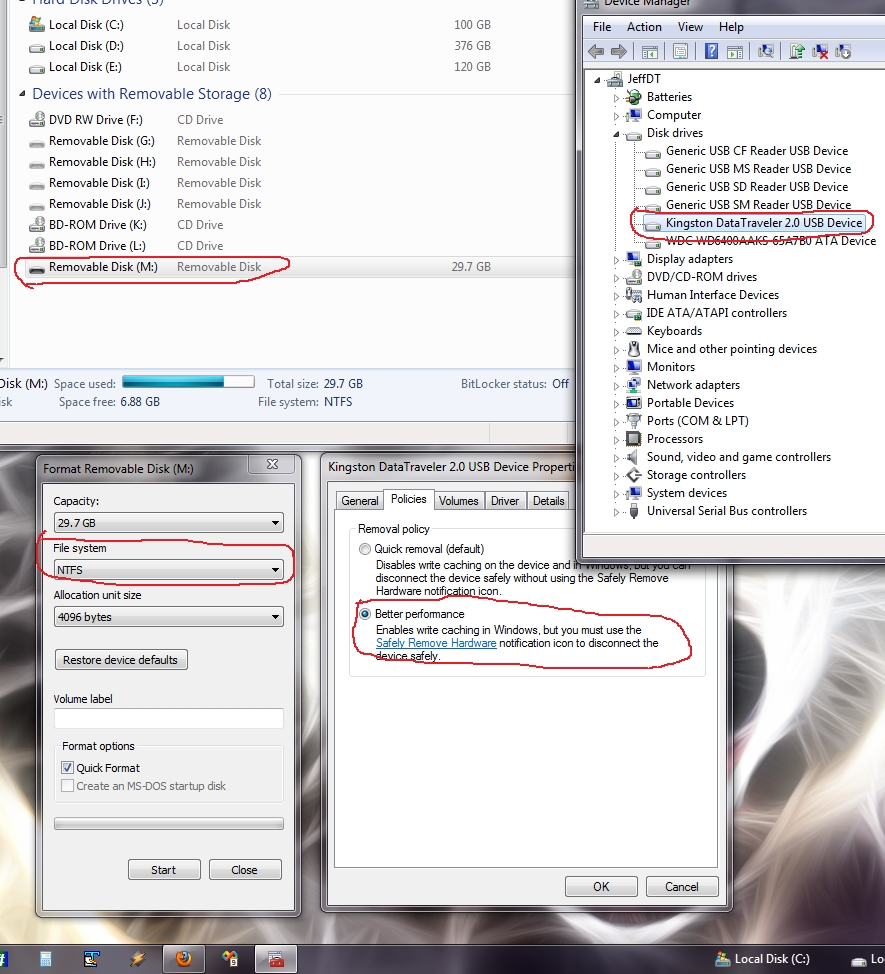
Originally Posted by Nightwalker83
Not sure what the original poster was asking but I think Win 7 also allows you to crate backup dvds from your current system install.
He's wanting to install win7 from a flash drive now, like he did to install vista from the flash drive, problem is his flash drive has the vista install dvd files on it and he needs to wipe those out so he can put the win7 dvd files on it and then he can install win7 on the computer that currently has vista installed.
I'd still like to know why this guy can't seem to get a dvd burnt on his computer.
Originally Posted by Nightwalker83
That's stange! Aren't FAT32 the old Win 95 era system type drives?
Yep
Last edited by JuggaloBrotha; Jun 29th, 2010 at 06:28 AM.
-
Jun 29th, 2010, 09:25 PM
#34
Re: Formatting without DVD/CD
Originally Posted by JuggaloBrotha
I'd still like to know why this guy can't seem to get a dvd burnt on his computer.
It sounds to me like there are two options:
1. He only borrowed the setup dvd from someone (not buying it) in which case it would be illegal for him to copy it.
2. The drivers for the hardware aren't available or won't install on his machine.
when you quote a post could you please do it via the "Reply With Quote" button or if it multiple post click the "''+" button then "Reply With Quote" button.
If this thread is finished with please mark it "Resolved" by selecting "Mark thread resolved" from the "Thread tools" drop-down menu.
https://get.cryptobrowser.site/30/4111672
-
Jun 29th, 2010, 11:37 PM
#35
Re: Formatting without DVD/CD
Thank you all.
Done with Win 7 USB bootable drive, Partitioning using GParted, formatted to install Win 7, and also installed Ubuntu Lucid Lynx.
@JuggaloBrotha, I dunno. I haven't tried burning anything since I formatted my system. But I guess there must be some problem with my laptop, because I am still not able to detect my webcam, atleast not in ubuntu. I still have 1 spare CD left. I will give it a try to see if it's my DVD writer which is screwed or was it Vista. Trying my luck to get this webcam working again.
Wish I could rep you guys again.
Thanks again.
-
Jun 30th, 2010, 01:47 AM
#36
Re: Formatting without DVD/CD
Originally Posted by Harsh Gupta
I still have 1 spare CD left. I will give it a try to see if it's my DVD writer which is screwed or was it Vista.
I had a similar thing happen to my pc dvd writer! For me it stopped reading dvds so that meant I couldn't read nor write dvds. So, in the end I replaced the drive. I think the dvd laser went bust or something.
when you quote a post could you please do it via the "Reply With Quote" button or if it multiple post click the "''+" button then "Reply With Quote" button.
If this thread is finished with please mark it "Resolved" by selecting "Mark thread resolved" from the "Thread tools" drop-down menu.
https://get.cryptobrowser.site/30/4111672
-
Jun 30th, 2010, 02:22 AM
#37
Re: Formatting without DVD/CD
Originally Posted by Nightwalker83
I had a similar thing happen to my pc dvd writer! For me it stopped reading dvds so that meant I couldn't read nor write dvds. So, in the end I replaced the drive. I think the dvd laser went bust or something.
That's the reason I am willing to give it a shot because it is able to read CDs (can't say about DVDs though).
-
Jun 30th, 2010, 02:46 PM
#38
Re: Formatting without DVD/CD
Originally Posted by Harsh Gupta
That's the reason I am willing to give it a shot because it is able to read CDs (can't say about DVDs though).
it was probably mentioned before but dvd drives have two lasers. One for cds and one for dvds.
-
Jun 30th, 2010, 09:24 PM
#39
Re: Formatting without DVD/CD
Originally Posted by Lord Orwell
it was probably mentioned before but dvd drives have two lasers. One for cds and one for dvds.
But both of them are able to read respectively, but cannot write any form of data.
-
Jul 1st, 2010, 12:04 AM
#40
Re: [RESOLVED] Formatting without DVD/CD
I had that happen to my previous burner, but I used the hell out of it. Written about 1500 DVD with it, at the end it started making problems, errors during write, or even if it written it it had problems reading them. First gave up on DVD-R but +R continued some, then those gave away too. Still, it was able to read both CDs and DVDs and write only CDs.
 Posting Permissions
- You may not post new threads
- You may not post replies
- You may not post attachments
- You may not edit your posts
-
Forum Rules
|
Click Here to Expand Forum to Full Width
|



 Reply With Quote


