|

-
May 15th, 2010, 02:49 AM
#1
Thread Starter
New Member

DGV row header won't display in tabs
I'm trying to add a title to the row header of a datagridview. I spent hours trying to get it to work to no avail. So finally I started a new project with only the very basic required code. It worked. I then copied the code from the basic project to my full project and the headers refused to show. Here is my code
Private Sub Form1_Load(ByVal sender As System.Object, ByVal e As System.EventArgs) Handles MyBase.Load
Dim Table1 As New DataTable
DGV1.DataSource = Table1
Table1.Columns.Clear()
Table1.Columns.Add("Col1")
Table1.Columns.Add("Col2")
Table1.Columns.Add("Col3")
Table1.Rows.Add(2, 3, 4)
Table1.Rows.Add(5, 3, 5)
Table1.Rows.Add(6, 3, 2)
DGV1.RowHeadersWidth = 80
DGV1.Rows(0).HeaderCell.Value = "1"
DGV1.Rows(1).HeaderCell.Value = "2"
DGV1.Rows(2).HeaderCell.Value = "3"
End Sub
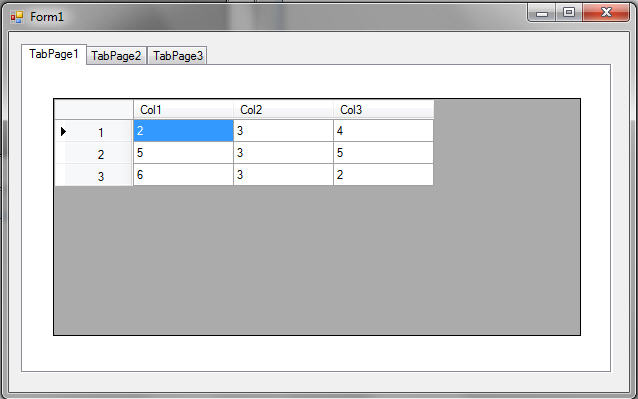
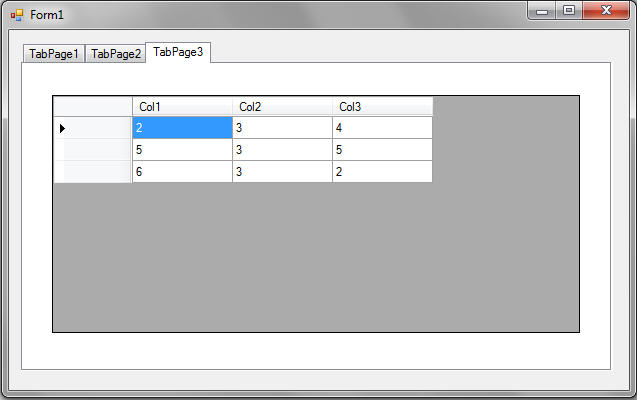
I finally figured out the difference. If the DGV control is on a form it works. If I use tabs and place the DGV anywhere in the tabs besides the first tab it doesn't work. I have two screen shots to show what I mean. Does anyone know why moving the DGV to a tab would break the ability to display row headers.
Working version
_
No headers displayed
-
Any help would be appreciated.
-
May 15th, 2010, 09:34 AM
#2
Thread Starter
New Member
Re: DGV row header won't display in tabs
I forgot to mention that I'm using VS 2008.
-
May 17th, 2010, 10:28 AM
#3
Thread Starter
New Member
VS 2010 didn't fix it.
I downloaded VS 2010 over the weekend and got the same results.
 Posting Permissions
- You may not post new threads
- You may not post replies
- You may not post attachments
- You may not edit your posts
-
Forum Rules
|
Click Here to Expand Forum to Full Width
|



 Reply With Quote