|

-
May 16th, 2010, 10:50 PM
#1
Thread Starter
Fanatic Member

 [RESOLVED] Support special characters [RESOLVED] Support special characters
Hi,
please help me how my VB text box can support
Japanese characters? and also support special characters like this ✿♥★

-
May 16th, 2010, 10:51 PM
#2
Frenzied Member
Re: Support special characters
-
May 16th, 2010, 11:04 PM
#3
Thread Starter
Fanatic Member
Re: Support special characters
 Originally Posted by Zach_VB6

Try using a RichTextBox
When i paste ✿♥★✿♥★ characters in RichTextBox, then it also shows Question mark (?)
-
May 17th, 2010, 11:38 PM
#4
Thread Starter
Fanatic Member
Re: Support special characters
Any one please help 
-
May 18th, 2010, 01:36 AM
#5
Re: Support special characters
I think, you need Unicode supported controls for displaying those characters.
Try searching this forum for "unicode control", especially in CodeBank - Visual Basic 6 and earlier.
You will find lots of custom controls..
If my post was helpful to you, then express your gratitude using Rate this Post. 
And if your problem is SOLVED, then please Mark the Thread as RESOLVED (see it in action - video)
My system: AMD FX 6100, Gigabyte Motherboard, 8 GB Crossair Vengance, Cooler Master 450W Thunder PSU, 1.4 TB HDD, 18.5" TFT(Wide), Antec V1 Cabinet
Social Group: VBForums - Developers from IndiaSkills: PHP, MySQL, jQuery, VB.Net, Photoshop, CodeIgniter, Bootstrap,...
-
May 18th, 2010, 10:07 AM
#6
Thread Starter
Fanatic Member
Re: Support special characters
Originally Posted by akhileshbc
I think, you need Unicode supported controls for displaying those characters.
Try searching this forum for "unicode control", especially in CodeBank - Visual Basic 6 and earlier.
You will find lots of custom controls..
Hi
i got this thread written by Marry.
http://www.vbforums.com/showthread.php?p=3084062
And download the source code and executed in my computer. before running the code i also made changes in Regional Settings
here are the steps
Inserted the XP SP2 CD
Start-->Control Panel --> Date, Time, Language, and Regional Options--> Regional And Language Options
Then Clicked on Advanced TAB
and in Code Page Conversion Table
i checked all the Check boxes and clicked Apply. Some files were copied itself from the CD and then asked for restart the computer, And i restarted the computer then i executed the Sample program of Unitext but i still can not view the Chinese Characters in UNITEXT here is my output image

WHERE as the actual output should be like this
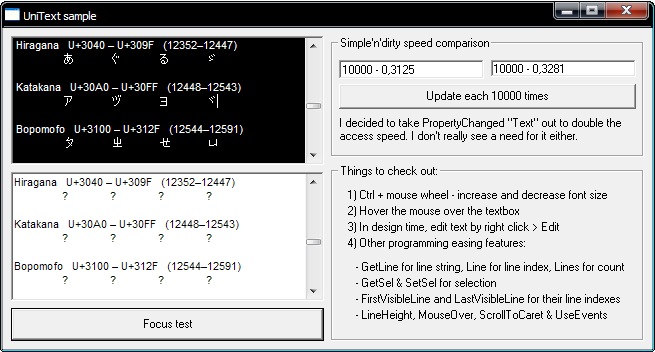
What should i do more to get it working please
-
May 18th, 2010, 10:43 AM
#7
Re: Support special characters
I believe, you also need to add Far Eastern and/or Arabic language support to your system. Do this via the Regional Settings applet in control panel.

-
May 18th, 2010, 02:21 PM
#8
Thread Starter
Fanatic Member
Re: [RESOLVED] Support special characters
Thanks LaVolpe
Finally 
 Posting Permissions
- You may not post new threads
- You may not post replies
- You may not post attachments
- You may not edit your posts
-
Forum Rules
|
Click Here to Expand Forum to Full Width
|



 Reply With Quote


