|

-
Apr 21st, 2010, 01:40 PM
#1
Thread Starter
Lively Member

How does memory work? - Simple question.
Okey, So I decided to hack firefox.
There is some annoying javascript counting down & I constantly miss the time frame Im given after the countdown. So I thought why not give me msbox after countdown is finished.
So I read this nice guide about memory.
After some struggle I even found a script that can read memory.
PHP Code:
$Mem_Read = _MemoryRead('07F3CE0D', 'Firefox.exe') ; Results 785
Problem1: The address is changing every time I reload the page or open new tab. But this script only gets value from 1 address. This means I need to scan whole memory.
Problem 2:
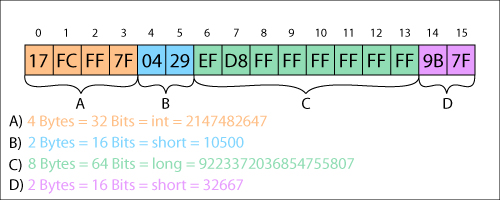
How will the memory address look like if I want to read data from first cluster? Then second one? then 45 clusters ahead? Do I just take hex value of 0,1,2,3,45 & vuala I have a memory address of first 4 Bytes?

M.V.B. 2008 Express Edition
-
Apr 21st, 2010, 03:06 PM
#2
Re: How does memory work? - Simple question.
You should probably stop downloading warez.
And the use of the word hack in your post automatically disqualified you from any replies that are not:
1. Mocking of your lack of competence in doing it yourself.
2. Snide... Like mine...
3. Completely irrelevant to the topic of your thread <-- Most common.
-
Apr 21st, 2010, 03:11 PM
#3
Re: How does memory work? - Simple question.
Not sure what you're trying to do, but reading 0,1,2,3 gives you the first 4 bytes, as it says right in the image. Is this a trick question?
-
Apr 21st, 2010, 03:30 PM
#4
Thread Starter
Lively Member
Re: How does memory work? - Simple question.
 Originally Posted by mendhak

Not sure what you're trying to do, but reading 0,1,2,3 gives you the first 4 bytes, as it says right in the image. Is this a trick question?
No, im not trying to trick anyone, Im just trying to understand how are the memory addresses created or I cant scan for that javascript countdown value in the memory.
so will this work or I still dont understand how to create a memory address?
Will this loop 1 byte at the time through all my memory?
PHP Code:
$Total_Memory = '299845504760742' all available psychical memory in bytes.


for $i=0 to $Total_Memory


    $Mem_Read     = _MemoryRead($i, 'Firefox.exe')


    MsgBox('value',$Mem_Read)

next
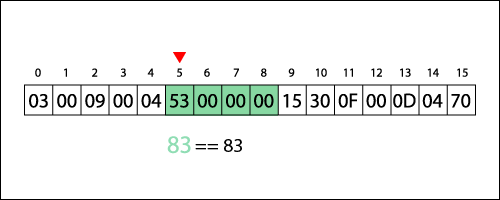
In this image, let say I want to find that value 83. will the memory address look like this?
PHP Code:
$Mem_Read = _MemoryRead('5678', 'Firefox.exe')
Last edited by goldenix; Apr 21st, 2010 at 03:34 PM.
M.V.B. 2008 Express Edition
-
Apr 21st, 2010, 03:43 PM
#5
Re: How does memory work? - Simple question.
firefox is open source isn't it? Why don't you just compile your own version with the desired functionality built in???
-
Apr 21st, 2010, 03:49 PM
#6
Thread Starter
Lively Member
Re: How does memory work? - Simple question.
Originally Posted by kleinma
firefox is open source isn't it? Why don't you just compile your own version with the desired functionality built in???
Im beginner dude, I dont even understand how most of the programming work. And you want me to rewrite firefox that is written in hell knows in what language just so I get a popup message once the countdown finishes?
Okey lets say, I do it. now I will need to alter the javascript functions I get from the server before displaying it. How do you imagine doing that?
I did some searching & it seems you cant alter javascript functions to begin with.
Anyway, please explain how to create a list of memory addresses in my computer?
M.V.B. 2008 Express Edition
-
Apr 21st, 2010, 05:13 PM
#7
Fanatic Member

Re: How does memory work? - Simple question.
Originally Posted by goldenix
Im beginner dude, I dont even understand how most of the programming work...
...Anyway, please explain how to create a list of memory addresses in my computer?

-
Apr 21st, 2010, 05:19 PM
#8
Re: How does memory work? - Simple question.
That's hardly a simple question. For one thing, there are LOTS of memory addresses. For another thing, the OS will be creating virtual memory addresses within a process, which will not be the same as physical memory addresses.
You'd have to know the offset of the counter into the address space of the process...if it even exists. Depending on how the counter actually works, it could even reside only in a register and not in memory at all. Not likely, though.
My usual boring signature: Nothing
 
-
Apr 21st, 2010, 05:58 PM
#9
Frenzied Member
Re: How does memory work? - Simple question.
Memory is a hard thing to parse, the reason being that it is contextual, unless you know what to look for your just getting random bytes. For instance reading 8 bytes in will give you 8 byte values. There not going to do you any good if you don't know what to convert the value into.
-
Apr 21st, 2010, 07:35 PM
#10
Thread Starter
Lively Member
Re: How does memory work? - Simple question.
I know what im looking for, I found this with cheat engine 4 bit, default scan. Since its a countdown I searched for decreasing value & it turns out it starts from 1000 and it takes around 10 minutes to get to 1
virtual memory addresses within a process, sounds darn complicated, hmm cant I I just simplify it by searching whole used memory in my Win XP?
When I did CE scan it took really long. But if I tried to search values between 500 - 999 it was almost instant. So i could try same thing when i code & 10 min. should be plenty of time to find that decreasing value.
Values in memory are stored in Binary right? so I just convert it to decimal & put it into an array & then just see if it has decreased until only 1 value remains. this I can do.
But I dont understand how do memory addresses look like. The guide says I need to search "0x0000000" to "0x7FFFFFFF" But what the hell does it mean? if first address is 0x0000000 then what is next & next after that. How do I determine that?
PS: If you have any reference that may help me to understand this Id appreciate it.
M.V.B. 2008 Express Edition
-
Apr 21st, 2010, 09:41 PM
#11
Re: How does memory work? - Simple question.
You could take the source HTML and take out the countdown JavaScript. If you don't know JavaScript and HTML, you could just disable JavaScript altogether when you reach the countdown page.
-
Apr 21st, 2010, 10:02 PM
#12
Re: How does memory work? - Simple question.
What web site is this for? It sounds like RapidShare's free user's download countdown
-
Apr 22nd, 2010, 04:16 AM
#13
Thread Starter
Lively Member
Re: How does memory work? - Simple question.
Its easyshare. with its 500 sec cool down. It took me a day once to download 1 file & in the end I still forgot to check back when the countdown finished & was not able to download anything. with its 500 sec cool down. It took me a day once to download 1 file & in the end I still forgot to check back when the countdown finished & was not able to download anything.
As you see I cant simply get the source & replace javascript. & I already tried this btw, it did not work. & I cant use greasemonkey cuz it wont let me modify javascript functions.
So the memory reading is the only solution I came up with.
M.V.B. 2008 Express Edition
-
Apr 22nd, 2010, 05:14 AM
#14
Re: How does memory work? - Simple question.
Originally Posted by goldenix
Its easyshare. with its 500 sec cool down. It took me a day once to download 1 file & in the end I still forgot to check back when the countdown finished & was not able to download anything.
As you see I cant simply get the source & replace javascript. & I already tried this btw, it did not work. & I cant use greasemonkey cuz it wont let me modify javascript functions.
So the memory reading is the only solution I came up with.
Do you know that there are download managers for those kind of things so you can add a list of files and it will download one at a time as soon as it can? I know there are for rapidshare, and I guess there are for easyshare too (not sure, I dont use either).
-
Apr 22nd, 2010, 05:27 AM
#15
Thread Starter
Lively Member
Re: How does memory work? - Simple question.
Yes I know, like cryp.tload, but I did not find anything for easyshare.
That external program idea was good, & it gave me even more wonderful idea. Instead of making it external I just made a monkey script with 1 line of code.
PHP Code:
setTimeout("alert('Countdown Finish!')",1000*500);
Now each time I open the page, the countdown will count down & display alert. & I wont need to start any external programs.
Well see how it goes. it seems the script continues to run if I restart the fox or close this tab & open new one, while countdown has not finished & then it simply wont work.
Last edited by goldenix; Apr 22nd, 2010 at 05:39 AM.
M.V.B. 2008 Express Edition
-
Apr 22nd, 2010, 04:39 AM
#16
Re: How does memory work? - Simple question.
Why not simply create a separate countdown alarm program, which allows you to input the amount of time?
-
Apr 22nd, 2010, 04:58 AM
#17
Thread Starter
Lively Member
Re: How does memory work? - Simple question.
hmm, I dont know how exact will this be. I gotta look in to this.
M.V.B. 2008 Express Edition
-
Apr 22nd, 2010, 11:28 AM
#18
Re: How does memory work? - Simple question.
Just for your information, those memory addresses are hexadecimal numbers (base 16). They are distinguished by starting with either 0x or &H, depending on the representation. Decimal numbers (base 10) have 10 distinct digits with which we are all familiar. Hexadecimal has to have 16 distinct digits. Since we have 10 already, there just has to be 6 more, and for those we use A-F. Therefore, the digits in decimal are:
0, 1, 2, 3, 4, 5, 6, 7 , 8, 9
while in hex, the digits are:
0, 1, 2, 3, 4, 5, 6, 7 , 8, 9, A, B, C, D, E, F
The advantage of hex is that modern computer code is based on 8 bit bytes. Therefore, the maximum value in a byte is 2^8 - 1, which is an awkward 255 in decimal. The value is awkward because you can't really string together the value of multiple bytes very well. However, if you use hexadecimal, then every four bits is one digit, such that the maximum value for a byte is FF. This means that you can show four byte integers as 8 digits. If you were to use decimal, the number of digits would be between four and twelve, and you would need something extra to separate them (hence the way IP addresses look, with a dot separator).
All memory addresses in 32 bit systems are four bytes, which means 8 hex digits. If you look at your example, you will see that all of those addresses are 8 digits long.
My usual boring signature: Nothing
-
Apr 22nd, 2010, 11:55 AM
#19
Re: How does memory work? - Simple question.
How about this, I found it by Googling "easyshare downloader"
http://www.megaleecher.net/taxonomy/term/6892
-
Apr 22nd, 2010, 01:32 PM
#20
Re: How does memory work? - Simple question.
As you see I cant simply get the source & replace javascript. & I already tried this btw, it did not work. & I cant use greasemonkey cuz it wont let me modify javascript functions.
You know, that means you did it wrong.
-
Apr 22nd, 2010, 05:00 PM
#21
Frenzied Member
Re: How does memory work? - Simple question.
You could also just pay for the account......
-
Apr 23rd, 2010, 01:22 AM
#22
Hyperactive Member

Re: How does memory work? - Simple question.
Originally Posted by DeanMc
You could also just pay for the account......
There's that.
Education is an admirable thing, but it is well to remember from time to time that nothing that is worth knowing can be taught. - Oscar Wilde
-
Apr 23rd, 2010, 02:06 AM
#23
Re: How does memory work? - Simple question.
Originally Posted by DeanMc
You could also just pay for the account......
Why pay if you can have it free. 
-
Apr 23rd, 2010, 05:53 AM
#24
Re: How does memory work? - Simple question.
If you want to know how memory works, then learn C or even better and assembly language. Trying
to find out how to write to an arbitary location containing a countdown vlaue is a little pointless and won't be of any use in showning you how objects are stored in memory. Anyhow, the timeout value is most probably stored as a date / time in memory, not an integer.
-
Apr 23rd, 2010, 07:07 AM
#25
Thread Starter
Lively Member
Re: How does memory work? - Simple question.
In any case I figured out how to make me scanner work. It can scan whole memory now. But its even slower than hell. If i use CE it takes around 1-2 seconds. with this 140+ HOURS. this is crazy lol.
Well im going to try to make it in C now. Maybe Ill find more guides for C.
If you want to try it out or just for fun, go ahead:
NomadMemory.au3
PHP Code:
#cs ----------------------------------------------------------------------------

 AutoIt Version: 3.3.6.0

 Author:         goldenix


    Script Function:     Scan Memory

    Remarks:            Hit ALT+ ESC to abort scan, show array & exit


                        Total Memory in Bytes 3144108000

#ce ----------------------------------------------------------------------------

#include <NomadMemory.au3>

#include <Array.au3>


HotKeySet("!{esc}", "_exit")     ; Alt ESC to exit

;~ ------------------------------------------------------------


;## Create 2 Arrays

Dim $avArray_1[2][2] ;2 Rows & 2 columns at the beginning

;~ ------------------------------------------------------------

Global $iv_Pid          = ProcessExists ( "firefox.exe" )

Global $MemoryOpen    = _MemoryOpen($iv_Pid)


Global $mem         = MemGetStats()

Global $Bytes         = stringreplace($mem[1]*1000,'.','')


ConsoleWrite('Total Memory in Bytes: ' & $Bytes & @CRLF)


Global $xxx = 1

Global $i

;~ ------------------------------------------------------------


For $i = 1 to $Bytes ; until total memory is scanned probably....


$begin = TimerInit(); check how long will it take to scan memory

;~     ---------------------------------------------------------------------

    $Address = _DecimalToHex($i,8)


    $Value = _MemoryRead('0x' & $Address, $MemoryOpen)


    $filter = _Flter($Value) ; 1=put to array, 0 Skip $Mem_Read value


    If $filter = 1 Then __ArrayAdd($Address, $Value)

;~     ---------------------------------------------------------------------

$dif = TimerDiff($begin)

ConsoleWrite('Time to scan memory in Hours:' & $dif/1000*$Bytes/60/60 & @CRLF)

_exit()


Next

_ArrayDisplay($avArray_1, "$avArray")


;~ ==================================

;## First scan

;~ ==================================

Func __ArrayAdd($Address, $Value)


    $iRow = UBound($avArray_1)        ;Get array lenght

    $iCol = UBound($avArray_1, 2)    ;Need this line to redim the colums


    $avArray_1[$xxx][0] = $Address

    $avArray_1[$xxx][1] = $Value


;~     ConsoleWrite($Address & ' ' & $Value & @CRLF)

    ReDim $avArray_1[$iRow + 1][$iCol]    ; add more rows +1


    $xxx = $xxx +1

EndFunc


;~ ==================================

;## Filter out values we are looking for

;~ ==================================

Func _Flter($Value)

    If $Value > 1 And $Value < 300    Then

        Return 1

    Else

        Return 0

    EndIf

EndFunc


Func _exit()

    _MemoryClose($MemoryOpen)

     _ArrayDisplay($avArray_1, "$avArray")

    Exit

EndFunc


; #FUNCTION# ==============================================================

; Function Name..: _DecToHex ( expression [, length] )

; Description ...: Returns a string representation of an integer converted to hexadecimal.

; Parameters ....: expression   - The integer to be converted to hexadecimal.

;                               - [optional] Number of characters to be returned (no limit).

;                                 If no length specified, leading zeros will be stripped from result.

; Return values .: Success      - Returns a string of length characters representing a hexadecimal expression, zero-padded if necessary.

;                  Failure      - Returns "" (blank string) and sets @error to 1 if expression is not an integer.

; Author ........: jennico (jennicoattminusonlinedotde)

; Remarks .......: Output format "FFFF".

;               The function will also set @error to 1 if requested length is not sufficient - the returned string will be left truncated.

;               Be free to modify the function to be working with binary type input - I did not try it though.

;               current AutoIt Hex() limitation: 0xFFFFFFFF (4294967295).

; Related .......: Hex(), Dec(), _HexToDec()

; =======================================================================

Func _DecimalToHex($hx_dec, $hx_length = 21)


    Local $HX_REF="0123456789ABCDEF"


    If IsInt($hx_dec) = 0 Then

        SetError(1)

        MsgBox(0,"Error","Wrong input, try again ...")

        Return ""

    EndIf

    Local $ret = "", $Ii, $hx_tmp, $hx_max

    If $hx_dec < 4294967296 Then

        If $hx_length < 9 Then Return Hex($hx_dec, $hx_length)

        If $hx_length = 21 Then

            $ret = Hex($hx_dec)

            While StringLeft($ret, 1) = "0"

                $ret = StringMid($ret, 2)

            WEnd

            Return $ret

        EndIf

    EndIf

    For $Ii = $hx_length - 1 To 0 Step -1

        $hx_max = 16 ^ $Ii - 1

        If $ret = "" And $hx_length = 21 And $hx_max > $hx_dec Then ContinueLoop

        $hx_tmp = Int($hx_dec/($hx_max+1))

        If $ret = "" And $hx_length = 21 And $Ii > 0 And $hx_tmp = 0 Then ContinueLoop

        $ret &= StringMid($HX_REF, $hx_tmp+1, 1)

        $hx_dec -= $hx_tmp * ($hx_max + 1)

    Next

    $ret=String($ret)

    If $hx_length < 21 And StringLen($ret) < $hx_length Then SetError(1)

    Return $ret

EndFunc  ;==>_DecToHex()
M.V.B. 2008 Express Edition
-
Apr 23rd, 2010, 11:44 AM
#26
Fanatic Member

Re: How does memory work? - Simple question.
How does memory work? It works very well.
 Make as many mistakes as you can as quickly as you can. We want to make sure that we make a great enough number of mistakes in a given amount of time so that we can be successful.
"Persistence is the magic of success." Paramahansa Yogananda
 Posting Permissions
- You may not post new threads
- You may not post replies
- You may not post attachments
- You may not edit your posts
-
Forum Rules
|
Click Here to Expand Forum to Full Width
|



 Reply With Quote


