|

-
Apr 1st, 2010, 03:46 AM
#1
Thread Starter
Hyperactive Member

'Replace' Form Enabled property
Is there a way to 'replace' the Enabled property of a form?
In a real object oriented language it is simple, it's also simple for a usercontrol, but I need it for a 'regular' Form.
Because of the limitation of 255 components on one form we were forced (10 years ago) to use a form for every 'tab' instead of using the normal tabcomponent. So we have a parentform and a childform (which is positioned over the tabstrip) now I have an object that disables it's ownerform using 'OwnerForm.Enabled=False/True', but this disables only the childform. So now I wanted to do something like this:
Code:
Public Property Let Enabled(ByVal bValue As Boolean)
'  me.Enabled = bValue
  m_OwnerForm.Enabled = bValue
End Property

Public Property Get Enabled() As Boolean
  Enabled = m_OwnerForm.Enabled
End Property
but ofcourse VB is bitching about the function already available, and even if it would work Me.Enabled would just call itself again.
maybe someone has a great idea how to 'fix' this..
In the meantime I'm going to checkout if I can do something with the Form activate/deactivate/Paint event..
(Damn MS for not releasing VB7 to the public and instead go for VB.NET, hehe..)
-
Apr 1st, 2010, 06:55 AM
#2
Re: 'Replace' Form Enabled property
 Originally Posted by SuperDre

Is there a way to 'replace' the Enabled property of a form?..
Even if it was some way I don't see any point in doing so...
Originally Posted by SuperDre
Because of the limitation of 255 components on one form...
To clarify: it's not limited to 255 components - number of controls per 1 form is limited to 255 unique names meaning that you can [in theory] have control array created for each name so the actual limitation [practically] cannot be reached.
Also, if you have more than say 100 controls on one form you should seriously reconsider your design.
ps, since this is professional forum please watch your language. Thanks.
-
Apr 1st, 2010, 07:56 AM
#3
Thread Starter
Hyperactive Member
Re: 'Replace' Form Enabled property
Originally Posted by RhinoBull
Even if it was some way I don't see any point in doing so...
Well if some other component/class disables the current form using OwnerForm.Enabled=False, I need to disable the current form's parent, and the only way to do this would be by catching the Enabled property of the current form.
looking at the activate/deactivate/paint events turned out to be very flacky.
Also more than 100 components isn't even a big issue IMHO, for example if you have settings-screen with multiple tabs for settings.. And yes we had to rethink our design, in the end the way we do it now (using a form as a tab positioned over another form) is for our project the best solution even though there are ofcourse some minor problems with having to catch the tab key, and ofcourse if your 'tabform' has the focus the 'mainform' will loose its focus and therefor the color of the titlebar accordingly.
-
Apr 1st, 2010, 08:19 AM
#4
Re: 'Replace' Form Enabled property
Originally Posted by SuperDre
...I need to disable the current form's parent, and the only way to do this would be by catching the Enabled property of the current form.
looking at the activate/deactivate/paint events turned out to be very flacky...
Show "child" form modally: Form2.Show vbModal
This way you wouldn't have to worry about disabling "parent".
-
Apr 1st, 2010, 09:45 AM
#5
Thread Starter
Hyperactive Member
Re: 'Replace' Form Enabled property
Originally Posted by RhinoBull
Show "child" form modally: Form2.Show vbModal
This way you wouldn't have to worry about disabling "parent".
that's not possible in this case..
At the moment I've just took the 'long road' by just disabling the owner before starting the specified function and then enabling it again afterwards, on every spot where it is needed, the other option by catching Enabled was a much cleaner and futureproof solution.. ahwell I guess that'll have to do for now, as there just isn't another safe approuch sadly.
thanx..
-
Apr 1st, 2010, 12:17 PM
#6
Re: 'Replace' Form Enabled property
But how is it different from showing modal form?  Perhaps you can explain. Perhaps you can explain.
-
Apr 1st, 2010, 01:15 PM
#7
Addicted Member
Re: 'Replace' Form Enabled property
showing modal would disable EVERYTHING until the form was finsihed with. Maybe he wants to keep other forms useable, just not the parent.
-
Apr 1st, 2010, 01:57 PM
#8
Re: 'Replace' Form Enabled property
Could we have a screen shot of what the project/main form looks like?
-
Apr 1st, 2010, 03:34 PM
#9
Re: 'Replace' Form Enabled property
Originally Posted by Golgo1
showing modal would disable EVERYTHING until the form was finsihed with...
Not necesary true - Timers will still operate asyncronously; besides some control (or functionality if you will) can easily be passed to the modal form; there is also ActiveX technology...
-
Apr 1st, 2010, 04:56 PM
#10
Addicted Member
Re: 'Replace' Form Enabled property
I guess by 'everything' I meant all forms and thier user interaction
-
Apr 1st, 2010, 04:59 PM
#11
Re: 'Replace' Form Enabled property
But that is one of the main reasons we need modal forms. 
-
Apr 1st, 2010, 07:34 PM
#12
Re: 'Replace' Form Enabled property
Are you aware that for the purposes of the 255 limit that control arrays count as only one?
-
Apr 1st, 2010, 08:11 PM
#13
Re: 'Replace' Form Enabled property
I tried mentioning that in post #2 but he didn't specifically admited he understood that.
-
Apr 1st, 2010, 08:21 PM
#14
Re: 'Replace' Form Enabled property
-
Apr 1st, 2010, 08:29 PM
#15
Re: 'Replace' Form Enabled property
No, I'm glad you did - hopefully OP will pay more attention...
Last edited by RhinoBull; Apr 1st, 2010 at 08:41 PM.
-
Apr 2nd, 2010, 03:21 AM
#16
Thread Starter
Hyperactive Member
Re: 'Replace' Form Enabled property
Originally Posted by MartinLiss
Are you aware that for the purposes of the 255 limit that control arrays count as only one?
It's 10 years ago when we encountered that problem, and we were already using control arrays, but it was even MS back then who said there was some other problem (can't really remember what it exactly was) we hit why we had to really rethink the approach. As I said the current method we use has been working perfectly for 10 years now.
With Modal Forms you cannot open another form on top of it which isn't modal.
In this case we have a class that acts like a 'printer' which can send the created page to a printer/file/memory or screen through a 'printpreview screen', now this screen has buttons (like next/previous page) which are 'checked' by the class (which handles the showing of the page, so if I tell the class to 'ShowPage', it will handle if it's going to the screen/printer/file/memory according to what I told it when I started the class), now this printpreviewscreen cannot go Modal as in some cases you are allowed to keep the printpreview open and do some stuff on another form.
Originally Posted by baja_yu
Could we have a screen shot of what the project/main form looks like?
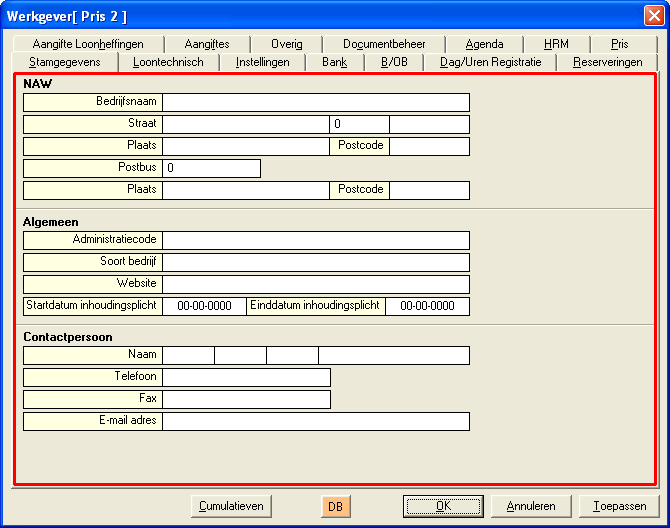
In this attachement you can see the 'tabform' which is outlined with red, and behind that is the 'parent', you see it looks like it is one form but actually are two. It's the 'tabform' which needs to disable/enable it's parent when itself is being disabled/enabled.
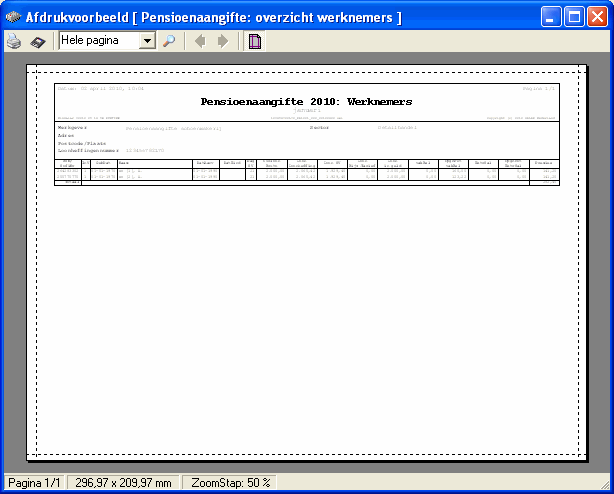
This attachement is an example of the 'printpreviewform' we made.
Ofcourse there are other ways to handle stuff, but this thing (display class with it's printpreview) worked perfectly for 7 years now, and we only found this problem now ourselves and were trying to resolve it, I just hoped I could fix it in a universal way and not having to add the 'OwnerForm.Enabled=False' and 'OwnerForm.Enabled=True' around each call to which might access the displayclass in these particular forms (as ofcourse there is definitly a chance I might forget it when I add something similar to one of those forms (although I doubt it as I normally do copy-paste LOL).
ahwell you can't have it all, hehe (that's why I said, if only they released VB7 (which does have real inheritance according to some MS insiders) instead of VB.NET.
-
Apr 2nd, 2010, 06:41 AM
#17
Re: 'Replace' Form Enabled property
Originally Posted by SuperDre
With Modal Forms you cannot open another form on top of it which isn't modal...
True.
Instead of disabling try hiding your "parent" form (Hide method or Visible property) while "child" is active so you can show another form.
-
Apr 2nd, 2010, 06:53 AM
#18
Re: 'Replace' Form Enabled property
Originally Posted by SuperDre
It's 10 years ago when we encountered that problem, and we were already using control arrays, but it was even MS back then who said there was some other problem (can't really remember what it exactly was) we hit ...
In VB6 you can have 254 unique controls (say Command1, Command2 and so on...)
For each of those you can have control array (each control array will be count as only 1).
Each control array can support upto 32,767 elements (since Index is defined as Integer).
It has been that way since [I believe] VB4 so I'm not sure how could you possibly run into any problem other than issues with available memory.
-
Apr 2nd, 2010, 07:05 AM
#19
Re: 'Replace' Form Enabled property
I have just done something asimilar and had 2 ways of doing this.
Convert your forms that you want to add as tabs into usercontrols, then you can just add 1 control per tab. If you ever need to use them as forms again, create a blank form and add the control on it.
There is a really easy way to convert them btw, you just copy and paste the .frm and .frx and rename both to .ctl and .ctx
Edit the .frx in notepad and replace Vb.Form with Vb.UserControl and any place that the .frx is named, replace with the .ctx filename instead.
Remove the old form from VB6 project, add the new usercontrol and fix properties as needed, you will get moaned at due to missing things like icons and captions. Replace Me.xxx with UserControl.xxx and your done.
The other method I have used is the SetParent API and extract the controls off the sub form and put straight into a picturebox or the like on the new form. This has drawbacks (but is quicker to code) with missing out certain keyboard presses and weird focus issues.
-
Apr 3rd, 2010, 10:18 AM
#20
Thread Starter
Hyperactive Member
Re: 'Replace' Form Enabled property
Originally Posted by Grimfort
I have just done something asimilar and had 2 ways of doing this.
Convert your forms that you want to add as tabs into usercontrols, then you can just add 1 control per tab. If you ever need to use them as forms again, create a blank form and add the control on it.
There is a really easy way to convert them btw, you just copy and paste the .frm and .frx and rename both to .ctl and .ctx
Edit the .frx in notepad and replace Vb.Form with Vb.UserControl and any place that the .frx is named, replace with the .ctx filename instead.
Remove the old form from VB6 project, add the new usercontrol and fix properties as needed, you will get moaned at due to missing things like icons and captions. Replace Me.xxx with UserControl.xxx and your done.
The other method I have used is the SetParent API and extract the controls off the sub form and put straight into a picturebox or the like on the new form. This has drawbacks (but is quicker to code) with missing out certain keyboard presses and weird focus issues.
Those are great alternative. The only 'problem' with the method of using UserControls, it will use a lot of memory, because you still have all the controls that are loaded on the Usercontrol which is loaded on the form in memory.
We use the SetParent API to make sure the 'tabform' is 'stitched' to the 'mainform'.
Thanx for sharing the alternatives..
BTW, I think one of the reasons we went from everyting on one form had something to do with Windows ME back then, but I might also be wrong, it's so long ago that I really can't remember the real reason, but I know it had something to do with a certain limit we crossed hehe... Just like we had to go to SP6 just so our 64-bit developmentsystems could load/run/compile (Can't remember which one) our VB-project hihi..
-
Apr 3rd, 2010, 03:35 PM
#21
Re: 'Replace' Form Enabled property
Just don't load the controls on the tabs until you actually open them. Slight overhead, but maybe you could do it in stages, load a set of 5 if they are linked or are commonly used, then load another set when you believe they will be used. It sounds like your gonna have to comprimise somewhere  . .
 Posting Permissions
- You may not post new threads
- You may not post replies
- You may not post attachments
- You may not edit your posts
-
Forum Rules
|
Click Here to Expand Forum to Full Width
|



 Reply With Quote


 2009 - 2016