|

-
Mar 26th, 2010, 09:52 PM
#1
Thread Starter
Fanatic Member

 [RESOLVED] DataTable Problem [RESOLVED] DataTable Problem
I have created a datatable and now i need to print it,so i did the following:
Code:
Private Sub PrintDocument1_PrintPage(ByVal sender As Object, ByVal e As System.Drawing.Printing.PrintPageEventArgs) Handles PrintDocument1.PrintPage

        Dim xPos As Single = 20
        Dim yPos As Single = 20
        Dim i As Integer = 0

        For Each rows As DataRow In dt.Rows
            e.Graphics.DrawString(dt.Rows(i).Item(0).ToString, _detailFont, Brushes.Black, xPos, yPos)
            xPos += e.Graphics.MeasureString(dt.Rows(i).Item(0).ToString, _detailFont).Width
            e.Graphics.DrawString(dt.Rows(i).Item(1).ToString, _detailFont, Brushes.Black, xPos, yPos)
            xPos += e.Graphics.MeasureString(dt.Rows(i).Item(1).ToString, _detailFont).Width
            e.Graphics.DrawString(dt.Rows(i).Item(2).ToString, _detailFont, Brushes.Black, xPos, yPos)
            xPos += e.Graphics.MeasureString(dt.Rows(i).Item(2).ToString, _detailFont).Width
            e.Graphics.DrawString(dt.Rows(i).Item(3).ToString, _detailFont, Brushes.Black, xPos, yPos)
            xPos = 20
            yPos += 20
            i += 1
        Next

    End Sub
The code works fine.But in the above code as you can see that i am printing the each rows content of the datatable one by one and after printing all the contents of a single row i am looping the code again for printing each and every row present in the datatable.
So i want to know that inspite of printing each and every data present in the row of the datatable,is it possible to print the entire datarow at a time and then loop through all the rows present in the datatable?
Hope you can understand my problem.Please help
Thank you
-
Mar 26th, 2010, 10:08 PM
#2
Thread Starter
Fanatic Member
Re: DataTable Problem
or some other alternating ideas to print the entire datatable will also be very helpful........
-
Mar 26th, 2010, 11:46 PM
#3
Re: DataTable Problem
one way or another you'll have to loop through your dt fields. doesn't seem to be any easier way.
- Coding Examples:
- Features:
- Online Games:
- Compiled Games:
-
Mar 26th, 2010, 11:49 PM
#4
Thread Starter
Fanatic Member
Re: DataTable Problem
If you were asked to do the same then may i know how you would have done it?
Though my code works but i am very interested to know how do the experts would have done the same thing.......
-
Mar 26th, 2010, 11:59 PM
#5
Re: DataTable Problem
i'm not sure how your formatting works out with your method. i'd measure each row of each field + format the columns appropriately based on the greatest column width
- Coding Examples:
- Features:
- Online Games:
- Compiled Games:
-
Mar 27th, 2010, 12:32 AM
#6
Thread Starter
Fanatic Member
Re: DataTable Problem
 Originally Posted by .paul.

i'm not sure how your formatting works out with your method. i'd measure each row of each field + format the columns appropriately based on the greatest column width
the formatting part is an issue for me also as i cant understand how to do this,even i cant add the datatable header(i.e,the column names of the datatable) and i need some help from you paul.
i did this to set the font:
Code:
 Private Sub PrintDocument1_BeginPrint(ByVal sender As Object, ByVal e As System.Drawing.Printing.PrintEventArgs) Handles PrintDocument1.BeginPrint
        'set the data pointers (if any) to the start position
        'initialise any page number variables you might have

        _titleFont = New Font(FontFamily.GenericSerif, 16, FontStyle.Bold, GraphicsUnit.Point)

        _detailFont = New Font(FontFamily.GenericSerif, 9, FontStyle.Bold, GraphicsUnit.Point)

    End Sub
but i need your help in measure each row of each field + format the columns appropriately based on the greatest column width.....
how would you have done this?
Please help
-
Mar 27th, 2010, 07:15 AM
#7
Thread Starter
Fanatic Member
Re: DataTable Problem
Originally Posted by .paul.
i'm not sure how your formatting works out with your method. i'd measure each row of each field + format the columns appropriately based on the greatest column width
as you said,i just changed my code to this:
Code:
   Private Sub PrintDocument1_PrintPage(ByVal sender As Object, ByVal e As System.Drawing.Printing.PrintPageEventArgs) Handles PrintDocument1.PrintPage
        Dim xPos As Single = 120

        Dim yPos As Single = 120

        Dim i As Integer = 0

        Dim y As Integer = 0

        Dim myArray() As Integer = {0, 0, 0, 0}

        For i = 0 To dt.Rows.Count - 1

            For y = 0 To dt.Columns.Count - 1

                If myArray(y) < e.Graphics.MeasureString(dt.Rows(i).Item(y).ToString, _detailFont).Width + 150 Then

                    myArray(y) = e.Graphics.MeasureString(dt.Rows(i).Item(y).ToString, _detailFont).Width + 150

                End If

            Next

        Next

        For i = 0 To dt.Rows.Count - 1

            For y = 0 To dt.Columns.Count - 1

                e.Graphics.DrawString(dt.Rows(i).Item(y).ToString, _detailFont, Brushes.Black, xPos, yPos)

                xPos += myArray(y)

            Next

            xPos = 120

            yPos += 50

        Next

    End Sub
Is it ok?
By this code i am adding the datas in the page before printing. Now i want add the datatable header(i.e,the column names of the datatable) on the page,how to go for it?
Should i use something like this to add each and every columns on the page?
Code:
e.Graphics.DrawString("Name", _titleFont, Brushes.Black, xPos, yPos)
e.Graphics.DrawString("Age", _titleFont, Brushes.Black, xPos, yPos)
e.Graphics.DrawString("Roll", _titleFont, Brushes.Black, xPos, yPos)
e.Graphics.DrawString("Sex", _titleFont, Brushes.Black, xPos, yPos)
Please suggest
-
Mar 27th, 2010, 11:08 AM
#8
Re: DataTable Problem
you can loop through the datacolumns + print the column name. you should obviously print the column headers before the rest of the datatable:
vb Code:
For Each c As DataColumn In dt.Columns
    MsgBox(c.ColumnName)
Next
- Coding Examples:
- Features:
- Online Games:
- Compiled Games:
-
Mar 27th, 2010, 11:12 AM
#9
Thread Starter
Fanatic Member
Re: DataTable Problem
hi paul,can you suggest what kind of formatting should i do in the printing page?
-
Mar 27th, 2010, 11:24 AM
#10
Re: DataTable Problem
try this:
vb Code:
Private Sub PrintDocument1_PrintPage(ByVal sender As Object, ByVal e As System.Drawing.Printing.PrintPageEventArgs) Handles PrintDocument1.PrintPage
     Dim yPos As Single = 120
     Dim columnWidths(dt.Columns.Count - 1) As Integer
     For x As Integer = 0 To dt.Columns.Count - 1
        columnWidths(x) = Integer.MinValue
    Next
       For x As Integer = 0 To dt.Columns.Count - 1
         For y As Integer = 0 To dt.Rows.Count - 1
             If columnWidths(x) < e.Graphics.MeasureString(dt.Rows(y).Item(x).ToString, _detailFont).Width + 150 Then
                 columnWidths(x) = e.Graphics.MeasureString(dt.Rows(y).Item(x).ToString, _detailFont).Width + 150
             End If
         Next
     Next
     For y As Integer = 0 To dt.Rows.Count - 1
         For x As Integer = 0 To dt.Columns.Count - 1
             If x > 0 Then
                 e.Graphics.DrawString(dt.Rows(y).Item(x).ToString, _detailFont, Brushes.Black, columnWidths(x - 1), yPos)
             Else
                 e.Graphics.DrawString(dt.Rows(y).Item(x).ToString, _detailFont, Brushes.Black, 120, yPos)
             End If
         Next
         yPos += 50
     Next
 End Sub
- Coding Examples:
- Features:
- Online Games:
- Compiled Games:
-
Mar 27th, 2010, 11:28 AM
#11
Thread Starter
Fanatic Member
Re: DataTable Problem
Originally Posted by .paul.
you can loop through the datacolumns + print the column name. you should obviously print the column headers before the rest of the datatable:
vb Code:
For Each c As DataColumn In dt.Columns
    MsgBox(c.ColumnName)
Next
i tried to implement this by doing this code:
Code:
 Private Sub PrintDocument1_PrintPage(ByVal sender As Object, ByVal e As System.Drawing.Printing.PrintPageEventArgs) Handles PrintDocument1.PrintPage

        Dim xPos As Single = 120

        Dim yPos As Single = 120

        Dim i As Integer = 0

        Dim y As Integer = 0
        Dim myArray() As Integer = {0, 0, 0, 0}

        For i = 0 To dt.Rows.Count - 1

            For y = 0 To dt.Columns.Count - 1

                If myArray(y) < e.Graphics.MeasureString(dt.Rows(i).Item(y).ToString, _detailFont).Width + 150 Then

                    myArray(y) = e.Graphics.MeasureString(dt.Rows(i).Item(y).ToString, _detailFont).Width + 150

                End If

            Next

        Next

        For Each c As DataColumn In dt.Columns

            e.Graphics.DrawString(c.ColumnName, _titleFont, Brushes.Black, xPos, yPos)

            xPos += myArray(y)

        Next

        xPos = 120

        yPos += 50

        For i = 0 To dt.Rows.Count - 1

            For y = 0 To dt.Columns.Count - 1

                e.Graphics.DrawString(dt.Rows(i).Item(y).ToString, _detailFont, Brushes.Black, xPos, yPos)

                xPos += myArray(y)

            Next

            xPos = 120

            yPos += 50

        Next

    End Sub
i am getting this exception:

How to solve this?
-
Mar 27th, 2010, 11:32 AM
#12
Thread Starter
Fanatic Member
Re: DataTable Problem
#10 is giving this output
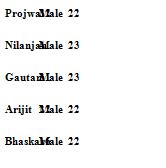
can you help me in solving the error of #11?
-
Mar 27th, 2010, 11:57 AM
#13
Re: DataTable Problem
vb Code:
Dim counter As Integer = 0
For Each c As DataColumn In dt.Columns
     e.Graphics.DrawString(c.ColumnName, _titleFont, Brushes.Black, xPos, yPos)
     xPos += myArray(counter)
    counter += 1
 Next
- Coding Examples:
- Features:
- Online Games:
- Compiled Games:
-
Mar 27th, 2010, 12:05 PM
#14
Thread Starter
Fanatic Member
Re: DataTable Problem
now its working and i am getting a output like this:
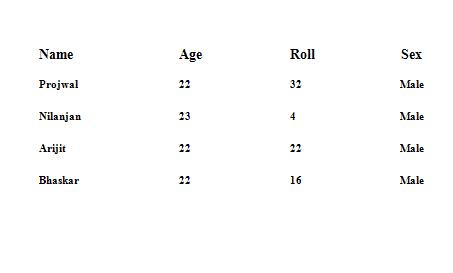
can you suggest how more to format the data so that it appears well to the user??
-
Mar 27th, 2010, 01:23 PM
#15
Thread Starter
Fanatic Member
Re: DataTable Problem
Code:
 e.Graphics.DrawLine(Pens.Black, 50, 50, 800, 50)

        e.Graphics.DrawLine(Pens.Black, 50, 50, 50, 1050)

        e.Graphics.DrawLine(Pens.Black, 50, 1050, 800, 1050)

        e.Graphics.DrawLine(Pens.Black, 800, 50, 800, 1050)

        e.Graphics.DrawLine(Pens.Black, 100, 110, 750, 110)

        e.Graphics.DrawLine(Pens.Black, 100, 150, 750, 150)

        e.Graphics.DrawLine(Pens.Black, 100, 1000, 750, 1000)
but this code is having some problems since if i change the page setup from portrait to landscape then it wont work.......
even the entire positioning of the contents of the page is changed............
is there a way to get rid of this problem?
Then how to do this?
Last edited by HowTo; Mar 27th, 2010 at 01:30 PM.
-
Mar 27th, 2010, 09:05 PM
#16
Thread Starter
Fanatic Member
Re: DataTable Problem
any suggestions/help please?
-
Mar 27th, 2010, 10:57 PM
#17
Thread Starter
Fanatic Member
Re: DataTable Problem
Originally Posted by HowTo
Code:
 e.Graphics.DrawLine(Pens.Black, 50, 50, 800, 50)

        e.Graphics.DrawLine(Pens.Black, 50, 50, 50, 1050)

        e.Graphics.DrawLine(Pens.Black, 50, 1050, 800, 1050)

        e.Graphics.DrawLine(Pens.Black, 800, 50, 800, 1050)

        e.Graphics.DrawLine(Pens.Black, 100, 110, 750, 110)

        e.Graphics.DrawLine(Pens.Black, 100, 150, 750, 150)

        e.Graphics.DrawLine(Pens.Black, 100, 1000, 750, 1000)
but this code is having some problems since if i change the page setup from portrait to landscape then it wont work.......
even the entire positioning of the contents of the page is changed............
is there a way to get rid of this problem?
Then how to do this?
Please help
-
Mar 27th, 2010, 11:03 PM
#18
Re: DataTable Problem
The problem is that you've written code that only works for one specific paper size and one specific orientation. If you want code that will work with any parameters then you can't hard-code every value. You have to use the information provided by the PrintPage event to determine what the parameters are, e.g. paper size and orientation, and then use those in your code to lay out the printed output accordingly
-
Mar 27th, 2010, 11:12 PM
#19
Thread Starter
Fanatic Member
Re: DataTable Problem
can you show me a sample code to do it....
last night i were thinking that since i am using the absolute positioning hence i am facing the problem but i cant solve it......
can you help me with a sample code which i can work on with?
-
Mar 27th, 2010, 11:25 PM
#20
Re: DataTable Problem
I'd suggest that you take a look at Merrion's CodeBank thread that provides DataGridPrinter and DataGridViewPrinter classes. I'm sure it handles different page orientations and more. Note that that is a different thread to the printing intro.
-
Mar 27th, 2010, 11:30 PM
#21
Thread Starter
Fanatic Member
Re: DataTable Problem
ok then i am creating a new thread on this topic.....
can you tell how can i bring merrions attraction towards this thread?I cant find him online and i have got lots and lots of questions to ask him about this printing issue.......
Please
 Posting Permissions
- You may not post new threads
- You may not post replies
- You may not post attachments
- You may not edit your posts
-
Forum Rules
|
Click Here to Expand Forum to Full Width
|



 Reply With Quote


