|

-
Mar 26th, 2010, 04:34 PM
#1
Thread Starter
Junior Member

 [RESOLVED] Help parsing String [RESOLVED] Help parsing String
I have been struggling with this for a bit and not quite sure the best way to go about this. I can go through the controls and get the text in each control and add them to a string.
Code Below Code:
Public Shared CombineBoxVarStr As String
             Dim sb As New StringBuilder()
             For Each ctrl As Control In FlowLayoutPanel1.Controls
                If TypeOf ctrl Is TextBox Then
                    Dim tbox = DirectCast(ctrl, TextBox).Text
                     sb.Append(tbox)
                 End If
             Next
             Dim Mystring As [String]
            Mystring = sb.ToString()
            CombineBoxVarStr = Mystring
Which works great but the problem is I need the format to be a bit different.
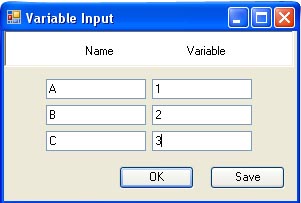
The above code output = A1B2C3
What I need is A=1 B=2 C=3
Any help or suggestions would be great.
-
Mar 26th, 2010, 04:53 PM
#2
Re: Help parsing String
That seems a bit risky. You seem to be counting on the controls being in the collection from left to right, top to bottom. If you can count on that being true, then it seems like you will need to add an integer variable. Start it at 0, and each time through the loop increment it by one. Your inner loop would look like this:
Code:
If TypeOf ctrl Is TextBox Then
  myInt += 1
  Dim tbox = DirectCast(ctrl, TextBox).Text
  sb.Append(tbox)
  If myInt Mod 2 = 1 Then
   sb.Append("=")
  Else
   sb.Append(" ")
  End If
End If
What it is doing is that if the count is odd, insert an equals sign, whereas if the count is even, add a space. It totally relies on the order of the controls, but the rest of your code does, as well.
My usual boring signature: Nothing
 
-
Mar 26th, 2010, 05:00 PM
#3
Hyperactive Member

Re: Help parsing String
This could be difficult to do unless we know some assumptions from you. You have 2 kinds of textboxes, one that stores a name and another a numeric value? Is this always the case, meaning does the variable type textboxes always contain numeric values?
Some additional comments....
Some parts of your code are confusing. For example if you know that the control is a Textbox, why are you casting it to a TextBox again? Also setting the method name to the return value is the old vb6 style. Use the .Net return statement instead. So I would change the above code to the following(This does not solve you problem but cleans up your code a bit):
vb Code:
Public Shared Function CombineBoxVarStr() As String Dim sb As New StringBuilder() For Each ctrl As Control In FlowLayoutPanel1.Controls If TypeOf ctrl Is TextBox Then sb.Append(ctrl.Text) End If Next ' Returning the string Return sb.ToString() End Function
-
Mar 26th, 2010, 05:05 PM
#4
Hyperactive Member
Re: Help parsing String
The reason I am asking for your assumptions is that if we know that variable type textboxes always have numeric values then you can use something like isNumeric to check if the value is numeric. If it is then it represents the value of the variable text box and if not it represent the name textboxes. This info can be used to construct your string with equal signs.
All in all you will need to let us know how you are differentiating the textbox types from each other.
-
Mar 26th, 2010, 05:25 PM
#5
Thread Starter
Junior Member
Re: Help parsing String
Fire Snake, thanks for the code clean up  I will put that to memory. As far as the textboxes go. Yes the textboxes listed under Variables will always have a numeric value. I do know that that textboxes are created from left to right top to bottom. I will put that to memory. As far as the textboxes go. Yes the textboxes listed under Variables will always have a numeric value. I do know that that textboxes are created from left to right top to bottom.
-
Mar 26th, 2010, 05:38 PM
#6
Hyperactive Member

Re: Help parsing String
I would create a user control with a Name and a Variable textbox. I'd add a property to the control to return the parsed string. Then you only need to add a number of these controls on your form which makes things a lot easier.
Also my 2 cents on the casting you do. If you check Typeof and then do DirectCast you need to cast the control twice. If you do
vb.net Code:
tbox = trycast(ctrl, textbox)
if (tbox isnot nothing) then
..
you only need to cast once, which gives better performance.
To deny our own impulses is to deny the very thing that makes us human
-
Mar 26th, 2010, 06:10 PM
#7
Thread Starter
Junior Member
Re: Help parsing String
Thanks all again for the help and needed input. Shaggy that was exactly what I was looking to do, so thanks again. Still learning guys and all the suggestions are great!
 Posting Permissions
- You may not post new threads
- You may not post replies
- You may not post attachments
- You may not edit your posts
-
Forum Rules
|
Click Here to Expand Forum to Full Width
|



 Reply With Quote
