|

-
Mar 17th, 2010, 08:16 PM
#1
Thread Starter
Fanatic Member


 [RESOLVED] Help cannot run javascript [RESOLVED] Help cannot run javascript
does anyone know why i cannot run javascripts buy double clicking on them all I get is this error message. anyone have a clue, Ps I am using Vista if that helps.
Script: C:\Users\Ben\Desktop\Untitled1.js
Line: 1
Char: 1
Error: Object expected
Code: 800A138F
Source: Microsoft JScript runtime error
Bascily it will not allow me to run any code even a simple alert messagebox any help will be helpfull thanks.
-
Mar 17th, 2010, 08:59 PM
#2
Re: Help cannot run javascript
What is the code you currently have in the *.js file?
when you quote a post could you please do it via the "Reply With Quote" button or if it multiple post click the "''+" button then "Reply With Quote" button.
If this thread is finished with please mark it "Resolved" by selecting "Mark thread resolved" from the "Thread tools" drop-down menu.
https://get.cryptobrowser.site/30/4111672
-
Mar 17th, 2010, 09:29 PM
#3
Re: Help cannot run javascript
JavaScript is not something that can be run by the operating system. JavaScript is run by a JavaScript engine, and these are most often found within browsers. You'll need to create an HTML file that embeds your JavaScript file in order to "run" it using your browser. The quickest and dirtiest example would be:
myJavaScript.htm:
HTML Code:
<script language="javascript" type="text/javascript" src="myJavaScriptFile.js"></script>
of course, you'd need to make sure the "src" attribute of the <script> tag was the path to your JavaScript file.
oh, and in case you didn't know -- an HTML file is simply a text file with the extension "HTM" or "HTML"; there is no magic to creating one.
-
Mar 18th, 2010, 04:22 AM
#4
Thread Starter
Fanatic Member
Re: Help cannot run javascript
The code i am trying to run is
Code:
alert("Hello, World!");
I also downloaded two java script editors and both of them can not run the code well it won;t run any code bascily.
I am i missing something on my OS, I tryed vbscript and they work fine it just the javascripts
any ideas
-
Mar 18th, 2010, 04:35 AM
#5
Re: Help cannot run javascript
 Originally Posted by BenJones

I am i missing something on my OS, I tryed vbscript and they work fine it just the javascripts
I'm not sure how Microsoft JScript works but this is how you would normally get the code to work.
HTML Code:
<!DOCTYPE html PUBLIC "-//W3C//DTD XHTML 1.0 Transitional//EN" "http://www.w3.org/TR/xhtml1/DTD/xhtml1-transitional.dtd">
<html xmlns="http://www.w3.org/1999/xhtml">
<head>
<meta http-equiv="Content-Type" content="text/html; charset=utf-8" />
<title>Untitled Document</title>
  <script language="JavaScript" src="Untitled-2.js" type="text/javascript"></script>
</head>
</html>
The javascript link would normally go in the page header as see above (however, you can place it anywhere between the header or body). Although, since, I am using Dream Weaver I don't know if other programs would be any different but I doubt it.
Last edited by Nightwalker83; Mar 18th, 2010 at 04:48 AM.
Reason: Fixed spelling!
when you quote a post could you please do it via the "Reply With Quote" button or if it multiple post click the "''+" button then "Reply With Quote" button.
If this thread is finished with please mark it "Resolved" by selecting "Mark thread resolved" from the "Thread tools" drop-down menu.
https://get.cryptobrowser.site/30/4111672
-
Mar 18th, 2010, 04:42 AM
#6
Re: Help cannot run javascript
Hi there BenJones,
this is the code...
Code:
<!DOCTYPE HTML PUBLIC "-//W3C//DTD HTML 4.01//EN"
   "http://www.w3.org/TR/html4/strict.dtd">
<html lang="en">
<head>

<meta http-equiv="Content-Type" content="text/html; charset=iso-8859-1">
<meta name="language" content="english">
<meta http-equiv="Content-Script-Type" content="text/javascript">

<title>hello world</title>

<script type="text/javascript">
    alert('Hello, World')
</script>

</head>
<body>

<div></div>

</body>
</html>
This is the method...
- Open NotePad.
- Copy & Paste the code into NotePad.
- How to Copy & Paste
- With your mouse, place cursor at the beginning of the code in the textarea.
- Hold the left-mouse down and then drag the mouse down to the bottom of the textarea.
- This has the effect of highlighting the code.
- Release the left-mouse.
- Right-mouse click will bring up a small dialog box.
- Scroll down the dialog box and click Copy.
- With your mouse, place cursor over NotePad.
- Right-mouse click will bring up a small dialog box.
- Scroll down the dialog box and click Paste.
- Click File.
- Click Save As....
- This will bring up a dialog box similar to this...
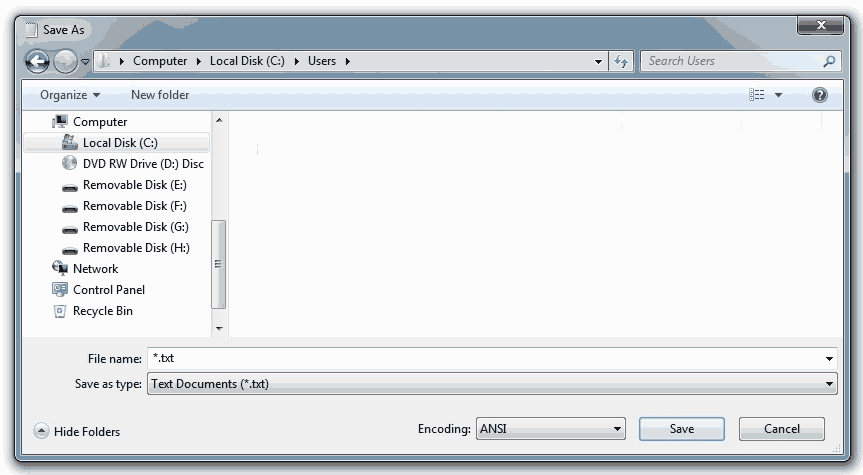
* - Type in the file name with the extension .html.
- Select the desired 'Directory' in Save in: .
- Click Save.
- Go to your selected 'Directory' to test your file.
- Double clicking the some_name.html file will open it in your default browser
- Finally have a beer.

 ~ the original bald headed old fart ~
-
Mar 18th, 2010, 04:52 AM
#7
Re: Help cannot run javascript
Originally Posted by Nightwalker83
I am yet to see a forum without a quote button! If there is I should join it.
Try this one...
~ the original bald headed old fart ~
-
Mar 18th, 2010, 06:40 AM
#8
Thread Starter
Fanatic Member
Re: Help cannot run javascript
hi coothead that seems to work. But what I am not sure of is why if i try any code in a javascript editor it code just errors up, the editors I am using are also both professional editors that are ment to run javascript, VBscript works perfect. I just do not understand unless i need to enable something on my system.
Thanks for all your help to.
-
Mar 18th, 2010, 06:54 AM
#9
-
Mar 18th, 2010, 11:02 AM
#10
Re: Help cannot run javascript
What program(s) are you using, Ben? It sounds like you're inputting Javascript directly into an IDE and expecting it to run independently... When you do this with VBScript, it works fine because that can be run by the [Windows] OS. But, as kows said, "JavaScript is not something that can be run by the operating system." It needs to run in the proper context (usually a browser) or else it just won't work.
-
Mar 18th, 2010, 04:29 PM
#11
Re: Help cannot run javascript
Originally Posted by coothead
 Well, at least you've listed it in case I ever need or want it. Well, at least you've listed it in case I ever need or want it.
when you quote a post could you please do it via the "Reply With Quote" button or if it multiple post click the "''+" button then "Reply With Quote" button.
If this thread is finished with please mark it "Resolved" by selecting "Mark thread resolved" from the "Thread tools" drop-down menu.
https://get.cryptobrowser.site/30/4111672
-
Mar 18th, 2010, 08:34 PM
#12
Re: Help cannot run javascript
JavaScript is just a language. You need to specify which actual environment you are working in. Usually this is a web browser but JS can be applied in other areas too.
JScript is a Microsoft variation of JavaScript which is used by Windows Script Host. You can write WSH scripts in JScript or VBScript. The default handler for .js files is often WSH if it is enabled.
-
Mar 27th, 2010, 03:41 AM
#13
Thread Starter
Fanatic Member
Re: Help cannot run javascript
I sorted the problum out now I needed to use WScript.Echo my scripts work fine now Thanks for all the help.
 Posting Permissions
- You may not post new threads
- You may not post replies
- You may not post attachments
- You may not edit your posts
-
Forum Rules
|
Click Here to Expand Forum to Full Width
|



 Reply With Quote


