|

-
Jan 12th, 2010, 05:07 PM
#1
Thread Starter
Hyperactive Member

 [RESOLVED] creating a collection array from textbox's [RESOLVED] creating a collection array from textbox's
I will try and explain this as best as I can. I have a group of boxes witch will all hold data input by the user. I am using an arraylist to store these, or atleast I am hoping to. So, the problem I have is getting the data to actually save to the arraylist. It keeps giving the error saying that type string cannot be converted to array list. My question is, how do I get these to save, I have been say here for about 3 hours trying to figure it out with my limited knowledge...
Dan
-
Jan 12th, 2010, 05:15 PM
#2
Thread Starter
Hyperactive Member
Re: creating a collection array from textbox's
I have tried the "add" function The Group save so to speak, just about everything I know for saving, with no prevail
-
Jan 12th, 2010, 05:16 PM
#3
Re: creating a collection array from textbox's
i'd use a list(of T) instead of an arraylist. to add the complete textboxes to a list(of textbox):
vb Code:
dim textboxes as new list(of textbox)
textboxes.addrange(textbox1, textbox2, etc)
 msgbox textboxes(0).text
- Coding Examples:
- Features:
- Online Games:
- Compiled Games:
-
Jan 12th, 2010, 05:17 PM
#4
Fanatic Member

Re: creating a collection array from textbox's
you could use a collection then convert ToArray afterwards
Code:
Dim listing As New Collection
For Each item as Frm1.TextBox
    listing.Add(item.Text)
Next
listing.ToArray
i'd be inclined to stay with the data in a collection than an array though
If debugging is the process of removing bugs, then programming must be the process of putting them in.
-
Jan 12th, 2010, 05:20 PM
#5
Thread Starter
Hyperactive Member
Re: creating a collection array from textbox's
using either one of these options, would I be able to bring the items up in a list view in a particular order?
-
Jan 12th, 2010, 05:23 PM
#6
Re: creating a collection array from textbox's
how many textboxes do you have?
what information do you want in your listview? just the textbox text property?
is there any other reason for needing a collection?
- Coding Examples:
- Features:
- Online Games:
- Compiled Games:
-
Jan 12th, 2010, 05:36 PM
#7
Thread Starter
Hyperactive Member
Re: creating a collection array from textbox's
right, i have twelve text boxes under the "product" section and another 2 under the "Price" section. Sections are a group of boxes designated to one thing (product for one and price for the other in this case) i want the text property to show in the list view. the list view has to columns, one designated price, the other designated product. as the product and price are paired, it is important that they stay that way  hope this is the info you wanted. hope this is the info you wanted.
Dan
-
Jan 12th, 2010, 05:38 PM
#8
Re: creating a collection array from textbox's
can you post a screenshot of your form?
- Coding Examples:
- Features:
- Online Games:
- Compiled Games:
-
Jan 12th, 2010, 05:44 PM
#9
Thread Starter
Hyperactive Member
Re: creating a collection array from textbox's
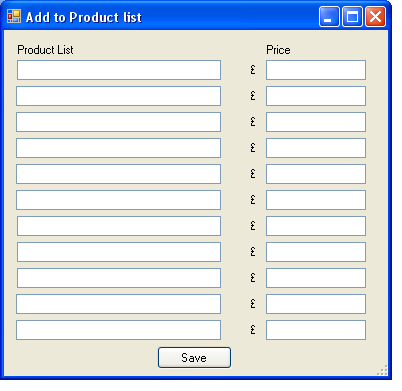
here is the page that I want users to put there values in (11 text baxes not 12 by the way
-
Jan 12th, 2010, 05:53 PM
#10
Thread Starter
Hyperactive Member
Re: creating a collection array from textbox's
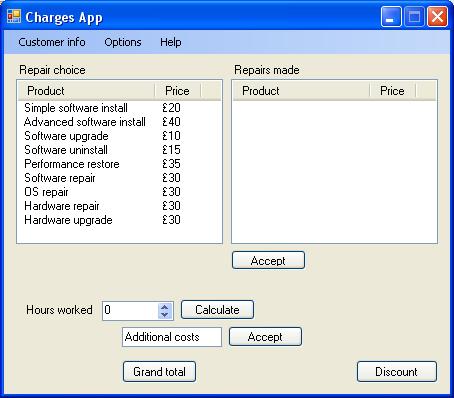
and here is the page that I want to load the values to. After the users saves there textbox list, i need it to show up here in the listview on the left
-
Jan 12th, 2010, 05:54 PM
#11
Re: creating a collection array from textbox's
assuming your 11 product textboxes are named txtProduct1 to txtProduct11 + your 11 price textboxes are named txtPrice1 to txtPrice11 then you can use this LINQ:
vb Code:
Dim products = (From item In Me.Controls _
                        Where TypeOf item Is TextBox And _
                        item.name.contains("txtProduct") _
                        Order By CInt(item.name.replace("txtProduct", "")) _
                        Select item.text).ToArray
 Dim prices = (From item In Me.Controls _
                        Where TypeOf item Is TextBox And _
                        item.name.contains("txtPrice") _
                        Order By CInt(item.name.replace("txtPrice", "")) _
                        Select item.text).ToArray
 For x As Integer = 0 To 10
    ListView1.Items.Add(New ListViewItem(New String() {products(x), prices(x)}))
Next
- Coding Examples:
- Features:
- Online Games:
- Compiled Games:
-
Jan 12th, 2010, 06:02 PM
#12
Re: creating a collection array from textbox's
The proper OOP way would be to create a class (Product) with two properties (ProductName and Price).
vb.net Code:
Public Class Product Public Sub New(ByVal name As String, ByVal price As Integer) Me.ProductName = name Me.Price = price End Sub Private _ProductName As String Public Property ProductName() As String Get Return _ProductName End Get Set(ByVal value As String) _ProductName = value End Set End Property Private _Price As Integer Public Property Price() As Integer Get Return _Price End Get Set(ByVal value As Integer) _Price = value End Set End Property End Class
You can then use a collection of those classes and load them into the listview like this:
vb.net Code:
Private productList As List(Of Product) Private Sub LoadIntoListview() ListView1.Items.Clear() Dim lvi As ListViewItem For Each p As Product In productList lvi = New ListViewItem(p.ProductName) lvi.SubItems.Add("$" & p.Price.ToString) ListView1.Items.Add(lvi) Next End Sub
Of course, you need to load the products into the productList first, which is what you asked for.
You can put the product name textboxes into one List(Of TextBox), and the price textboxes into another (for example in the Form_Load event)
vb.net Code:
Private names As List(Of TextBox) Private prices As List(Of TextBox) Private Sub Form1_Load(ByVal sender As System.Object, ByVal e As System.EventArgs) Handles MyBase.Load names = New List(Of TextBox) names.AddRange(New TextBox() {txtName1, txtName2, txtName3, ..., txtName11}) prices = New List(Of TextBox) prices.AddRange(New TextBox() {txtPrice1, txtPrice2, txtPrice3, ..., txtPrice11}) End Sub
Then, when the Save button is clicked, you can fill the productList by looping through the lists:
vb.net Code:
productList = New List(Of Product) Dim name As String Dim price As Integer Dim product As Product For i As Integer = 0 To names.Count - 1 name = names(i).Text price = Integer.Parse(prices(i).Text) product = New Product(name, price) productList.Add(product) Next
(This assumes the prices are all integers and not empty, you would be wise to check that first)
So, now you have the productList collection filled and you can use the first code to put it into the Listview.
This may seem like a lot of work compared to paul's method, but it is much more easily extended and it is something that occurs in many applications, so understanding this is important.
Last edited by NickThissen; Jan 12th, 2010 at 06:06 PM.
-
Jan 12th, 2010, 06:13 PM
#13
Re: creating a collection array from textbox's
don't forget, if you use Nick's method, every time 1 of your textbox' contents changes, you need to update your list.
edit: if you intend to use your list in other areas of your project, as Nick suggested.
Last edited by .paul.; Jan 12th, 2010 at 06:21 PM.
- Coding Examples:
- Features:
- Online Games:
- Compiled Games:
-
Jan 12th, 2010, 06:19 PM
#14
Thread Starter
Hyperactive Member
Re: creating a collection array from textbox's
Paul, I tried usin your method, but I keep on getting errors as listview1 isn't on the same page as I am having users input the values. If i take the "callback" code and put it on that page, then it is dumb and doesnt know where it is calling from:S
-
Jan 12th, 2010, 06:20 PM
#15
Re: creating a collection array from textbox's
 Originally Posted by .paul.

don't forget, if you use Nick's method, every time 1 of your textbox' contents changes, you need to update your list
True, but judging from the screenshots, the textboxes are on a separate form, which I suppose he is showing as a dialog. So the user would never be able to change a single textbox and see the value change immediately in the listview; he would always have to open the dialog form, set the values, and then click the save button again, so each time the listview would be completely re-newed.
I also suppose the dialog form would load the current values. In my case he simply needs to fill the TextBoxes with the properties of each Product in the productList, no need to 'parse' them from the listview directly.
Perhaps I am assuming too much, but that would be logical.
-
Jan 12th, 2010, 06:23 PM
#16
Re: creating a collection array from textbox's
[formName].ListView1.Items.Add(New ListViewItem(New String() {products(x), prices(x)}))
- Coding Examples:
- Features:
- Online Games:
- Compiled Games:
-
Jan 12th, 2010, 06:25 PM
#17
Re: creating a collection array from textbox's
Originally Posted by danielpalfrey
Paul, I tried usin your method, but I keep on getting errors as listview1 isn't on the same page as I am having users input the values. If i take the "callback" code and put it on that page, then it is dumb and doesnt know where it is calling from:S
If you use my method, you should give the form with the textboxes a property that returned the productList variable. The 'main' form calling that textboxes form could then retrieve the property, and then it would have all the products.
In the textboxes form:
vb.net Code:
Public ReadOnly Property Products() As List(Of Product)
   Get
      Return _productList
   End Get
End Property
Then, in the main form, you can do this in the method that opens the textboxes form
vb.net Code:
Dim f As New TextboxesForm
f.ShowDialog()
 LoadIntoListview(f.Products)
You should then have the LoadIntoListview method accept a list of products as an argument, instead of using the private "_productList" variable as I did.
Using pauls method, you can do something similar, by creating a property for the Names and one for the Prices.
-
Jan 12th, 2010, 06:58 PM
#18
Thread Starter
Hyperactive Member
Re: creating a collection array from textbox's
I went with pauls method as it was more at my level of skill, will have a play around with your suggestion too though right, now that I can get the items to display in the list view, I now need to save them, so that the next time they use the app, there still usable and they will not need to re enter any of the info.
-
Jan 12th, 2010, 08:13 PM
#19
Thread Starter
Hyperactive Member
Re: creating a collection array from textbox's
The values are set by the user, but they must be permenant, which is why i was trying to go through my.settings, but the problem now is the conversion to an arra y or something else that is capable of storing the list view items. any suggestions wo uld be greatly appreciated.
Dan
-
Jan 12th, 2010, 08:45 PM
#20
Fanatic Member
Re: creating a collection array from textbox's
if you used .Pauls method you will have the 2 arrays you could save, with nicks method you have a collection. I have something of a similar project i'm working on, my solution is nearer to nicks but it does use LINQ to get the data (which in my case is from an xml file generated from another app)
If debugging is the process of removing bugs, then programming must be the process of putting them in.
-
Jan 12th, 2010, 09:44 PM
#21
Re: creating a collection array from textbox's
after you've loaded your listview using my previous code, you could amalgamate the 2 arrays + serialize the resulting array as binary:
vb Code:
Dim newArray(1, 10) As String
For x As Integer = 0 To 10
    newArray(0, x) = products(x)
    newArray(1, x) = prices(x)
Next
 Dim formatter As New Runtime.Serialization.Formatters.Binary.BinaryFormatter
Dim bw As New IO.FileStream("savedItems.bin", IO.FileMode.Create)
formatter.Serialize(bw, newArray)
bw.Close()
then to load your saved values when you open your listview form:
vb Code:
Private Sub Form2_Load(ByVal sender As System.Object, ByVal e As System.EventArgs) Handles MyBase.Load
    If IO.File.Exists("savedItems.bin") Then
        Dim savedItems(,) As String
        Dim formatter As New Runtime.Serialization.Formatters.Binary.BinaryFormatter
        Dim fs As New IO.FileStream("savedItems.bin", IO.FileMode.Open)
        savedItems = DirectCast(formatter.Deserialize(fs), String(,))
        fs.Close()
         For x As Integer = 0 To 10
            ListView1.Items.Add(New ListViewItem(New String() {savedItems(0, x), savedItems(1, x)}))
        Next
    End If
End Sub
- Coding Examples:
- Features:
- Online Games:
- Compiled Games:
-
Jan 13th, 2010, 03:54 AM
#22
Thread Starter
Hyperactive Member
Re: creating a collection array from textbox's
I will look into this when I get home, thanks for the info and you will all bne getting ratings.
-
Jan 13th, 2010, 04:02 AM
#23
Re: creating a collection array from textbox's
If you don't want to rely on a separate file, then you need to use the My.Settings method. You can create two StringCollection settings, one for the names and one for the prices.
You'd simply do this for saving
vb.net Code:
My.Settings.Names = New Specialized.StringCollection() My.Settings.Prices = New Specialized.StringCollection() For Each str As String in names My.Settings.Names.Add(str) Next For Each int as Integer in Prices My.Settings.Prices.Add(int.ToString) Next
For loading, very similar
vb.net Code:
names = New List(Of String) prices = New List(Of Integer) For Each str As String In My.Settings.Names names.Add(str) Next For Each str As String In My.Settings.Prices prices.Add(Integer.Parse(str)) Next
-
Jan 13th, 2010, 04:06 AM
#24
Thread Starter
Hyperactive Member
Re: creating a collection array from textbox's
I will also have a look into this method and see which one works more the way I need/want it to.
-
Jan 14th, 2010, 01:48 PM
#25
Thread Starter
Hyperactive Member
Re: creating a collection array from textbox's
I had a play with your code nick, and edited it here and there, got it working rather well, but I might just go with pauls because pauls save the listview itself which means i can add to the list
-
Jan 14th, 2010, 01:52 PM
#26
Re: creating a collection array from textbox's
I don't see how pauls code saves the listview itself. It is saving two arrays, the names and the prices (added together into a single 2d array but that doesn't really matter). My code does just the same. As far as I can see the only difference is that pauls code needs you to store a file somewhere, whereas my code stores it in the settings (alright, that is also a file, but you already have it anyway so why not save to that?). It really doesn't matter which you choose.
-
Jan 14th, 2010, 03:55 PM
#27
Thread Starter
Hyperactive Member
Re: creating a collection array from textbox's
I am sorry nick, upon second viewing I relised that pauls is pretty much the same as yours. I was mistaken and I appologise. The advantage of saving the list viewitself means that it can always be added to afterwords, but from what I can tell with saving the "collection" you can't really add to the list afterwords. So I am thinking about changing that a little.
Dan
-
Jan 14th, 2010, 04:41 PM
#28
Re: creating a collection array from textbox's
You don't need to apologize, I was just confused why you thought it was saving the entire listview, because it's not.
Also, if you have a collection that is displayed in a ListView, you will always need to update the listview when you change the collection; there is no way around that. So you can certainly add new items to the list afterwards, you just have to either reload the listview (from the now modified collection) or add the item to the listview as well.
The only way you can see a collection in some control change when you modify the collection is by using data binding, which a listview does not support.
-
Jan 14th, 2010, 05:03 PM
#29
Thread Starter
Hyperactive Member
Re: creating a collection array from textbox's
hmm, well, I went with pauls Idea in the beggining and pauls idea for saving, but if I go back to add even more to the list view, it overwrites what I already have... Is this the downside to using pauls code as apposed to yours??? or is it just in need of a little tweak??? i donno, but I will look into using your code and see which one works best for what I want
Dan
-
Jan 14th, 2010, 05:13 PM
#30
Thread Starter
Hyperactive Member
Re: creating a collection array from textbox's
hehe, nop worries I have it figured out. Thanks ever so much for your help everyone you'll be getting rated!!! Dan
-
Jan 14th, 2010, 05:16 PM
#31
Thread Starter
Hyperactive Member
Re: creating a collection array from textbox's
Just to inform you all, I had to make a couple of edits to the code displayed on this page. So I'll post that up for you to see
Now then, this is the code for saving the user set info, and also for putting it in the list view.
vb Code:
Dim products = (From item In Me.Controls _
                        Where TypeOf item Is TextBox And _
                        item.name.contains("Product") _
                        Order By CInt(item.name.replace("Product", "")) _
                        Select item.text).ToArray
         Dim prices = (From item In Me.Controls _
                                Where TypeOf item Is TextBox And _
                                item.name.contains("Price") _
                                Order By CInt(item.name.replace("Price", "")) _
                                Select item.text).ToArray
         For x As Integer = 0 To 10
            Charges_app.Product.Items.Add(New ListViewItem(New String() {products(x), prices(x)}))
        Next
        My.Settings.listprod = New Specialized.StringCollection()
        My.Settings.listprice = New Specialized.StringCollection()
        For Each str As String In products
            My.Settings.listprod.Add(str)
        Next
        For Each int As Integer In prices
            My.Settings.listprice.Add(int.ToString)
        Next
This is where the info loads (upon form load) to put the info BACK into the listview.
vb Code:
For x As Integer = 0 To 10
            Product.Items.Add(New ListViewItem(New String() {My.Settings.listprod(x), My.Settings.listprice(x)}))
        Next
-
Jan 14th, 2010, 05:19 PM
#32
Re: [RESOLVED] creating a collection array from textbox's
don't forget to clear your listview + your stringcollections before you add your items, or you'll end up with duplicated entries
- Coding Examples:
- Features:
- Online Games:
- Compiled Games:
-
Jan 15th, 2010, 07:59 AM
#33
Thread Starter
Hyperactive Member
Re: [RESOLVED] creating a collection array from textbox's
Thanks for the reminder paul, I had indeed forgoten to clear it!!!
 Posting Permissions
- You may not post new threads
- You may not post replies
- You may not post attachments
- You may not edit your posts
-
Forum Rules
|
Click Here to Expand Forum to Full Width
|



 Reply With Quote
