|

-
Jan 12th, 2010, 08:21 AM
#1
Thread Starter
Lively Member

How To edit right click windows context menu
hELLO EVERYONE,
I am looking for a code that can help me Disable Refresh Entry from Right Click Context Menu.
One more thing is with refresh Menu entry I want to make a search in Context menu and if there is an entry name = abc than I want to disable it too. So any idea how to proceed.
So far I have gathered this information that this command can help me, but as am a newbee in .NET i don't think I can code it myself therefore need some assistance can anyone help
Code:
BOOL EnableMenuItem(
    HMENU hMenu,
    UINT uIDEnableItem,
    UINT uEnable
);
Note: I am not talking about Context menu inside a program, I am referring to windows context menu
Last edited by riteshtechie; Jan 13th, 2010 at 04:13 AM.
< advertising link removed by moderator >
-
Jan 12th, 2010, 09:28 AM
#2
Re: How To edit right click windows context menu
which Right Click Context Menu?
you can use your own context menu for controls
- Coding Examples:
- Features:
- Online Games:
- Compiled Games:
-
Jan 12th, 2010, 09:35 AM
#3
Re: How To edit right click windows context menu
To edit the System's context menus, you'd have to edit the registry, well mostly.
here is a thread - yes, I know it is in the VB 6 forum, but it will still help you :
http://www.vbforums.com/showthread.php?t=593181
VB.NET MVP 2008 - Present
-
Jan 12th, 2010, 10:13 AM
#4
Thread Starter
Lively Member
Re: How To edit right click windows context menu
i want to make refresh menu entry gray in explorer context menu
< advertising link removed by moderator >
-
Jan 12th, 2010, 10:27 AM
#5
Re: How To edit right click windows context menu
Erm.... Did you actually go to the link I have posted ¿ 
VB.NET MVP 2008 - Present
-
Jan 13th, 2010, 12:30 AM
#6
Banned
Re: How To edit right click windows context menu
Why not use System.Windows.Controls.ContextMenu.
You can find how to use it on MSDN.
__________________________
Sabrina Gage
Last edited by si_the_geek; May 19th, 2010 at 06:00 PM.
Reason: removed advertising link
-
Jan 13th, 2010, 02:50 AM
#7
Thread Starter
Lively Member
Re: How To edit right click windows context menu
 Originally Posted by HanneSThEGreaT

Erm.... Did you actually go to the link I have posted ¿
Yes and found nothing useful.
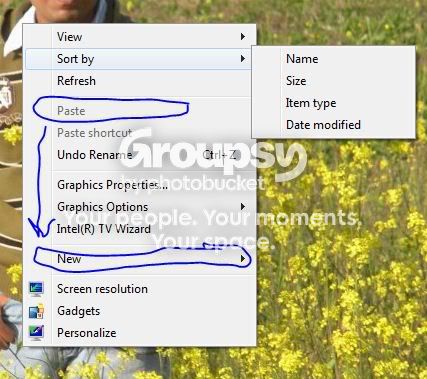
Look this is what I want.
I want to Gray down New Entry and refresh menu entry just like the PAste see below pic.
< advertising link removed by moderator >
-
Jan 13th, 2010, 03:49 AM
#8
Re: How To edit right click windows context menu
It may simply not be possible to do that. You need to understand how the windows context menu is built. When you right click, windows queries the registry for items. But it's not necessarily as simple as having a string with the name of your program and a word for the title. The Paste item for example is actually the result of a call to a registered dll that returns a windows context menu item. In the dll, the logic checks the clipboard for pastable data and if it doesn't find any, returns a disabled menu item. Otherwise it returns an enabled one.
It's important that you understand this because of what it means to you. You cannot artificially disable another menu item. The menu items you see are not controls on a form. By the time that you see them, they are immutable. Static. The only way for you to influence the behaviour of other menu items is to gain access to the dlls that create them, and manipulate the code that generates them.
This is likely to be extremely difficult though, as these dlls are usually written in C++.
Last edited by MaximilianMayrhofer; Jan 13th, 2010 at 08:39 AM.
-
Jan 13th, 2010, 04:12 AM
#9
Thread Starter
Lively Member
Re: How To edit right click windows context menu
May be its not that difficult
EnableMenuItem Function - http://msdn.microsoft.com/en-us/libr...36(VS.85).aspx
Regex.Replace Method - http://msdn.microsoft.com/en-us/libr...x.replace.aspx
I can search for string yusing regex replave and disable menu item by EnableMenuItem Function
But am not a good programmer, i knew the concept now! can any help me with this noe
< advertising link removed by moderator >
-
Jan 13th, 2010, 05:04 AM
#10
Thread Starter
Lively Member
Re: How To edit right click windows context menu
I got from somewhere that Class ID of Windows Explorer Context menu is #32770 in Windows 7
mau be this would be of some help
< advertising link removed by moderator >
-
Jan 13th, 2010, 08:44 AM
#11
Re: How To edit right click windows context menu
Those APIs were developed specifically for the dlls that I mentioned in my earlier post. It would be either completely or nearly impossible to retrieve the handle of the context menu any other way than from a dll specifically invoked by it, and as a result it is very much immutable to outside influence.
I wrote a context menu a while back for an application that depending on the file type either returned different menu items or returned nothing. This made it very simple to implement file specific context menus. In the function I do have access to the handle of the context menu, obviously, but i'm going to risk a guess that my earlier advice, as far as any external application is concerned, still applies.
Last edited by MaximilianMayrhofer; Jan 13th, 2010 at 08:49 AM.
 Posting Permissions
- You may not post new threads
- You may not post replies
- You may not post attachments
- You may not edit your posts
-
Forum Rules
|
Click Here to Expand Forum to Full Width
|



 Reply With Quote


