|

-
Jan 6th, 2010, 04:23 PM
#1
Thread Starter
PowerPoster


 [RESOLVED] Shared folders causing me problems again [RESOLVED] Shared folders causing me problems again
I have a shared folder on a server and I want to map a network drive to it. I used to have this drive mapped, but last night I turned off my PC. Now when I try to map the drive, it wants an id and password but doesn't like what I am giving it and keeps prompting me.
I rarely reboot my PC and whenever I did I'd have this problem. So I documented what my id and password is instead of just relying on (my poor) memory. So I'm pretty sure I have that right, but then why won't it let me in?
I should also say last night we moved offices and the servers moved physically as did my PC (which is why I had to turn it off) so I don't know if some address changed that I am not aware of (our public IP changed, but if my PC and the server are internal, would that matter?). But I guess my basic question is how do you map a drive and how do you know what credentials it wants?
Thanks.
There are 10 kinds of people in this world. Those who understand binary, and those who don't.
-
Jan 7th, 2010, 12:05 AM
#2
Re: Shared folders causing me problems again
Try this
Click on Start~~>Run
Type the relevant IP +path as shown below
\\xxx.xxx.xxx.xxx\Pathname
and press enter. Now try the username and the password.
We will take it from there....
A good exercise for the Heart is to bend down and help another up...
Please Mark your Thread " Resolved", if the query is solved
MyGear: Resolved", if the query is solved
MyGear:
★ CPU ★ Ryzen 5 5800X
★ GPU ★ NVIDIA GeForce RTX 3080 TI Founder Edition
★ RAM ★ G. Skill Trident Z RGB 32GB 3600MHz
★ MB ★ ASUS TUF GAMING X570 (WI-FI) ATX Gaming
★ Storage ★ SSD SB-ROCKET-1TB + SEAGATE 2TB Barracuda IHD
★ Cooling ★ NOCTUA NH-D15 CHROMAX BLACK 140mm + 10 of Noctua NF-F12 PWM
★ PSU ★ ANTEC HCG-1000-EXTREME 1000 Watt 80 Plus Gold Fully Modular PSU
★ Case ★ LIAN LI PC-O11 DYNAMIC XL ROG (BLACK) (G99.O11DXL-X)
★ Monitor ★ LG Ultragear 27" 240Hz Gaming Monitor
★ Keyboard ★ TVS Electronics Gold Keyboard
★ Mouse ★ Logitech G502 Hero
-
Jan 7th, 2010, 08:31 AM
#3
Re: Shared folders causing me problems again
Your local network admins should be able to help you with this. Have you contacted them?
-
Jan 7th, 2010, 08:56 AM
#4
Re: Shared folders causing me problems again
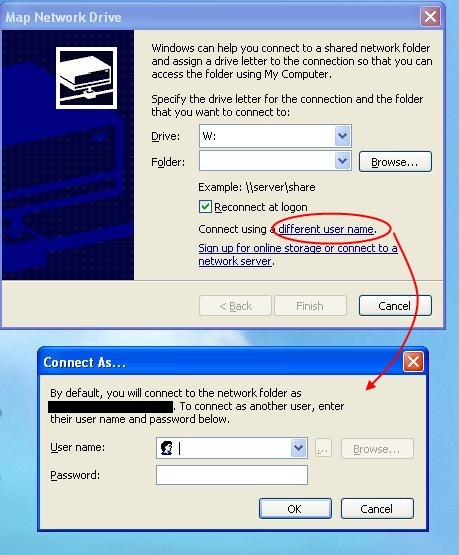
While mapping the network drive, provide the correct username and password by clicking that "different user name" link in that window. It won't ask for password after that after you reboot.
-
Jan 7th, 2010, 05:00 PM
#5
Re: Shared folders causing me problems again
As for how to map a drive - open My Computer and go to Tools -> Map Network Drive. That will take you to the screen Pradeep has shown you.
But like Hack says, this is really the job of your network admins and ideally they should be deploying such mapped drives by logon script or group policy so that you users do not have to ever mess around mapping them yourself. It sounds like a bit of an odd setup you have got there though if you have to specify a username and password to access the share, normally the admin would just grant your windows account access to the share and that would be it. Also, it is pretty likely that the office move has something to do with it if suddenly stopped working since then.
-
Jan 12th, 2010, 11:50 AM
#6
Thread Starter
PowerPoster
Re: Shared folders causing me problems again
I also believe the office move has something to do with it.
Thanks for all the replies. (I've been out the last few days but of course when I came back this was still here waiting for me).
As for the advice about contacting my administrator, yes, I wish I had one. I think it is me. We are a very small shop and since I am the web developer which has something to do with computers by default I am also the network administrator since that has something to do with computers (we have use of a network engineer at our boss's brother's company and he and I work together great, but the relationship is being severed because the companies are splitting, and I have been getting yelled at for calling him). Our company VP does a lot of the network stuff, but this is for Visual Source Safe, which I have set up because I wanted it, so I may be stuck as the one to fix it.
But I think I'll risk the yelling and asking the network engineer for help. Your ideas resulted in different results, none of which has gotten me in yet, but thanks, I feel I'm getting closer.
TBC...
There are 10 kinds of people in this world. Those who understand binary, and those who don't.
-
Jan 12th, 2010, 03:10 PM
#7
Thread Starter
PowerPoster
Re: Shared folders causing me problems again
I think I am getting somewhere. I at least got connected to the drive on the server which I mapped to the source safe folder. I found this advice on another forum which somebody else had asked:
You should try to connect from your client to the SourceSafe share and create a test file in the data directory.
If this works look at the explicit rights.dat file.
Otherwise check permissions on both the share and NTFS. And I cannot create a test file. The error was
Unable to create the file 'New Text Document.txt'. Access is denied. Do you know how I can grant myself the necessary access rights?
There are 10 kinds of people in this world. Those who understand binary, and those who don't.
-
Jan 12th, 2010, 03:52 PM
#8
Re: Shared folders causing me problems again
Right click the shared folder (on server) and select Properties.
In the properties window, go to Sharing tab.
click Permissions button.
Select Everyone and then tick mark the Full control (allow) checkboxes.
[Note that this will grant full control to anyone on your network. If you want it for yourself only then add your UserName to that users list and grant permissions.]
-
Jan 12th, 2010, 04:27 PM
#9
Thread Starter
PowerPoster
Re: Shared folders causing me problems again
Thank you. Now I am able to create a test file. But I get the same error message. Which according to the advice in post #7 indicates that I need to "look at the explicit rights.dat file." Look at it and do what with it? And does that mean look at its properties, because I can't look at it, it's binary.
Thanks.
There are 10 kinds of people in this world. Those who understand binary, and those who don't.
-
Jan 12th, 2010, 04:30 PM
#10
Re: Shared folders causing me problems again
Have you tried opening it in Notepad?
-
Jan 12th, 2010, 04:34 PM
#11
Thread Starter
PowerPoster
Re: Shared folders causing me problems again
Yes, that's how I did try it and saw that it was binary. So I don't know what I'm looking at.
There are 10 kinds of people in this world. Those who understand binary, and those who don't.
-
Jan 12th, 2010, 04:58 PM
#12
Thread Starter
PowerPoster
Re: Shared folders causing me problems again
Okay, if you click on enough things eventually you get it right.
What seemed to do the trick was the VSS folder, Properties, the Sharing tab, the Permissions button and I gave Full Control to Everyone. Which means I may not have done exactly what Pradeep suggested until just now, since that seems to be exactly what Pradeep said. But I think I first tried just me and that didn't work.
Thank you. I still don't know why this happened just from a simple move of hardware up the stairs...
There are 10 kinds of people in this world. Those who understand binary, and those who don't.
-
Jan 12th, 2010, 05:00 PM
#13
Thread Starter
PowerPoster
Re: [RESOLVED] Shared folders causing me problems again
I should say that when I first made Pradeep's change, I next got unable to open user login file. There wasn't one (data\loggedin\mmock.log) so I created a zero length one, then had other problems, then went back to Pradeep's advice with Everyone selected.
I'm sorry I can't recount the exact steps of what I did,but like I said, I clicked a lot of things!
There are 10 kinds of people in this world. Those who understand binary, and those who don't.
-
Jan 12th, 2010, 05:41 PM
#14
Re: [RESOLVED] Shared folders causing me problems again
The share permissions are not what Pradeep was talking about - there are NTFS permissions (which is what he was talking about) and Share permissions. I think he just forgot to mention the Share permissions (and I would have as well...). Generally we just grant Everyone full control on the share permissions and then restrict access via the NTFS permissions as you have more flexibility with NTFS permissions.
 Posting Permissions
- You may not post new threads
- You may not post replies
- You may not post attachments
- You may not edit your posts
-
Forum Rules
|
Click Here to Expand Forum to Full Width
|



 Reply With Quote


 icon on the left of the post.


