|

-
Jan 8th, 2010, 09:06 AM
#1
Thread Starter
Addicted Member


 Random with weight Random with weight
Hello fellow VB-ers!
I'd like to ask you a programming problem which is bothering me for quite some time now. Here is the problem
I'd like to pick random names from:
-peter,50
-rick,25
-linda,12.5
-dennis,6.25
-rob,6.25
After each name is the probability that the name is picked. To explain it the other way round; If you took 100 random names, Peter would occur about 50 percent of the times.
I've figured that you your fill and array with 100 string spaces, and fill peter 50 times, rick 25 times etc. But there must be a better way to do that!
Thanks for thinking along!
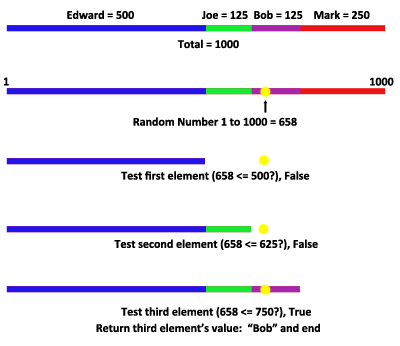
Lectere
-
Jan 8th, 2010, 09:32 AM
#2
Re: Random with weight
Code:
        'peter,50
        'rick,25
        'linda,12.5
        'dennis,6.25
        'rob,6.25
        Dim s() As String = New String() {"peter", "rick", "linda", "dennis", "rob"}
        Dim ct(4) As Integer
        Dim r As New Random, idx As Integer
        For x As Integer = 1 To 10000
            idx = r.Next(1, 10001)
            Select Case idx
                Case Is >= 5000
                    ct(0) += 1
                Case Is >= 2500
                    ct(1) += 1
                Case Is >= 1250
                    ct(2) += 1
                Case Else
                    If r.Next(1, 3) = 1 Then ct(4) += 1 Else ct(3) += 1
            End Select
        Next
-
Jan 8th, 2010, 09:33 AM
#3
Addicted Member

Re: Random with weight
edit: dbasnett beat me to it
-
Jan 8th, 2010, 09:38 AM
#4
Re: Random with weight
You don't need the loop, but if you get rid of that, you have to move the declaration of the Random object outside of the sub.
The easiest thing to do is to multiply each probability by 10, to get it up to an integer:
peter = 500
rick = 250
linda=125
dennis or rob = 125
That's a total of 1000.
random.GetNext(0,999)
If > 500 Then Peter
ElseIf >250 Rick
ElseIf > 125 Linda
Else
random.GetNext(0,99)
If >50 Dennis
Else Rob
End If
That's the outline.
My usual boring signature: Nothing
 
-
Jan 8th, 2010, 09:44 AM
#5
Thread Starter
Addicted Member
Re: Random with weight
This was just a simple example, my actual list of the names is about 30 names long.
I know the array this was just the first thing that poped in my head, but there has to be a better way.
Also with the many if statements, there must be a more charming way to solve this...
-
Jan 8th, 2010, 10:25 AM
#6
Re: Random with weight
There may be. Are the weights fixed, or are they up to you?
I run into this situation often when working on parental selection in genetic algorithms. In those cases, I have 100 different levels, and I sure don't write 100 If statements. I don't have an example handy, but the concept is still the same in that you build a range of values (0-999 in the previous example), and pick a random number in that range. The problem comes in when you try to figure out where the cutoffs are, and what the range needs to be. This can be simplified if you make a variety of assumptions. Here's one example:
Assumption: Each weight has a single decimal place.
Steps:
1) Multiply each weight by 10.
2) Sum the weights. This is the total range.
3) Sort the list from worst to best (the list would have to have name and weight as a class, probably).
4) Get a random number N from 0 to the range.
5) Do this loop:
Code:
 Dim accum as integer
For x as Integer = 0 to list.count-1
 accum += list.item.weight
 If N< accum
   'This is the one. Exit the loop here.
   Exit For 'x holds the item selected.
 End If
Next
There are numerous other examples, depending on patterns to your curve.
EDIT: Turn that upside down. It would be far more efficient to check from most common to least common, rather than the other way around.
Last edited by Shaggy Hiker; Jan 8th, 2010 at 10:30 AM.
My usual boring signature: Nothing
-
Jan 9th, 2010, 04:30 AM
#7
Thread Starter
Addicted Member
Re: Random with weight
That looks good Shaggy,
I'm gonna work from that example, I'll let you know the final outcome!
Thanks for thinking along!
Cheers!
-
Jan 10th, 2010, 01:11 PM
#8
Re: Random with weight
@shaggy
Another attempt(why did I start thinking about this again?????)
Code:
Public Class Form1
    'peter,50
    'rick,25
    'linda,12.5
    'dennis,6.25
    'rob,6.25
    Private Sub Button1_Click(ByVal sender As System.Object, ByVal e As System.EventArgs) Handles Button1.Click
        Dim myRndWtdLst As New RandomWeighted(2)
        'add entries to list
        myRndWtdLst.AddEntry(12.5D, "Linda")
        myRndWtdLst.AddEntry(6.25D, "Dennis")
        myRndWtdLst.AddEntry(50D, "Peter")
        myRndWtdLst.AddEntry(6.25D, "Rob")
        myRndWtdLst.AddEntry(25D, "Rick")
        'generate samples
        For x As Integer = 1 To 10000
            myRndWtdLst.NewSample()
        Next
        Stop
    End Sub
End Class
Public Class RandomWeighted
    Dim _List As SortedList(Of Integer, Entry)
    Dim _Prec, _Tot As Integer
    Dim _Rand As New Random
    Public Sub New(ByVal DecimalPrec As Integer)
        _List = New SortedList(Of Integer, Entry)
        _Prec = CInt(10 ^ DecimalPrec)
        _Tot = 0
    End Sub
    Function AddEntry(ByVal weight As Decimal, Optional ByVal id As String = "") As Boolean
        Dim idx, key As Integer, ent As New Entry
        key = CInt(weight * _Prec) 'calculate the key = weight * precision
        idx = _List.IndexOfKey(key) 'see if it exists
        If idx = -1 Then 'nope - add one
            ent.ID = New List(Of String)
            ent.ID.Add(id) 'add the id
            ent.Hits = New List(Of Integer)
            ent.Hits.Add(0) 'init hits
            ent.Weight = weight 'record the weight
            _List.Add(key, ent)
        Else
            _List.Item(key).ID.Add(id) 'add id to existing entry
            _List.Item(key).Hits.Add(0)
        End If
        _Tot += CInt(weight * _Prec) 'accumulate total
    End Function
    Function NewSample() As Boolean
        Dim smpl As Integer = _Rand.Next(0, _Tot)
        Dim accum As Integer
        'look at each entry
        For Each kvp As KeyValuePair(Of Integer, Entry) In _List
            accum += kvp.Key * _List(kvp.Key).Hits.Count 'accumulate
            If smpl < accum Then 'is sample < than accummulated weights
                'yes
                If _List(kvp.Key).Hits.Count > 1 Then 'if more than one entry with same key
                    _List(kvp.Key).Hits(_Rand.Next(0, _List(kvp.Key).Hits.Count)) += 1
                Else
                    _List(kvp.Key).Hits(0) += 1
                End If
                Exit For
            End If
        Next
    End Function
    Function Results() As List(Of String)

    End Function
    Structure Entry
        Dim Weight As Decimal
        Dim ID As List(Of String)
        Dim Hits As List(Of Integer)
    End Structure
End Class
-
Jan 12th, 2010, 09:02 AM
#9
Thread Starter
Addicted Member
Re: Random with weight
Heya dbasnett,
Thanks, I had a close look at your construction. But it fails to return one of the random names. And I must add, I don't totally get your plan.
How should I modify your code to make it return one of the random picked names...
Kind regards,
Dennis
-
Jan 12th, 2010, 09:16 AM
#10
Re: Random with weight
Code:
Imports System.Text
Public Class Form1
    'peter,50
    'rick,25
    'linda,12.5
    'dennis,6.25
    'rob,6.25
    Private Sub Button1_Click(ByVal sender As System.Object, ByVal e As System.EventArgs) Handles Button1.Click
        Dim myRndWtdLst As New RandomWeighted(2)
        'add entries to list
        myRndWtdLst.AddEntry(12.5D, "Linda")
        myRndWtdLst.AddEntry(6.25D, "Dennis")
        myRndWtdLst.AddEntry(50D, "Peter")
        myRndWtdLst.AddEntry(6.25D, "Rob")
        myRndWtdLst.AddEntry(25D, "Rick")
        'myRndWtdLst.AddEntry(22D, "Dewayne")
        'generate samples
        For x As Integer = 1 To 1000000
            myRndWtdLst.NewSample()
        Next
        RichTextBox1.Text = myRndWtdLst.Results
        TextBox1.Text = myRndWtdLst.SelectById("Rob").ToString '<<<<<<<<<<<<<<<<<<<<<<<<<<
    End Sub
End Class
Public Class RandomWeighted
    Dim _List As SortedList(Of Integer, Entry)
    Dim _Prec, _Tot, _DecPt, _Count As Integer
    Dim _Rand As New Random
    Public Sub New(ByVal DecimalPrec As Integer)
        _List = New SortedList(Of Integer, Entry)
        _Prec = CInt(10 ^ DecimalPrec)
        _DecPt = DecimalPrec
        _Tot = 0
        _Count = 0
    End Sub
    Function AddEntry(ByVal weight As Decimal, Optional ByVal id As String = "") As Boolean
        Dim idx, key As Integer, ent As New Entry
        key = CInt(weight * _Prec) 'calculate the key = weight * precision
        idx = _List.IndexOfKey(key) 'see if it exists
        If idx = -1 Then 'nope - add one
            ent.ID = New List(Of String)
            ent.ID.Add(id) 'add the id
            ent.Hits = New List(Of Integer)
            ent.Hits.Add(0) 'init hits
            ent.Weight = weight 'record the weight
            _List.Add(key, ent)
        Else
            _List.Item(key).ID.Add(id) 'add id to existing entry
            _List.Item(key).Hits.Add(0)
        End If
        _Tot += CInt(weight * _Prec) 'accumulate total
        _Count += 1
    End Function
    Function NewSample() As Boolean
        Dim smpl As Integer = _Rand.Next(0, _Tot)
        Dim accum As Integer
        'look at each entry
        For Each kvp As KeyValuePair(Of Integer, Entry) In _List
            accum += kvp.Key * _List(kvp.Key).Hits.Count 'accumulate
            If smpl < accum Then 'is sample < than accummulated weights
                'yes
                If _List(kvp.Key).Hits.Count > 1 Then 'if more than one entry with same key
                    _List(kvp.Key).Hits(_Rand.Next(0, _List(kvp.Key).Hits.Count)) += 1
                Else
                    _List(kvp.Key).Hits(0) += 1
                End If
                Exit For
            End If
        Next
    End Function
    Function Results() As String
        Dim l As New StringBuilder, fmt As String = "N" & _DecPt.ToString
        l.Append("Total = " & (_Tot \ _Prec).ToString("N0") & Environment.NewLine)
        l.Append("Count = " & _Count.ToString("N0") & Environment.NewLine)
        For Each kvp As KeyValuePair(Of Integer, Entry) In _List
            For x As Integer = 0 To _List(kvp.Key).Hits.Count - 1
                l.Append(_List(kvp.Key).ID(x) & vbTab)
                l.Append(_List(kvp.Key).Weight.ToString(fmt) & vbTab)
                l.Append(_List(kvp.Key).Hits(x).ToString("N0") & Environment.NewLine)
            Next
        Next
        Return l.ToString
    End Function
    Function SelectById(ByVal id As String) As Integer
        For Each kvp As KeyValuePair(Of Integer, Entry) In _List
            For x As Integer = 0 To _List(kvp.Key).ID.Count - 1
                If _List(kvp.Key).ID(x) = id Then
                    Stop
                    Return _List(kvp.Key).Hits(x)
                End If
            Next
        Next
        Return -1 'not found
    End Function
    Structure Entry
        Dim Weight As Decimal
        Dim ID As List(Of String)
        Dim Hits As List(Of Integer)
    End Structure
End Class
The code has changed since my last post.
-
Jan 12th, 2010, 09:33 AM
#11
Re: Random with weight
Here's a very simple weighted random generic class I had sitting around:
Code:
Public Class WeightedRandom(Of T)

    Private rand As New Random
    Private totalChance As Integer
    Private dictValues As Dictionary(Of T, Integer)

    Public Sub New(ByVal WeightedValues As Dictionary(Of T, Integer))
        dictValues = WeightedValues
        For Each kv In dictValues
            totalChance += kv.Value
        Next
    End Sub

    Public Function [Next]() As T
        Dim randNumber As Integer = rand.Next(1, totalChance + 1)

        Dim count As Integer
        For Each kv In dictValues
            count += kv.Value
            If randNumber <= count Then Return kv.Key
        Next
        Return Nothing
    End Function
End Class
You use it like this:
Code:
    Private Sub Button1_Click(ByVal sender As System.Object, ByVal e As System.EventArgs) Handles Button1.Click
        Dim dictData As New Dictionary(Of String, Integer)
        dictData("Peter") = 5000
        dictData("Rick") = 2500
        dictData("Linda") = 1250
        dictData("Dennis") = 625
        dictData("Rob") = 625

        Dim wrand As New WeightedRandom(Of String)(dictData)

        Label1.Text = wrand.Next

    End Sub
Last edited by Jenner; Jan 13th, 2010 at 08:33 AM.
-
Jan 12th, 2010, 11:40 AM
#12
Re: Random with weight
One more time. NewSample returns the ID now.
Code:
Imports System.Text
Public Class Form1
    'peter,50
    'rick,25
    'linda,12.5
    'dennis,6.25
    'rob,6.25
    Private Sub Button1_Click(ByVal sender As System.Object, ByVal e As System.EventArgs) Handles Button1.Click
        Dim myRndWtdLst As New RandomWeighted(2)
        'add entries to list
        myRndWtdLst.AddEntry(12.5D, "Lin")
        myRndWtdLst.AddEntry(6.25D, "Den")
        myRndWtdLst.AddEntry(50D, "Pet")
        myRndWtdLst.AddEntry(6.25D, "Rob")
        myRndWtdLst.AddEntry(25D, "Ric")
        'myRndWtdLst.AddEntry(22D, "Dew")
        'generate samples
        For x As Integer = 1 To 100
            Debug.WriteLine(myRndWtdLst.NewSample) 'NewSample returns the ID now
        Next
        'Stop
        RichTextBox1.Text = myRndWtdLst.Results
        TextBox1.Text = myRndWtdLst.SelectById("Lin").ToString
    End Sub
End Class
Public Class RandomWeighted
    Dim _List As SortedList(Of Integer, Entry)
    Dim _Prec, _Tot, _DecPt, _Count, _Samples As Integer
    Dim _Rand As New Random
    Dim _CalcPerCent As Boolean
    Public Sub New(ByVal DecimalPrec As Integer)
        _List = New SortedList(Of Integer, Entry)
        _Prec = CInt(10 ^ DecimalPrec)
        _DecPt = DecimalPrec
        _Tot = 0
        _Count = 0
        _Samples = 0
        _CalcPerCent = False
    End Sub
    Function AddEntry(ByVal weight As Decimal, Optional ByVal id As String = "") As Boolean
        Dim idx, key As Integer, ent As New Entry
        key = CInt(weight * _Prec) 'calculate the key = weight * precision
        idx = _List.IndexOfKey(key) 'see if it exists
        If idx = -1 Then 'nope - add one
            ent.ID = New List(Of String)
            ent.ID.Add(id) 'add the id
            ent.Hits = New List(Of Integer)
            ent.Hits.Add(0) 'init hits
            ent.RealPerCent = New List(Of Single)
            ent.RealPerCent.Add(0)
            ent.Weight = weight 'record the weight
            _List.Add(key, ent)
        Else
            _List.Item(key).ID.Add(id) 'add id to existing entry
            _List.Item(key).Hits.Add(0)
            _List.Item(key).RealPerCent.Add(0)
        End If
        _Tot += CInt(weight * _Prec) 'accumulate total
        _Count += 1
    End Function
    Function DoSamples(ByVal count As Integer) As Boolean
        For x As Integer = 1 To count
            NewSample()
        Next
    End Function
    Function NewSample() As String
        Dim smpl As Integer = _Rand.Next(0, _Tot)
        Dim accum As Integer, theID As String
        If Not _CalcPerCent Then
            _CalcPerCent = True
            For Each kvp As KeyValuePair(Of Integer, Entry) In _List
                For x As Integer = 0 To _List(kvp.Key).ID.Count - 1
                    _List(kvp.Key).RealPerCent(x) = CSng(kvp.Key / _Tot)
                Next
            Next
        End If
        _Samples += 1
        'look at each entry
        For Each kvp As KeyValuePair(Of Integer, Entry) In _List
            accum += kvp.Key * _List(kvp.Key).Hits.Count 'accumulate
            If smpl < accum Then 'is sample < than accummulated weights
                'yes
                If _List(kvp.Key).Hits.Count > 1 Then 'if more than one entry with same key
                    Dim r As Integer = _Rand.Next(0, _List(kvp.Key).Hits.Count)
                    _List(kvp.Key).Hits(r) += 1
                    theID = _List(kvp.Key).ID(r)
                Else
                    _List(kvp.Key).Hits(0) += 1
                    theID = _List(kvp.Key).ID(0)
                End If
                Exit For
            End If
        Next
        Return theID
    End Function
    Function Results() As String
        Dim l As New StringBuilder, fmt As String = "N" & _DecPt.ToString
        l.Append("Total = " & (_Tot \ _Prec).ToString("N0") & Environment.NewLine)
        l.Append("Count = " & _Count.ToString("N0") & Environment.NewLine)
        l.Append("Samples = " & _Samples.ToString("N0") & Environment.NewLine)
        For Each kvp As KeyValuePair(Of Integer, Entry) In _List
            For x As Integer = 0 To _List(kvp.Key).Hits.Count - 1
                l.Append(_List(kvp.Key).ID(x) & vbTab)
                l.Append(_List(kvp.Key).Weight.ToString(fmt) & vbTab & _List(kvp.Key).RealPerCent(x).ToString("P1") & vbTab)
                l.Append(_List(kvp.Key).Hits(x).ToString("N0") & Environment.NewLine)
            Next
        Next
        Return l.ToString
    End Function
    Function SelectById(ByVal id As String) As Integer
        For Each kvp As KeyValuePair(Of Integer, Entry) In _List
            For x As Integer = 0 To _List(kvp.Key).ID.Count - 1
                If _List(kvp.Key).ID(x) = id Then
                    Return _List(kvp.Key).Hits(x)
                End If
            Next
        Next
        Return -1 'not found
    End Function
    Structure Entry
        Dim Weight As Decimal
        Dim ID As List(Of String)
        Dim Hits As List(Of Integer)
        Dim RealPerCent As List(Of Single)
    End Structure
End Class
-
Jan 13th, 2010, 11:09 AM
#13
Thread Starter
Addicted Member
Re: Random with weight
A friend of mine, who knows a lot about statistics said it was called 'rejection sampling', and it had to be done in two steps:
1-Get a random number between 0 and the highest percentage. Loop true all canidates, if percentage is lower then the random number, the canidate goes to round 2.
2-pick a random canidate
Which results in this:
Code:
    Public Class RejectionSampling
        Inherits SortedList(Of String, Double)

        Public HigestPercentage As Double
        Public SRnd As New Random

        Public Sub AddSample(ByVal Name As String, ByVal Percentage As Double)
            Name = Name.ToLower.Trim
            If Not Me.ContainsKey(Name) Then
                ' make it dummy proof, don't allow negative percentages and above 100
                If Percentage > 100 Then Percentage = 100
                If Percentage < 0 Then Percentage = 0

                ' keep up the highest percentage
                If HigestPercentage < Percentage Then
                    HigestPercentage = Percentage
                End If

                ' add it to the list
                Me.Add(Name, Percentage)
            End If
        End Sub

        Public Function GetRandomSample() As String
            ' pick a random number between 0 and higest percentage
            Dim MyRandomNumber As Double = (SRnd.Next(0, HigestPercentage * 100) / 100)
            Dim Elected As New List(Of String)
            For Each S As KeyValuePair(Of String, Double) In Me
                If MyRandomNumber < S.Value Then Elected.Add(S.Key)
            Next
            ' return one of the random elected samples
            Return Elected(SRnd.Next(0, Elected.Count))
        End Function

    End Class
But I'm still testing this, I'm not sure the outcome is what is suppose to be!
-
Jan 13th, 2010, 11:21 AM
#14
Re: Random with weight
I think that this does that.
Code:
Imports System.Text
Public Class Form1
    'To test this create a form with
    'a button
    'a textbox
    'a richtextbox
    '
    'peter,50
    'rick,25
    'linda,12.5
    'dennis,6.25
    'rob,6.25
    Private Sub Button1_Click(ByVal sender As System.Object, ByVal e As System.EventArgs) Handles Button1.Click
        Dim myRndWtdLst As New RandomWeighted(2)
        'add entries to list
        myRndWtdLst.AddEntry(12.5D, "Lin")
        myRndWtdLst.AddEntry(6.25D, "Den")
        myRndWtdLst.AddEntry(50D, "Pet")
        myRndWtdLst.AddEntry(6.25D, "Rob")
        myRndWtdLst.AddEntry(25D, "Ric")
        'myRndWtdLst.AddEntry(22D, "Dew")
        'generate samples
        RichTextBox1.Clear()
        For x As Integer = 1 To 100
            RichTextBox1.AppendText(myRndWtdLst.NewSample) 'NewSample returns the ID now
            RichTextBox1.AppendText(Environment.NewLine)
            RichTextBox1.Refresh()
        Next
        System.Threading.Thread.Sleep(1000)
        RichTextBox1.Clear()
        RichTextBox1.Text = myRndWtdLst.Results
        TextBox1.Text = myRndWtdLst.SelectById("Lin").ToString
    End Sub
End Class
Public Class RandomWeighted
    Dim _List As SortedList(Of Integer, Entry)
    Dim _Prec, _Tot, _DecPt, _Count, _Samples As Integer
    Dim _Rand As New Random
    Dim _CalcPerCent As Boolean
    Public Sub New(ByVal DecimalPrec As Integer)
        _List = New SortedList(Of Integer, Entry)
        _Prec = CInt(10 ^ DecimalPrec)
        _DecPt = DecimalPrec
        _Tot = 0
        _Count = 0
        _Samples = 0
        _CalcPerCent = False
    End Sub
    Function AddEntry(ByVal weight As Decimal, Optional ByVal id As String = "") As Boolean
        Dim idx, key As Integer, ent As New Entry
        key = CInt(weight * _Prec) 'calculate the key = weight * precision
        idx = _List.IndexOfKey(key) 'see if it exists
        If idx = -1 Then 'nope - add one
            ent.ID = New List(Of String)
            ent.ID.Add(id) 'add the id
            ent.Hits = New List(Of Integer)
            ent.Hits.Add(0) 'init hits
            ent.RealPerCent = New List(Of Single)
            ent.RealPerCent.Add(0)
            ent.Weight = weight 'record the weight
            _List.Add(key, ent)
        Else
            _List.Item(key).ID.Add(id) 'add id to existing entry
            _List.Item(key).Hits.Add(0)
            _List.Item(key).RealPerCent.Add(0)
        End If
        _Tot += CInt(weight * _Prec) 'accumulate total
        _Count += 1
    End Function
    Function DoSamples(ByVal count As Integer) As Boolean
        For x As Integer = 1 To count
            NewSample()
        Next
    End Function
    Function NewSample() As String
        Dim smpl As Integer = _Rand.Next(0, _Tot)
        Dim accum As Integer, theID As String = ""
        If Not _CalcPerCent Then
            _CalcPerCent = True
            For Each kvp As KeyValuePair(Of Integer, Entry) In _List
                For x As Integer = 0 To _List(kvp.Key).ID.Count - 1
                    _List(kvp.Key).RealPerCent(x) = CSng(kvp.Key / _Tot)
                Next
            Next
        End If
        _Samples += 1
        'look at each entry
        For Each kvp As KeyValuePair(Of Integer, Entry) In _List
            accum += kvp.Key * _List(kvp.Key).Hits.Count 'accumulate
            If smpl < accum Then 'is sample < than accummulated weights
                'yes
                If _List(kvp.Key).Hits.Count > 1 Then 'if more than one entry with same key
                    Dim r As Integer = _Rand.Next(0, _List(kvp.Key).Hits.Count)
                    _List(kvp.Key).Hits(r) += 1
                    theID = _List(kvp.Key).ID(r)
                Else
                    _List(kvp.Key).Hits(0) += 1
                    theID = _List(kvp.Key).ID(0)
                End If
                Exit For
            End If
        Next
        Return theID
    End Function
    Function Results() As String
        Dim l As New StringBuilder, fmt As String = "N" & _DecPt.ToString
        l.Append("Total = " & (_Tot \ _Prec).ToString("N0") & Environment.NewLine)
        l.Append("Count = " & _Count.ToString("N0") & Environment.NewLine)
        l.Append("Samples = " & _Samples.ToString("N0") & Environment.NewLine)
        For Each kvp As KeyValuePair(Of Integer, Entry) In _List
            For x As Integer = 0 To _List(kvp.Key).Hits.Count - 1
                l.Append(_List(kvp.Key).ID(x) & vbTab)
                l.Append(_List(kvp.Key).Weight.ToString(fmt) & vbTab & _List(kvp.Key).RealPerCent(x).ToString("P1") & vbTab)
                l.Append(_List(kvp.Key).Hits(x).ToString("N0") & Environment.NewLine)
            Next
        Next
        Return l.ToString
    End Function
    Function SelectById(ByVal id As String) As Integer
        For Each kvp As KeyValuePair(Of Integer, Entry) In _List
            For x As Integer = 0 To _List(kvp.Key).ID.Count - 1
                If _List(kvp.Key).ID(x) = id Then
                    Return _List(kvp.Key).Hits(x)
                End If
            Next
        Next
        Return -1 'not found
    End Function
    Structure Entry
        Dim Weight As Decimal
        Dim ID As List(Of String)
        Dim Hits As List(Of Integer)
        Dim RealPerCent As List(Of Single)
    End Structure
End Class
-
Jan 13th, 2010, 05:12 PM
#15
Re: Random with weight
The algorithm in my class is far simpler and does the exact same thing.
Basically, all weights are added so the total system weight is known. If these weights are percentiles and they add up to 100, then so be it. It's not necessary though.
A random number is chosen between 1 and the total system weight.
All values can be thought of as divisions on a number line. Example: A:25%, B:25%, C:50% can be thought of as: A=1 to 25, B=26 to 50, C=51 to 100
Make a count variable and add the first item's weight to it (count = 25), if the random number is <=, then select that value. If not, add the next item's weight to the count (count = 50) and check it the same way. Eventually, the condition of "random number <= count" is true and when it is, you return the value associated with that weight.
I'm still boggling as to way you'd need to do anything more complicated than that. The class I posted can take any object as it's reference type and the weights and values are simply stored in an appropriate Dictionary.
-
Jan 13th, 2010, 05:42 PM
#16
Re: Random with weight
Jenner - what happens if you have two items with the same weight?
Such as Dennis and Rob?
-dennis,6.25
-rob,6.25
now it's not quite so cut and dry.
-tg
-
Jan 13th, 2010, 06:23 PM
#17
Re: Random with weight
He has that
dictData("Dennis") = 625
dictData("Rob") = 625
though why it works escapes me.?????????????
-
Jan 14th, 2010, 10:23 AM
#18
Re: Random with weight
Yea... two items: Dennis: 625, Rob: 625.
My algorithm:
Sum their weights = 1250
Take random number from 1 to 1250
(Example 1: 541, Example 2: 1018)
Loop through your elements:
First element = Dennis, weight 625
Count += 625
Is Example 1 (541) <= Count (625)? Yes, Return "Dennis"; End Function
Is Example 2 (1018) <= Count (625)? No, next element = Rob, weight 625
Count += 625
Is Example 2 (1018) <= Count (1250)? Yes, Return "Rob"; End Function
It's totally cut, dried and ready to put in yer pipe to smoke up. 
Why it works is because it's like randomly picking points on a number-line divided into ranges. You test each range with an ever-increasing offset until you hit the range your point falls in.
Graphic:
Last edited by Jenner; Jan 14th, 2010 at 10:39 AM.
-
Jan 14th, 2010, 10:34 AM
#19
Re: Random with weight
<= Hmmmmm. How stupid do I feel.
-
Jan 14th, 2010, 11:03 AM
#20
Re: Random with weight
dbasnett - fear not, you're in good company this time. The chart helps... I have to admit... that's pretty slick and not something I would have ever thought of.
-tg
-
Jan 14th, 2010, 11:08 AM
#21
Re: Random with weight
I need to be less stingy with ratings.
-
Jan 15th, 2010, 05:26 AM
#22
Thread Starter
Addicted Member
Re: Random with weight
I made a mistake in my previous posting... it was not correct...
Last edited by Lectere; Jan 15th, 2010 at 05:31 AM.
-
Jan 15th, 2010, 06:44 AM
#23
 Posting Permissions
- You may not post new threads
- You may not post replies
- You may not post attachments
- You may not edit your posts
-
Forum Rules
|
Click Here to Expand Forum to Full Width
|



 Reply With Quote


 the people who helped you and mark your forum RESOLVED when you're done!
