|

-
Jan 3rd, 2010, 08:34 AM
#1
Thread Starter
Fanatic Member

 [RESOLVED] Problems with creating directory [RESOLVED] Problems with creating directory
I tried this code:
Code:
Imports System.IO
Public Class Form1
    Private Sub Button1_Click(ByVal sender As System.Object, ByVal e As System.EventArgs) Handles Button1.Click
        If Directory.Exists("c:\testDir1") Then
            'shows message if testdir1 exist
            MsgBox("Directory 'testDir' Exist ")
        Else
            'create the directory testDir1
            Directory.CreateDirectory("c:\testDir1")
            MsgBox("testDir1 created ! ")
            'create the directory testDir2
            Directory.CreateDirectory("c:\testDir1\testDir2")
            MsgBox("testDir2 created ! ")
            'move the directory testDir2 as testDir in c:\
            Directory.Move("c:\testDir1\testDir2", "c:\testDir")
            MsgBox("testDir2 moved ")
            'delete the directory testDir1
            Directory.Delete("c:\testDir1")
            MsgBox("testDir1 deleted ")
        End If
    End Sub
End Class
i am getting errors such as:
Code:
Exists is not a member of directory
          CreateDirectory is not a member of directory....... and so on
how to remove these errors?
thank you
-
Jan 3rd, 2010, 04:28 PM
#2
Re: Problems with creating directory
It ought to work the way you've shown it so I think there must be something you are not showing us. This perhaps?
Code:
Private Class Directory
End Class
If you have that in your code, the compiler will look there instead of in System.IO. You could get rid of the errors by giving an unambiguous reference, for example:
Code:
If System.IO.Directory.Exists(path) ..
Or change the name of your own Directory object. Did I guess right?
bye, BB
-
Jan 3rd, 2010, 09:45 PM
#3
Thread Starter
Fanatic Member
Re: Problems with creating directory
hi bb,
i pasted exactly the same code that id did in my project.........
to remove the bug i just placed an IO before all the Directory...........i.e,IO.Directory.Exists,IO.Directory.CreateDirectory and so on...........
Can you say why is it behaving like this?
-
Jan 3rd, 2010, 10:16 PM
#4
Fanatic Member

Re: Problems with creating directory
you need to import the system.io namespace
make sure that it is included in your app properties/references/imported namespaces
If debugging is the process of removing bugs, then programming must be the process of putting them in.
-
Jan 3rd, 2010, 11:39 PM
#5
Thread Starter
Fanatic Member
 Re: Problems with creating directory Re: Problems with creating directory
 Originally Posted by Megalith

make sure that it is included in your app properties/references/imported namespaces
what do you mean by this?
you can see my first post where i imported System.IO
but i cant understand what you meant by the above.............
need your help
thank you
-
Jan 3rd, 2010, 11:45 PM
#6
Thread Starter
Fanatic Member
Re: Problems with creating directory
ok now i did this:
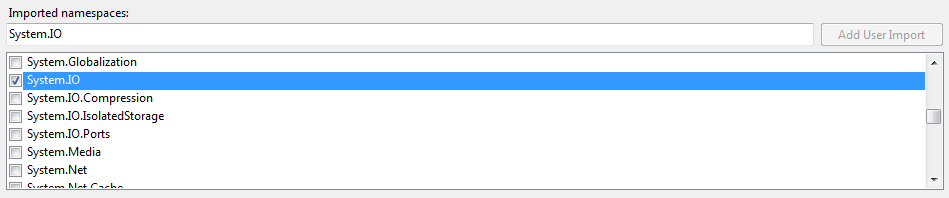
then i did exactly the same code that i gave in the first post,but still the same problem..............it tells
exists is not a member of directory
for this particular line od the code:
Code:
Directory.exists("C:\testDir")
need some help
thank you
-
Jan 4th, 2010, 03:19 AM
#7
Re: Problems with creating directory
I don't have access to vb.net at the moment so I typed this in Notepad so please amend the syntax errors if any...
Could you tell me what do you get when you use this code?
Code:
Imports System.IO
Public Class Form1
    Private Sub Button1_Click(ByVal sender As System.Object, _
    ByVal e As System.EventArgs) Handles Button1.Click
        MsgBox DirExst("C:\testDir1")
    End Sub

    Public Function DirExst(ByVal Path As String) As Boolean
        On Error Resume Next
        Dim myIO As New FileInfo(Path)
        If Not myIO.Exists() Then
            myIO = New DirectoryInfo(Path)
        End If
        Return myIO.Exists()
    End Function
End Class
A good exercise for the Heart is to bend down and help another up...
Please Mark your Thread " Resolved", if the query is solved
MyGear: Resolved", if the query is solved
MyGear:
★ CPU ★ Ryzen 5 5800X
★ GPU ★ NVIDIA GeForce RTX 3080 TI Founder Edition
★ RAM ★ G. Skill Trident Z RGB 32GB 3600MHz
★ MB ★ ASUS TUF GAMING X570 (WI-FI) ATX Gaming
★ Storage ★ SSD SB-ROCKET-1TB + SEAGATE 2TB Barracuda IHD
★ Cooling ★ NOCTUA NH-D15 CHROMAX BLACK 140mm + 10 of Noctua NF-F12 PWM
★ PSU ★ ANTEC HCG-1000-EXTREME 1000 Watt 80 Plus Gold Fully Modular PSU
★ Case ★ LIAN LI PC-O11 DYNAMIC XL ROG (BLACK) (G99.O11DXL-X)
★ Monitor ★ LG Ultragear 27" 240Hz Gaming Monitor
★ Keyboard ★ TVS Electronics Gold Keyboard
★ Mouse ★ Logitech G502 Hero
 Posting Permissions
- You may not post new threads
- You may not post replies
- You may not post attachments
- You may not edit your posts
-
Forum Rules
|
Click Here to Expand Forum to Full Width
|



 Reply With Quote

