|

-
Dec 18th, 2009, 09:23 AM
#1
Thread Starter
Addicted Member

 [RESOLVED] Can VS copy the executable to a separate directory? [RESOLVED] Can VS copy the executable to a separate directory?
I'm learning a lot of things as I go along here. And one thing I've just learned is that when developing a dll with its own Config file, the dll has to be copied into the same directory as the parent application.
My question is:
VS sets your project up with the default directory structure: ...\bin\debug which also seems to contain some other files besides your dll (I assume these are related to the debug symbols, etc).
So how do you set it up to copy your dll to another directory when debugging?
Right now, I'm having to manually copy the built dll with every run and that's getting to be a bit annoying.
Thanks in advance for any help!! 
Oops... Forgot to mention I'm using VS 2008
-
Dec 18th, 2009, 09:27 AM
#2
Re: Can VS copy the executable to a separate directory?
not sure if it works for ClickOnce, but the way I do it is to add a "Setup Project" to your project and you publish that. The properties for the Setup Project will allow you to specify output directories for resources and any other files you want to include during installation (such as shortcuts on the desktop, program files, etc)
-
Dec 18th, 2009, 09:33 AM
#3
Thread Starter
Addicted Member
Re: Can VS copy the executable to a separate directory?
Hmmm... That sounds great for deployment, but what about during testing and debugging.
I've just recently found out that in order for my custom config file to work, a copy of the dll has to be located in the same directory as the parent executable. Even when all I'm doing is making some test runs and debugging. Is there a simple solution to allow VS 2008 to copy the debug dll to that directory when you select the "Start Debugging" menu item?
-
Dec 18th, 2009, 09:40 AM
#4
Re: Can VS copy the executable to a separate directory?
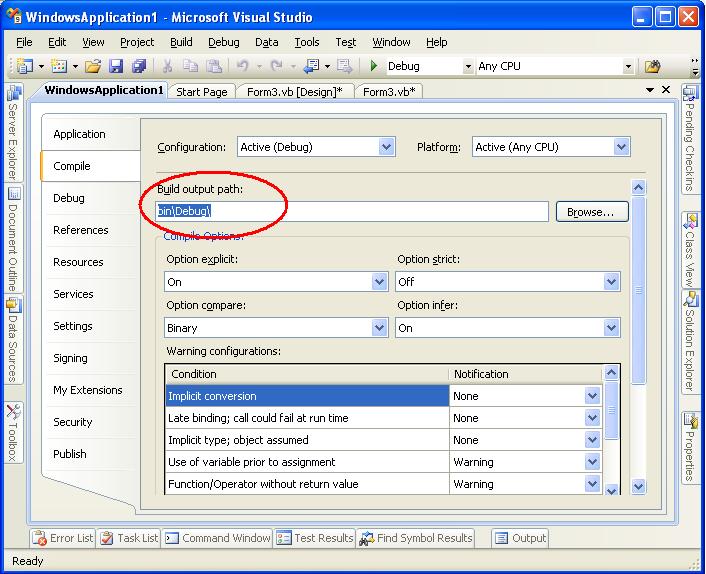
Open project properties. On the Compile tab there is option to set Build output path. Set that path appropriately.
-
Dec 18th, 2009, 09:40 AM
#5
Re: Can VS copy the executable to a separate directory?
If the dll is compiled you can add it to your project and make sure its "copy to output directory" property is set to "copy if newer" and then when you build it will copy that dll to the bin directory where your exe is made.
Or if this is a .NET dll you made, you could just add the dll project itself to your solution, reference it from your exe project, and then when you built, it will copy the dll to the exe folder as well.
-
Dec 18th, 2009, 09:45 AM
#6
Thread Starter
Addicted Member
Re: Can VS copy the executable to a separate directory?
I had thought about changing the Build Output path as suggested, but that would also build all the other files that accompany the dll I'm building there as well. Would that hurt anything?
I apologize for the dumb question in advance, I feel like I've learned enough to be dangerous. But I'm at least having fun learning it!
-
Dec 18th, 2009, 09:52 AM
#7
Re: Can VS copy the executable to a separate directory?
don't chance the build path, just reference the dll from your exe project. If there is no reference to be made, then just add the dll to the exe project.
-
Dec 18th, 2009, 10:03 AM
#8
Thread Starter
Addicted Member
Re: Can VS copy the executable to a separate directory?
Well... that's where the rub is.
The exe is a prebuilt off-the-shelf application (AutoCAD to be specific, whose executable is acad.exe). Autodesk opens the AutoCAD API to the developers to use to develop dll's that allows custom code to manipulate drawings. Unfortunately, in order to debug my code utilizing the Configuration classes, I have to have a copy of my dll that I'm developing be located in the same directory as the acad.exe. I was just hoping there was a nice hidden little feature that would copy my dll to that directory automatically as I run it in debug mode.
I probably should've also stated that I have the start external program and working directory set-up so that when I select the start debugging item, it automatically starts up AutoCAD for me so that I can load my dll (file chosen from the debug bin), run, and debug as necessary.
-
Dec 18th, 2009, 10:13 AM
#9
Re: Can VS copy the executable to a separate directory?
In Project Properties, Compile tab (same tab as in above screenshot), there is a Build Events button. Click that button. Then in Post-build events commandline, add this command:
Code:
copy "$(TargetPath)" "put-whatever-is-your-project-path-here"
This will copy the dll file to your other directory whenever you build the project.
-
Dec 18th, 2009, 10:26 AM
#10
Thread Starter
Addicted Member
Re: Can VS copy the executable to a separate directory?
Eureka!!! It worked!! Thanks!!! Just what I was looking for.
-
Dec 18th, 2009, 10:35 AM
#11
Re: Can VS copy the executable to a separate directory?
Beware that your old dll would be lost. So be careful.
Or better still, add script to backup that file before you build.
something like this:
Code:
rename "your-project-path\dllname" "your-project-path\dllname.backup"
copy "$(TargetPath)" "your-project-path"
-
Dec 18th, 2009, 11:04 AM
#12
Thread Starter
Addicted Member
Re: Can VS copy the executable to a separate directory?
Great suggestion. I will definitely incorporate that. Thank you!
Tags for this Thread
 Posting Permissions
- You may not post new threads
- You may not post replies
- You may not post attachments
- You may not edit your posts
-
Forum Rules
|
Click Here to Expand Forum to Full Width
|



 Reply With Quote


 icon on the left of the post.


