|

-
Dec 2nd, 2009, 06:42 AM
#1
 [RESOLVED] Dual Monitor Setup [RESOLVED] Dual Monitor Setup
Hey,
Ok, I thought this was going to be simple, but obviously, I am going something wrong.
Here is my setup:
Windows 7 Ultimate 64 Bit Edition
Geforce 8500 GT (DVI and VGA output)
Two monitors, each with only VGA Input
Most recent drivers for Graphics card installed, and all monitor drivers also installed and updated
Now, the problem.
I can get one or other of the monitors to work from the Graphic Cards VGA port, so I know both monitors are working. However, when I try to connect another monitor to the DVI port on the graphics card, using a DVI cable and then a DVI to VGA convertor, I don't get anything appearing on the monitor. The monitor just goes to sleep.
However, within Windows Display Properties, the monitor has been detected, and I am able to set the resolution of both monitors, choose the option to extend the desktop etc, but I can't get anything to appear on the second monitor.
Any ideas?
Thanks
Gary
-
Dec 2nd, 2009, 11:51 AM
#2
Re: Dual Monitor Setup
thread moved to General PC.
-
Dec 2nd, 2009, 05:41 PM
#3
Re: Dual Monitor Setup
Have you tried plugging a DVI-to-VGA plug into the video card, then using a vga cable to the monitor?
This is how mine is setup
-
Dec 2nd, 2009, 05:56 PM
#4
Re: Dual Monitor Setup
Hey,
Nope, unfortunately that won't work, as the connector I have won't work with that configuration, i.e. the male and female connectors are the wrong way round.
I did think about this though. Might pick up another connector.
Gary
-
Dec 3rd, 2009, 02:58 AM
#5
Re: Dual Monitor Setup
did you try using nvidia control panel to enable this stuff? It is notorious for not working pleasantly (at least for me) with the properties page for monitors. I had a huge problem getting it to show svideo output. It kept enabling for a second then shutting off. Then one day it decided it just wasn't going to work at all. I finally gave up and threw the tv away (no lie). I was using the tv as a video display for movies and i decided a 2nd monitor of appropriate size would not only be sharper but have side benefits of normal usability.
In my case however, the problem was with vista x32. I don't know if it would be the same issue in x64. For whatever reason, x64 seems to be more stable for me, although some of my hardware STILL doesn't have drivers, and according to the hauppage website it never will.
Edit: i just remembered: There are actually three different dvi standards. If you have a dvi cable for a modern tv or imac, it may not have pass-thru for the analog signals pc monitors require. On the side of the connector with the blade, analog cables have 4 pins. two on top and two on bottom of the blade.
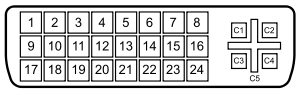 . If either your cable or adapter is missing the c1 thru c4 pins in this image (or horrors: Your video out is), you will need to buy a different one. . If either your cable or adapter is missing the c1 thru c4 pins in this image (or horrors: Your video out is), you will need to buy a different one.
Last edited by Lord Orwell; Dec 3rd, 2009 at 03:04 AM.
-
Dec 3rd, 2009, 03:07 AM
#6
Re: Dual Monitor Setup
Hey,
Yes, it is the nVidia Control Panel that I am using.
A friend suggested that I what I would have to do is configure the DVI port to output an analogue signal, rather than a digital one.
Does that sound right to you?
Going to pick up another adapter at lunch time today, and see if that helps, but not convinced that it will do anything.
Gary
P.S. Love the new signature btw!!
-
Dec 3rd, 2009, 03:15 AM
#7
Re: Dual Monitor Setup
i edited the above post. look and see if the new info helps. It's also possible your cable is faulty. If the timing sync wire is bad, you won't get a display. The port should know it's an analogue connection.
-
Dec 3rd, 2009, 03:40 AM
#8
Re: Dual Monitor Setup
Hey,
Thanks for the info, that maybe does help!!
I will let you know how I get on.
Gary
-
Dec 5th, 2009, 01:17 PM
#9
Re: Dual Monitor Setup
Hey Lord Orwell,
I have just gotten round to having a look at this again, and looks like it could be the DVI cable that is causing me problems. I have just had a look at it, and looks like it doesn't have C1 through C4. I don't actually have another cable, so I will need to pick one up to see if that solves my problem.
Thanks again for your help!!
Gary
-
Dec 7th, 2009, 03:40 PM
#10
Re: Dual Monitor Setup
Hey Lord Orwell,
Just thought I would let you know that I have now resolved this. The problem was solely down to the DVI Cable that I was using, i.e. the lack of C1 through C4 pins. I picked up one of these:
http://www.maplin.co.uk/Module.aspx?ModuleNo=97372
And it is working perfectly.
Thanks for your help!!
Gary
 Posting Permissions
- You may not post new threads
- You may not post replies
- You may not post attachments
- You may not edit your posts
-
Forum Rules
|
Click Here to Expand Forum to Full Width
|



 Reply With Quote

