|

-
Nov 24th, 2009, 05:12 PM
#1
Thread Starter
Junior Member

label unstable in panel control
I've in my program label+panel+image_control
The label size varies according to the included data and I've to show it programatically as soon as the user move the cursor over the image (using the mousemove event), but unfortunately the label seems to be unstable as it appears in different locations in my form & sometimes hanging although i specify the location to appear in.
How show the frame in front of the panel even though the frame sometimes may cross the limits of the panel control???
-
Nov 24th, 2009, 05:23 PM
#2
Re: label unstable in panel control
How show the frame in front of the panel
hmmm... what frame? you only mention a label + panel + image_control
Can you post the relevant parts of your code - labels don't just randomly choose their locations so I'm guessing there's some issue around either the code positioning the label or possibly something to do with auto-positioning using anchor?
-
Nov 25th, 2009, 01:19 AM
#3
Thread Starter
Junior Member
Re: label unstable in panel control
the panel=frame
Actually the label is invisible but once the mouse moves over the image the label appears like popup @ the location of the image
Please note that I have many images in the panel distributed in different places inside. some images are beside the edge of the panel so I can't ensure the label to be totally appear inside the panel!
Please help
-
Nov 26th, 2009, 06:29 AM
#4
Thread Starter
Junior Member
-
Nov 26th, 2009, 06:38 AM
#5
Re: label unstable in panel control
A screen shot will speak better
Please mark you thread resolved using the Thread Tools as shown
-
Nov 26th, 2009, 07:38 AM
#6
Thread Starter
Junior Member
Re: label unstable in panel control
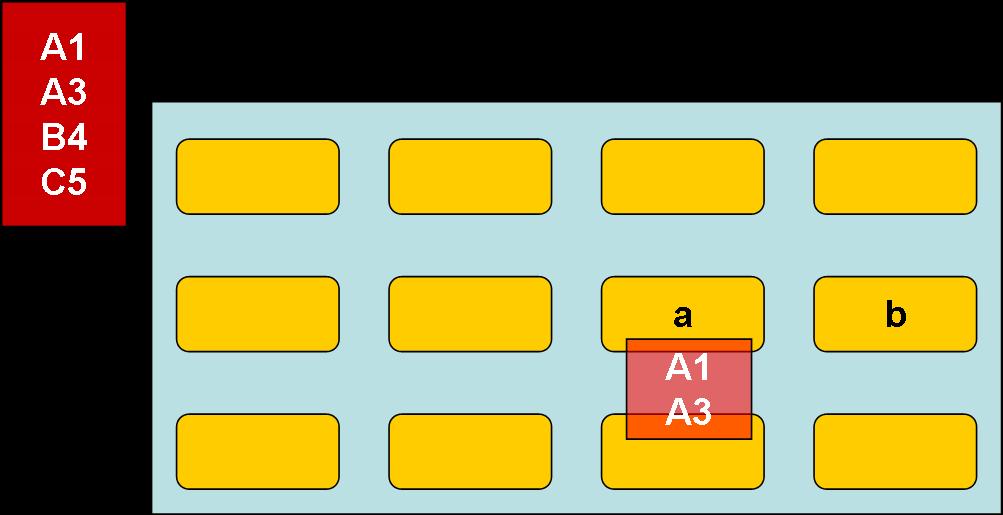
the panel appeared in light blue & other controls included inside the panel in yellow
the popup appeared in red should appears when the mouse come over any of the controls inside the panel.
for example when the mouse comes on control "a" the popup appears inside the panel but for control "b" it appeared away in other place in the form and somtimes the popup hangs, so I need to overcome this issue regardless the position of the control inside the panel
Thanks
-
Nov 27th, 2009, 04:30 AM
#7
Re: label unstable in panel control
Please mark you thread resolved using the Thread Tools as shown
-
Nov 27th, 2009, 05:52 AM
#8
Thread Starter
Junior Member
Re: label unstable in panel control
yes it's a label
sorry for inconvenience but I just simulate the problem on power point but it's quit similar
to my program...
I need to overcome the problem of showing the label away from the mouse cursor as explained above
 Posting Permissions
- You may not post new threads
- You may not post replies
- You may not post attachments
- You may not edit your posts
-
Forum Rules
|
Click Here to Expand Forum to Full Width
|



 Reply With Quote
 Re: Label unstable in panel control


