


This tip will add an entry to the right-click context menu on .sln files. When clicked, a command prompt will be spawned (and remain open) with MSBuild performing the build.
This example uses 3.5's MSBuild. Just replace the path to your preferred .NET installation's MSBuild location (%WINDIR%\Microsoft.NET\Framework\{{Version}}\MSBuild.exe)
Open Windows Explorer & open the Folder Options dialog (Tools menu)
Locate the Visual Studio Solution file type (SLN) and click "Advanced":
In the "Edit File Type" dialog, click the "New" button:
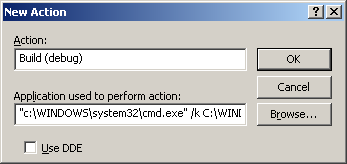
In the "New Action" dialog, give your action a name (say, "Build (debug)") and the following application path (verbatim):
"c:\WINDOWS\system32\cmd.exe" /k C:\WINDOWS\Microsoft.NET\Framework\v3.5\MSBuild.exe "%1" /p:Configuration=Debug /t:Rebuild

 Reply With Quote