|

-
Oct 26th, 2009, 08:55 PM
#1
 [RESOLVED] Record of user posts [RESOLVED] Record of user posts
Hi,
Does the forum keep a record of how many posts a user posts each year? I was wondering if there was a simple way of keeping track how many posts I had this year, rather than searching through user posts. Something like a chart which displays the post details. Is it possible to implement if there isn't already a feature like this?
Thanks,
Nightwalker
when you quote a post could you please do it via the "Reply With Quote" button or if it multiple post click the "''+" button then "Reply With Quote" button.
If this thread is finished with please mark it "Resolved" by selecting "Mark thread resolved" from the "Thread tools" drop-down menu.
https://get.cryptobrowser.site/30/4111672
-
Oct 26th, 2009, 09:03 PM
#2
Re: Record of user posts
You can do a Member|Advanced search to do that.
-
Oct 26th, 2009, 09:13 PM
#3
Re: Record of user posts
I mean I want to find out how many posts I had for this year "2009" but not the total number of posts. Is that possible? I tried the advanced member search but it would only return the full number of posts I got not list each post after the date the I specified.
when you quote a post could you please do it via the "Reply With Quote" button or if it multiple post click the "''+" button then "Reply With Quote" button.
If this thread is finished with please mark it "Resolved" by selecting "Mark thread resolved" from the "Thread tools" drop-down menu.
https://get.cryptobrowser.site/30/4111672
-
Oct 27th, 2009, 02:48 AM
#4
Re: Record of user posts
Hey,
How about this:
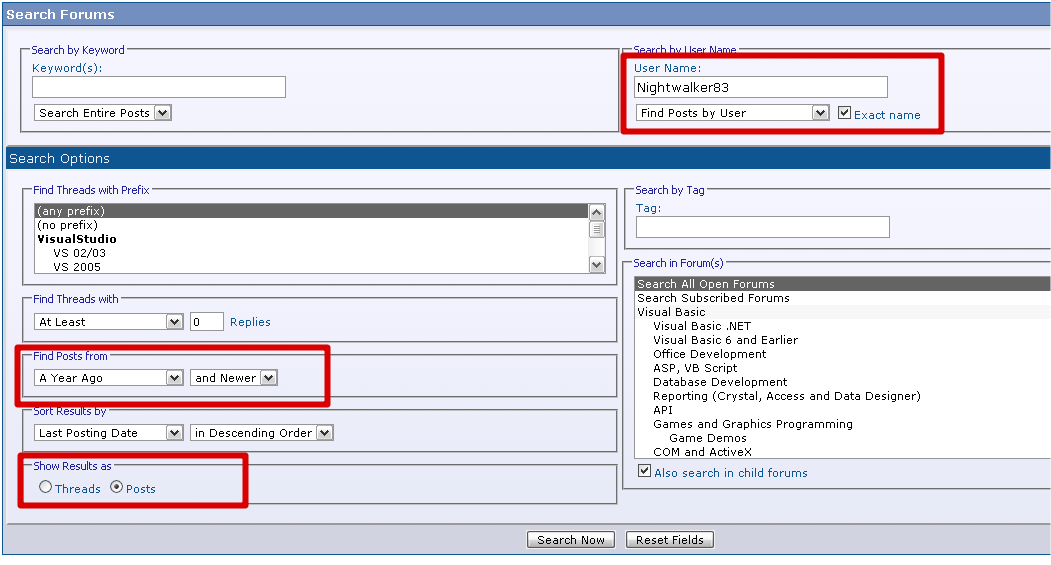
This would give you a rough indication.
Gary
-
Oct 27th, 2009, 02:54 AM
#5
Re: Record of user posts
Thanks! I found out I have at least 500 posts this year.
when you quote a post could you please do it via the "Reply With Quote" button or if it multiple post click the "''+" button then "Reply With Quote" button.
If this thread is finished with please mark it "Resolved" by selecting "Mark thread resolved" from the "Thread tools" drop-down menu.
https://get.cryptobrowser.site/30/4111672
-
Oct 27th, 2009, 02:56 AM
#6
Re: [RESOLVED] Record of user posts
Ah, I am not sure how accurate that search is then. 
I have just done the same search, and it is only returning 500 for me as well, but I know for a fact I have done more than that.
The results must be capped at 500.
Gary
-
Oct 27th, 2009, 05:10 AM
#7
Re: [RESOLVED] Record of user posts
Yes the search results are limited to a maximum of 500 results.
VB/Office Guru™ (AKA: Gangsta Yoda™  ®) ®)
I dont answer coding questions via PM. Please post a thread in the appropriate forum. 
Microsoft MVP 2006-2011
Office Development FAQ (C#, VB.NET, VB 6, VBA)
Senior Jedi Software Engineer MCP (VB 6 & .NET), BSEE, CET
If a post has helped you then Please Rate it! 
• Reps & Rating Posts • VS.NET on Vista • Multiple .NET Framework Versions • Office Primary Interop Assemblies • VB/Office Guru™ Word SpellChecker™.NET • VB/Office Guru™ Word SpellChecker™ VB6 • VB.NET Attributes Ex. • Outlook Global Address List • API Viewer utility • .NET API Viewer Utility •
System: Intel i7 6850K, Geforce GTX1060, Samsung M.2 1 TB & SATA 500 GB, 32 GBs DDR4 3300 Quad Channel RAM, 2 Viewsonic 24" LCDs, Windows 10, Office 2016, VS 2019, VB6 SP6
-
Oct 27th, 2009, 06:41 AM
#8
Re: [RESOLVED] Record of user posts
I remember seeing (don't know if it was here) awhile ago there was a pie chart that showed how many posts the user had in each section of the forum.
when you quote a post could you please do it via the "Reply With Quote" button or if it multiple post click the "''+" button then "Reply With Quote" button.
If this thread is finished with please mark it "Resolved" by selecting "Mark thread resolved" from the "Thread tools" drop-down menu.
https://get.cryptobrowser.site/30/4111672
-
Oct 27th, 2009, 10:07 AM
#9
Re: [RESOLVED] Record of user posts
 Originally Posted by Nightwalker83

I remember seeing (don't know if it was here) awhile ago there was a pie chart that showed how many posts the user had in each section of the forum.
Not here.
-
Oct 27th, 2009, 10:06 PM
#10
Re: [RESOLVED] Record of user posts
Originally Posted by Nightwalker83
I remember seeing (don't know if it was here) awhile ago there was a pie chart that showed how many posts the user had in each section of the forum.
Now that would be a nice AddOn.
VB/Office Guru™ (AKA: Gangsta Yoda™ ®)
I dont answer coding questions via PM. Please post a thread in the appropriate forum.
Microsoft MVP 2006-2011
Office Development FAQ (C#, VB.NET, VB 6, VBA)
Senior Jedi Software Engineer MCP (VB 6 & .NET), BSEE, CET
If a post has helped you then Please Rate it!
• Reps & Rating Posts • VS.NET on Vista • Multiple .NET Framework Versions • Office Primary Interop Assemblies • VB/Office Guru™ Word SpellChecker™.NET • VB/Office Guru™ Word SpellChecker™ VB6 • VB.NET Attributes Ex. • Outlook Global Address List • API Viewer utility • .NET API Viewer Utility •
System: Intel i7 6850K, Geforce GTX1060, Samsung M.2 1 TB & SATA 500 GB, 32 GBs DDR4 3300 Quad Channel RAM, 2 Viewsonic 24" LCDs, Windows 10, Office 2016, VS 2019, VB6 SP6
-
Oct 28th, 2009, 12:54 AM
#11
Re: [RESOLVED] Record of user posts
Originally Posted by RobDog888
Now that would be a nice AddOn.
This is what the system over at gtaforums does:
Active Stats
Total Cumulative Posts 1,473
( 0.8 Posts per day / 0.04% of total forum posts )
Joined Oct 10, 2004
Most active in Gameplay
163 posts in this forum
( 17% of this member's active posts )
User's local time Oct 28 2009, 16:13
Last Activity / Last Post Oct 28 2009, 16:12 / Oct 26 2009, 11:23
GTAGarage No GTAGarage mods
Currently Viewing: Viewing Members Profile
So it not only shows the number of posts the user has but with for the user has posted most in as well that users post percentage of the whole forums posts.
when you quote a post could you please do it via the "Reply With Quote" button or if it multiple post click the "''+" button then "Reply With Quote" button.
If this thread is finished with please mark it "Resolved" by selecting "Mark thread resolved" from the "Thread tools" drop-down menu.
https://get.cryptobrowser.site/30/4111672
-
Oct 28th, 2009, 02:11 AM
#12
Re: [RESOLVED] Record of user posts
Hey,
Unless I am missing something, it seems like it is part of vBulletion:
http://www.vbulletin.com/docs/html/main/stats_logs
Perhaps just not enabled?
Gary
-
Oct 28th, 2009, 03:40 PM
#13
Re: [RESOLVED] Record of user posts
Thats a different thing Gary. Its for the stats at the bottom of the home page.
( 0.8 Posts per day / 0.04% of total forum posts )
Most active in Gameplay
163 posts in this forum
( 17% of this member's active posts )
These are probably calculated on the postbit page which on a large forum like ours will slow it down. The calcs are performed on the forum & postcounts. It would be better to have a "report" page so there will be no extra queries or load on thread/post views.
VB/Office Guru™ (AKA: Gangsta Yoda™ ®)
I dont answer coding questions via PM. Please post a thread in the appropriate forum.
Microsoft MVP 2006-2011
Office Development FAQ (C#, VB.NET, VB 6, VBA)
Senior Jedi Software Engineer MCP (VB 6 & .NET), BSEE, CET
If a post has helped you then Please Rate it!
• Reps & Rating Posts • VS.NET on Vista • Multiple .NET Framework Versions • Office Primary Interop Assemblies • VB/Office Guru™ Word SpellChecker™.NET • VB/Office Guru™ Word SpellChecker™ VB6 • VB.NET Attributes Ex. • Outlook Global Address List • API Viewer utility • .NET API Viewer Utility •
System: Intel i7 6850K, Geforce GTX1060, Samsung M.2 1 TB & SATA 500 GB, 32 GBs DDR4 3300 Quad Channel RAM, 2 Viewsonic 24" LCDs, Windows 10, Office 2016, VS 2019, VB6 SP6
-
Oct 28th, 2009, 04:16 PM
#14
Re: [RESOLVED] Record of user posts
Ah, my bad. Never read the page properly
I'll be quiet now.
 Posting Permissions
- You may not post new threads
- You may not post replies
- You may not post attachments
- You may not edit your posts
-
Forum Rules
|
Click Here to Expand Forum to Full Width
|



 Reply With Quote
 2009 - 2016

