Results 1 to 8 of 8

Thread: [RESOLVED] Form Populate

  1. #1

    Thread Starter
    Hyperactive Member
    Join Date
    Apr 2007
    Posts
    362

    Resolved [RESOLVED] Form Populate

    I have this form Customer which is designed with labels, textboxes and comboboxes. I want to populate them by way of databinding. How can i do this??

  2. #2
    VB Addict Pradeep1210's Avatar
    Join Date
    Apr 2004
    Location
    Inside the CPU...
    Posts
    6,614

    Re: Form Populate

    If you have defined a datasource at design time, you can specify the property you want to bind and populate from that datasource.

    Since you have not provided much information, I'll just explain with illustration. I assume that you have created the dataset & binding source at design time and have a textbox you want to bind to this dataset.
    So open the properties of this textbox, and expand the DataBindings node. You will see all the properties that can be bound. Chooose the property you want to bind. For textbox, you would bind the Text property to display. Click the combo dropdown beside it and choose the field to bind it to. (see attached screenshot.)
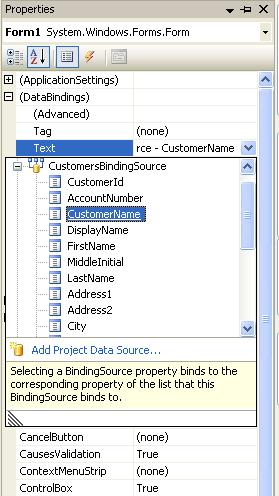
    Name:  databind.JPG
Views: 130
Size:  36.3 KB


    Just in case you are creating your datasource from code, you need to create the databindings there.

    For e.g. something like this should work:
    vb.net Code:
    1. Private Sub Form1_Load(ByVal sender As System.Object, ByVal e As System.EventArgs) Handles MyBase.Load
    2.  
    3.         TextBox1.DataBindings.Add "Text", TheDataSource, TheDataMember)
    4.  
    5. End Sub
    Last edited by Pradeep1210; Oct 22nd, 2009 at 05:21 AM.
    Pradeep, Microsoft MVP (Visual Basic)
    Please appreciate posts that have helped you by clicking icon on the left of the post.
    "A problem well stated is a problem half solved." — Charles F. Kettering

    Read articles on My Blog101 LINQ SamplesJSON ValidatorXML Schema Validator"How Do I" videos on MSDNVB.NET and C# ComparisonGood Coding PracticesVBForums Reputation SaverString EnumSuper Simple Tetris Game


    (2010-2013)
    NB: I do not answer coding questions via PM. If you want my help, then make a post and PM me it's link. If I can help, trust me I will...

  3. #3

    Thread Starter
    Hyperactive Member
    Join Date
    Apr 2007
    Posts
    362

    Re: Form Populate

    Thanks for your prompt reply Pradeep.

    I have binded the textbox to the datasource as you described. But after launching the application the data is not showing up in the textbox. For eg. on startup i want to show details of Client_ID no:1. How can i do this?

    Lux.

  4. #4
    VB Addict Pradeep1210's Avatar
    Join Date
    Apr 2004
    Location
    Inside the CPU...
    Posts
    6,614

    Re: Form Populate

    Are you sure you have populated your datasource before you are expecting it to be shown there in the controls?
    Pradeep, Microsoft MVP (Visual Basic)
    Please appreciate posts that have helped you by clicking icon on the left of the post.
    "A problem well stated is a problem half solved." — Charles F. Kettering

    Read articles on My Blog101 LINQ SamplesJSON ValidatorXML Schema Validator"How Do I" videos on MSDNVB.NET and C# ComparisonGood Coding PracticesVBForums Reputation SaverString EnumSuper Simple Tetris Game


    (2010-2013)
    NB: I do not answer coding questions via PM. If you want my help, then make a post and PM me it's link. If I can help, trust me I will...

  5. #5

    Thread Starter
    Hyperactive Member
    Join Date
    Apr 2007
    Posts
    362

    Re: Form Populate

    Yes, i have.

  6. #6
    VB Addict Pradeep1210's Avatar
    Join Date
    Apr 2004
    Location
    Inside the CPU...
    Posts
    6,614

    Re: Form Populate

    Are you databinding at design time or from code?

    You might need to call the DataBind method after you have set the bindings:

    vb Code:
    1. TextBox1.DataBindings.Add "Text", TheDataSource, TheDataMember)
    2. TextBox1.DataBind()
    Pradeep, Microsoft MVP (Visual Basic)
    Please appreciate posts that have helped you by clicking icon on the left of the post.
    "A problem well stated is a problem half solved." — Charles F. Kettering

    Read articles on My Blog101 LINQ SamplesJSON ValidatorXML Schema Validator"How Do I" videos on MSDNVB.NET and C# ComparisonGood Coding PracticesVBForums Reputation SaverString EnumSuper Simple Tetris Game


    (2010-2013)
    NB: I do not answer coding questions via PM. If you want my help, then make a post and PM me it's link. If I can help, trust me I will...

  7. #7

    Thread Starter
    Hyperactive Member
    Join Date
    Apr 2007
    Posts
    362

    Re: [RESOLVED] Form Populate

    oki got it!!! thanks.. and what do i have to do when i need to update the dataset??

  8. #8
    VB Addict Pradeep1210's Avatar
    Join Date
    Apr 2004
    Location
    Inside the CPU...
    Posts
    6,614

    Re: [RESOLVED] Form Populate

    call DataAdapter.Update method
    Pradeep, Microsoft MVP (Visual Basic)
    Please appreciate posts that have helped you by clicking icon on the left of the post.
    "A problem well stated is a problem half solved." — Charles F. Kettering

    Read articles on My Blog101 LINQ SamplesJSON ValidatorXML Schema Validator"How Do I" videos on MSDNVB.NET and C# ComparisonGood Coding PracticesVBForums Reputation SaverString EnumSuper Simple Tetris Game


    (2010-2013)
    NB: I do not answer coding questions via PM. If you want my help, then make a post and PM me it's link. If I can help, trust me I will...

Posting Permissions

  • You may not post new threads
  • You may not post replies
  • You may not post attachments
  • You may not edit your posts
  •  


Click Here to Expand Forum to Full Width
