|

-
Oct 13th, 2009, 12:57 AM
#1
Thread Starter
Lively Member


 Datetimepicker notifying icon Datetimepicker notifying icon
Hi…
I’ve got problem with my form application:
Datetimepicker notifying icons won't refresh on changing of datetime value during run-time,it’s only change when the form closed and reopened... 
Code:
Public Class Form1
    Private Sub Form1_FormClosing(ByVal sender As Object, ByVal e As System.Windows.Forms.FormClosingEventArgs) Handles Me.FormClosing
        My.Settings.Save()
    End Sub

    Private Sub Form1_Load(ByVal sender As System.Object, ByVal e As System.EventArgs) Handles MyBase.Load

        Me.DateTimePicker1.DataBindings.Add(New System.Windows.Forms.Binding("Value", _
        Global.DateTimeAlert.My.MySettings.Default, "Date1", _
        True, System.Windows.Forms.DataSourceUpdateMode.OnPropertyChanged))

        Me.DateTimePicker2.DataBindings.Add(New System.Windows.Forms.Binding("Value", _
        Global.DateTimeAlert.My.MySettings.Default, "Date2", _
        True, System.Windows.Forms.DataSourceUpdateMode.OnPropertyChanged))

        Me.DateTimePicker3.DataBindings.Add(New System.Windows.Forms.Binding("Value", _
        Global.DateTimeAlert.My.MySettings.Default, "Date3", _
        True, System.Windows.Forms.DataSourceUpdateMode.OnPropertyChanged))

        ShowErrorIcon(DateTimePicker1)
        ShowErrorIcon(DateTimePicker2)
        ShowErrorIcon(DateTimePicker3)

    End Sub

    Private Sub ShowErrorIcon(ByVal dtPicker As DateTimePicker)

        Dim errProvider As ErrorProvider

        Try
            errProvider = New ErrorProvider
            errProvider.SetIconPadding(dtPicker, 5)

            Select DateDiff(DateInterval.Day, Now, dtPicker.Value)
                Case Is > 2
                    errProvider.Icon = My.Resources.OK
                    errProvider.SetError(dtPicker, "more than two days")
                    errProvider.BlinkStyle = ErrorBlinkStyle.NeverBlink

                Case Is < 1

                    errProvider.Icon = My.Resources.Urgent
                    errProvider.SetError(dtPicker, "less than one day")
                    errProvider.BlinkStyle = ErrorBlinkStyle.AlwaysBlink
                    errProvider.BlinkRate = 500

                Case Else

                    errProvider.Icon = My.Resources.Attention
                    errProvider.SetError(dtPicker, "between one and two days")
                    errProvider.BlinkStyle = ErrorBlinkStyle.AlwaysBlink
                    errProvider.BlinkRate = 2600
            End Select
Catch ex As Exception
            MessageBox.Show(ex.Message)
        End Try
    End Sub

End Class
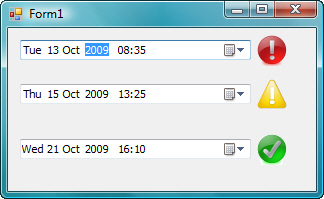
Any idea…
Regards…
-
Oct 13th, 2009, 01:11 AM
#2
Re: Datetimepicker notifying icon
If you expect the ErrorProvider to react when the Value of the DateTimePicker changes then you will have to tell the ErrorProvider that the Value has changed, i.e. handle the ValueChanged event of the DTP and call ShowErrorIcon.
Also, you should NOT be creating your ErrorProviders in the ShowErrorIcon method. Add them to the form in the designer and configure them there, then simply call their SetError methods when you need something to happen.
-
Oct 13th, 2009, 08:12 AM
#3
Thread Starter
Lively Member
Re: Datetimepicker notifying icon
 Originally Posted by jmcilhinney

If you expect the ErrorProvider to react when the Value of the DateTimePicker changes then you will have to tell the ErrorProvider that the Value has changed, i.e. handle the ValueChanged event of the DTP and call ShowErrorIcon.
Also, you should NOT be creating your ErrorProviders in the ShowErrorIcon method. Add them to the form in the designer and configure them there, then simply call their SetError methods when you need something to happen.
Thanks jmcilhinney for your help...
Not working properly with ValueChanged event of the DTP and call ShowErrorIcon
I’ve tried this code:
Code:
Private Sub DateTimePicker1_ValueChanged(ByVal sender As System.Object, ByVal e As System.EventArgs) Handles DateTimePicker1.ValueChanged
        ShowErrorIcon(DateTimePicker1)
    End Sub
My actual project contain over 150 DTP ,so do I have to add 150 ErrorProviders to the form designer...
Regards...
-
Oct 13th, 2009, 07:38 PM
#4
Re: Datetimepicker notifying icon
A single ErrorProvider can service as many controls as you like, but it can only have one icon. As such, you need as many ErrorProviders as you want to be able to display different icons. From your screen shot, you have three different icons so you would need three different ErrorProviders, regardless of the number of controls.
 Posting Permissions
- You may not post new threads
- You may not post replies
- You may not post attachments
- You may not edit your posts
-
Forum Rules
|
Click Here to Expand Forum to Full Width
|



 Reply With Quote
