|

-
Oct 9th, 2009, 02:22 PM
#1
Thread Starter
Addicted Member


 GroupBox Array GroupBox Array
I'm working with a vb.net project that was converted to vb.net from vb6. One form has a groupbox array. So I see one frame, but there are several others behind it that I can only see if I drag the contents of the current frame to the side. Is there any way to view all of the frames at one time? I don't know how to edit or add something new to this form. Thanks
-
Oct 9th, 2009, 04:31 PM
#2
Re: GroupBox Array
If they are stacked one over the other, it's hard to view the contents of the ones in the behind without moving the ones on the front.
But to make things easier, Use the Document Outline window.
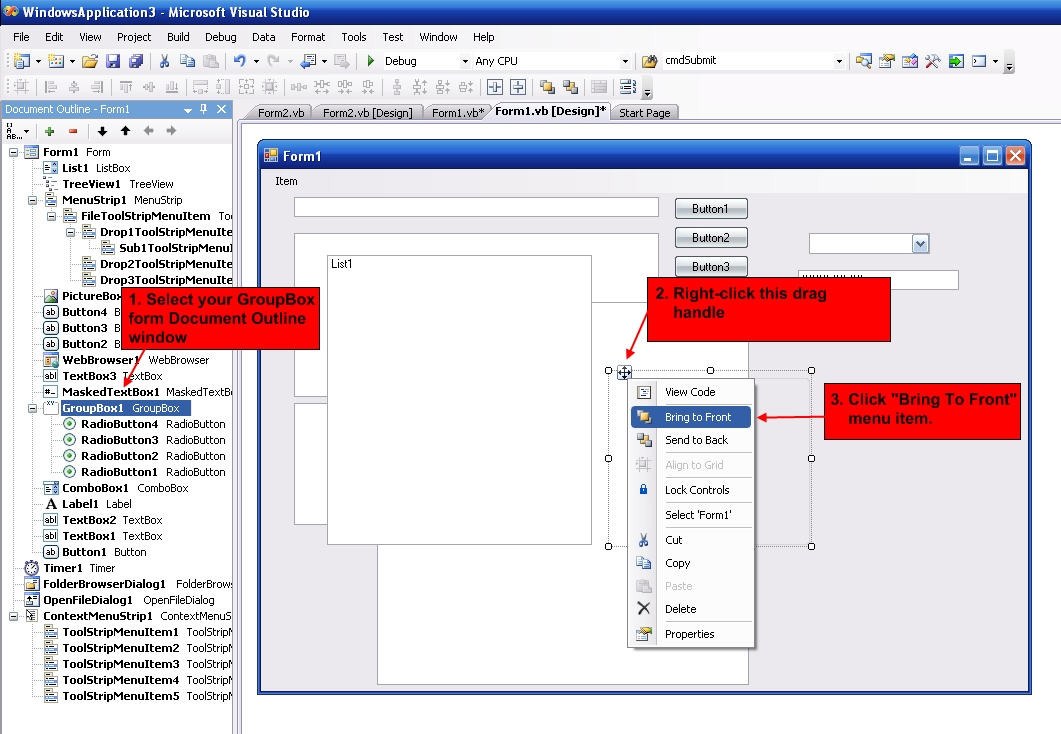
In the Document Outline window, select the groupbox you want to view. Notice that the particular groupbox gets selected on the form. Right-click on it (top left corner) and from popup menu select "Bring To Front".
This way you won't need to move the groupboxes.
-
Oct 9th, 2009, 04:43 PM
#3
Thread Starter
Addicted Member
Re: GroupBox Array
 Originally Posted by Pradeep1210

If they are stacked one over the other, it's hard to view the contents of the ones in the behind without moving the ones on the front.
But to make things easier, Use the Document Outline window.
In the Document Outline window, select the groupbox you want to view. Notice that the particular groupbox gets selected on the form. Right-click on it (top left corner) and from popup menu select "Bring To Front".
This way you won't need to move the groupboxes.
I think this would be very helpful usually. I can't seem to get the left corner of one that I click because the others are completely on top of it. Using several groupboxes and putting them on top of each other seems like a major pain in the butt. Is there a better way to do this than how it was done? I'm guessing this was the best way to do it when it was done ten years ago in vb6.
-
Oct 9th, 2009, 04:48 PM
#4
Re: GroupBox Array
Maybe this screenshot would explain better what I'm trying to say.
-
Oct 9th, 2009, 05:22 PM
#5
Re: GroupBox Array
My first question would be: What are you trying to accomplish with a bunch of group boxes stacked? Designing those things would be difficult, but not impossible. I do something like that with panels for mobile apps. Once you get a certain number of them, it turns into a messy chore, but I just put them wherever I need them during design, then move them where they need to be in the Form_Load event.
My usual boring signature: Nothing
 
 Posting Permissions
- You may not post new threads
- You may not post replies
- You may not post attachments
- You may not edit your posts
-
Forum Rules
|
Click Here to Expand Forum to Full Width
|



 Reply With Quote

 icon on the left of the post.

