|

-
Jun 30th, 2009, 07:54 AM
#81
Re: You owe it to yourself to use WPF
I haven't played with 2k10 yet. I know eventually I'll end up using WPF like you. It's something I keep coming back to and if I could manage to get even one successful project written with it, I'd probably stick with it.
Since just about all my work-related projects require very complex forms work and those in charge of the "look and feel" of the program (i.e. Marketing) never seem to like any form of standardized automatic layout, I don't think it's going to happen until I find the time to do a complex enough personal project.
Plus there's the aforementioned *ML issue that I hate. I see all *ML style languages these days as purely moronic as far as syntax is concerned. Nobody would design a language where quotes are needed around every functional statement:
Code:
  " "Friend Function RoundToValue "ByVal nValue As Decimal", "ByVal nCeiling As Decimal" As Decimal"
    "Dim tmpVal As Decimal"
    "If nCeiling.Equals(0) Then "Exit Function""

    "tmpVal = "Math.Round "nValue / nCeiling", 0""
    "tmpVal = "Math.Round "tmpVal * nCeiling", 3""

    "Return tmpVal"

    "End Function" "
...but that's essentially what they did with XAML because everyone's on this "must mimic HTML's tag behavior" kick for some reason. Call me old fashioned, but whenever I look at a pile of any *ML style language, my head hurts and it takes me ages to actually find the chunk of code I'm looking for. It's just something I'm going to have to put up with though. 
Last edited by Jenner; Jun 30th, 2009 at 08:17 AM.
-
Jun 30th, 2009, 08:57 AM
#82
Re: You owe it to yourself to use WPF
Jenner - I'm not sure where you're getting this "Quotes" around all the code from... I've never had to do that in any of my XAML adventures....
You should end up with a .XAML file that holds the UI.... and that's it. There should then be a "code behind" file (.vb or .cs) where the actual code resides.... just like in winforms, where there is a form .designer file and a form .vb/cs file with the code...
If you're getting something different, then I can certanly see your frustration with it.
-tg
-
Jun 30th, 2009, 09:21 AM
#83
Re: You owe it to yourself to use WPF
No, I'm just comparing the absurdity of *ML style <blah blah></blah><wibble>Hi mom</wibble> style of surrounding everything with < > to the implied absurdity of having to put " " around everything in VB.NET.
Syntax-wise, you don't enclose everything in "" in VB.NET. You only use "" for strings. All your functional arguments are plainly written. Why should any language be written where the code statements all have to be contained in <> and even the simplest one-line statement have to be enclosed in the form of <MyStatement />?
-
Jun 30th, 2009, 09:51 AM
#84
Re: You owe it to yourself to use WPF
I'm still lost... the only things that should be in tags is the ui definition.... the code isn't... maybe if you post an example of what you're complaining about, I might understand... but at the moment, I don't get what the problem is.
-tg
-
Jun 30th, 2009, 09:55 AM
#85
Re: You owe it to yourself to use WPF
I was just going to say that - yes you have quotes around values but that should be it...
Here's a very basic example off the top of my head of how a basic window would look in XAML:
Code:
<Window Title="Main Window" Width="500" Height="400">
    <Grid>
        <Button Name="ClickMeBtn" Content="Click Me!" Width="80" Height="23" Margin="4,2,4,2" />
    </Grid>
</Window
So I assume its the quotes around the values that you are referring to, but I dont know why you find that to be such a pain. Also as TG pointed out, the XAML window doesnt do any actual 'coding' , it just defines your UI and you then work with your UI in code in the same way as you would in winforms really (but with advantages like routed events)
-
Jun 30th, 2009, 09:59 AM
#86
Re: You owe it to yourself to use WPF
Its no different to putting Sub and End Sub around all of your procedures in a VB program in my opinion.
For example, what are the alternatives to this:
Code:
<Button>
    <WrapPanel>
       <Image Source="..\Images\something.png" />
       <TextBlock Text="Some text here" />
    </WrapPanel>
</Button>
How would you tell it where the WrapPanel and Button end if you didnt use the tags? The only other way would be to have some key word like "End Button" or "End Control" etc but then thats more effort than just </Button>
-
Jun 30th, 2009, 11:32 AM
#87
Thread Starter
Frenzied Member

Re: You owe it to yourself to use WPF
 Originally Posted by Jenner

Syntax-wise, I'm of strong opinion the majority of programming language's program code should be plain-text and only special conditions such as specific data-types warrant whole-line modifiers such as [brackets], <tags>, or "quotes".
That is what is going on here your saying:
Treat the following line as a button:
and so on. I thought the same as yourself about XAML but try to think how they could have done it differently remember XAML describes things thats its job it does not assign things you do not assign a button in XAML (ok in the backround you do but thats a different matter) you basicly are using XAML to say I have a forum with 10 buttons 6 radio buttons and a list. You also use it to say that the things you have discribed have access to X data, y event and look XY way.
If you think about how you currently do that in C#/VB you will see that XAML makes more sense, code is separated out and containment is more natural.
-
Jun 30th, 2009, 11:35 AM
#88
Thread Starter
Frenzied Member
Re: You owe it to yourself to use WPF
Also I really need to pass on the latest build of the highlighter to mendhak all those silly issues are resolved that your getting chris!
-
Jun 30th, 2009, 11:42 AM
#89
Thread Starter
Frenzied Member
Re: You owe it to yourself to use WPF
Jenner, I just looked at your post properly at the top. You do know that you still use C#/VB for the code right? XAML is literally UI only after that its all code. Just checking.
-
Jun 30th, 2009, 12:17 PM
#90
Re: You owe it to yourself to use WPF
-
Jun 30th, 2009, 12:41 PM
#91
Thread Starter
Frenzied Member
Re: You owe it to yourself to use WPF
Ha ha I though you said ripple!
-
Jun 30th, 2009, 12:45 PM
#92
Thread Starter
Frenzied Member
Re: You owe it to yourself to use WPF
All we really need now is for Jmc to say he uses WPF and it'll take like wildfire. Back on topic, it would be interesting to see HTML become as powerful as Xaml without that god awe full thing they call CSS!
-
Jun 30th, 2009, 01:05 PM
#93
Re: You owe it to yourself to use WPF
Wha- the-???? CSS "god awe full" ??? How do you figure? I consider CSS way much more flexible and easier to use than trying to set the frakin styles in HTML. some HTML, some CSS, a bit of Javascript, and you've got yourselves the makings of a nifty platform for web work. I've been working with AJAX the last week or so, and some of the things I'm doing with my website now... there's no way it would work w/o CSS. CSS is just further separation of the presentation layer.
-tg
-
Jun 30th, 2009, 01:17 PM
#94
Re: You owe it to yourself to use WPF
ok ladies lets not get too off topic now :P
-
Jun 30th, 2009, 01:41 PM
#95
Thread Starter
Frenzied Member
Re: You owe it to yourself to use WPF
Originally Posted by techgnome
Wha- the-???? CSS "god awe full" ??? How do you figure? I consider CSS way much more flexible and easier to use than trying to set the frakin styles in HTML. some HTML, some CSS, a bit of Javascript, and you've got yourselves the makings of a nifty platform for web work. I've been working with AJAX the last week or so, and some of the things I'm doing with my website now... there's no way it would work w/o CSS. CSS is just further separation of the presentation layer.
-tg
Well we will have to agree to disagree, I must make a topic about this though because I feel as a presentation layer its rubbish.
-
Jun 30th, 2009, 01:55 PM
#96
Re: You owe it to yourself to use WPF
Alright, against my better judgment I made a new WPF project and have been tinkering around trying to reproduce things I've been able to do with Winforms.
Here's a question to pull this a little further back on track, how do I embed an image that I have in a resource file to the background of a button? I can't seem to find a straight answer on the web.
If I got any further questions I'll make threads for them somewhere else.
Also, how do WPF forms handle Localization? I noticed there's no simple local resource files with the forms.
-
Jul 1st, 2009, 04:15 AM
#97
Re: You owe it to yourself to use WPF
When you say an image "in a resource file" what do you mean? The way I use images in WPF is by just importing whatever image it is into the project in say an Images folder and then you would reference it like so (from XAML):
Code:
<Image Source="..\Images\MyImage.png" />
So if you wanted to stick that inside a Button and have some text on top of it you could do something like this:
Code:
<Button>
    <Grid>
        <Image Source="..\Images\blahblah.png" />
        <TextBlock Text="Some Text" HorizontalAlignment="Center" VerticalAlignment="Center" />
    </Grid>
</Button>
I havent tested that or anything but it should be fairly close.
Of course if you want several buttons with this background image then you would be better off creating your own style or control template (two powerful UI features in WPF)
As for WPF Windows and localization I'm afraid I havent got a clue but I would have thought google would have found that one for you?
-
Jul 1st, 2009, 05:22 AM
#98
Thread Starter
Frenzied Member
Re: You owe it to yourself to use WPF
Im unsure of what you mean by the resource files for localisation. I know that if you adhere to the correct control placement like you would a web page language localisation will happen based on what the pc uses as its local language. Could you be a bit more specific about what would be in these files.
-
Jul 1st, 2009, 08:32 AM
#99
Re: You owe it to yourself to use WPF
In a WinForms application, every form has a corresponding .resx file. If you turn the Localization property "on" on that form, you can then change the "Language" property.
Changing the Language of a form from (for example) default to Spanish will generate a second resource file, only this one will have a .es.resx extension.
I can then change all my text on my form, and these changes are now saved in the new Spanish resource file. I can also edit the size of my fields, the fonts, etc... and these are also saved in the Spanish resource file. When I revert back to "default" (which for me is English), everything pops back.
The magic is when I run my program on different computers. When I run it on a computer set up with Spanish as the main language, my application automatically uses the Spanish resource files; without me having to do a thing otherwise. It does this because the compiler will auto generate an es/ directory and drop in it a resources.dll file which is a compilation of all my spanish resources.
Of course, you can create other, generic resource files as well. Let's say I want to make a resource file to hold a bunch of graphics for my application. I make a new resource file and call it "blah.resx". One graphic is an American Stop sign; a big red octogon with the word STOP clearly marked on it in white. I add it to my resource file and call it "stopsign". It's perfect for an American user, but not for a Mexican user.
So... I make a second resource file called "blah.es.resx" and add to it a Mexican stop sign; also a big red octogon, but with the word ALTO on it. I name this image the same name as my American counterpart: "stopsign".
In my program, I want to use this resource on a button. So I set that button's Image property to: My.Resources.blah.stopsign
I'm done. Now, that image will change as well with the text on the forms if this computer is used in Mexico because that file will also automatically be compiled in my es/resources.dll file.
So, back to my original question, if I got 5 resource files; all formatted for different localizations such as American, Mexican, French, German, and Japanese, and they all contain an image called "stopsign"; and can all be referenced with the code: "My.Resources.mySigns.stopsign", how do I embed that image as the background of a WPF button, or did Microsoft epically fail in that WPF has no tools or provisions for easy localization?
My programs and my company have a global market to consider. We just sent out the resource files of our flagship product for translation into Russian. When I get them back, I'll have to flip all the forms into Russian language and possibly adjust control layout and placement. What may be <-this long-> in English might be <--------------this long---------------> in Russian.
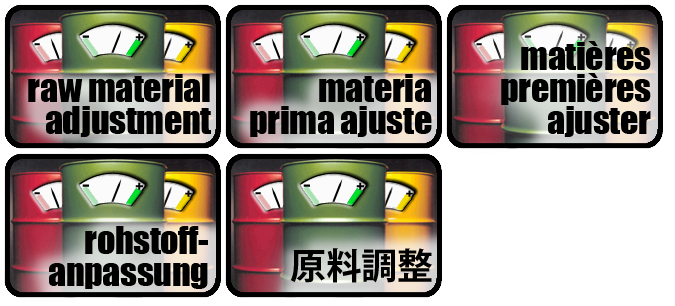
Example of one of our main-menu buttons:
Last edited by Jenner; Jul 1st, 2009 at 09:09 AM.
-
Jul 1st, 2009, 09:59 AM
#100
Re: You owe it to yourself to use WPF
My first guess would be yes they probably did fail... hear me out. Whilst I do love WPF, I accept that it is not suitable for a large amount of production environments because it is still so young. There is still so much that is either missing or just hard to do. However, pretty much non of these missing items affect me personally, hence my liking of WPF.
A quick google search informs me that basically at the moment there is not much in the way of good official localisation support in WPF, but does this article help your situation? http://www.codeproject.com/KB/WPF/WP...alization.aspx
As for text taking up more room if it is in Russian etc, that is one thing that WPF can handle very well in my opinion. Using the right containers and properties you can easily make your UI very dynamic, such that it will expand controls if the content within it (ie text on a button) gets too large and it will move adjacent controls to accommodate this growth. Your example buttons would be very easy to make with WPF so that they could handle any length of text inside them.
EDIT: also im curious as to how you made those buttons with winforms, or are they just a static image with the text and the glow effect already in the image?
-
Jul 1st, 2009, 10:00 AM
#101
Thread Starter
Frenzied Member
Re: You owe it to yourself to use WPF
ok ive got an answer but im in work, let me get on my lunch and il post up.
-
Jul 1st, 2009, 10:08 AM
#102
Re: You owe it to yourself to use WPF
Lunch? at this time of the day!? Its almost home time for me  (I know you're in Ireland but im pretty sure there isnt THAT much of a time difference). (I know you're in Ireland but im pretty sure there isnt THAT much of a time difference).
-
Jul 1st, 2009, 10:27 AM
#103
Thread Starter
Frenzied Member
Re: You owe it to yourself to use WPF
Ha ha yeah where on the same timezone but unfortunately commission means that I take lunch when its quiet not when im hungry.
So I noticed that in your post jenner you talk about messing with forms for localization. Here is how I would do it. First great a generic xaml based window for English. Be careful when creating a window that it conforms to good web standards so that controls grow or shrink as text changes rather than having to do it manually.
Then I would simply have different resource dictionaries for each language. I don't have it to hand but there is generic .net code to find out the localization of the computer your application is running on. Using this you can simply load the applicable resource file.
Now I know you can just let windows handle the text, infact WPF does it very well, but you would be best to still double check the text for obvious language conversion reasons.
As for embedding resources. I never really understood the actual need for it. The image can be accessed so long as it is in a folder. So in essence rather than having an .RESX file for each language you would have a .Xaml file and you would have a small helper class which loads up the correct one.
In fact you could go one step further and parse the whole UI based on language because you can add a Xaml parser with your app but that would be just showing off.
-
Jul 1st, 2009, 10:37 AM
#104
Re: You owe it to yourself to use WPF
Originally Posted by DeanMc
In fact you could go one step further and parse the whole UI based on language because you can add a Xaml parser with your app but that would be just showing off.
and would probably be a bit slow 
As for using a helper class to work with the images, I believe in WPF the best way might be to use a Converter (this might be what you are referring to, just with a different name). I've not done a lot with them yet (will be doing very soon though) but I believe you can use Converters to basically apply some logic which you have defined in your VB code behind and set a specific XAML property based on that logic.
For example, this application uses a converter to convert the DateTime value stored with each item in the listbox into a representation of that time in a clock image: http://learnwpf.com/Data/Images/Lear...taTemplate.jpg
So in a similar way, you could use a converter to check which language you are currently using and that then dictates which image gets shown.
-
Jul 1st, 2009, 10:47 AM
#105
Thread Starter
Frenzied Member
Re: You owe it to yourself to use WPF
Ooooh goody I must check them out too!
-
Jul 1st, 2009, 10:55 AM
#106
Re: You owe it to yourself to use WPF
Resource files were designed with localization support firmly in mind. Also, using them completely removes the need to write some routine to load in properly localized resources or maintain dictionaries for dozens of forms. When you make a new control on a form, the IDE links it's properties to the resource files.
Third, the compiler modularizes these resources into resource.dll files and .NET is smart. It check automatically to see what language and local the thread launching the program is in, and then it dynamically looks in the application directory for a proper resource.dll file. If it doesn't find one, it falls back according to the standardized localization rules:
This process is launching in Mexican-Spanish... check for a "es-mx" directory with a resources.dll file in it (for specifically Mexican Spanish resources). No? Check for an "es" directory with a resources.dll file in it (for generic Spanish resources). No? Use the default embedded resources (which are U.S. English).
I don't want to reinvent Microsoft's own standard for dealing with localization; which exists in a WinForms application. Unfortunately, This is a pretty big issue for us since all of our software must be if nothing else, ready for localization, and the companies we use for translation/localization expect a pile of .resx files (along with the .html help files and MS Word .doc files with the printed info.)
It's stuff like this that keep me of the opinion that WPF is still a long way off. All I attempted to do was recreate the main menu form of one of our older applications. All it is, is a form with buttons on it and a top menu, and the buttons have images in them. The form is also localized and the localized resources are present.
I even have a function that instructs it to re-load all the forms properties from the resource files so you can change languages on-the-fly if desired. All I was trying to do is reproduce this form 100% in WPF.
@chris: They're static images produced for us by a graphic design house. We have the original Photoshop files so we can adjust the glow effect (which is just painted on manually) and adjust the text info, size, font, kerning, overlap, etc... Each of the images you see in the above graphic are saved as separate files. These are then loaded into the collection of resource files and all are given the same index name.
EDIT: @chris: That article you found is exactly what I was looking for, although I'm a bit appalled there's so little support in the framework and IDE itself.
Last edited by Jenner; Jul 1st, 2009 at 11:11 AM.
-
Jul 1st, 2009, 11:05 AM
#107
Re: You owe it to yourself to use WPF
It doesn't surprise me that localization is an issue in WPF... I mean, we're basicalyl on WPF 1.5 at the moment.... how long did it take VB to get localization? Unfortunately it's not something that's going to be solved all that quickly... I'm sure there's movement afoot to get easy to use localization into WPF... if they want widespread adoption of WPF, there will HAVE TO be support for it at some point. I just don't see it on the next iteration. Perhaps on the next one.
-tg
-
Jul 1st, 2009, 12:19 PM
#108
Re: You owe it to yourself to use WPF
Originally Posted by Jenner
EDIT: @chris: That article you found is exactly what I was looking for, although I'm a bit appalled there's so little support in the framework and IDE itself.
Yeah I can understand that being rather frustrating, but as TG and I have pointed out - WPF is still in its infancy at the moment and things like this will be addressed at some point. Its just that I guess these kinds of issues prevent the use of WPF in a lot of situations (such as yours). Come back to this thread in a few years and see what happens then eh :P
The main thing that I think a lot of people (including myself) fail to realise at first is that WPF is not just a new version of winforms, it is a brand new technology built from the ground up that just happens to share a lot of its features and expectations with winforms. When I first used it I was thinking why on earth have they REMOVED functionality from some of the controls... but then you realise that they havent removed it, they just havent had time to include it in the WPF implementation of said control (or the functionality you are looking for can be acheived in a different way using new binding features or data templates etc etc)
-
Jul 1st, 2009, 12:27 PM
#109
Re: You owe it to yourself to use WPF
"why on earth have they REMOVED functionality from some of the controls... but then you realise that they havent removed it, they just havent had time to include it in the WPF implementation of said control"
That's the dirty little secret of WPF that 1) Isn't brought out into the open much (since MS is trying to get it adopted....) 2) When people venture into WPF (and this includes me) don't realize that the controls have to be completely re-engineered for WPF....
-tg
-
Jul 1st, 2009, 12:35 PM
#110
Re: You owe it to yourself to use WPF
Exactly lol its only when you read a WPF book or do a bit of research that you discover that because of the way WPF works (ie with vector based visuals for easy scalability and animation without pixelation etc) they had to create each control from scratch. The nice thing is that you can easily view the default control template used for each control and take it apart piece by piece to see how it works and customise it.
PS who on earth added washing machines (spelt wrong) as a tag for this thread!
-
Jul 1st, 2009, 12:53 PM
#111
Re: You owe it to yourself to use WPF
Yea, it's weird and at first I'd think it questionable because personally, WPF seems like it's at the point where it should be coming into the mainstream. I mean, it's one of the technologies that Office 2k7 is based on, as well as Windows Vista, and already, Windows 7 is less than a year away from getting shipped out the door. But, it's really only been three years, and that's not a whole lot of time in the world of .NET development.
I'll probably start some WPF projects on a personal level that don't require localization or some of the fancier things I need from WinForms, but looks like I'll still be biding my time waiting for more support before I start steering our company down the WPF route.
The localization wasn't the only deal-breaker for me either, there are some third-party controls we use from National Instruments in their Measurement Studio API that don't have any WPF equivalents. I'm going to have to wait for those as well. DevExpress, another controls package we utilize has only just begun on a set of WPF controls too.
-
Jul 1st, 2009, 02:10 PM
#112
Re: You owe it to yourself to use WPF
with WPF though, you might not require as many third party control packages as you can make your own controls with a much greater appearance and greater level of functionality Im sure there will be some specialist things that you still need to get from a third party but its worth a thought.
-
Jul 1st, 2009, 02:15 PM
#113
Thread Starter
Frenzied Member
Re: You owe it to yourself to use WPF
I think you are making a wise decision to at least use it at home because when mass appeal does happen you will be ready for it!
-
Jul 1st, 2009, 02:22 PM
#114
Re: You owe it to yourself to use WPF
"you can make your own controls with a much greater appearance and greater level of functionality"
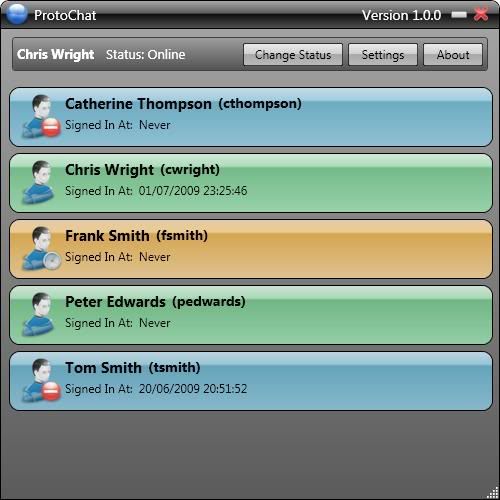
We'll now be able to answer that thread that comes up from time to time "how can I display multiple lines for each item in my listbox?" .... Found an early xaml tutorial that showed how... gave the items a rounded border and everything... two toned shading....
-tg
-
Jul 1st, 2009, 03:17 PM
#115
Re: You owe it to yourself to use WPF
-
Jul 1st, 2009, 03:46 PM
#116
Thread Starter
Frenzied Member
Re: You owe it to yourself to use WPF
-
Jul 2nd, 2009, 01:10 PM
#117
Re: You owe it to yourself to use WPF
Very cool! 
Tags for this Thread
 Posting Permissions
- You may not post new threads
- You may not post replies
- You may not post attachments
- You may not edit your posts
-
Forum Rules
|
Click Here to Expand Forum to Full Width
|



 the people who helped you and mark your forum RESOLVED when you're done!
 Reply With Quote