|

-
May 20th, 2009, 03:13 PM
#1
Thread Starter
Addicted Member

 Loginform Loginform
Can anyone help me with the loginform?
How do i set username and password, and how do i make a function that makes it aviable to change the password and the username from the program??
Last edited by Eldrup; May 20th, 2009 at 03:19 PM.
Reason: More text !
Eldrup
-
May 20th, 2009, 04:06 PM
#2
Frenzied Member

Re: Loginform
Have you checked out the CodeBank yet  There all kinds of samples of pretty much any thing you could need in there. There all kinds of samples of pretty much any thing you could need in there.
-
May 20th, 2009, 04:12 PM
#3
Thread Starter
Addicted Member
Re: Loginform
I'll Try 
-
May 20th, 2009, 04:16 PM
#4
Thread Starter
Addicted Member
Re: Loginform
Hmm...Well i cant find anything?
-
May 20th, 2009, 04:34 PM
#5
Re: Loginform
Hmm...Well i cant find anything?
You should probably look harder. There's several examples on validating login information and at least one on a login form.
CodeBank contributions: Process Manager, Temp File Cleaner
 Originally Posted by SJWhiteley
"game trainer" is the same as calling the act of robbing a bank "wealth redistribution"....
-
May 20th, 2009, 11:40 PM
#6
Frenzied Member
Re: Loginform
You tried for what? 4 minutes.
-
May 21st, 2009, 12:29 AM
#7
Hyperactive Member

Re: Loginform
You could Create a listbox object
Code:
Dim User as new Listbox
Then set up a location to save the items of the listbox, and see if the listbox contains your username, then use another listbox with passwords, and then make it where the password listbox.selectedindex is equal to the second listboxes.selected index.
-
May 21st, 2009, 01:44 AM
#8
Fanatic Member

Re: Loginform
Originally Posted by Eldrup

Can anyone help me with the loginform?
How do i set username and password, and how do i make a function that makes it aviable to change the password and the username from the program??
Ok, i used save setting for change password. i mean at form login you can create 2 label . 1 for pass and that one for user name.
And when textboxpass and textboxusername change you assign of these value textboxs for labels. Finally when login form close you can save it to setting and when form load you can load it. exp :
Code:
Private Sub Form1_Closing(ByVal sender As System.Object, ByVal e As System.EventArgs) Handles MyBase.
        SaveSetting(Application.ProductName, Application.ProductName, "Label1", Label1.Text)
    End Sub

    Private Sub Form1_Load(ByVal sender As System.Object, ByVal e As System.EventArgs) Handles MyBase.Load
        ' Get checkbox value
        Label1.Text = GetSetting(Application.ProductName, Application.ProductName, "Label1", "")
    End Sub
-
May 21st, 2009, 08:42 AM
#9
Frenzied Member
Re: Loginform
If you want you can use StreamReader and StreamWriter also, although it is simplistic set up this way and only allows one user, it shows you the steps required. Create a new project; add a new form, 2 text boxes, 2 labels, 4 buttons, a folder called TextFiles, a text document called simpleLogin.txt and name them the same as in the code.
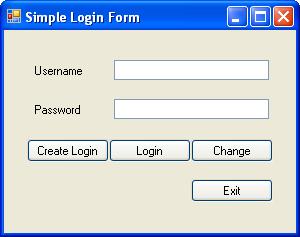
Code:
Public Class frmSimpleLogin
    Private Sub frmSimpleLogin_Load(ByVal sender As System.Object, ByVal e As System.EventArgs) Handles MyBase.Load
        Dim sr As New IO.StreamReader("..\..\TextFiles\simpleLogin.txt")
        Dim userName As String = sr.ReadLine
        Dim password As String = sr.ReadLine

        If userName = String.Empty AndAlso password = String.Empty Then
            Me.btnCreateLogin.Visible = True
            Me.btnCreateLogin.Enabled = True
            MessageBox.Show("Please create a username and password.")
            ' keep other buttons disabled and invisible until username and password are created
            Me.btnLogin.Visible = False
            Me.btnLogin.Enabled = False
            Me.btnChange.Visible = False
            Me.btnChange.Enabled = False
        End If
    End Sub

    Private Sub btnLogin_Click(ByVal sender As System.Object, ByVal e As System.EventArgs) Handles btnLogin.Click
        Dim sr As New IO.StreamReader("..\..\TextFiles\simpleLogin.txt")
        Dim userName As String = sr.ReadLine
        Dim password As String = sr.ReadLine
        sr.Close()
        If Me.txtUserName.Text = String.Empty Then
            MessageBox.Show("You must enter a username.")
            Me.txtUserName.Select()
        ElseIf txtPassword.Text = String.Empty Then
            MessageBox.Show("You must enter a password.")
            Me.txtPassword.Select()
        ElseIf Me.txtUserName.Text = userName AndAlso Me.txtPassword.Text = password Then
            MessageBox.Show("You successfully logged in.")
            ' Enable the change button only if login is successful
            Me.btnChange.Visible = True
            Me.btnChange.Enabled = True
            ' do what ever else you want to do here after login is successful
        Else
            MessageBox.Show("Wrong username or password.")
            Me.clear()
        End If
        Me.clear()
    End Sub

    Private Sub btnCreateLogin_Click(ByVal sender As System.Object, ByVal e As System.EventArgs) Handles btnCreateLogin.Click
        Me.createChangeLogin()
    End Sub

    Private Sub btnChange_Click(ByVal sender As System.Object, ByVal e As System.EventArgs) Handles btnChange.Click
        Me.createChangeLogin()
    End Sub

    Public Sub clear()
        Me.txtUserName.Clear()
        Me.txtPassword.Clear()
        Me.txtUserName.Select()
    End Sub

    Public Sub createChangeLogin()
        Dim sw As New IO.StreamWriter("..\..\TextFiles\simpleLogin.txt")
        If Me.txtUserName.Text = String.Empty Then
            MessageBox.Show("You must enter a username.")
            Me.txtUserName.Select()
        ElseIf txtPassword.Text = String.Empty Then
            MessageBox.Show("You must enter a password.")
            Me.txtPassword.Select()
        End If
        sw.Write(txtUserName.Text & Environment.NewLine)
        sw.Write(txtPassword.Text)
        sw.Close()
        Me.clear()
    End Sub

    Private Sub btnExit_Click(ByVal sender As System.Object, ByVal e As System.EventArgs) Handles btnExit.Click
        Me.Close()
    End Sub
End Class
Tags for this Thread
 Posting Permissions
- You may not post new threads
- You may not post replies
- You may not post attachments
- You may not edit your posts
-
Forum Rules
|
Click Here to Expand Forum to Full Width
|



 Reply With Quote

