|

-
May 1st, 2009, 01:19 PM
#1
Thread Starter
Frenzied Member


 [RESOLVED] Setting control properties in the designer [RESOLVED] Setting control properties in the designer
I've played around with this and have figured most of it on how to set the properties of most controlss in the designer. I have 2 check boxes I need to set the values on but do not know how. 2 fields one for each in the db with a char(1) value, can be Y or N. If it a Y in the db how would I set it as checked on the form?
Code:
'cboPosition
'
Me.cboPosition.DataBindings.Add(New System.Windows.Forms.Binding("SelectedValue", Me.FmfieldmanmasterBindingSource1, "position_name", True))
Me.cboPosition.DataBindings.Add(New System.Windows.Forms.Binding("Text", Me.FmfieldmanmasterBindingSource1, "position_name", True))
Me.cboPosition.Enabled = False
Me.cboPosition.FormattingEnabled = True
Me.cboPosition.Location = New System.Drawing.Point(80, 104)
Me.cboPosition.Name = "cboPosition"
Me.cboPosition.Size = New System.Drawing.Size(220, 21)
Me.cboPosition.TabIndex = 5
and then where the record is updated it is like so
Code:
Fieldman_masterTableAdapter.UpdateQuery(txtFieldPersonFirstName.Text, txtFieldPersonLastName.Text, cboFieldPersonStatus.Text, txtfieldPersonAddress1.Text, txtfieldPersonAddress2.Text, txtfieldPersonAddress3.Text, txtFieldPersonCity.Text, cboFieldPersonState.Text.ToUpper, mtbFieldPersonZipCode.Text, txtFieldPersonEmailAddress.Text, mtbFieldPersonHomePhone.Text, mtbFieldPersonWorkPhone.Text, mtbFieldPersonExtension.Text, mtbFieldPersonPager.Text, mtbFieldPersonMobilePhone.Text, mtbFieldPersonVehiclePhone.Text, mtbFieldPersonFax.Text, cboFieldPersonAffiliation.Text, cboPosition.Text, cbxDivisionManager.XXXXX, cbxReagionManager.XXXXX, txtFieldPersonFieldNumber.Text)
-
May 1st, 2009, 02:25 PM
#2
Re: Setting control properties in the designer
the property is called "Checked", so it would be:
Me.cboPosition.Checked = True
-
May 1st, 2009, 04:23 PM
#3
Thread Starter
Frenzied Member
Re: Setting control properties in the designer
I realize that, I've just never set all the properties in the deigner. I figured I would just look at one of my apps with checkboxes and see what settings were used.
-
May 4th, 2009, 08:02 AM
#4
Thread Starter
Frenzied Member
Re: Setting control properties in the designer
OK after trying to see how I set the properties on a check box before in other apps, it isn't clear. So if I want the checkbox checked if the value in the field is "Y" what would I do? Ignore the first post, I posted for a combo box by mistake instead of a checkbox
Code:
 Me.cbxRegionManager.AutoSize = True
 Me.cbxRegionManager.DataBindings.Add(New System.Windows.Forms.Binding("Checked", Me.FmfieldmanmasterBindingSource1, "region_manager_flag", True))
 Me.cbxRegionManager.DataBindings.Add(New System.Windows.Forms.Binding("CheckState", Me.FmfieldmanmasterBindingSource1, "region_manager_flag", True))
 Me.cbxRegionManager.Enabled = False
 Me.cbxRegionManager.Location = New System.Drawing.Point(307, 106)
 Me.cbxRegionManager.Name = "cbxRegionManager"
 Me.cbxRegionManager.Size = New System.Drawing.Size(105, 17)
 Me.cbxRegionManager.TabIndex = 25
 Me.cbxRegionManager.Text = "Region Manager"
 Me.cbxRegionManager.UseVisualStyleBackColor = True
-
May 4th, 2009, 08:14 AM
#5
Re: Setting control properties in the designer
The code in the designer is just plain VB - so basically you set it in there exactly the same way you would in normal code :
Code:
        Me.CheckBox1.Checked = True
        Me.CheckBox1.CheckState = System.Windows.Forms.CheckState.Checked
-
May 4th, 2009, 09:02 AM
#6
Re: Setting control properties in the designer
Sorry I've re-read your post a bit more carefully now and see that you are wanting to query a database field in there.
The comment above still stands - the code in the designer is just standard VB but has been created automatically in response to the visual layout set up in the design window. The code is just the same as it would be if you were creating controls dynamically at runtime (because thats exactly what it is doing!). Theoretically you can do in there pretty much anything that you can in any other piece of code, although I'm not sure its a great idea.
Why not just set the check box's value on form_load?
I wouldn't have thought that many people would think to look in the designer for program logic so if anyone else were to try and debug your program they may well get totally lost, especially given that depending on the version of VS used the designer code may well be hidden from the developer completely.
The point of having the designer code hidden is to separate program logic from interface, I wouldn't tinker with it! Especially given the warning in the designer code :
'NOTE: The following procedure is required by the Windows Form Designer
'It can be modified using the Windows Form Designer.
'Do not modify it using the code editor.
Another thing to note is that your terminology is confusing : what you are actually trying to do is "Set control properties outside of the designer" not in the designer : the designer is the visual interface where you can drag and drop controls etc. What you are talking about is the code that is generated by the designer.
Last edited by keystone_paul; May 4th, 2009 at 09:35 AM.
-
May 4th, 2009, 09:21 AM
#7
Re: Setting control properties in the designer
I'm not 100% sure, but I also think that any manual changes you make in that code will be gone when you next make a change in the designer (via the usual way), as that code is regenerated... I might be wrong, but I think I saw something like that in the past.
-
May 4th, 2009, 10:00 AM
#8
Re: Setting control properties in the designer
You're barking up the wrong tree. If you want to bind data to the Checked property of a CheckBox then the data has to be type Boolean. You would need to add a new property to the class that you're binding that is type Boolean. For instance, if you have a String property that returns "Y" or "N" you can add a new property that returns whether or not that property value equals "Y". That will return a Boolean: True for "Y" and False for "N". You can then bind that Boolean property to your CheckBox's Checked property.
Also, before you say that you're using a typed DataSet and you can't add properties, the code generated by the Data Source wizard is all partial classes so you absolutely can add your own members to all those classes, simply by declaring another partial class in the same namespace with the same name.
-
May 4th, 2009, 10:18 AM
#9
Thread Starter
Frenzied Member
Re: Setting control properties in the designer
Unfortunately I have been handed an app where everything was done with Drag and Drop Data Sources and multiple table adapters and binding sources, so I am trying to work through it to make the changes that they now require.
As an example, all along I have had no problems running the app, everything falls into place where it belongs, no for no reason I can think of i get an error here, All this line does is call a SPROC that populates a listbox, I haven't changed any code or the SPROC but now I get the errror.
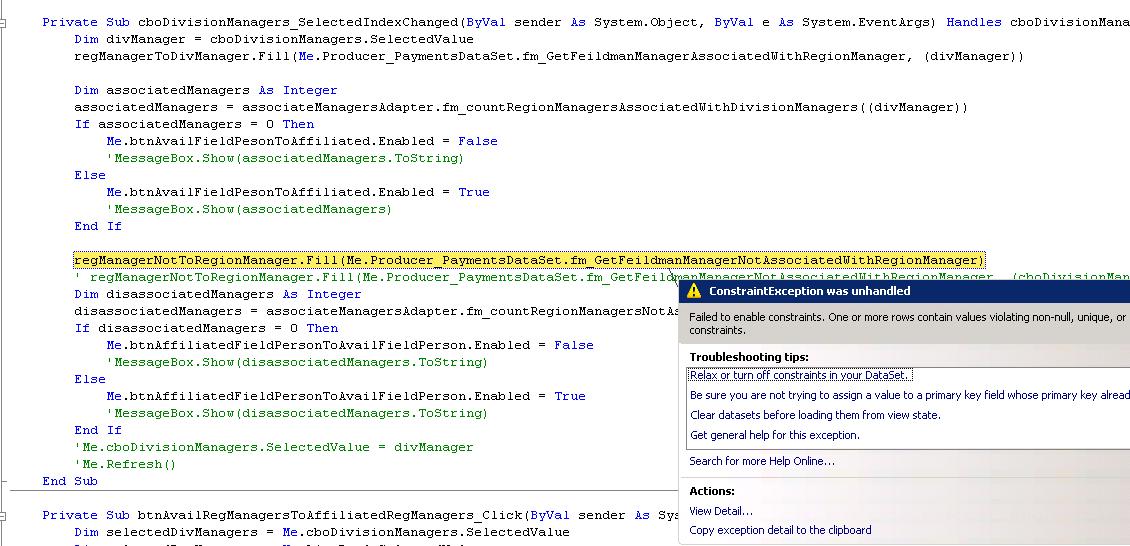
Loading from this simple table, there is a composite key, regional_manager and date_changed.
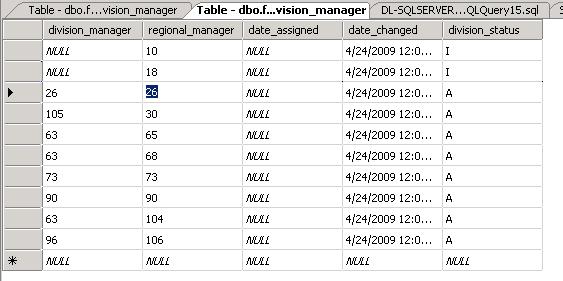
division_manager, date_assigned and division_status all allow nulls.
Last edited by CoachBarker; May 4th, 2009 at 02:51 PM.
-
May 4th, 2009, 04:07 PM
#10
Re: Setting control properties in the designer
Weird, I had this exact exception today. This forum post was pretty interesting in regards to it: http://social.msdn.microsoft.com/for...-0204893fdcd1/
 Posting Permissions
- You may not post new threads
- You may not post replies
- You may not post attachments
- You may not edit your posts
-
Forum Rules
|
Click Here to Expand Forum to Full Width
|



 Reply With Quote

 the people who helped you and mark your forum RESOLVED when you're done!

