|

-
Apr 18th, 2009, 02:00 AM
#1
Thread Starter
Hyperactive Member


 [RESOLVED] How to make an html preview on using textbox or richtextbox [RESOLVED] How to make an html preview on using textbox or richtextbox
Hello everyone..I have a problem here regarding to html and html preview..I have 3 tabs and I want the first tab to be plain text..My Second tab will be the html codes wherein i can let the user paste define an html code there. While in the third tab i want it to preview the html...Could anyone help me how to some solution to it? Actually this is the format:
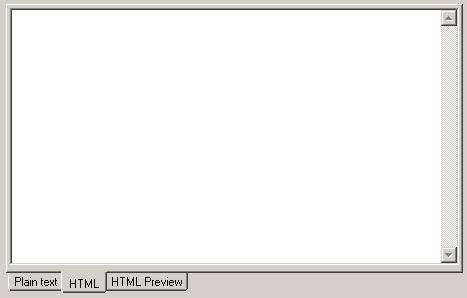
Thanks in advance for the people who can help me.
Last edited by shyguyjeff; May 19th, 2009 at 03:05 AM.
-
Apr 18th, 2009, 03:03 AM
#2
Re: How to make an html preview on using textbox or richtextbox
If you are saying you actually want to view the HTML as it would appear in Internet Explorer on the third tab then use a webbrowser control for the HTML Preview tab.
When the user changes tabs away from the HTML source tab, save the contents of the text box containing the source and then when the HTML preview tab is activated use the webbrowser.Navigate method to load it.
Last edited by keystone_paul; Apr 18th, 2009 at 03:09 AM.
-
Apr 18th, 2009, 03:04 AM
#3
Re: How to make an html preview on using textbox or richtextbox
I don't really understand what the difference between the first and second tab is supposed to be. HTML code is just text, after all.
Are you saying that you want syntax highlighting in that second tab?
As for the third tab, you would just use a WebBrowser and assign your HTML code to its DocumentText property.
-
Apr 18th, 2009, 03:22 AM
#4
Thread Starter
Hyperactive Member
Re: How to make an html preview on using textbox or richtextbox
Thanks keystone_paul. I will try to look for that webbrowser control for html.
 Originally Posted by jmcilhinney

I don't really understand what the difference between the first and second tab is supposed to be. HTML code is just text, after all.
Are you saying that you want syntax highlighting in that second tab?
As for the third tab, you would just use a WebBrowser and assign your HTML code to its DocumentText property.
About for that jm, hmmmp..I think there is no need for that, maybe I will just remove that tab. What really I want is that a user will encode an html format then it can preview as what the browser will shows. Thank you jm for reminding me that. Have a nice day.
-
Apr 18th, 2009, 03:23 AM
#5
Re: How to make an html preview on using textbox or richtextbox
Originally Posted by keystone_paul
When the user changes tabs away from the HTML source tab, save the contents of the text box containing the source and then when the HTML preview tab is activated use the webbrowser.Navigate method to load it.
No need for saving and navigating. As I said, just assign the HTML code directly to the DocumentText property.
-
Apr 18th, 2009, 03:25 AM
#6
Re: How to make an html preview on using textbox or richtextbox
NB - jmcilhinney is right that you can load the text directly without having to save it to a file, however I guess you will want to save the file at some point anyway so its up to you which way to do it.
-
Apr 18th, 2009, 03:38 AM
#7
Thread Starter
Hyperactive Member
Re: How to make an html preview on using textbox or richtextbox
Yeah...jm is exactly right..I am working with it right now but could you site some example jm on how to set the document directly to html? Thanks again jm and also to you paul..
Last edited by shyguyjeff; Apr 18th, 2009 at 04:38 AM.
-
Apr 18th, 2009, 08:18 AM
#8
Hyperactive Member
Re: [RESOLVED] How to make an html preview on using textbox or richtextbox
richtextbox1.text= "<html><h1>Hello</h1></html>" 'This is html file ( ur richtextbox where html codes are there..
webbrowser1.documenttext = richtextbox1.text ' This is ur webbrowsers whose document text is assigned whatever u have in richtextbox1.text ...
Hope this helps...
-
Apr 18th, 2009, 03:05 PM
#9
Re: [RESOLVED] How to make an html preview on using textbox or richtextbox
Originally Posted by yogesh12
richtextbox1.text= "<html><h1>Hello</h1></html>" 'This is html file ( ur richtextbox where html codes are there..
webbrowser1.documenttext = richtextbox1.text ' This is ur webbrowsers whose document text is assigned whatever u have in richtextbox1.text ...
Hope this helps...
Isn't that exactly what JMcilhinney said?
-
Apr 18th, 2009, 03:07 PM
#10
Hyperactive Member
Re: [RESOLVED] How to make an html preview on using textbox or richtextbox
Originally Posted by keystone_paul
Isn't that exactly what JMcilhinney said?
yeah it is
-
Apr 18th, 2009, 04:55 PM
#11
Re: [RESOLVED] How to make an html preview on using textbox or richtextbox
some code i use for webbrowser
Code:
htmlEditor.document.execcommand "ForeColor", False, v
    htmlEditor.SetFocus

htmlEditor.document.execcommand "Bold", False, Nothing
    htmlEditor.SetFocus

htmlEditor.document.execcommand "fontsize", False, cboSize.Text
    htmlEditor.SetFocus

htmlEditor.document.execcommand "fontname", False, cboFont.Text
    htmlEditor.SetFocus


htmlEditor.document.execcommand "underline", False, Nothing
    htmlEditor.SetFocus
End Sub


htmlEditor.document.execcommand "Italic", False, Nothing
    htmlEditor.SetFocus


'Insert image from file
htmlEditor.document.execcommand "InsertImage", "C:\Image234.jpg"

'Open picture dialog
htmlEditor.Document.execCommand "InsertImage", True
Waiting for a full featured smart phone with out marrying a provider
Go Android 
Go raiders 
-
Apr 20th, 2009, 04:47 AM
#12
Thread Starter
Hyperactive Member
Re: [RESOLVED] How to make an html preview on using textbox or richtextbox
Originally Posted by keystone_paul
Isn't that exactly what JMcilhinney said?
yes it is.. anyway I mark already this thread as resolved..Thank You everyone for the help.
 Posting Permissions
- You may not post new threads
- You may not post replies
- You may not post attachments
- You may not edit your posts
-
Forum Rules
|
Click Here to Expand Forum to Full Width
|



 Reply With Quote


